Complete Guide to Deploying Large Models Locally with Ollama: From Installation to Code Integration
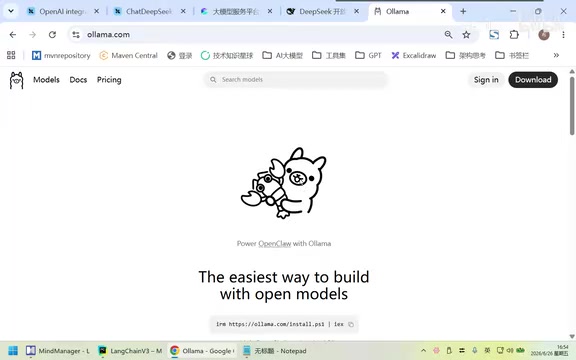
Master Ollama local deployment: installation, configuration, and LangChain integration for private AI.
Learn how to deploy large models locally with Ollama, the Docker-equivalent for AI models. This guide covers custom installation to avoid C drive issues, essential commands, port verification, and integrating local models with LangChain for enterprise-grade private AI development that meets compliance requirements.
Why Deploy Large Models Locally
In real development work, most models we've called previously are services provided by third-party vendors (like OpenAI, DeepSeekAd, etc.), with all requests going through public clouds. But when you enter an enterprise environment, you'll encounter a practical issue: much of the data involves privacy and compliance concerns, making it inconvenient to upload directly to public clouds.
Data compliance issues are becoming increasingly prominent in enterprise AI applications. Taking China as an example, the Data Security Law and Personal Information Protection Law impose strict requirements on cross-border data transmission and third-party processing; the EU's GDPR similarly has clear constraints on the geographic location and methods of data processing. Industries like finance, healthcare, and government typically have stricter data classification protection systems, with core business data often not permitted to leave the internal network. In this context, deploying large models on enterprise-owned servers or private clouds, keeping data entirely within the internal network, becomes the most direct solution to meet compliance requirements.
At this point, deploying large models locally becomes a necessity.
Local deployment requires a "carrier" or "container" to host and run models, and Ollama fills this role. To put it in one sentence: Ollama is the Docker of large models.
Docker's core consists of three concepts—images, repositories, and instances. Similarly, Ollama follows a similar design philosophy: one model (image) can run multiple instances. Docker is the de facto standard for containerization technology, with its core philosophy being to encapsulate applications and their dependencies through images, achieve isolated execution through containers, and enable distribution and sharing through registries. Ollama borrows this complete lifecycle management approach: model files correspond to images, running model instances correspond to containers, and Ollama Hub corresponds to Docker Hub. This analogy not only reduces the learning curve but, more importantly, introduces engineering capabilities like version management, instance isolation, and resource scheduling, evolving model management from the primitive state of manually copying files to standardized toolchain management. This approach of "borrowing ideas from mature frameworks" is precisely why Ollama has been quickly adopted by developers.
The Underlying Logic of Ollama's Command Design
The command design of any tool is typically not created from scratch but rather borrows ideas from previously mature frameworks. The reason is simple: tools are built to be used, and the key to adoption is simplicity, convenience, and alignment with usage habits. When a new tool's usage is highly consistent with what you're already familiar with, you're willing to use it.
Ollama is exactly this—its commands correspond almost one-to-one with Docker:
DockerHubfor images →OllamaHubfor modelsdocker run→ollama rundocker pull→ollama pull
If you know Docker, learning Ollama feels virtually effortless.
Ollama's Architectural Positioning: Turning One-to-Many into One-to-One
In enterprise AI systems, LangChain is typically used as the "glue framework" between business systems and large models. LangChain is currently one of the most popular frameworks for developing large model applications, created by Harrison Chase in 2022. Its core value lies in providing a standardized abstraction layer that encapsulates common patterns like prompt management, model invocation, output parsing, chain orchestration, memory management, and RAG (Retrieval-Augmented Generation) into unified interfaces. Through this abstraction, developers can use nearly identical code logic to switch between different underlying model providers, greatly reducing vendor lock-in risk. LangChain currently supports Python and JavaScript, has an active community ecosystem, and has become the mainstream choice for enterprises building AI applications.
The ideal architecture is: various business systems uniformly interface with models through LangChain, transforming "one-to-many" into "one-to-one" as much as possible.
However, the problem is that if LangChain directly interfaces with N large model providers, it's still a complex one-to-many relationship. This is where Ollama's value becomes apparent—by putting all large models into Ollama as an intermediary framework:
LangChain → Ollama (one-to-one) → N local models
Ollama acts like Docker carrying a bunch of instances on its back, and LangChain only needs to find its single entry point to reach multiple models.
Trade-offs Between Model Parameters and Hardware
Before downloading models, you need to understand a key unit: B (Billion). For example, 7B represents 7 billion parameters.
- Larger parameters → More precise model performance
- Larger parameters → Higher requirements for disk space and bandwidth
Model parameter count directly determines the computational resources required for inference. Taking the common FP16 (half-precision floating-point) format as an example, each parameter occupies 2 bytes, so a 7B model requires at least about 14GB of VRAM to be fully loaded into GPU. To run large models on consumer-grade hardware, the community has developed quantization techniques (such as Q4 and Q8 quantization in GGUF format), which compress model size and VRAM usage by reducing the precision bits of each parameter, at the cost of some accuracy loss. For instance, a 7B model can be compressed from 14GB to about 4GB after 4-bit quantization, enabling smooth operation on ordinary graphics cards with 8GB VRAM. Ollama has built-in support for the GGUF quantization format, which is the key technical foundation for running large models on personal computers.
For personal learning or local testing, it's recommended to use smaller models (like 1B, 2.5B, 3.5B), which can complete the workflow without getting stuck on network downloads of seven or eight GB large models. The focus during the learning phase is mastering the process, not pursuing full-power models.
Installing Ollama: The Critical Point—Never Install to C Drive
This is the most important practical detail emphasized in this article. Ollama defaults to installing everything to the C drive, and model files are often several GB each, quickly filling up the C drive. Therefore, you must customize the installation path.
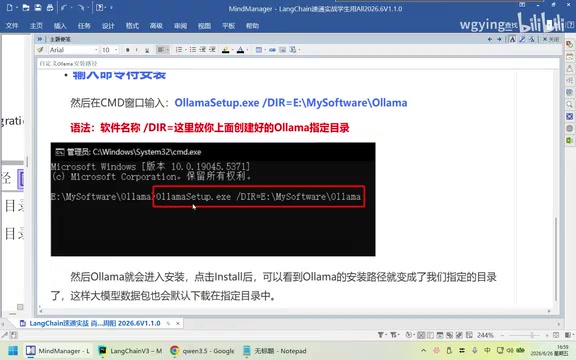
Complete Steps for Custom Installation Path
Step 1: Customize Installation Directory
First, create a directory on a non-C drive (like D drive or E drive) and place the downloaded OllamaSetup.exe there.
Step 2: Specify Installation Path via Command Line
Open CMD in that directory and execute the installation command, specifying installation to your custom path instead of the default C drive.
Step 3: Configure Environment Variables
Create a storage directory for large models and configure the environment variable OLLAMA_MODELS, setting its Value to your local storage path (recommended to keep consistent with the installation path).
Environment variables are operating system-level global configuration mechanisms that programs read when starting to determine runtime parameters. The OLLAMA_MODELS environment variable tells the Ollama process which disk path to use for storing and retrieving model files. On Windows, you can set system-level environment variables through "System Properties → Advanced → Environment Variables," and you need to restart the Ollama service after setting for it to take effect. Similarly, Ollama supports environment variables like OLLAMA_HOST (specifying listening address and port) and OLLAMA_NUM_PARALLEL (number of parallel requests). This pattern of configuration through environment variables is very common in server-side software and is convenient for automated configuration in Docker containers or CI/CD pipelines.
Step 4: Migrate Existing Model Files
- Stop the Ollama service
- Find the
.ollamafolder in the C drive user directory - Copy everything to the newly created storage directory
- Delete the
modelsfolder under C drive
After this processing, Ollama will no longer be able to download models to the C drive. Finally, restart and run ollama list to check if it displays normally. If it runs normally, the configuration is successful.
Disk partition recommendation: Have at least three partitions—C for system, D for work, E for data backup. If you currently only have a C drive, you can temporarily install on C drive and later use partitioning software to create independent partitions from C drive.
Practical Ollama Commands
Ollama's commands follow the same lineage as Docker and are very quick to master:
# List locally downloaded models
ollama list

# Run model (runs directly if local, pulls remotely if not)
ollama run qwen2.5

# Pull model to local
ollama pull llama3

# View currently active model instances
ollama ps

# Delete model
ollama rm <model_name>
The recommended operational habit is to pull first, then run, though combining both steps into one is also possible.
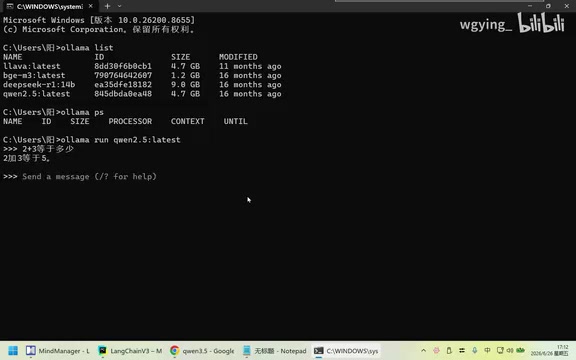
After successful configuration, even with internet disconnected, local models can run independently. For example, asking "2+3", the model will directly provide the result locally—this is the core value of local private domain models.
Verifying Ollama Startup Success
This involves cross-platform basics. On Linux, to view background processes and port usage:
ps -ef | grep 11434
But most students use Windows for local development, where the command is completely different:
netstat -ano | findstr 11434
11434 is Ollama's default port. If this port is being listened on, it means Ollama has successfully started.
Port listening checks are basic operations in operations and development. On Linux systems, besides the ps command, you can also commonly use lsof -i :11434 or ss -tlnp | grep 11434 to view port usage. In Windows systems, netstat -ano displays all network connections and corresponding process PIDs. After filtering for a specific port with findstr, you can further use tasklist /fi "pid eq <PID>" to confirm which program is listening. On macOS, the command is lsof -i :11434. Mastering these cross-platform equivalent commands is not only useful for troubleshooting Ollama startup issues but is also an essential skill for diagnosing port conflicts, service anomalies, and other issues in daily backend development.
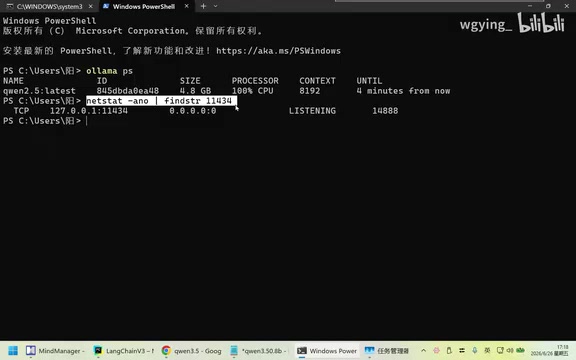
These commands may seem trivial but are high-frequency topics in work and interviews. When asked in interviews to "name five common Linux commands" or "name five common Python exceptions," if you can't answer, it shows your fundamentals need work. These are things used daily in development.
Integrating Local Ollama Models with LangChain
After establishing local deployment, the final step is making code call local models. The installation method continues the familiar pattern:
# Previously interfacing with OpenAI
pip install langchain-openai

# Previously interfacing with DeepSeek
pip install langchain-deepseek

# Now interfacing with Ollama
pip install langchain-ollama
This is the official collaboration package between LangChain and Ollama. Understanding this pattern, you'll find: regardless of which model you're interfacing with, the routine is consistent. Through its Provider mechanism, LangChain provides independent integration packages for each model provider, with each package implementing unified ChatModel or LLM interfaces. This means your business code only depends on abstract interfaces; when switching underlying models, you only need to change the Provider package and configuration parameters without modifying core logic—this is interface-oriented programming manifested in AI application development.
In code, point the request address to http://localhost:11434 (Ollama's default port) to call the locally deployed qwen2.5 model and see results.
Consistency Between Local and Remote Calls
An important insight: if you can get it working locally, this program can definitely work with remote calls too. The difference is only in endpoint addresses. This means your development experience with locally deployed private domain models can seamlessly transfer to scenarios calling cloud models. From a technical perspective, whether local Ollama or cloud APIs, both follow the same HTTP protocol and OpenAI-compatible interface specifications. Ollama itself exposes an OpenAI API-compatible /v1/chat/completions endpoint, so many client codes originally written for OpenAI can directly interface with local models by simply changing base_url to http://localhost:11434/v1, without any code modifications.
Summary
The core logic of Ollama local deployment is essentially the reuse of "Docker for large models" thinking. Mastering it isn't difficult; the key is to grasp several points:
- Understand Ollama's positioning as a model container, working with LangChain to achieve a clean "one-to-one" architecture;
- When installing, be sure to customize the path—absolutely do not install to C drive;
- Master commands like
ollama list / run / pull / psand cross-platform port checking methods; - Implement code calls through the
langchain-ollamapackage, with consistent logic between local and cloud calls.
Local deployment of large models is an essential skill for doing AI development in enterprises. Follow the process hands-on once, and you'll have a completely offline-capable private domain model. Worth mentioning, Ollama isn't the only choice for local deployment—vLLM focuses on high-throughput production-grade inference, LocalAI provides broader model format compatibility, and llama.cpp is the underlying C++ inference engine. But Ollama, with its minimalist user experience and Docker-style management paradigm, has become the best starting point for individual developers and small-to-medium teams entering local deployment.
Related articles

Coinbase Engineer: How to Determine Whether an AI Agent Can Operate Unattended
Coinbase engineer Evan Kormos shares an engineering method for judging whether an AI agent can run unattended: model processes with DAG/DCG, replace output comparison with statistical evaluation, and hand over control in three phases—supervision, sampling, and exception handling.

WorkBuddy Beginner's Guide: How AI Agents Automate Office Tasks
WorkBuddy tutorial: learn how this desktop AI agent workbench automates files, organizes data, and generates documents, compared with LLMs and Codex, plus a beginner path and cost analysis.

Doubao Work in Practice: Three Modes That Let AI Actually Get Work Done
Doubao Work practical tutorial: from chat mode to Work Mode Lite and Pro, explaining the logic for choosing among three modes with real office task demonstrations. Even complete beginners can learn to use an AI agent to handle local files, organize materials, and generate documents.