Complete Guide to Running Your Own Local DeepSeek: Web Access, Knowledge Base & Privacy

Run your own private DeepSeek locally with Ollama and AnythingLLM — free, offline, and fully private.
This guide covers the complete workflow for running DeepSeek locally on a regular PC. The stack: Ollama to run distilled models (32B recommended, near GPT-o1 performance), Chatbox or Page Assist for a graphical UI and web search, and AnythingLLM for building a private RAG-based knowledge base with optional API access. It explains the difference between the full 671B model and distilled versions, how knowledge distillation works, the Retrieve-Augment-Generate pipeline, and the roles of embeddings and vector databases — all data stays on your machine.
Want to use DeepSeek but worried about data leaks, platform restrictions, or paywalls? Deploying a fully self-controlled private LLM locally is the most practical solution for privacy-sensitive use cases. This guide — based on a comprehensive walkthrough — covers everything from model selection and framework installation to knowledge base setup and API integration, in a way any regular user can follow.
Why Choose Local Deployment
The appeal of running an LLM locally boils down to six points: it's free, keeps your data private, has no content restrictions, works offline, delivers low latency, and supports custom knowledge base fine-tuning. Whether for personal daily use or handling sensitive business documents, your data stays entirely on your machine — no third-party servers involved.
That said, there's one unavoidable reality: local deployment is hardware-hungry. An average PC simply can't run the full-power version of DeepSeek. The "full-power" version refers to the complete model with 671 billion (671B) parameters — extremely capable, but with GPU memory and compute requirements far beyond what most people can afford.
Full Model vs. Distilled Model: Understanding the Naming
What you'll actually run locally is almost always a distilled version. Knowledge distillation is a technique that transfers the core knowledge from a large model into a smaller one, dramatically reducing compute requirements while preserving much of the performance. Current distilled versions range from 1.5B to 70B parameters.
Understanding model names matters. Take DeepSeek-R1-Distill-Qwen-32B as an example: R1 is the base model name, Distill indicates it's a distilled version, Qwen means it was distilled from Alibaba's Qwen model, and 32B refers to the parameter count — B stands for billion, so 32B means approximately 32 billion parameters. More parameters generally means greater expressive power and complexity, but also higher resource demands.
Based on publicly available benchmarks, the 32B distilled version of DeepSeek-R1 performs comparably to GPT-o1 and DeepSeek V3 in most scenarios — making it the sweet spot for users balancing performance and cost. If your hardware can handle it, the full 671B version is also an option; Chinese cloud providers like Alibaba Cloud and Tencent Cloud offer one-click R1 deployment, though that essentially means renting their hardware.
A note on knowledge distillation: The core idea is to use a large, already-trained model (the "teacher") to guide the training of a smaller model (the "student"). The student learns not just from ground-truth labels, but also from the probability distributions output by the teacher — these "soft labels" carry richer inter-class relationship information. In the case of DeepSeek-R1's distilled versions, the research team used the full 671B model to generate high-quality reasoning data, then used that data to fine-tune smaller base models like Qwen and Llama. This is why the 32B distilled version can approach GPT-o1 performance: it inherits not just compressed weights, but the chain-of-thought reasoning patterns the large model developed through reinforcement learning.
Running Models with Ollama: The Lowest-Cost Option
The most popular and cost-effective local deployment method right now is Ollama — an open-source framework for running LLMs locally, designed to work seamlessly with most mainstream local AI tools.
Installation is straightforward: visit the Ollama website, download the installer for your OS (Windows/Mac/Linux), and follow the prompts. Once installed, run ollama --version in your terminal to verify, and Ollama will start listening on port 11434.
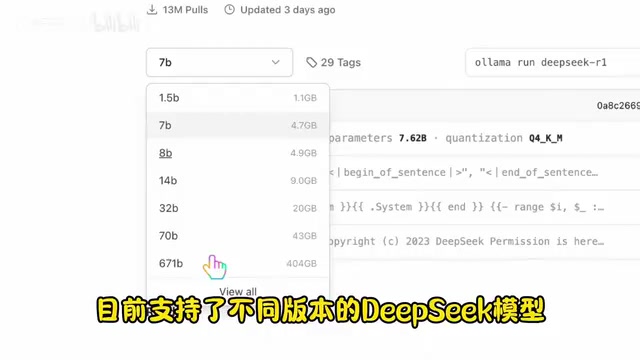
Downloading and running a model takes a single command: ollama run <model-name>. If the model isn't cached locally, it will download automatically. The Ollama model library lists all available DeepSeek versions along with their required disk space — DeepSeek-related models have already been downloaded nearly 13 million times, which speaks to the demand.
Better UX with Chatbox
Command-line interaction isn't for everyone. Chatbox is an open-source client that supports most major models — both locally deployed ones and third-party API providers. It's cross-platform, user-friendly, and has around 29K stars on GitHub.
To configure it: download the client for your OS, go to Settings, select Ollama as your model provider, enter localhost:11434 as the API endpoint, and it will automatically detect the models you've installed via Ollama.
It's also worth mentioning that Chatbox works well with SiliconFlow to give you access to the full-power DeepSeek R1 — just sign up, generate an API key, and paste it into Chatbox. SiliconFlow is a paid service, but comes with a free credit allowance before you need to pay.
Note that Chatbox's web browsing feature only works with certain models. To give your local model internet access, try the browser extension Page Assist — also open-source, originally designed to provide a chat interface for local AI, but its standout feature is seamless web search support with everything running locally. After installing it, click the icon and it will auto-detect your running Ollama instance and installed models. The globe icon at the bottom of the chat window toggles web search on and off.
Building a Local Knowledge Base with AnythingLLM
To make your local model answer questions based on your own documents, the key technology is RAG (Retrieval-Augmented Generation). Think of it as three steps: find relevant content → organize it into context → generate a precise, grounded answer.
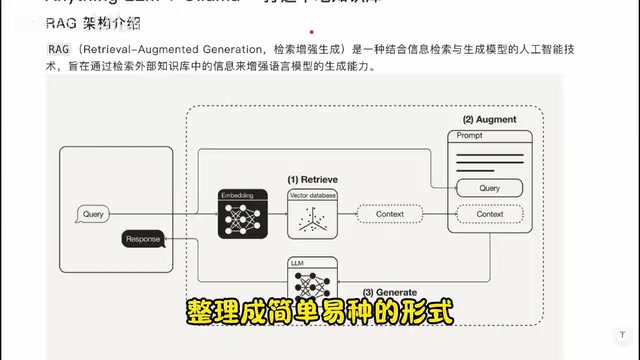
RAG involves three core concepts: LLM (the language model itself), Embeddings, and a Vector Database. Embedding models convert text, tables, and other data into vectors that machines can process — semantically similar content ends up closer together in vector space (e.g., "apple" and "fruit" are close; "apple" and "car" are far apart). The vector database stores and retrieves these vectors efficiently. Chain those three steps — Retrieve, Augment, Generate — and you have a complete RAG pipeline.
The recommended tool for this is AnythingLLM, a local knowledge base application built on RAG architecture that combines your documents and web pages with a local LLM to create a personalized knowledge system.
Key configuration steps:
- LLM: Select Ollama — it will auto-detect your locally installed models.
- Embedding model: The built-in free model works fine out of the box. For higher accuracy, OpenAI's embedding models are more powerful, but require an internet connection and payment.
- Vector database: Defaults to LanceDB, which runs entirely locally and is free.
- Workspaces: Different workspaces can have separate knowledge bases, fully isolated from each other.
RAG vs. Long Context: The fundamental difference from simply stuffing documents into the context window is that Long Context approaches are limited by the model's maximum token window — longer documents get truncated or dilute the model's attention. RAG only retrieves the most relevant snippets for the current question and feeds those to the model, saving compute and keeping the focus sharp. Embedding model quality is critical here — it determines whether "semantic similarity" is judged accurately. Local free embedding models, typically trained at smaller parameter counts, tend to be slightly weaker at fine-grained Chinese semantic understanding compared to OpenAI's text-embedding-3 series. If your knowledge base is primarily Chinese professional documents, consider alternatives like Zhipu AI's embedding models or BGE (optimized for Chinese) as a substitute.
Knowledge Base Quality Determines Answer Quality
The structure of your knowledge base directly affects answer quality. Ideally, it should be hierarchically organized and easy to retrieve from. AnythingLLM supports a variety of file types: plain text files (TXT, Markdown), documents (PDF, Word), structured data (CSV, JSON), and you can also paste URLs directly to build a knowledge base from web pages.
In practice, uploading structured Markdown data and asking about product prices yields precise results. Web pages, being largely unstructured, perform less reliably — it's best to pre-process them into AI-friendly formats locally before uploading.
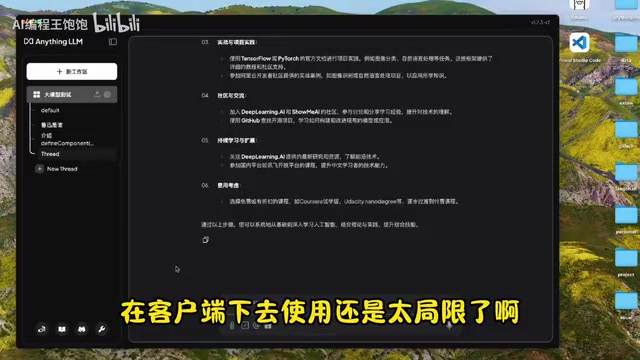
AnythingLLM also includes robust built-in Agent capabilities: deep web scraping, chart uploads, database connections, and web search. For free web search, DuckDuckGo or SearXNG both work. Type @ in the chat window to invoke Agent capabilities.
Advanced: API Integration for Custom Workflows
Using the client alone has its limits. AnythingLLM exposes an API that lets you build custom use cases with code — such as a personal knowledge management tool, an internal business chatbot, and more.
Two core concepts to understand:
- Workspace: An isolated environment with its own knowledge base and settings.
- Thread: An individual conversation record within a Workspace. All chats must be initiated within a Thread under a Workspace.
Create an API key in Settings → API Keys, and you'll have access to detailed API documentation with an online testing interface. The primary endpoint is the chat API under Workspace → Thread, which requires two mandatory parameters: workspace slug and thread slug. Note that the workspace slug isn't directly visible in the client UI — you'll need to retrieve it from the API response. Once you have the parameters, use the cURL examples in the docs to construct your request. The response includes the model output, the retrieved knowledge base context, and the call parameters used.
Summary
The full tech stack can be summarized as: Ollama runs the model, Chatbox / Page Assist handles the UI and web access, AnythingLLM manages the knowledge base and Agent capabilities, and the API enables custom integrations and development. All data stays local throughout — giving you privacy, offline capability, and zero platform restrictions. For regular users, the client-based setup is more than enough. For developers, the API opens the door to building more flexible agents and automated workflows.
Related articles
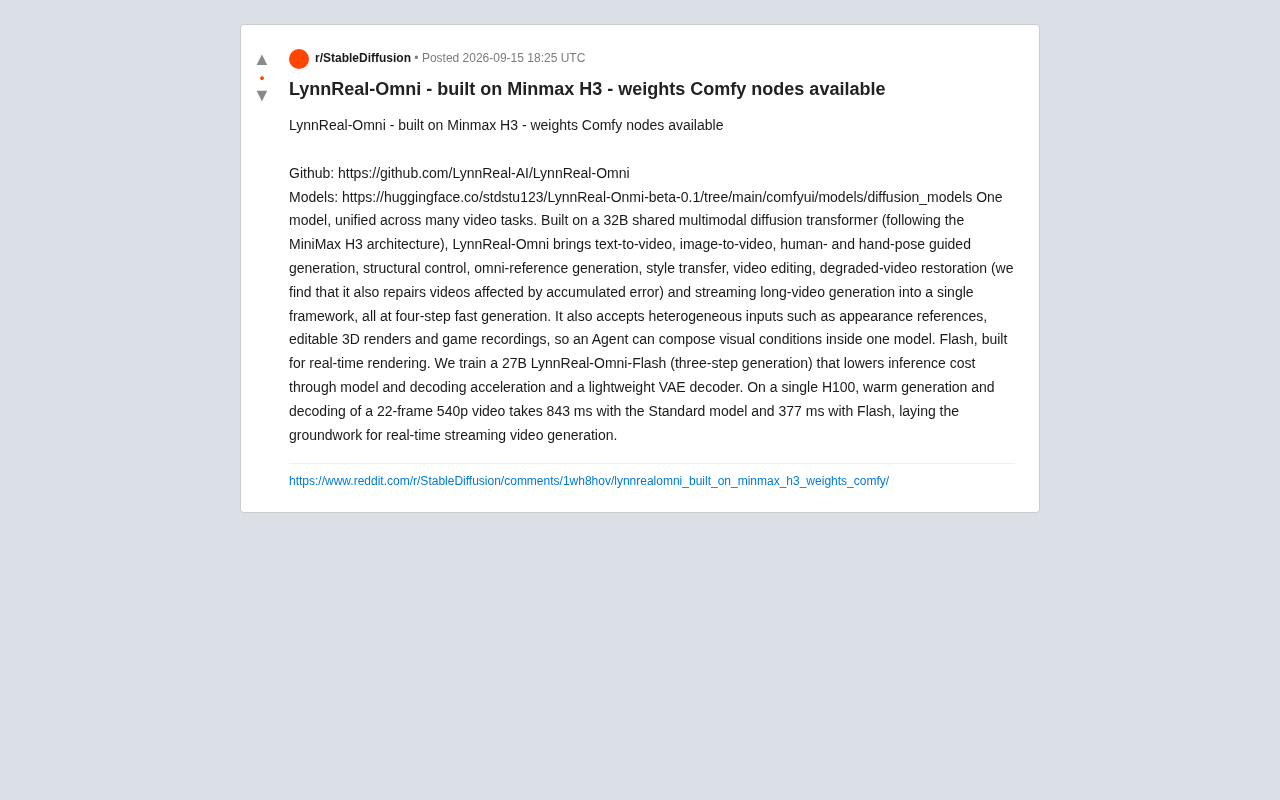
LynnReal-Omni: 32B Unified Video Diffusion Model Goes Open Source with Multi-Task Coverage in Four Steps
LynnReal-Omni is a 32B unified video diffusion model on MiniMax H3, covering text-to-video, pose guidance, style transfer, restoration in 4 steps. Flash version generates 540p video in 377ms on one H100.

Anthropic Co-Founder: AI 'Kill Switch' May Need to Be Mandatory by Law
Anthropic's co-founder tells the BBC that AI 'kill switches' may need to be legally mandated. We analyze the industry logic, technical challenges, and the tension between regulation and innovation.

The AI Data Center Boom Is Colliding With Cities Scarred by Heavy Industry
The AI data center boom is clashing with post-industrial communities. Philadelphia's case reveals structural conflicts between AI growth, energy use, water, and environmental justice.