Complete Guide to Using Claude Code in China: Installation, Model Selection, and Real Cost Testing
Claude Code is an agentic AI coding tool that reads your full project — here's how to set it up in China.
Claude Code is Anthropic's agentic coding tool that reads your entire project context, auto-debugs, and self-corrects — delivering noticeably higher accuracy than conversational tools like Cursor or TRAE. It runs as a plugin inside VS Code or JetBrains, not as a standalone IDE. For users in China, two hard blockers apply: a VPN is required during installation, and Anthropic doesn't serve mainland China, so official account login is impossible. The workaround is configuring Claude Code with DeepSeek directly or via a relay API provider. Token costs for coding are far higher than casual chat — a ¥37 balance can vanish in two conversations — making DeepSeek V4 during its discount period or a monthly coding plan the most cost-effective options.
What Is Claude Code, Exactly
Claude Code is an AI coding assistant developed by Anthropic. Rather than thinking of it as yet another chat-based AI, it's better understood as an entirely new development paradigm. Traditional conversational coding tools — whether DeepSeek's client or ChatGPT — can only return code snippets. You then have to take those snippets back to your project, run them yourself, hit errors, go back and ask follow-up questions, and repeat the cycle several times before landing on something that actually works. Even more critically, these tools have no way to read your entire project's context. If your codebase has hundreds of files, the model simply can't see all of them — you're stuck manually selecting and pasting relevant pieces.
This is exactly where Claude Code differs: it can read your entire project, feed that content as context to the model, and generate code that aligns with your actual business logic. It can also automatically debug and self-correct, ultimately delivering a reasonably accurate, runnable result. It's an automated programming tool — not just a Q&A bot.
Architecturally, Claude Code falls under the category of "Agentic Coding." What sets it apart from traditional completion-based AI is its Tool Use capability: it can proactively read the file system, execute terminal commands, run test scripts, and autonomously decide what to do next based on the output — forming a closed loop of perception, decision-making, and execution, without human intervention at every intermediate step. This design is sometimes referred to as the "AI Agent" pattern: the model doesn't just generate text, it acts as an autonomous agent completing tasks within your development environment. By contrast, tools like ChatGPT and DeepSeek's client fall into the "conversational completion" category — the code they output is static text, and whether it actually runs is entirely up to you to verify. Understanding this distinction helps explain why Claude Code feels meaningfully different when working on large projects: it consumes not just the language model's reasoning capacity, but also relies on an execution framework that continuously interacts with your local environment.
Side-by-Side Comparison: Cursor, TRAE, and Copilot
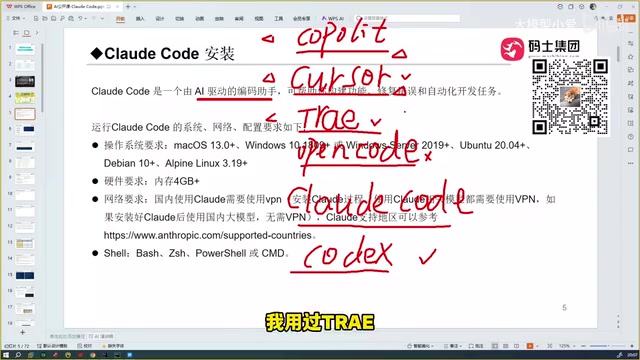
AI coding tools have proliferated in recent years. GitHub Copilot arrived first as a plugin, and its code autocomplete felt genuinely disruptive. Then came Cursor, a step up in intelligence, capable of more automated coding — a concept that's actually quite similar to what Claude Code does today. After that came ByteDance's TRAE, available in both an international and a domestic Chinese version; users in China can simply use the domestic version (the international version is paid). There's also OpenCode, which is technically a coding tool, but real-world performance has been disappointing — not recommended.
Before discovering Claude Code, the author had come to believe TRAE was the best coding tool available — it handles Chinese input well, it's free, and it's been thoughtfully optimized for users in China. But after trying Claude Code, that assessment changed completely. The core reason comes down to the underlying model: the capability ceiling of any coding assistant is determined by the model powering it. Claude Code's Sonnet model (and the even more powerful Opus) genuinely sits in the top tier. TRAE is free, but its accuracy drops off in more obscure or technically niche scenarios.
OpenAI's Codex also deserves credit — paired with GPT-5, its coding ability is reportedly on par with Claude Code. After comparing a range of domestic and international models (including Qwen and GLM series), the author's conclusion is: Claude Code is the best tool, but the right model depends on your needs. Its biggest edge over Cursor and TRAE is accuracy — they can all do automated coding, but Claude Code's accuracy rate is noticeably higher.
Installation: One Command, but You Must Use a VPN
Claude Code and tools like Cursor or TRAE differ at a fundamental level. The latter are IDEs (integrated development environments) built on the VS Code core — download, double-click, and you're coding. Claude Code is not an IDE. It's more like a software plugin that integrates into your existing development tools — you can plug it into Cursor, TRAE (VS Code), or JetBrains IDEs like PyCharm. Anthropic's own recommendation is to use it as a plugin.
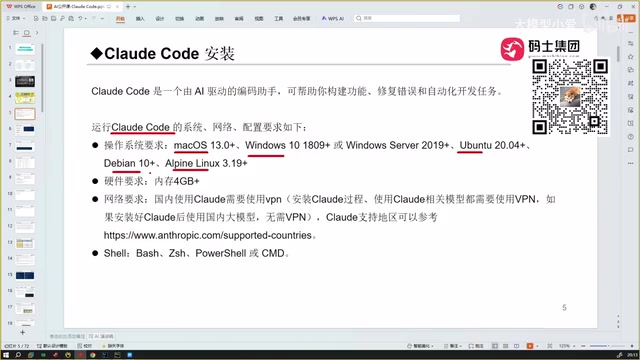
macOS, Windows, and Linux are all supported; Windows and macOS cover the majority of development use cases. The minimum hardware requirement is 4 GB of RAM. The hard prerequisite during installation is that you must have a working VPN/proxy — without one, the installer can't reach external servers and the process will fail.
In practice: on macOS, run the official install command in Terminal; on Windows, run the corresponding command in PowerShell (or CMD). The version demonstrated was 2.1.97, and with a proxy active, the full process takes roughly three to five minutes. A success message appears when it's done. If you see a wall of red error output, it's almost always a network/proxy issue.
Windows users also need to install Git separately. This allows Claude Code to auto-update itself — the demo version that started at 2.1.97 had quietly updated to 2.1.116 by the time of recording, entirely automatically with no manual action required.
Once installed, navigate to your project directory and type claude to enter the interactive interface. The first time you do this, you'll be prompted to trust the project directory (select "yes I trust this folder"). All generated code files will be written to the current directory.
Claude Code is distributed and installed via npm (the Node.js package manager), which is why installation requires a terminal/PowerShell command rather than a clickable installer. npm is the dominant package manager in the frontend and full-stack ecosystem. If Node.js isn't already installed on your machine, you'll need to download it first from the official Node.js website — npm comes bundled with it. Git is a version control system that Claude Code uses to track code changes and handle its own automatic updates, which is why Windows users need to install it separately. macOS typically includes Git by default, or will prompt you to install it automatically the first time it's needed.
The Critical Trap: Anthropic Accounts Don't Work in China
This is something every user in China needs to understand upfront. By default, typing claude redirects you to the Anthropic website to log in — but Anthropic doesn't serve mainland China or Hong Kong, so you simply cannot create an account.
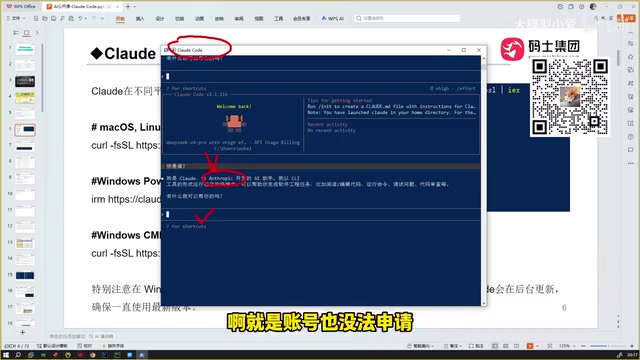
The author is emphatic on this point: don't try to buy an Anthropic account, and don't try to register with a foreign phone number. Even if you somehow manage to register, the account will get banned the moment it's used from within China — with almost no exceptions. The correct path for users in China is: skip Anthropic's official login entirely, and configure Claude Code to use a third-party model (such as DeepSeek) or access Claude-family models through a relay/proxy API provider.
The Three Official Models: Opus, Sonnet, or Haiku?
Anthropic offers three model tiers. Understanding their positioning helps you balance cost and performance:
- Opus: The most capable tier. Best suited for complex, deep codebases with intricate business logic. The trade-off is slower response times. Supports up to 1M context. Pricing is approximately $5/million input tokens and $25/million output tokens.
- Sonnet: The balanced option — fast responses with solid reasoning. This is the default model (the demo uses Sonnet 4.6). Also supports 1M context. Pricing is approximately $3/million input tokens and $15/million output tokens.
- Haiku: The least capable of the three, but far from useless — it outperforms most locally deployed models. Context window is 200K. The cheapest option, roughly 5x less expensive than Sonnet.
You might be wondering why context size matters so much: every time you send a request, the model needs to read your project's code files plus the entire conversation history as input context. The larger the context, the more tokens are consumed, and the higher the cost. Older models like the original DeepSeek often topped out at 128K context; the newer DeepSeek V4 Pro now supports up to 1M.
The token is the basic unit of measurement for text processing in large language models. Roughly speaking, one Chinese character corresponds to about 1.5–2 tokens, and one English word to about 1–1.5 tokens. In a coding context, token consumption is dramatically higher than in casual conversation because every request packages the entire project codebase plus the full conversation history as input (the "context input"). A medium-sized Python project can easily have tens of thousands of lines of code, pushing a single request's input token count well past 100,000. A 1M context window sounds large, but for big monolithic projects or extended sessions, the risk of hitting the limit — or watching costs spike sharply — is very real. When choosing a model, context size and the separate pricing for input vs. output tokens are both dimensions you must evaluate together, not just the headline per-token rate.
Real Cost Testing: AI Coding Can Get Expensive Fast
Cost is the most practically valuable section of this entire guide. The author shares a firsthand lesson: in the early days, using Qwen Coder (priced at roughly ¥24/million tokens, which is on the expensive end), a starting balance of about ¥37 was completely drained — including going into negative balance and getting disconnected — after just two conversations on a moderately large project. This illustrates the point clearly: token consumption for coding tools vastly exceeds that of casual chat.
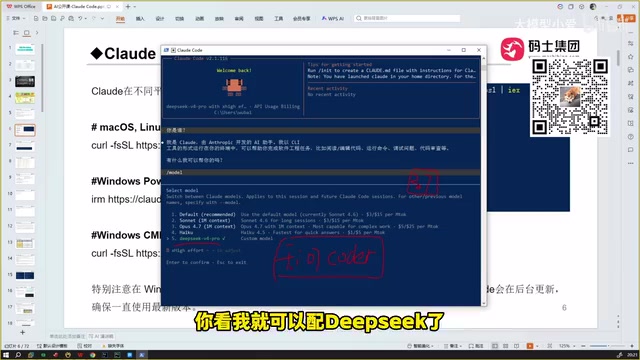
There are two more cost-effective approaches:
Option 1: Subscribe to a coding plan. Some platforms offer a ¥200/month coding plan with 6,000 calls per 5-hour window, with quota rolling over on a window basis. A flat ¥200/month for sustained usage is significantly more cost-effective than pay-as-you-go.
Option 2: Access Sonnet/Opus via a relay provider. Direct Claude access from China is difficult, and resellers on platforms like Taobao tend to be overpriced. Relay providers perform slightly less well, but with the right provider the experience is still solid. In practice, using a relay to run Sonnet on a project costs roughly ¥1 per conversation (in the ¥1.5–2 range), while simple questions that don't require heavy context loading can cost just a few jiao (fractions of a yuan).
Option 3: DeepSeek V4 is currently the best value. DeepSeek V4 Pro is a smaller-parameter "lite" version, but during its discount period (at 25% of list price) the pricing is extremely attractive: output at approximately ¥6/million tokens (list price is ¥24, on par with Qwen Coder) and input at about ¥3/million tokens, with cache hits priced even lower. In testing, ¥12 was enough to write two full projects, with individual conversations often costing just a few jiao — described as "incredibly satisfying to use." One caveat: the discount is time-limited, and if prices return to full rate, costs will rise noticeably.
Summary
For developers in China, Claude Code's value lies in the accuracy advantage that comes from reading the full project context and automatically self-correcting. But getting it running requires clearing two hurdles: a VPN is mandatory during installation, and Anthropic's official account system is inaccessible, so you'll need to route through DeepSeek directly or use a relay API provider. For model selection: Opus for deep, complex work; Sonnet for everyday balance; Haiku or discounted DeepSeek V4 when cost is the priority. On pricing, set your baseline expectation at "one conversation can easily cost ¥1 or more" — if you're a heavy, frequent user, a monthly coding plan is almost certainly the smarter choice.
Related articles

LynnReal-Omni: 32B Unified Video Diffusion Model Goes Open Source with Multi-Task Coverage in Four Steps
LynnReal-Omni is a 32B unified video diffusion model on MiniMax H3, covering text-to-video, pose guidance, style transfer, restoration in 4 steps. Flash version generates 540p video in 377ms on one H100.

Anthropic Co-Founder: AI 'Kill Switch' May Need to Be Mandatory by Law
Anthropic's co-founder tells the BBC that AI 'kill switches' may need to be legally mandated. We analyze the industry logic, technical challenges, and the tension between regulation and innovation.

The AI Data Center Boom Is Colliding With Cities Scarred by Heavy Industry
The AI data center boom is clashing with post-industrial communities. Philadelphia's case reveals structural conflicts between AI growth, energy use, water, and environmental justice.