Complete Tutorial: Build a Free Memos-Worker Personal Knowledge Base at Zero Cost

Build a free, serverless personal knowledge base using Memos-Worker on Cloudflare's free tier.
This tutorial walks you through setting up Memos-Worker, a lightweight note-taking system that runs entirely on Cloudflare's free services. By leveraging D1 database, KV storage, R2 buckets, and Pages deployment, you can create a permanently online personal knowledge base at zero cost—no server required. The guide covers forking the project, configuring resources, deploying via Cloudflare Pages, and setting up admin credentials.
Why Choose Cloudflare for a Private Note System
In the digital age, personal knowledge management has become essential. There are many excellent note-taking apps on the market, but they either require paid subscriptions or pose data privacy risks—your notes are actually stored on third-party servers. Data Sovereignty refers to the data owner's complete control over their data, including storage location, access permissions, and deletion rights. Mainstream note apps like Notion and Evernote store data on commercial company servers, meaning users only have usage rights. In recent years, several incidents have raised concerns about data security: Evernote's data security risks were exposed following layoffs, and Notion also faced privacy controversies related to AI training data. While self-hosted solutions increase the technical barrier, data remains entirely under user control, unaffected by service provider shutdowns, policy changes, or data breaches. For users who prioritize data sovereignty, a self-hosted note system is the more ideal choice.
When it comes to self-hosted notes, many people immediately think of Memos, an open-source application. Memos is an open-source self-hosted note app maintained by developer usememos, with a Go backend and React frontend. Its design draws inspiration from Twitter/Flomo's fragmented recording approach, emphasizing "quickly capturing ideas" rather than traditional hierarchical note organization. The project has over 30,000 stars on GitHub and is one of the most popular note tools in the self-hosting space. It features a clean interface and practical functionality, making it popular among developers. However, traditional Memos deployment has an obvious barrier: you need your own server. Traditional deployment typically requires a Docker container plus PostgreSQL or SQLite database, needing at minimum a 1-core 1GB VPS, costing at least 30-50 RMB per month. A server means ongoing expenses, daily maintenance, and the hassle of regular renewals. For budget-conscious individual users, this isn't cost-effective.
The Memos-Worker introduced in this article is a lightweight solution modeled after Memos that runs on Cloudflare. Cloudflare is one of the world's largest edge network platforms, with data centers deployed in over 300 cities globally. The core philosophy of its Serverless architecture is to let developers build without managing server infrastructure—code runs directly on edge nodes closest to users. Unlike traditional cloud servers (such as AWS EC2 or Alibaba Cloud ECS), Serverless charges based on actual invocations, incurring no costs when idle. Cloudflare Workers provides 100,000 free requests per day, and Pages offers unlimited static hosting, making personal projects virtually free to run. Leveraging Cloudflare's free tier, individuals can build a permanently online, zero-cost private note system.
Memos-Worker Core Features
Memos-Worker is highly similar to the original Memos in functionality, covering most daily needs for recording, searching, and managing notes.
Feature Highlights
- Quick note-taking: Write content directly in the input box, click save, perfect for recording temporary ideas, URLs, file information, etc.
- Multi-device sync: Since it runs on Cloudflare's edge network, it's accessible from any device at any time. The edge network advantage is that data returns from the node closest to the user—whether you're in Asia or overseas, you get low access latency
- Note sharing: Supports generating share links with configurable expiry periods (e.g., 1 day, 7 days), and sharing can be revoked at any time
- Archive function: Completed tasks or notes can be archived to keep the main interface clean
- Image and document uploads: Supports saving images and uploading documents, extending the note system's use cases
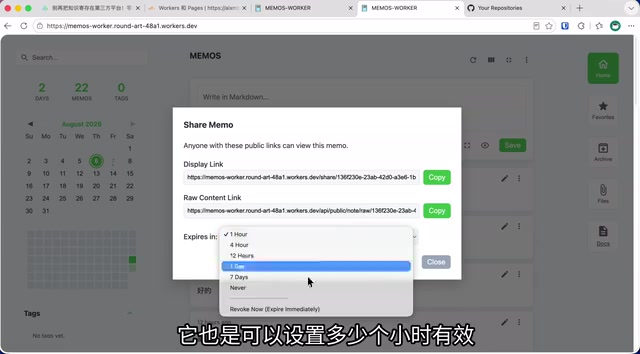
It's worth noting that Memos-Worker currently only has an English interface with no Chinese version available. However, the English used in the interface is quite simple and basically doesn't affect normal usage. Additionally, share links have no password protection, which is something to keep in mind when sharing sensitive content.
Preparation Before Setting Up Memos-Worker
The entire setup process is based entirely on Cloudflare's free services, requiring no server. You'll need to prepare:
- A GitHub account (for forking the project and deployment)
- A Cloudflare account
- (Optional) A domain name already managed by Cloudflare, for binding a custom access address
Regarding security: since deployment is done through GitHub, some key information will be exposed in the repository, but the risk is low and generally not a problem. If you have concerns about this, you can use the Plan B provided in the author's blog (typically deploying locally via Wrangler CLI to avoid pushing configuration files to a public repository). For convenience of future updates and syncing, this tutorial uses direct deployment from GitHub.
Detailed Memos-Worker Setup Steps
Step 1: Fork the Project to Your GitHub
Log into GitHub, navigate to the project URL provided by the author, and click Fork to copy the project to your own repository. You can customize the name (keeping the default is recommended). The Fork operation creates a complete copy of the project under your account—you can modify it freely without affecting the original project, and it also makes it easy to sync upstream updates via the Sync feature later.
Step 2: Create a Cloudflare D1 Database
Go to the Cloudflare dashboard, select "Storage & Databases" → "D1 Database", and create the database with the specified name required by the project. You can choose Asia-Pacific for the location. Cloudflare D1 is an edge distributed database service based on SQLite, launched in 2022. SQLite itself is the world's most widely used embedded database engine, extensively used in mobile apps and browsers. D1 combines SQLite's lightweight advantages with Cloudflare's global network, allowing database queries to be completed at edge nodes, dramatically reducing latency. The free plan provides 5GB of storage and 5 million row reads per day, which is more than sufficient for personal note-taking. After creation, remember to copy and save the database name and database ID—you'll need them for configuration later.
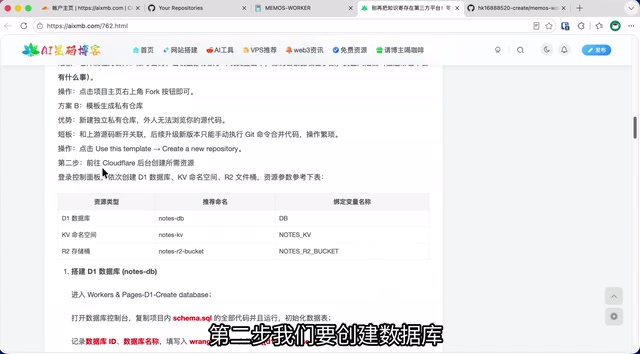
After successful creation, go to the database's "Console", paste the initialization SQL code provided by the project, and execute it to initialize the database structure. These SQL statements create the data tables needed for storing note content, user information, sharing records, etc.
Step 3: Create KV Namespace and R2 Storage Bucket
Continue creating in Cloudflare:
-
KV Namespace: Create with the specified name, and record its ID after creation. Cloudflare Workers KV is a globally distributed key-value storage service using an eventual consistency model. Its strength is extremely fast reads (millisecond-level), making it suitable for storing infrequently changing data such as user session tokens and application configuration. KV's free plan provides 100,000 reads and 1,000 writes per day, with 1GB of storage. In Memos-Worker, KV is primarily used for storing login sessions and system configuration.
-
R2 Storage Bucket: The name must match the project requirements. Choose Asia-Pacific for the region, and record the bucket name after creation. Cloudflare R2 is an S3-compatible object storage service whose key differentiator is zero egress bandwidth fees—reading data from R2 incurs no traffic charges. Traditional object storage (like AWS S3 or Alibaba Cloud OSS) often has egress traffic fees as the primary cost driver. R2's free plan provides 10GB storage, 1 million Class A operations (writes) per month, and 10 million Class B operations (reads) per month, making it ideal for storing images and document attachments in notes.
Record all parameters (D1 database ID, name, KV ID, R2 bucket name) in a notepad for later use.
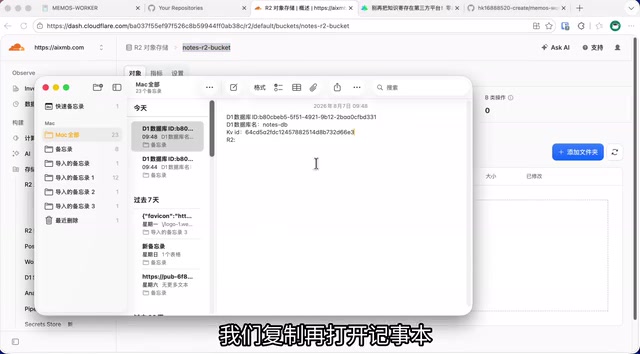
Step 4: Modify the Wrangler Configuration File
Return to your forked repository on GitHub, find the configuration file (e.g., wrangler.toml), click edit, and fill in the recorded parameters in their corresponding positions. wrangler.toml is the core configuration file for Cloudflare Workers/Pages projects, used to define the project name, bound resources (database, KV, R2), and environment variables. Wrangler is Cloudflare's official CLI tool, and Pages deployment automatically reads this configuration file.
Parameters to fill in include:
- D1 database account ID
- D1 database name
- KV namespace ID
- R2 bucket name
Save and commit after completing the modifications.
Step 5: Deploy the Application via Cloudflare Pages
Go to "Workers and Pages" in Cloudflare, create an application, authorize and select the forked project. Cloudflare Pages was originally designed as a hosting platform for static websites, but later added Functions capability to run server-side logic. It integrates deeply with GitHub—every code push triggers automatic builds and deployments, implementing a CI/CD workflow. The build and deployment commands will auto-populate; keep the defaults and click deploy. Wait a few minutes for completion.
Step 6: Set Admin Account Credentials
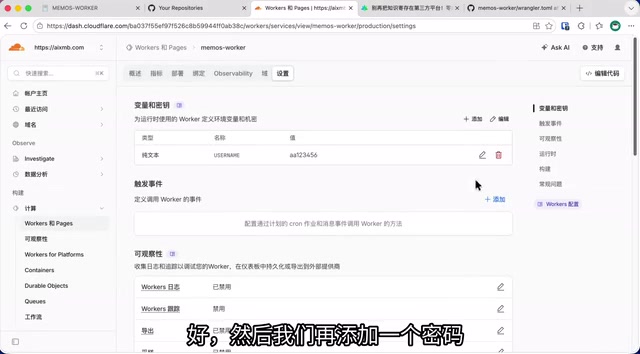
After deployment, go to the project "Settings" → "Environment Variables and Secrets", and add two environment variables:
- Admin username (corresponding to the specified variable name)
- Admin password (corresponding to the specified variable name)
Environment variables are a security practice that separates sensitive information (such as passwords and API keys) from code. Passwords set through environment variables don't appear in the code repository, making them more secure than hardcoding in configuration files. Save and redeploy after filling in the values to apply the new environment variables.
Step 7: Bind a Custom Domain (Optional)
If you have a domain already managed by Cloudflare, you can add a custom domain in the project settings. Once DNS propagates, you can access your system through your own domain. Cloudflare Pages assigns a *.pages.dev subdomain by default; binding a custom domain is not only easier to remember but also provides Cloudflare's CDN acceleration and DDoS protection.
Step 8: Execute Final Database Initialization Commands
Finally, return to the D1 database console and execute the SQL commands provided by the project (for rebuilding the search engine, etc.). The search engine here typically refers to SQLite's built-in FTS5 (Full-Text Search 5) extension, which builds an inverted index for note content, dramatically improving keyword search speed. After all commands are executed, refresh the project page, enter your admin credentials to log in, and you can officially start using your private note system.
Value Proposition and Target Audience Analysis
The core value of Memos-Worker lies in replacing traditional servers with Serverless architecture. Serverless doesn't literally mean no servers—rather, server management, scaling, security patches, and other operations are all handled by the platform, allowing developers to focus solely on business logic. It cleverly leverages a combination of three Cloudflare free products:
- D1 Database: Stores note text data (free 5GB, 5 million row reads per day)
- KV Storage: Stores configuration and session information (free 1GB, 100,000 reads per day)
- R2 Storage Bucket: Stores images, documents, and other files (free 10GB, zero egress traffic fees)
Combined with Workers/Pages edge computing capability (free 100,000 requests per day), the entire system runs on globally distributed nodes with fast access speeds and no maintenance required. For individual users, Cloudflare's free tier is more than generous—even recording dozens of notes per day won't come close to hitting the free tier limits.
This solution is particularly suitable for:
- Budget-conscious individual users who value data autonomy
- Light users who want multi-device note syncing
- Tech enthusiasts wanting to learn Serverless deployment practices
Of course, it has limitations: the English-only interface isn't ideal for some users, sharing lacks password protection, and keys exposed in a public repository present a minor security concern. For team collaboration or high-security scenarios, more complete self-hosted solutions are still recommended (such as deploying the original Memos via Docker on a VPS, or using Obsidian with a self-built sync service). Overall, as a permanently free personal knowledge base, Memos-Worker is an exceptionally cost-effective choice.
Key Takeaways
Related articles

Apple HomeView Hands-On Review: Is the $300 Smart Home Hub Worth It?
Apple HomeView hands-on: a $300 smart home hub with facial recognition for quick account switching, but no App Store or voice recognition. Is the wall-mounted version worth it? Should you buy the first generation?

Meta Muse Wonder Launch: What It Means for Meta's Return to the Frontier AI Race
Meta releases Muse Wonder and WonderFull, benchmarks reach the frontier, community feedback is polarized. An in-depth look at Meta's return to the frontier AI race, its personal agent strategy, and Zuckerberg's different path.

Apple Home Smart Home Lineup Leaked: LG and Schneider Team Up, UWB Door Lock on Board
Apple Home ecosystem gains new LG and Schneider devices: UWB smart lock with proximity unlock, 2.5K dual-camera doorbell, privacy indoor camera, and AirPods-like seamless pairing.