Connecting Gemini Models to Codex: A Complete Reverse Proxy Setup Guide
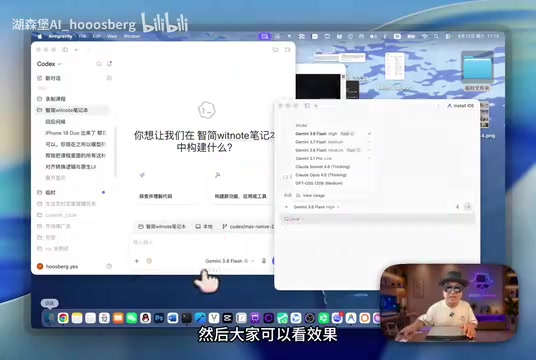
Use an open-source reverse proxy to bring Gemini models into Codex and expand your AI coding quota on the cheap.
This article walks through a setup that connects Google Antigravity's built-in Gemini models to OpenAI's Codex. The motivation: Codex has a better UX but the $20 plan runs short on quota, while a ~30 RMB third-party student plan unlocks generous Gemini quota. The technical backbone is CLIProxyAPI, an open-source reverse proxy with ~51k GitHub stars that creates a local OpenAI-compatible layer and forwards Codex requests to Gemini's backend. The standout approach is letting the agent configure itself — users just provide project keywords and Codex handles the rest. Since cross-provider conflicts prevent native model mixing, a Codex Switch script handles toggling between model sets with a required restart. The setup works, but relies on third-party channels and open-source projects, carrying compliance and long-term stability risks.
Why Connect Gemini Models to Codex
If you've used both OpenAI's Codex and Google's Antigravity (which the video author phonetically translates as "anti-gravity"), you've probably run into the same frustration: both AI agent coding tools have their strengths, but each is locked into its own ecosystem with no cross-compatibility.
Antigravity, Google's AI coding and productivity agent that runs parallel to Codex, comes bundled with the Gemini model series and Claude Code. Codex, on the other hand, is tied to OpenAI's GPT models. The author's core idea is straightforward: "port" the Gemini models from Antigravity into Codex — which has a more polished UX — so you can freely access both model libraries from within Codex's interface.
The motivation comes down to two things: first, Codex simply has a smoother interaction and controller experience; second, quota economics — the author mentions that their $20 Codex subscription is increasingly running short, while Gemini offers more generous quota at a similar price point. Bridging the two meaningfully increases the available quota per project.
The Cost Angle: Leveraging Student Plans
The whole setup only makes financial sense because of low-cost access to Antigravity's model usage. The author points out that Google offers annual student plans, and on platforms like Xianyu you can get a year of student eligibility for around 30 RMB — essentially gaining near-Pro-tier model quota at minimal cost.
A word of caution: student plans obtained through third-party channels like this carry compliance and account security risks. This article is a neutral technical writeup and does not constitute a recommendation to follow this approach. Readers who want to replicate it should independently assess platform policies and account risks.
In the author's testing, the Gemini model library (from Gemini 3.x to Claude Code) "punches above its weight and offers great value," effectively delivering a year of extra model quota for next to nothing.
The Technical Core: CLIProxyAPI Reverse Proxy
The technical foundation of this setup is an open-source project on GitHub with roughly 51,000 stars — the author refers to it as "CLIProxyAPI" (phonetically translated; verify the actual project name when reproducing this). Its purpose is to unify auth conversion across Gemini, Codex, and Claude CLI tools, with support for streaming tool calls.
The author admits he initially considered CC Switch, a mature open-source switching framework, but found it "a bit heavy." After several exploratory conversations with an AI assistant, he settled on this lighter reverse proxy project as the technical backbone.
From a request-flow perspective, the setup has two routes:
- Official direct route: Goes through the official OpenAI backend API, calling Codex's native models.
- External proxy route: Goes through a local proxy, connecting to Google Antigravity's Gemini models via the CLI proxy service.
The author notes that in theory you could also reverse-proxy the official route, but he didn't bother — the roundabout path serves no purpose. The architecture is also extensible: the external proxy isn't limited to Gemini and can theoretically integrate additional third-party APIs.
A quick note on what a reverse proxy actually does here. A regular (forward) proxy sits on the client side and helps users reach external services. A reverse proxy sits on the server side, receiving client requests and forwarding them to the real backend — from the caller's perspective, it looks like a single unified endpoint. In this setup, CLIProxyAPI starts a local listener port that presents itself externally as an OpenAI-compatible API server. When Codex sends an API request, CLIProxyAPI intercepts it, converts the format, and forwards it to Google Antigravity's Gemini backend. This means Codex doesn't need to natively support Gemini's auth protocol — it just "thinks" it's talking to a standard OpenAI-compatible interface. This kind of "OpenAI compatibility layer" is the most common integration pattern in today's multi-model ecosystem; tools like LM Studio and Ollama use the same approach.
Letting the Agent Configure Itself
The most interesting part of the whole setup is the methodology the author keeps emphasizing: don't configure it yourself — let the agent configure itself.
The approach is simple: paste the relevant open-source project keywords and your requirements in plain language directly into Codex and let it handle the installation, integration, and configuration on its own. The only point that requires manual intervention is the Antigravity authorization step — when the config script triggers an auth prompt, you just click "authorize" in a browser window where you're already logged into Antigravity.
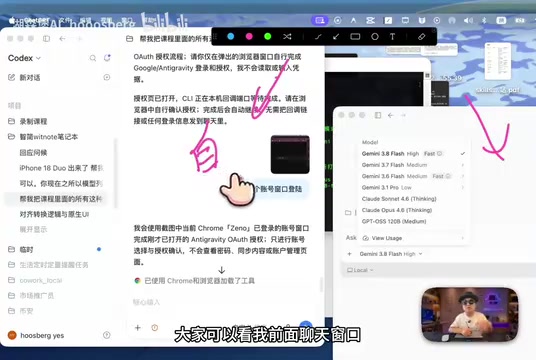
This "use AI to configure AI" approach lowers the barrier for non-technical users. You don't need to understand every technical detail — just supply the right project keywords and let the agent take it from there.
At its core, this "let AI configure AI" approach treats the agent as a script executor with contextual understanding. The "keywords" the user provides are essentially high-level task descriptions; the agent then looks up relevant documentation, infers dependencies, and generates and runs the installation commands. Compared to following a tutorial manually, the key advantage is fault tolerance — if a command fails, the agent can attempt to fix it on its own rather than leaving you to parse error messages. The limitation is that the agent's reasoning depends on project information from its training data. If an open-source project has had major interface changes recently, the agent's suggested configuration steps may be outdated, and you'll still need to manually verify the critical steps.
The Model Switching Script: Codex Switch
After completing the setup, the author ran into a practical issue: the models were connected, but there was no easy way to switch back to the official models. This comes down to Codex's loading mechanism — it reads the model list from a config file at startup and can't natively mix two sets of models at runtime.
The reason the Codex dropdown can't natively blend both model sets is cross-provider conflict: routing GPT models through the local reverse proxy causes errors. So a switching mechanism is needed to work around this limitation.
The solution was, again, delegated to Codex — the author had it write a switching script called "Codex Switch." The logic is simple: for each model or conversion mode you need, create a corresponding switch command.
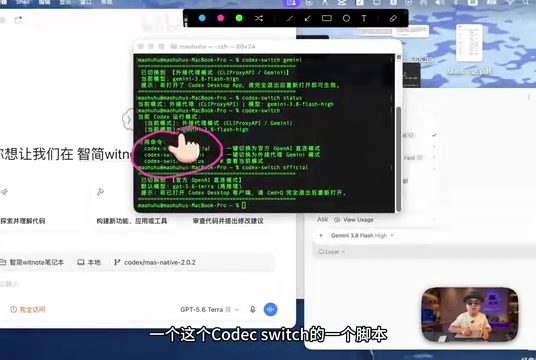
To use it, type Codex Switch in the terminal to see available commands — for example, switching to official models or switching to Gemini models. There's one critical step after switching: you must restart Codex. Without a restart, it won't reload the model list. Once you relaunch, the model list updates to reflect the selected model set.
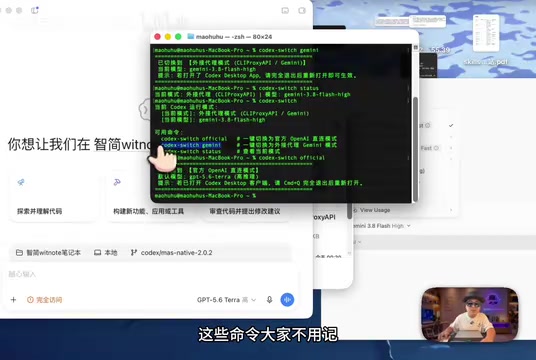
The author suggests you don't need to memorize these commands — just copy and paste them. He also recommends documenting the entire setup as a reference guide, including installation steps, the switching script, and an uninstall/restore walkthrough for when you want to clean up or migrate later.
Practical Value and Caveats
In the author's testing, the setup runs stably and achieves the original goal: within Codex's polished interface, you can use both the native models and a low-cost Gemini/Claude Code model library, giving you significantly more quota headroom per project.
From a technical standpoint, the broader takeaway is more instructive than the specific steps — this demonstrates how open-source reverse proxy tools can bridge AI agent ecosystems across different vendors, and how the "let the agent configure itself" approach can lower the barrier to entry for complex setups.
That said, a few limitations are worth acknowledging honestly: first, the setup depends on third-party student plan channels, which carry compliance and account security uncertainty; second, cross-provider reverse proxying may break if either vendor adjusts their policies; third, project names in the original video are phonetic translations, so readers reproducing this will need to verify the exact open-source projects and configuration details. Overall, this is a creative and instructive advanced setup — but one that warrants careful risk assessment before adoption.
Related articles
vLLM v0.30.0rc1 Released: Isolates FlashInfer BF16 Autotuning Logic
vLLM v0.30.0rc1 release candidate fixes FlashInfer BF16 autotuning isolation (PR #57285). Learn the technical background and its impact on inference deployment.
Comp AI Raises $34M Series A, Bets on Agentic Security Compliance
Comp AI raises $34M Series A led by Roo Capital and Grand Ventures, betting on "continuously agentic" AI to transform compliance from periodic audits into real-time monitoring.
MIT Technology Review's 35 Innovators Under 35: A Climate Tech Edition Explained
MIT Technology Review's latest 35 Innovators Under 35 list focuses on climate tech, spotlighting nine young global innovators. Here's what the list means and why it matters.