Coze in Practice: A Complete Guide to Building AI Teams with Multi-Agent Collaboration

Coze is a Chinese low-code agent platform built for multi-person, multi-agent AI team collaboration.
Coze is a Chinese intelligent agent platform designed for both non-developers and developers, enabling AI workflow deployment without extensive coding. The article categorizes Agent products into building tools, Agent software, and development frameworks — with Coze spanning the first two. Its standout feature is multi-person, multi-Agent collaboration: a single project space can host specialized agents (coordinator, legal, coding) alongside human teammates. Notably, Coze integrates with local Claude Code, letting developers remotely orchestrate their local environment via mobile. All collaboration artifacts are automatically retained, ensuring persistent project context.
Coze, a Chinese-made intelligent agent development platform, has been attracting considerable attention in the AI community. Its core pitch is enabling users to rapidly deploy agent-based workflows and assemble an "AI team" of multiple collaborating AI agents — all without writing large amounts of code. This article, based on a Bilibili tutorial, breaks down Coze's product positioning, core capabilities, and practical approaches to multi-agent collaboration.
Three Categories of Agent Products
Before diving into Coze, it helps to understand how Agent-related products on the market are generally classified — this makes it easier to see where any given tool fits in the ecosystem. The tutorial author organizes them into three broad categories.
The first category is agent-building tools. These platforms essentially let you "use an Agent to build the Agent you want" — quickly assembling intelligent agents tailored to your needs through a visual platform. Representative products include Coze, Coze Studio, Dify, and tools like MaxKB. Coze and Coze Studio share the same lineage: Coze has a lower barrier to entry and can be used without any programming knowledge, while Coze Studio requires some coding ability.
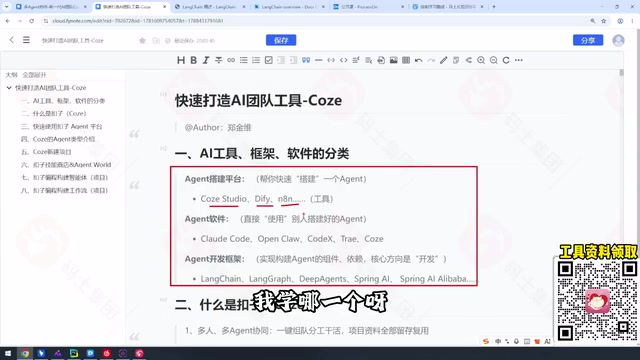
The second category is Agent software — products that can directly get things done. Examples include coding tools like Claude Code, Codex, and Cursor, as well as various applications. The challenge here lies in installation and configuration, and in describing your requirements precisely. The tutorial author also places the current version 3.0 of Coze in this category — earlier versions of Coze leaned more toward the "tool" end, but through iteration, it has acquired the characteristics of Agent software.
The third category is Agent development frameworks, which represent the most fundamental layer for programmers. This includes the LangChain ecosystem (LangChain, LangGraph, DeepAgents) and Java-oriented frameworks like Spring AI and Spring AI Alibaba.
The author's advice is straightforward: IT professionals should be familiar with all three categories, though priorities differ. Learn what your company uses, use what your employer reimburses; and the Python LLM ecosystem (LangChain/LangGraph/DeepAgents) is an essential long-term skill.
The LangChain ecosystem mentioned under Agent development frameworks deserves a closer look. LangChain is currently the most mainstream framework for building LLM-powered applications, providing standardized abstractions for model calls, memory management, and tool use. LangGraph is a derivative project specifically designed for building stateful, multi-step, multi-agent workflows — it describes agent collaboration logic using a "graph" structure (nodes + edges), making it well-suited for complex scenarios that require conditional branching and loops. DeepAgents is a derivative toolchain oriented toward Chinese developers. Spring AI and Spring AI Alibaba bring LLM capabilities into the Java/Spring ecosystem, enabling enterprises with existing Java stacks to quickly integrate AI features. Understanding the hierarchy across these three framework types helps clarify in which scenarios a low-code platform like Coze can replace hand-written code, and where framework-level custom development is still necessary.
What Coze Can Actually Do
One practical note on access: visiting coze.com directly may not work, while coze.cn takes you straight into the workspace without showing product information. The tutorial author provides a URL with an ovio suffix for viewing the homepage and documentation. Since the official homepage undergoes frequent redesigns — the "Documentation" entry disappeared at one point — it's advisable to access the official Chinese docs through a curated link.

Coze's core positioning is "hand your work over to Coze." Whether you're in programming, accounting, or design, Coze can handle corresponding tasks thanks to its rich built-in skills. For developers, it can even act as a bridge layer connecting to platforms like Claude Code for code generation.
The full learning path the tutorial maps out spans eight dimensions: Agent product concepts, a Coze overview, using the Agent platform, the three Agent types within Coze, project structures, the skills marketplace, Coze's programming and customization capabilities, and workflows. Together, these modules form a complete path from beginner to advanced user.
Multi-Person, Multi-Agent Collaboration: Coze's Killer Feature
The very first capability emphasized in Coze's official documentation is multi-person, multi-Agent collaboration for completing real tasks. This is also what sets it apart from ordinary agent tools.
"Multi-Agent" means a single workspace can host multiple agents, each with a distinct role. The tutorial author demonstrated three agents he built: a coordinator agent renamed "Wang Gang" (the system gives you a default agent named "Coze" upon login), a Claude Code agent dedicated to writing code, and a "Gold-Medal Legal Counsel" agent handling legal matters. Together, the three can take on a legal-related project.
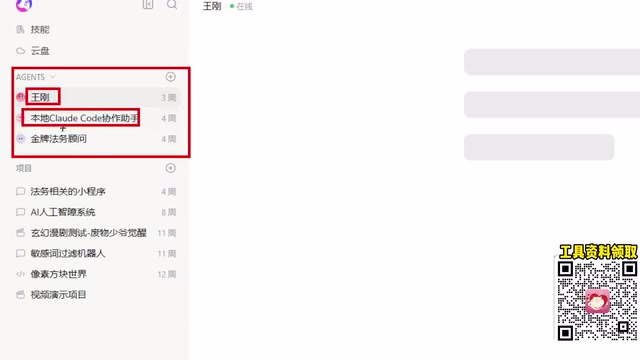
Particularly noteworthy is the agent that connects to a local Claude Code instance. The author has Claude Code properly installed locally, and Coze can connect to his local Windows machine through it. This means that instead of sitting at your computer and manually nudging Claude Code forward step by step (what the author calls "pushing it N1, N2 at a time"), once your local machine is running, you can remotely control your local Claude Code via Coze's mobile app. This "mobile remote control of a local dev environment" model represents a genuine shift in how developers can work.
Claude Code is Anthropic's command-line AI programming assistant. It can read and write the local filesystem, execute terminal commands, and complete multi-step programming tasks — essentially acting as an AI developer that operates inside a real development environment. Its strength is powerful task execution, but its interaction model tends toward "one prompt, one step forward" — the user needs to stay at the terminal and keep providing the next instruction (the "N1, N2 pushing" mentioned above). The significance of connecting Claude Code to Coze is that Coze acts as an orchestration layer, transforming the "someone must stay at the terminal and confirm each step" model into an async workflow that can be triggered from a mobile device and executed locally — significantly reducing the time cost for developers.
Multi-Person Collaboration and Persistent Context
The "multi-person" dimension operates at the project level. A single project can contain multiple Agents while also welcoming real human collaborators. In the legal mini-program project mentioned above, for example, you could have Wang Gang, Gold-Medal Legal Counsel, and Claude Code working alongside multiple human team members.
This "multi-human + multi-Agent" team model enables one-click team assembly and role-based task distribution. Crucially, all materials generated throughout the collaboration are retained on the Coze platform, ensuring continuity of project context and history.
For users who want to genuinely embed AI into their team's workflow, this design — uniting humans and multiple agents within a single project space — is the core value Coze aims to deliver.
Persistent storage of project context is especially critical in multi-agent scenarios. The context available in any single conversation window is bounded by the model's context window; once that limit is exceeded, earlier information gets truncated and the Agent effectively "forgets" what happened before. By storing all collaboration artifacts in a shared project space, Coze essentially provides the entire team with an external "long-term memory," allowing agents to access historical information the next time they're invoked — fundamentally alleviating the context-loss problem. This is one of the core advantages of a platform-level product over simply calling APIs directly.
Conclusion
As a Chinese-built agent platform, Coze's strengths lie in its Chinese-language friendliness, low barrier to entry, and the headroom it provides for advanced customization through workflows and custom skills. It works both as a no-code building tool for non-programmers and as a remote-control hub for developers connecting to a local Claude Code setup. Multi-person multi-Agent collaboration, one-click team assembly, and persistent context storage are the key differentiators that set it apart from comparable products. That said, the tutorial is candid that response times "still require patience when they require patience," and that Agent World remains closed for security reasons — practical caveats worth keeping in mind.
Related articles

Gaussian Process Bandit Optimization: Exploration Strategies and Inference Regret Guarantees
Cumulative regret guarantees in Bayesian optimization fail to reflect final recommendation quality. This article examines a new study that provides inference regret guarantees for Gaussian process bandit optimization through exploration query strategies and fill distance analysis, validated on hyperparameter optimization and control tasks.

The Most Detailed Codex Guide on Bilibili: From Installation to Real-World Practice
The most detailed Codex guide on Bilibili: from app store installation to daily work mode configuration, with a real coffee shop project demonstrating file organization, data extraction, dashboard creation, and other practical tasks. Learn to use Plan Mode and desktop pets to leverage Codex efficiently.

Appearance Compensation in Volume Rendering: Why RGB Accuracy Cannot Guarantee Density Correctness
Volume rendering research reveals that volumetric data perfectly reproducing external RGB views may still contain density errors: appearance compensation can double central density and keep external rays unchanged even when L2 error exceeds 14.52%. Density recovery depends on appearance capacity, spatial resolution, and measurement design.