Coze in Practice: A Three-Tier Agent Classification and a Multi-Agent Collaboration Guide
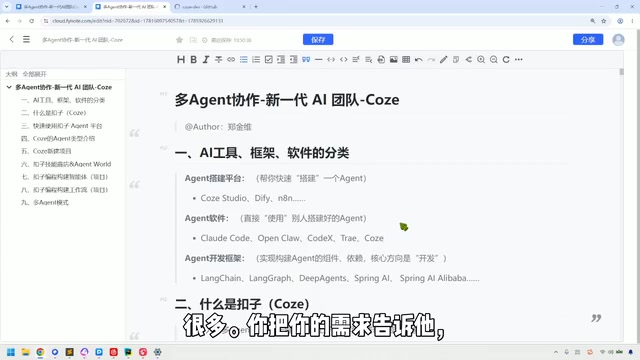
Divides Agent tools into three layers—platforms, software, and frameworks—and uses Coze to demonstrate multi-agent team assembly.
Based on a hands-on Bilibili tutorial, the article splits the current Agent ecosystem into three categories: developer-oriented Agent building platforms (Coze Studio, Dify, n8n), ready-to-use Agent software (Claude Code, Codex, Cursor), and development frameworks aimed entirely at IT professionals (LangChain, LangGraph, Spring AI). The author argues that clarifying these three layers is more decisive for learning costs than blindly chasing new tools. It then uses Coze as an example to introduce its "AI team" positioning for multi-agent collaboration—configurable domain-expert Agents mixed with real people, Agent calls billed in credits, web/desktop/mobile interoperability, and the ability to connect to local Agents for computer operations. The article is reserved about the "one sentence lets multiple Agents complete an entire project" model, noting uncertain results and high credit consumption. Finally, it reminds readers that Coze's official website iterates frequently and the documentation entry has moved, with official docs still the most reliable channel for tracking new features.
Multi-agent collaboration is becoming the mainstream form of AI application deployment, but faced with a dizzying array of toolchains, developers and non-developers alike often don't know where to start. In a hands-on tutorial on Bilibili, the creator splits the current Agent ecosystem into three categories and uses Coze as an example to demonstrate how to quickly assemble an "AI team." Although this classification isn't an official standard, it's highly useful for clarifying tool selection.
Three Types of Agent Tools: First, Figure Out What You're Using
The creator divides Agent-related products on the market into three layers, and this division directly determines what different roles should and shouldn't touch.
Category 1: Agent Building Platforms
Representative products are Coze Studio (open-sourced on GitHub, downloadable and installable), Dify, and n8n. These tools target technically savvy developers, who can build an agent or knowledge base through drag-and-drop and simple operations. The creator's judgment is blunt: developers can dabble, but non-developers should stay away. The reason is that although these platforms lower the barrier to building, they still require users to understand the basic structure of an agent and how data flows.
Category 2: Agent Software (Web Coding Tools)
Tools like Claude Code, Codex, and Cursor all fall into this category. You tell it your requirements, and it handles the specific coding work for you. In the video, the creator demonstrates describing to Claude Code "what's needed to build a knowledge base," and the tool immediately offers an analysis approach, then advances the task through repeated communication.
A hallmark of these tools is that they're ready to use out of the box—you don't need to dig into how they parse intent internally or how the agent architecture is designed. Configure your token, spend your own money, and it gets to work. Both developers and non-developers can pick them up, which is why it has become the hottest track right now. The creator notes that precisely because the application layer has such a low barrier, "everyone who previously did coding work is now competing in this space."
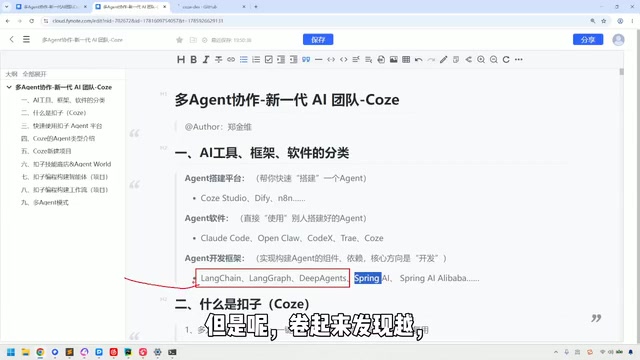
Category 3: Agent Development Frameworks
LangChain, LangGraph, and Deep Agents in the Python ecosystem, as well as Spring AI in the Java ecosystem, are entirely aimed at IT developers. Building relatively complex agents requires understanding the underlying architecture and orchestration logic. Non-developers need not pay attention to this layer.
LangChain is one of the most widely known frameworks for developing large-model applications; its core idea is to abstract capabilities like "model invocation," "tool use," "memory management," and "retrieval augmentation" into composable modules that developers string together through chained calls. LangGraph builds on this to further solve orchestration problems that are "stateful, multi-step, and loopable," using a graph structure to describe nodes and edges—suitable for building complex agents that need conditional branching, backtracking, and multi-round collaboration. Deep Agents leans more toward an out-of-the-box scaffold for "deep task" agents. Spring AI brings the same ideas into the Java ecosystem, offering unified model access, prompt templates, vector store integration, and more. The key to understanding the differences among these frameworks is to see whether they solve "single-call orchestration" or "multi-agent state transitions," which directly determines the ceiling of a project's complexity.
What Coze Can Do: An AI Team You Can Summon at Will
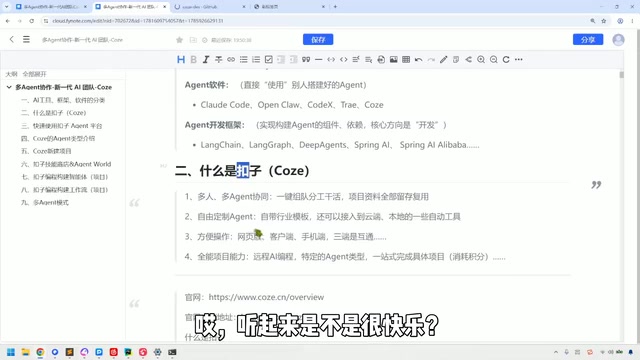
Having covered the classification, the creator shifts focus to Coze. The course title positions it as "multi-agent collaboration, a new generation AI team"—analogous to how HR recruits and assembles teams in a company: you can configure multiple Agents on Coze, each playing an expert role in a different domain, and combined with real human members, they form a hybrid team. The creator offers an analogy: two humans plus four Agents make a six-person project team.
An Agent's "salary" is credits. As the creator puts it, "either talk to me about tokens or talk to me about credits"—with enough credits, you can mobilize all kinds of Agent talent.
Free Customization and Industry Templates
Coze provides a large number of industry templates by default, covering scenarios like legal, short video, and AIGC, which can be used directly, and it also supports letting Agents learn new skills on their own.
So-called "industry templates" are essentially pre-built Agent configuration packages: including role settings (prompts), available plugins/tools, knowledge base mounting methods, and workflow orchestration. After selecting a template, users can replace the knowledge base, adjust prompts, and add or remove tools on top of it, rather than building from scratch. Such templates lower cold-start costs and are especially suited to scenarios with relatively fixed processes, like legal consulting, short video scripts, and AIGC asset generation. Note, however, that template prompts and tool combinations are designed for general needs; when applied directly to a vertical business, private data and business rules usually still need to be added—otherwise the output tends to remain at the level of "looks right but isn't usable."
Three-Platform Interoperability: Command from Anywhere
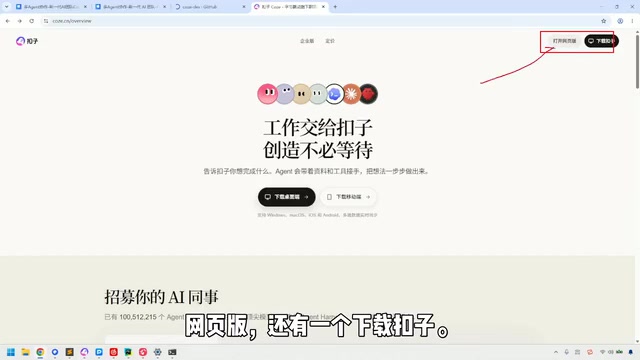
Coze has a web version, a desktop client, and a mobile app. The creator's description is quite vivid: pull out your phone and tap a couple of times while climbing a mountain, and you can get the Agent to work—"you can be on the job anytime, anywhere."
The download entry is in the upper-right corner of the official website, with two options: "Open web version" and "Download Coze," the latter offering desktop and mobile versions.
Connecting to Local Agents and the Cost of "One-Stop"
Coze can connect to local Agents, letting them perform operations on your computer—similar to desktop Agents like OpenClawAd that require higher permissions. The creator cautions that this capability requires a specific type of local Agent to implement.
Regarding "completing a project in one stop," the creator is quite reserved: saying one sentence and having a bunch of Agents do everything doesn't necessarily produce the expected result and may require rework—yet credits are still spent, and the consumption is significant. It works, but it's not recommended as the default way of working.
A "local Agent" refers to an agent program running on the user's own computer, which directly operates resources like files, browsers, and terminals through system permissions—in contrast to cloud Agents, which can only call plugins provided by the platform. Tools like OpenClaw are typical examples: they require users to grant high system permissions, offering greater capability but also greater risk. Once an instruction is misunderstood, the impact of misoperations expands to the local file system. When Coze connects to a local Agent, it usually requires a specific connection method or client to dispatch cloud-orchestrated tasks to local execution, so permission configuration and security boundaries are issues that must be thought through before use.
Pitfalls of the Official Website Structure and Documentation Entry
Coze's official website is in a state of continuous iteration. In the video, the creator says "it's constantly iterating and updating" five times in a row, admitting that many things you want to find may not be findable. Currently, the homepage distinguishes between personal and enterprise editions; scrolling down reveals example scenarios (such as quickly reading medical papers), and at the bottom of the page, four core product directions are listed: Coze, Coze Coding, Coze Loop, and Coze Open Source (i.e., Coze Studio). The tutorial suggests focusing on the first two; Loop is a tool for testing Agents and can be skipped for now.
The location of the documentation entry has also changed—there used to be a "Docs" label at the top, but now it's gone. The creator keeps the old address and emphasizes that official documentation is the most reliable channel for learning about new features.
Who This Kind of Tutorial Is For
Judging from its content orientation, this tutorial targets practitioners who "want to get hands-on but aren't sure of the tool boundaries": developers can use it to clarify the division of labor among the three layers—platforms, software, and frameworks—while product managers and those from non-technical backgrounds can skip the framework layer and start directly with platforms like Coze. The creator's core point can be distilled into one sentence: first figure out whether what you have is a building platform, ready-made software, or a development framework, and then decide how much learning cost to invest—this is more efficient than blindly chasing new tools.
Related articles

No Coding Required: He Shipped an App Store App by 'Cutting Features' and Nitpicking with AI
A game designer with zero frontend/backend skills shipped a dual-platform App Store app with AI—not via one-click generation, but by cutting scope and nitpicking like a demanding client.
What Is Harness Engineering? From Concept Origins to Enterprise-Level Agent Implementation
What is Harness Engineering? This article traces the concept's origins and analyzes enterprise-level Agent requirements for tool call fault tolerance, data security, tenant isolation, and memory gaps.
How the Mind Steers the Body: An Underrated Self-Regulation Revolution
An interpretation of the Substack essay Getting the mind to steer the body to steer you: how the mind regulates itself through bodily feedback, an embodied cognition framework for self-management, and the multi-angle discussion in the Hacker News community.