Coze in Practice: Building an AI Work Team and an Agent Development Guide

Using a Coze tutorial as a thread, this article covers selecting among three Agent product categories and building an AI work team.
Based on the Bilibili tutorial "Coze in Practice," the article divides AI Agent products into tools (Coze Studio, Dify), software (Claude Code, Cursor), and frameworks (LangChain, LangGraph) to build a selection framework. It advises learning all three with priorities, then covers Coze agent creation, local Claude Code integration, multi-role project division, skills, JSON output, API calls, and cloud/local deployment, concluding that developers who can combine all three categories will have an edge.
AI Agents are moving from concept to implementation, but with tools and frameworks proliferating, developers often struggle to choose. The Bilibili tutorial "Coze in Practice: Building an AI Work Team" offers a clear classification approach: dividing Agent products into three categories—tools, software, and development frameworks—and on that basis explains how to use Coze to build agents, integrate a local Claude Code, assign project roles, and configure skills. Drawing on the tutorial's views, this article lays out a path from understanding to hands-on practice.
1. The Three Categories of Agent Products: Tools, Software, and Frameworks
The tutorial divides Agent products on the market into three dimensions to help developers build a selection framework.
Tools refer to platforms for quickly building agents, such as Coze Studio, Dify, M8N, and others. These products lower the programming barrier, letting users compose the agents they want through a visual interface. Coze itself was initially more of a tool.
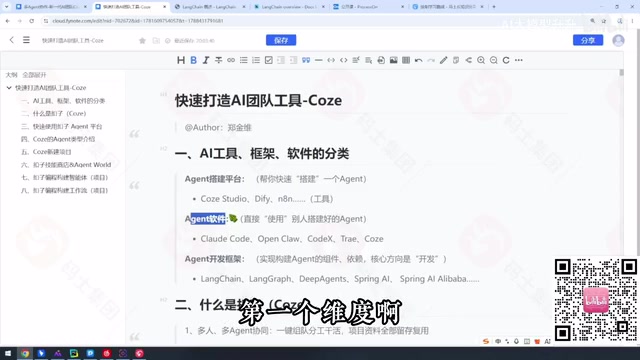
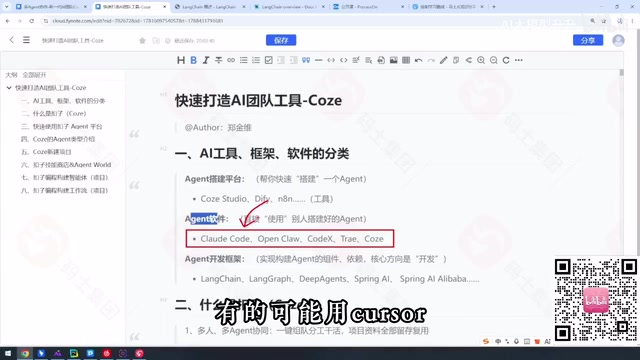
Software refers to Agent applications that directly execute tasks, such as Claude Code, WorkBuddyAd, Cursor, and others. Users simply issue instructions, and the software completes operations like coding and writing. The tutorial also places the iterated Coze 3.0 in this category, since it now has strong task-execution capabilities.
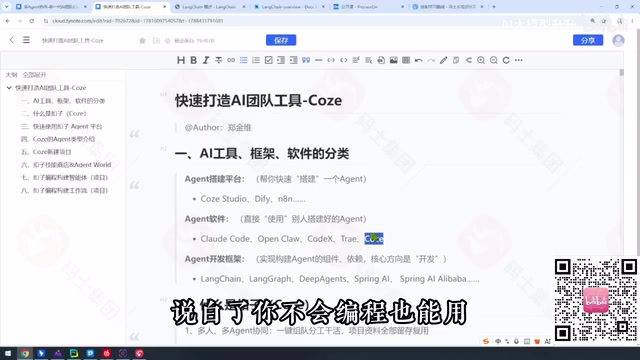
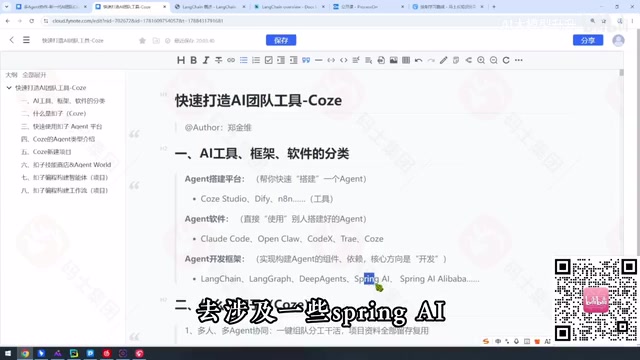
Development frameworks are aimed at programmers and include LangChain, LangGraph, and Deep Agents in the LangChain ecosystem, as well as Spring AI, which Java developers may encounter. These frameworks provide underlying capabilities and suit building customized Agent systems.
The layers of the LangChain ecosystem: LangChain itself is a programming framework for building LLM applications, offering abstractions such as Chain, Agent, and Memory; LangGraph is a stateful graph orchestration framework extended on top of it, describing complex control flow with nodes and edges and suited to multi-step reasoning and loops; Deep Agents further encapsulates multi-agent collaboration patterns. The three are not substitutes but a progression of capability from "single call" to "state-machine orchestration" to "multi-agent coordination." Understanding this hierarchy helps with selecting the right tool for a project's complexity.
2. How to Choose: Adults Don't Pick One, but They Do Prioritize
Faced with three categories of products, the tutorial's advice is to "learn them all, but in order of priority."
Among tool-type products, Dify is used more in enterprises, so learn it first if your company uses it; otherwise, you can defer it. Software-type products vary by company—Claude Code, Codex, and Cursor each have their adherents—so choose based on company reimbursement policy and personal fit. Development frameworks are essential skills for IT professionals to extend their career lifecycle, and LangChain, LangGraph, and Deep Agents in the Python large-model ecosystem need to be mastered one by one.
The tutorial stresses that the premise of choosing is understanding each category's positioning: tools solve "quick building," software solves "getting work done directly," and frameworks solve "deep customization."
3. Coze in Practice: Creating Agents and Integrating Local Claude Code
The core hands-on part of the tutorial centers on Coze. First, create an agent and define its role, skills, and knowledge base. Coze supports structured results via JSON output, facilitating subsequent API calls and system integration.
Integrating a local Claude Code is a highlight. By configuring the local environment, Claude Code is invoked as a tool or subprocess of the Coze agent, thereby leveraging Claude Code's coding capabilities within Coze workflows. This approach connects a cloud agent platform with a local development environment, extending Coze's application boundaries.
In the section on project division of labor and skill use, the tutorial demonstrates how to assign task roles to different agents and achieve collaboration through skill configuration. For example, one agent handles requirements analysis, another handles code generation, and a third handles testing and verification, forming a simple AI work team. The workflow demo shows the complete path from input to output, including conditional branches, loops, and exception handling.
The difference between knowledge bases and skills: In Coze, a knowledge base is used to mount external materials such as documents and web pages, which the agent cites when answering through retrieval-augmented generation (RAG); skills (plugins/tools) are the ability granted to the agent to call external APIs or perform actions. The former extends "what it knows," the latter extends "what it can do." When building an AI work team, you typically configure a dedicated knowledge base for each role to keep it domain-focused, then grant operational permissions such as reading and writing files and calling coding tools through skills.
4. Deployment and Integration: JSON Output and API Calls
Once a Coze agent is developed, it can provide services externally through APIs. The tutorial shows how to configure API keys, define request parameters, and parse JSON responses. For scenarios that need to be embedded in existing systems, this integration approach is especially practical.
In the deployment section, the tutorial compares cloud deployment and local deployment. Cloud deployment saves operations costs and suits rapid validation; local deployment meets data privacy and customization needs. Developers can choose flexibly according to project requirements.
The engineering value of JSON output: Having an agent return results in JSON format essentially adds a layer of structured contract beyond free text. Callers can reliably parse fields according to a predefined schema, avoiding the ambiguity of natural language and making it easier for downstream systems to validate, store, or trigger workflow branches. In Coze, this is usually done by constraining the output format through prompts, or by declaring the return structure in a plugin node—especially critical for chaining multiple agents, where the structured output of one agent can serve directly as the input parameters of the next.
5. Conclusion: From Tool User to Framework Master
The value of this tutorial lies in providing an Agent learning map. Beginners can start with tool-type products like Coze to quickly experience agent building; advanced developers need to go deep into frameworks like LangChain to master customization capabilities. Behind the tutorial's quip that "adults don't pick one" is a dual pursuit of both breadth and depth in technology.
With the iteration of Coze 3.0, its positioning has shifted from tool to software, reflecting that Agent platforms are blurring the boundary between tools and applications. In the future, developers who can flexibly combine tools, software, and frameworks will be better able to build complex AI work teams.
One-line Summary
Using a Coze tutorial as a thread, this article lays out the selection of three Agent product categories and the path to building an AI work team.
Paragraph Summary
Based on the Bilibili tutorial "Coze in Practice," the article proposes dividing AI Agent products into tools (Coze Studio, Dify), software (Claude Code, Cursor), and development frameworks (LangChain, LangGraph), building a selection framework. The author advises developers to "learn them all but in order of priority": tools based on company usage, software based on reimbursement policy and personal fit, and frameworks as essential skills for IT professionals to extend their career lifecycle. The hands-on part centers on Coze, covering agent creation, integrating local Claude Code, multi-role project division and skill configuration, as well as JSON output, API calls, and a comparison of cloud vs. local deployment. The conclusion is that Agent platforms are blurring the boundary between tools and applications, and developers who can flexibly combine the three categories will have an edge.
Related articles

Chain of Thought Isn't Just for AI: How Humans Can Use CoT to Improve Thinking Quality
Chain of Thought isn't just a prompt trick for large models. Starting from a Hacker News discussion, this article analyzes why CoT works for human thinking too, breaks down actionable ways to transfer it, and highlights the key differences between human CoT and machine CoT.
Cloudflare Teams Up with OpenAI: Closi…
Cloudflare Teams Up with OpenAI: Closing the Loop from Vulnerability Discovery to Defense with AI
Cloudflare uses OpenAI Daybreak to investigate security vulnerabilities and generate reviewable remediation plans, while developers use Codex to boost coding efficiency and quality.

Orca Multi-Agent Orchestration in Practice: A Guide to Parallel Collaboration with Claude and Codex
Orca is Stable AI's free open-source agent workbench supporting 34 agents like Claude Code and Codex in parallel. Learn its Git worktree isolation, multi-model orchestration, and mobile management.