Coze (扣子) Zero-Basics Guide: Build AI Agents and Office Automation in 7 Days
Unpacking Coze's core capabilities, real-world scenarios, and key insights from its 7-day beginner path.
The article examines ByteDance's AI agent platform Coze, extracting the valuable parts of a Bilibili creator's 7-day tutorial. It uses a "Lego factory" analogy to explain how Coze breaks agents into persona logic, plugins, knowledge base, and workflows, shifting the barrier from coding to describing needs. It covers four core capabilities, three scenarios (customer service, content marketing, knowledge Q&A), and the learning path's logic of workflows before agents, plus beginner pitfalls.
ByteDance's AI agent development platform Coze (扣子) is making "build a bot without writing code" as simple as stacking Lego bricks. A Bilibili creator put together a 7-day zero-basics tutorial that attempts to explain agents, workflows, and plugins in one go. This article doesn't recount the tutorial outline point by point — instead, it extracts the genuinely valuable parts: what the platform can actually do, which real office scenarios these capabilities map to, and where beginners most often get stuck.
What Coze Really Is: A Lego Factory for AI Bots
The creator's framing of Coze is straightforward: an AI agent development platform from ByteDance, an "AI bot manufacturing factory." Building a bot that can auto-reply, write articles, and check the weather the traditional way requires a programmer to write code from scratch; Coze's approach is to lay out functional modules and plugins so users can combine them like Lego bricks.
Behind this analogy lies a difference in product form. Coze breaks an agent into several configurable components: persona and reply logic, plugins, knowledge base, and workflows. Users don't need to understand the underlying technical implementation of these components — they just describe requirements in everyday language: give the bot a name, set its personality (a humorous customer service rep or a serious lawyer), and teach it how to respond in natural language.
For people with no programming background at all, this lowering of the barrier is substantial. The real mental work shifts from "how to write code" to "how to describe requirements clearly" — and the latter is precisely the more common skill in office settings.
Agent (智能体) is the starting point for understanding Coze. It's not an ordinary chatbot, but a program entity that can perceive its environment, make decisions, and call tools to execute actions. A complete agent typically has four layers: a model responsible for understanding user intent, a knowledge base storing domain knowledge, tools or plugins for calling external capabilities, and a planning module that orchestrates multi-step tasks. Coze packages these layers as visual components — configuring persona and reply logic is essentially defining the agent's decision strategy; attaching plugins equips it with execution means. This explains why the same platform can serve as both a customer service bot and a content assistant — the difference isn't in the underlying model, but in how components are combined and the scope of the corpus.
Four Core Capabilities, Mapping to Four Types of Office Needs
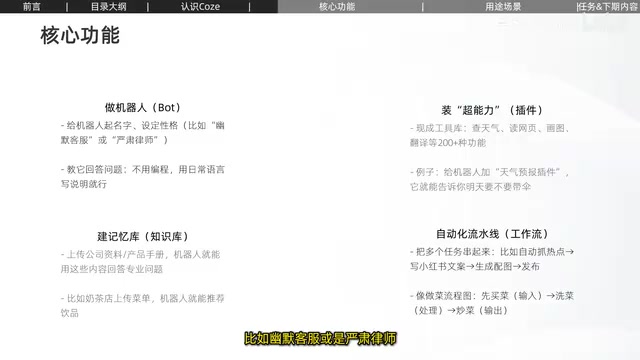
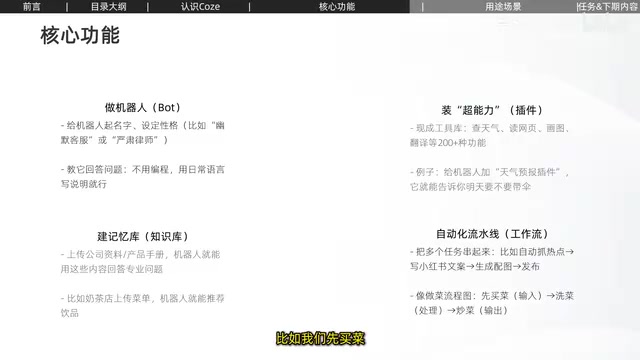
The tutorial distills Coze's core functions into four items, each directly corresponding to an automation need.
Building a bot (agent configuration): Set the name, personality, and reply logic, and explain business rules in natural language. This is the foundational carrier for all subsequent capabilities.
Installing superpowers (plugins): The platform offers over 200 ready-made tools — weather lookup, web page reading, drawing, translation, and more. Attach a weather plugin to the bot and it can answer "do I need an umbrella tomorrow?"; attach a web-reading plugin and it can scrape the content of a specified page. Plugins solve the problem that "the agent itself doesn't know the outside world."
Building a memory bank (knowledge base): After uploading company materials and product manuals, the bot can answer professional questions based on that content. The creator's example: a milk tea shop uploads its menu and the bot can recommend drinks; swap in legal statutes or technical manuals and it becomes a legal advisor or IT operations assistant. The value of the knowledge base is constraining a general-purpose model to a specific domain's corpus, reducing fabrication.
Automated pipeline (workflow): String multiple tasks into a chain — for example, automatically catching trending topics, writing Xiaohongshu copy, generating accompanying images, and completing the publish. The creator uses a cooking flowchart analogy — buying groceries is input, washing vegetables is processing, stir-frying is output — corresponding to node orchestration in a workflow.
None of these four capabilities is novel on its own; the combination is Coze's real selling point: plugins fetch external information, the knowledge base supplies domain knowledge, workflows chain multi-step operations, and the agent handles external interaction.
Plugin (插件) plays the role of "capability add-on" in this system. Large language models have knowledge cutoff dates and cannot directly access real-time weather, databases, or third-party services — plugins are the interface layer that bridges this gap. Technically, a plugin is usually a declarative API description: the platform tells the model "this tool exists, here are the parameters it needs," and the model decides during conversation when to call it and how to fill in the parameters. Coze's 200+ ready-made plugins amount to pre-packaged common external services, so users don't have to write interface integration code themselves. Understanding this helps judge the boundaries — what data a plugin can retrieve and how good its returned results are directly determines the reliability of the agent's answers; choosing the wrong plugin or misconfiguring parameters is often worse than not attaching one at all.
Knowledge base is often misunderstood as "feeding materials to the model," but its actual operation is closer to retrieval-augmented generation (RAG). Uploaded documents are split into chunks and converted into vectors stored in an index; when a user asks a question, the system first retrieves the most relevant chunks, then passes them as context to the model to compose an answer. This means the knowledge base's effectiveness depends on three things: whether document chunking is reasonable, whether retrieval hits the correct chunks, and whether the model faithfully uses the retrieved content. The milk tea menu works well because the content is short, clearly structured, and easy to match in retrieval; legal statutes or technical manuals, being long and dense with terminology, require more careful cleaning and segmentation strategies — otherwise retrieved chunks may miss the point entirely.
Three Real-World Scenarios: Customer Service, Content, and Knowledge Q&A
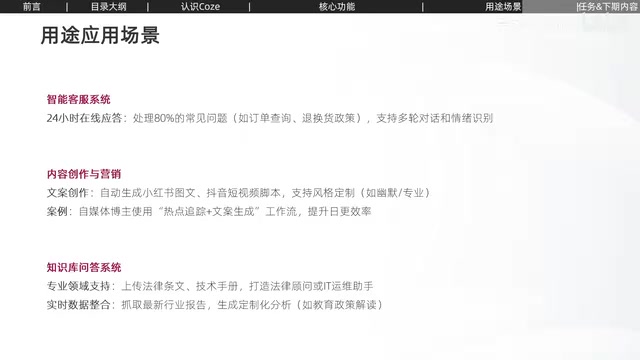
The tutorial lists three application directions that beginners can use as a reference for choosing scenarios.
AI customer service system: 24/7 online responses, handling about 80% of common questions (order inquiries, return policies, etc.), supporting multi-turn dialogue and emotion recognition. The commonality of such scenarios is high question repetition and answers with clear sources — ideal for knowledge base plus agent.
Content creation and marketing: Automatically generating Xiaohongshu image-text posts and Douyin short video scripts, with style customization (humorous or professional). Some self-media bloggers use a "trend tracking plus copy generation" workflow to boost their daily publishing efficiency. The key here isn't having AI write viral hits, but compressing the waiting time in topic selection, first drafts, and image generation.
Knowledge base Q&A: Beyond the legal advisor and IT operations assistant mentioned above, it can also scrape industry reports to generate customized analysis, such as education policy interpretation. Such scenarios demand higher answer accuracy — the quality of the knowledge base corpus directly determines output quality.
The creator also admits these are just three directions and that actual uses require users to discover their own needs. This sounds like a pleasantry, but it's an important reminder for beginners: Coze itself doesn't solve the "what to do" problem — scenario selection still depends on understanding your own business processes.
Learning Path and Commonly Overlooked Points for Beginners
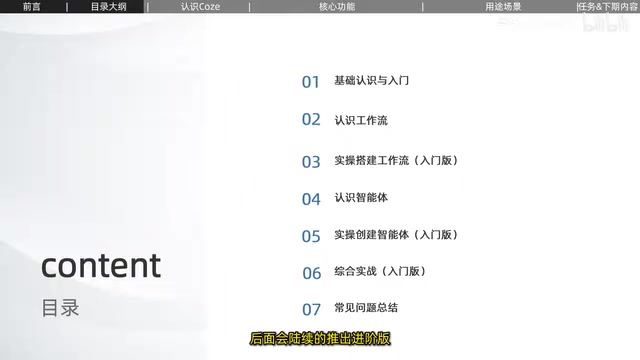
The 7-day schedule of this tutorial is: basic concepts and introduction, understanding workflows, hands-on building of a beginner workflow, understanding agents, hands-on creation of a beginner agent, comprehensive beginner project, and common questions summary. The rhythm is to establish concepts first, then practice hands-on, and finally tie everything together — the creator specifically emphasizes this is a "beginner version" with advanced content to follow.
For those preparing to get started, there are a few things worth knowing in advance. Day one's task is really just registration: the domestic version is at coze.cn, the international version at coze.com, and the two will have functional differences going forward — the creator says the international version will be covered in more depth later.
Another easily overlooked point is the learning order of workflows versus agents. The tutorial places workflows before agents because workflows are the more foundational orchestration capability — understanding how nodes chain together first, then how agents call them, is smoother than learning in reverse. Many people want to build an "all-purpose bot" right away and get stuck trying to chain multiple plugins into a stable process.
Finally, expectation management. What 7 days can achieve is "getting a beginner-level agent running," not "building a production-grade automation system." How to clean knowledge base corpora, how to handle workflow exceptions, how to design multi-turn dialogue — these are what determine whether an agent is actually usable, and a tutorial outline can only touch on them briefly. Distinguishing beginner-level from mastery makes it easier to keep learning.
The relationship between workflows and agents deserves separate clarification. Agents excel at open-ended dialogue, with the model deciding the next step autonomously; workflows are deterministic node orchestration where each step's input, output, and execution order are predefined. The two aren't substitutes: a workflow can be called by an agent as a "tool," and an agent can be embedded in a workflow to handle a node requiring natural language understanding. The tutorial places workflows before agents precisely because workflows are closer to the foundational thinking of "breaking things into steps" — mastering concepts like nodes, variables, and conditional branches first, then understanding how agents call them, gives a gentler learning curve. Learning agents first makes it easy to treat "the model will figure it out" as a default assumption, leaving you helpless once a process needs stable reproducibility.
One-line Summary
Unpacking ByteDance Coze's core capabilities, real-world scenarios, and key insights from its 7-day beginner path.
Paragraph Summary
The article focuses on ByteDance's AI agent development platform Coze, not recounting the Bilibili creator's 7-day tutorial outline point by point but extracting what's genuinely valuable. It first uses a "Lego factory" analogy to explain Coze's product form: breaking agents into four configurable components — persona logic, plugins, knowledge base, and workflows — so users can build bots by describing needs in natural language, shifting the barrier from "writing code" to "clearly stating requirements." It then summarizes the four core capabilities and their corresponding office automation needs, and lists three real-world scenarios: AI customer service, content creation and marketing, and knowledge base Q&A. Finally, it explains the logic behind the 7-day learning path — workflows before agents — and reminds beginners about domestic vs. international version differences, expectation management, and that knowledge base corpus quality and workflow exception handling are what really determine actual results.
Related articles

Frontend to AI Agent Development: A Frontline Architect Explains Career Paths and Opportunities
A frontline AI architect explains the industry changes and practical paths for frontend developers transitioning to AI Agent development: why pure frontend jobs are disappearing, why Agent + full-stack has become mainstream in hiring, and three transformation routes—Agent development engineer, FDE, and remote contracting—along with corresponding learning strategies.

How to Choose an AI Agent Development Course: Five Pitfall-Avoidance Guidelines
A mechanical-engineering career changer's two-year pitfall-tested checklist for screening AI Agent development courses: complete delivery pipeline, resume-worthy projects, real development perspective, update frequency, and coaching feedback—with concrete judgment methods and pitfall-avoidance tips.

Coze AI Agent Building for Beginners: A Zero-Code AI Agent Development Guide
Coze, ByteDance's one-stop AI application development platform, supports zero-code drag-and-drop AI agent building. This article outlines Coze's core concepts, three advantages, differences between the domestic and international versions, and the distinction between agents and apps, helping beginners quickly get started with AI Agent development.