Coze Multi-Agent in Practice: A Complete Guide to Building AI Collaborative Teams

A clear breakdown of the three-layer Agent tool stack to help you choose the right tools based on your background.
This article organizes the tools involved in the most common enterprise AI use case — Agents and knowledge bases — into three clear layers: visual builders like Coze Studio, Dify, and n8n for quick prototyping; ready-to-use Agent software like Claude Code and Trae for developers and non-developers alike; and professional frameworks like LangChain and LangGraph for complex multi-Agent systems. The core message: choose tools by understanding each layer's role, not by chasing a single "best" tool.
Starting with Knowledge Bases: Why Enterprises Love Building Agents
For most developers, the first AI project they encounter at a new company is usually a knowledge base or a simple agent. The reason is straightforward: low cost, fast results. But a challenge quickly follows — if you're not familiar with the AI tech ecosystem, where do you even begin?
There are actually two ways to solve this. One is to use Web Coding tools and let AI write the code for you. The other is to use ready-made visual tools to quickly build an Agent. Coze and the family of products built around it exist precisely to lower this barrier. This article maps out the full tool stack needed to build an AI collaborative team, helping you understand the role and target audience of each type of tool.
Coze Studio: An Agent-Building Tool for Developers
The first category is "tools that help you build Agents," and Coze Studio is the prime example. It shares the same origins as Coze — both are ByteDance products — but is positioned more toward technically-minded developers.
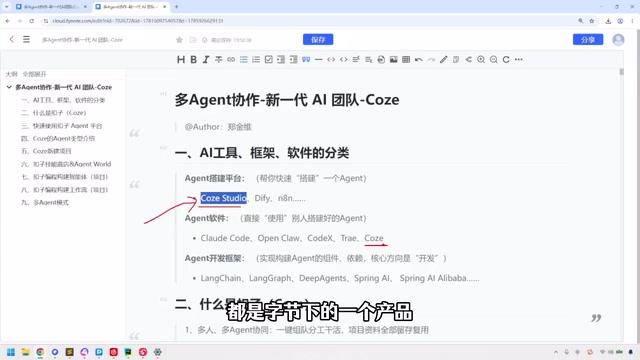
One of Coze Studio's key features is that it's open source, with the code hosted on GitHub. You can download it locally, install it, and then use the interface to drag, drop, and configure your way to a working agent. Whether you're building a knowledge base or a relatively simple agent, these visual tools significantly lower the barrier to entry.
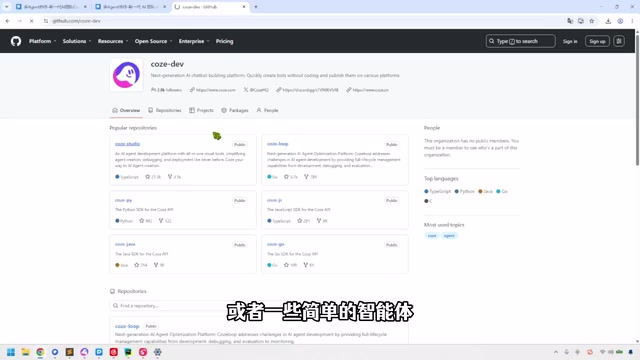
Similarly positioned products include Dify and n8n — all of them belong to the "build Agents with tools" category. The practical advice here: these tools are fun for developers to experiment with, though most will only scratch the surface. Non-developers don't need to dive deep into these just yet.
Agent Software: Ready-to-Use Coding Assistants
The second category is the more familiar Agent software — the various Web Coding tools. Claude Code, Codex, Trae, and products from vendors like Zhipu AI all fall into this category.
The usage logic is very direct: describe what you need, and let the tool handle the actual coding.
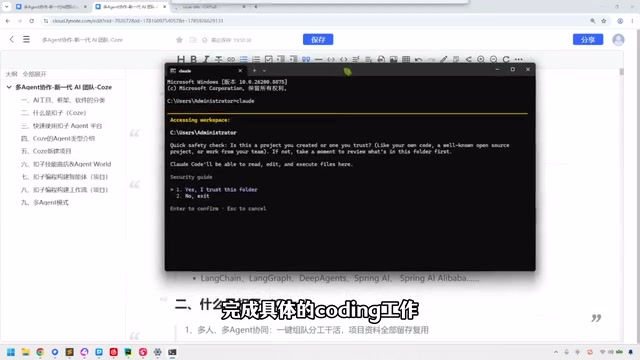
Take Claude Code as an example — you can simply say "I want to write some code, help me analyze this," hit enter, and it'll respond. Want to know what components you need for a knowledge base? It'll break down the list for you. You provide the direction, iterate through back-and-forth conversations, and hand off all the coding work to it.
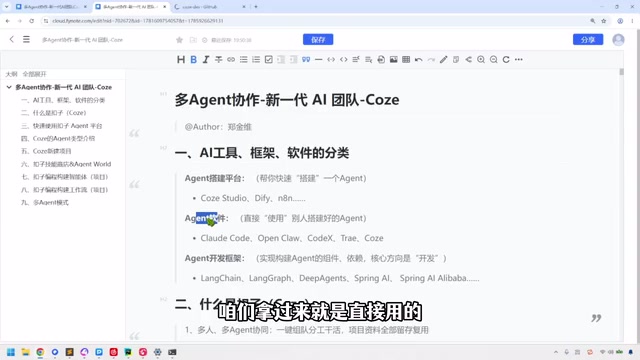
The key value of these tools is that they're ready to use out of the box. You don't need to understand how Claude Code interprets your intent internally or what its Agent architecture looks like — that's irrelevant to the user. Set up your Token, pay for what you use, and it gets to work. Because the barrier has been effectively removed, both developers and non-developers can get started.
Note on "Token" here: Token in this context refers to an API access credential (Access Token), not the text unit used in language models. When using tools like Claude Code or Codex, you typically need to apply for an API Key from the corresponding platform, enter it into the tool's configuration, and pay based on actual usage. Different tools use different billing units: some charge per input/output token count, others charge per task. For individual developers, using the official API directly is the most flexible option. For enterprise deployments, cost control and key security become important concerns — organizations typically set up an internal proxy or unified API gateway to centrally manage access permissions and budgets.
Agent Development Frameworks: The Deep End for Professional Developers
The third category is Agent development frameworks — this is squarely the domain of IT developers. If you want to build relatively complex agents using Python, you'll need to understand frameworks like LangChain, LangGraph, and Deep Agents, along with their underlying architectural philosophies.
For enterprise teams looking to ship quickly with Java, there are also corresponding technology options. This layer is no longer about drag-and-drop visual operations — it requires a genuine understanding of Agent orchestration logic, state management, and multi-step reasoning mechanisms.
The framework layer has the highest barrier to entry, but also offers the greatest flexibility and control. When visual tools can't meet complex business requirements, going back to the framework layer for custom development becomes the inevitable choice.
A closer look at the frameworks: LangChain is one of the most mainstream Agent development frameworks available today, primarily Python-based (with a JS version as well). Its core idea is to "chain" together LLM calls, tool usage, memory management, and other capabilities. LangGraph is an upgraded version released by the LangChain team that introduces a graph structure to describe Agent state transitions, making it better suited for building complex multi-Agent systems with conditional branching and loop-based reasoning. Unlike LangChain's linear chain-style calls, LangGraph lets developers explicitly define nodes and edges, making the Agent's decision paths more controllable and debuggable. For enterprise Java stacks, Spring AI and LangChain4j are common counterparts that leverage the existing Spring ecosystem to reduce integration costs with existing systems. Understanding these frameworks comes down to mastering two core concepts: Tool Calling — which gives LLMs the ability to operate external systems — and state machines — which manage context and flow control across multi-step tasks.
How to Choose: Understanding Your Agent Tool Stack by Layer
Looking at all three categories together, a clear technical layering emerges:
- Visual building tools (Coze Studio, Dify, n8n): Lowest barrier to entry, ideal for quickly building knowledge bases and simple agents. Developers can play around, but won't go too deep.
- Agent software (Claude Code, Codex, Trae, etc.): Ready-to-use coding assistants that require no understanding of internal architecture. Accessible to both developers and non-developers.
- Development frameworks (LangChain, LangGraph, Deep Agents): Built for professional developers, serving as the infrastructure for complex multi-Agent systems.
For anyone looking to build an "AI collaborative team," the first step to choosing the right tool is being clear about your technical background and the complexity of your requirements. Non-developers can start with visual platforms like Coze, while developers can flexibly combine Agent software and development frameworks based on project complexity.
The heart of multi-Agent collaboration isn't about which single tool you use — it's about understanding the role of each layer in the stack and putting the right capabilities together.
Related articles

How Big Can Stars Really Get? The Physical Limits of the Largest Stars
Red supergiants are the largest stars by volume, with radii up to 2,000 times the Sun, engulfing the inner solar system. But there is no precise upper limit on stellar size—models predict up to 15,000 solar radii. The most massive blue stars are far smaller than red supergiants—biggest and heaviest are two different things.

Apple HomeView Smart Display Full Feature Breakdown: Wall-Mount or Desktop, $299
Apple launches HomeView, a $299 smart display with wall-mount and desktop options, 12MP camera for facial recognition, smart home control, music playback, and recipe step-by-step cooking. Full breakdown of watch faces, apps, privacy, and cooking integration.

Where Did the Promised New Studio Go? Craft Computing Answers After Five Years
Craft Computing's host responds to viewer questions: the new studio promised five years ago was shelved as construction costs soared from $30,000 to $75,000, and was replaced by a 168-square-foot garage conversion.