Cursor AI Editor Tutorial: Build a Portfolio Website from Scratch

Cursor is a VS Code-like editor with a built-in AI agent that can generate a deployable website in minutes using natural language prompts.
Cursor is an AI-first code editor that retains VS Code's full workflow and extension ecosystem while adding a built-in AI agent that understands your entire codebase. It offers four interaction modes — Agent, Plan, Debug, and Ask — along with @ file references, RAG browser retrieval, and multimodal input. In a live demo, Cursor built a complete, multi-section portfolio website in about five minutes, with step-by-step accept/reject controls keeping the user in full control of every AI change. Pricing includes a free tier and paid plans at $20, $60, and $200/month, suitable for individual developers through enterprise teams.
Cursor is an AI-first code editor that embeds large language models directly into the coding workflow, letting developers edit files, generate applications, and restyle entire sites using natural language prompts. This article draws from a hands-on demo to break down Cursor's core features, interaction modes, and real-world build process — helping beginners get up to speed quickly.
What Is Cursor: VS Code, Evolved with AI
At its core, Cursor is a Visual Studio Code-like code editor. Its interface layout and interaction logic are nearly identical to VS Code, which means developers with existing experience can migrate with almost zero learning curve. It even supports importing your VS Code settings and keyboard shortcuts directly.
The real difference lies in the built-in AI Agent. This agent understands the context of your entire codebase, helping you plan, search, and build everything you need — writing code end-to-end — while also providing access to top-tier models for precise code rewrites. On top of that, Cursor offers tab completion, multi-line editing, and intelligent code rewriting, consolidating AI-assisted programming into a single workspace.
On pricing, Cursor offers a free tier with some limitations, and paid plans at $20, $60, and $200 per month — the higher the tier, the more AI usage, early access to new features, and unlimited code completions you get. Plans for teams, enterprises, and business users are also available.
AI Agent is an AI system capable of autonomously planning and executing multi-step tasks. Unlike a standard chatbot's back-and-forth Q&A, an agent can break down goals, call tools (such as reading/writing files or running commands), and iterate continuously until a task is complete — all without step-by-step human instruction. Cursor's built-in Agent scans the entire codebase to understand project structure and dependencies. This "codebase-level context awareness" enables consistent, cross-file modifications rather than just completing a single line of code. This is what fundamentally distinguishes Cursor from simpler AI completion plugins like early versions of GitHub Copilot.
Four Interaction Modes: The Right AI for Every Job
After downloading and installing Cursor (download button in the top-right corner of the official site; available for Windows, macOS, and more) and completing setup, you'll land on the main interface. From here you can open local projects, clone repositories from GitHub, connect via SSH, or chat directly with the AI.
The Agent Chat panel on the right side of the interface is the central hub for AI interaction. It currently offers four primary modes:
- Agent Mode: Plans, searches, and builds what you need directly — writing code end-to-end in one go.
- Plan Mode: First generates a step-by-step plan for your review before executing anything.
- Debug Mode: Finds and fixes errors or warnings in your code.
- Ask Mode: Works like a standard chatbot for asking questions about your code or implementation approach.
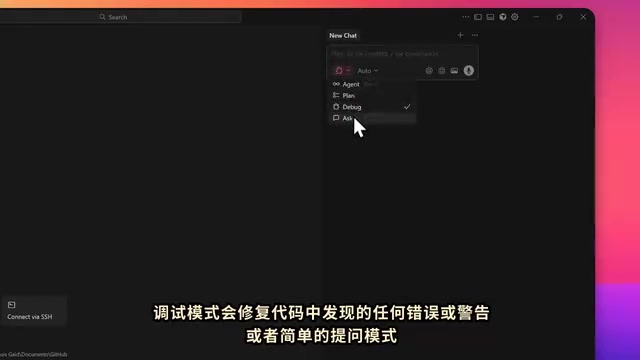
You can manually search for and select a model, or let Cursor choose automatically. In your prompts, you can use @ to reference specific files, branches, GitHub content, or previous chat history. You can also connect a browser for search context (with RAG retrieval capability), and the editor supports multimodal inputs including image uploads, voice recording, and file attachments.
RAG (Retrieval-Augmented Generation) is a technique that lets a large language model first retrieve relevant content from an external knowledge source, then use that content as context when generating a response. Cursor's browser-connected RAG means you can have the AI pull in up-to-date documentation, Stack Overflow answers, or GitHub Issues in real time while answering questions or generating code. This bridges the gap created by a model's training data cutoff — especially useful for projects that rely on the latest API versions or frameworks.
Hands-On Demo: Generate a Portfolio Website in Five Minutes
The demo goal is to build a portfolio website complete with design and copy specifications. One key takeaway the presenter emphasizes: the more detailed your prompt, the better the results — being specific about copy, design, and functionality in every detail noticeably improves the quality of the AI's output.
In Agent Mode, Cursor first plans the steps and lists the details. Once the user clicks to execute, it begins building files and code in real time. The entire process is visible — you can watch each file (HTML and others) being generated as it happens. In the demo, Cursor took roughly five minutes to produce a complete, modern portfolio website with a Hero section, featured projects, an About Me section, a skills list, and contact information — ready to deploy.
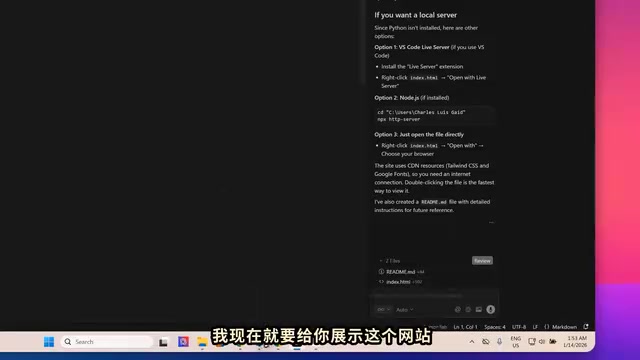
One standout aspect of the design is user control: for every change, you can choose Accept All to keep it or Reject All to roll back to the previous state, preventing the AI from making uncontrolled overwrites. The presenter also notes that you can simply ask the AI "how do I run this" and it will offer multiple options to choose from.
Iterative Edits: Using Plan Mode for Follow-Up Changes
Once the site is generated, making changes is just as simple — go back to the editor and type a new prompt. In the demo, the presenter asks the AI to make two changes: add a professional work experience section with real data, and update the color scheme to a darker, greener, more modern palette.
This time, he selects Plan Mode. Cursor first generates a text file listing every step it intends to take, giving the user a chance to review and edit the plan. Once satisfied, a Build button appears in both the chat and code panels, alongside the AI's own to-do checklist. Clicking Build deploys the changes in real time.

The final result matched the plan exactly: the site adopted a green-and-black visual theme, and a new work experience section was added. You can clearly see everything the AI deleted and added directly in the codebase.
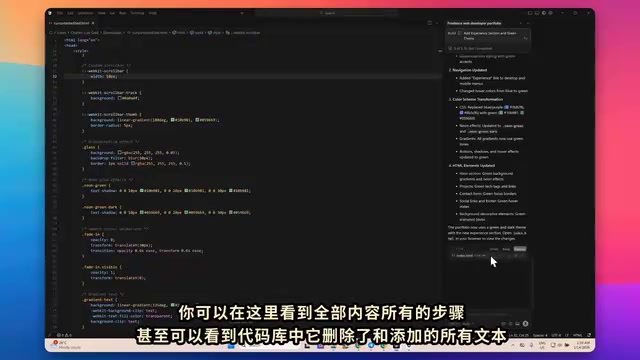
Once finished, the site can be deployed to your own domain or a third-party platform just like any regular code project. If you need to add your own images, you can do so the same way you'd work with any other file in the project folder.
Extensions and Wrap-Up: Less Friction, Faster Builds
Cursor preserves VS Code's extension ecosystem — open the sidebar to search and install any extension you need, with no restrictions on how you code. For developers already familiar with VS Code or other editors, virtually all existing workflows carry over seamlessly.
Cursor's core value proposition is bringing an AI agent, coding guidelines, and an editing environment together in one place: letting AI handle the heavy lifting of repetitive coding and modifications, delivering a development experience that's "less friction, more capability, faster to build, faster to ship." For anyone looking to quickly turn ideas into working projects — or to empower their workflow through Vibe Coding — Cursor offers a remarkably low barrier to entry and a high degree of flexibility.
Note: This article is based on a demo tutorial from a Bilibili creator. For the latest features and pricing, please refer to the official Cursor website.
Vibe Coding is a programming approach coined by OpenAI co-founder Andrej Karpathy in early 2025. The core idea is to "fully embrace the vibe and forget that the code itself exists" — developers simply describe their intent in natural language, and AI generates and iterates on the code entirely, shifting the human role from "line-by-line writing" to "reviewing, testing, and directing." This approach dramatically lowers the barrier for non-professional developers to bring ideas to life, but it also demands higher-quality prompts and sharper judgment when reviewing AI output, to avoid accumulating hard-to-detect bugs. Cursor, with its complete Agent workflow and step-by-step undo mechanism, is widely considered one of the go-to tools for Vibe Coding.
Related articles

AI Compute Is the New Oil, But the Market Mechanism Has Yet to Take Shape
Hacker News compares AI compute to the new oil, noting the lack of price discovery, concentrated supply, and no hedging tools. The article analyzes structural issues in compute trading and explores a possible three-tier market of spot, contracts, and derivatives, plus the real impact on AI practitioners' cost management.

Running Full iOS 16.5 Firmware on Android Devices: Technical Demo or Marketing Gimmick?
A Hacker News post claims full iOS 16.5 firmware can run on Android, with 315 upvotes. This analysis argues it is more likely a web UI simulation than a true firmware port, and explores the value and risks of such projects.

Etsy Cracks Down on AI Slop: Addressing Buyer and Seller Anxieties
Etsy introduces stricter rules limiting AI-generated content in listings, addressing buyer confusion over AI products and seller fears of original work being diluted by AI slop.