Cursor + Claude Code: A Practical Guide to Small-Step Development and Git Rollback

A practical guide to pairing Cursor with Claude Code for small-step AI development with Git rollback safety.
This guide demonstrates a collaborative workflow using Cursor and Claude Code to safely implement features through small-step development. Cursor handles requirement articulation via screenshots and files, Claude Code executes implementation in Plan Mode, and Git provides version control baselines. The core philosophy—visible, controllable, reversible—ensures developers maintain control over AI-assisted coding with proper rollback strategies.
Handing an entire project to AI to complete in one go sounds convenient, but once something goes wrong, it's often impossible to figure out which step to roll back to. This guide takes a different approach: using Cursor and Claude Code together to add a small feature to a page that already has its UI completed—saving "Today's Focus" and restoring it after a refresh. The core methodology is just nine words: visible, controllable, reversible.
Cursor and Claude Code: Each Playing Their Role
The key to this workflow is letting two AI tools each do what they're best at on the same pipeline, rather than having them compete to write code simultaneously.
- Cursor: Excels at combining page screenshots with files to help us articulate requirements clearly. Cursor is an AI code editor deeply built on VS Code, with multimodal understanding as one of its core capabilities—it can simultaneously receive screenshots, file contents, and natural language instructions, using visual recognition models to parse the current state of the page UI, then combining code context to generate precise requirement descriptions. It can interpret how a page looks from a screenshot, combine that with the existing structure of
index.htmlandscript.js, and transform vague requirements into accurate written tasks. - Claude Code: Excels at entering project directories to read files, propose solutions, modify code, and run checks. Claude Code is Anthropic's command-line AI coding assistant that runs directly in the terminal, capable of reading entire project directories, executing shell commands, editing files, and running tests—more like an autonomous development agent. It is the true "executor." The two tools have different design philosophies: Cursor emphasizes visual interaction and context fusion, while Claude Code emphasizes terminal-level execution power and project-level code understanding.
- Git: Responsible for reliably saving every confirmed correct result.
The main thread is crystal clear: Cursor helps us articulate requirements clearly, Claude Code helps us implement the feature, and Git helps us save correct results. Throughout the entire process, the decision of "whether to proceed to the next step" always rests with the human.
Step 1: Confirm the Goal and Create the Task Card
Before starting, confirm in the browser that this feature hasn't been implemented yet. Enter a "Today's Focus" item, click save—the page shows no response, and after refreshing, the content isn't restored—confirming that the save and restore functionality is indeed missing. The clearer the goal confirmation, the more confidence you'll have during acceptance testing.
The "save and refresh restore" feature mentioned here is typically implemented in web development using the browser's localStorage API. localStorage is a client-side storage mechanism defined in the HTML5 specification that persists data in the user's browser as key-value pairs, with a typical capacity of 5-10MB. Data persists across page refreshes and browser closures (unless the user manually clears it). Related alternatives include sessionStorage (session-level storage that expires when the tab closes) and Cookies (small capacity, sent to the server with every HTTP request). For lightweight, purely frontend data persistence needs like "Today's Focus," localStorage is the simplest and most direct choice, requiring no backend server or database support.
Using Cursor to Generate a Clear Task Card
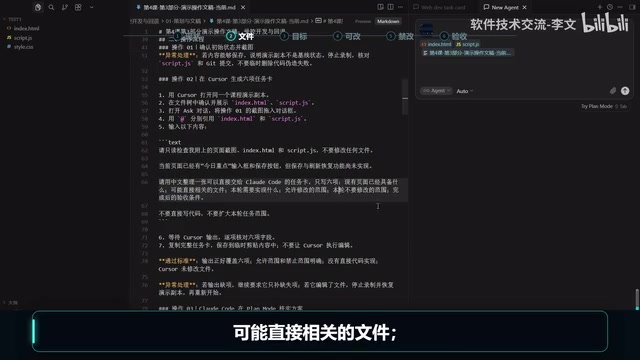
Now we enter the first collaboration phase. Note that Cursor doesn't modify any code in this step—it does only one thing: organize the page screenshot and related files into a clear task card.
The specific approach is to drag the page screenshot into Cursor's chat box, then use @ to reference index.html and script.js. Why provide both types of information together? Because the screenshot shows the page behavior while the files show the existing structure—combining both allows Cursor to convert requirements into accurate written tasks.
The instruction to Cursor asks it to only inspect without modifying files, and organize six items:
- What the existing page already has
- Potentially relevant files
- What needs to be implemented this round
- Allowed modification scope
- What should NOT be modified this round
- Acceptance criteria after completion
Here's a practical detail worth noting: the GLM-4.5 series model currently used by Claude Code doesn't support reading screenshots, so images aren't passed to it. Only the written task card organized by Cursor is copied over, and Claude Code independently verifies within the project.
Step 2: Claude Code Plan Mode for Solution Verification
With the task card ready, we enter the second collaboration phase. Launch Claude Code in the project root directory and switch to Plan Mode. Plan Mode is a safe working mode provided by Claude Code: in this mode, the AI can fully read project files, analyze code structure, and propose implementation plans, but all file write operations are intercepted and must be explicitly confirmed by the user before execution. This design stems from an important software engineering principle—solution review and code execution should be separated. In traditional development, this corresponds to the Code Review process: first review whether the plan is reasonable, then decide whether to merge it. Plan Mode embeds this process into the human-AI collaboration workflow, preventing the AI from modifying code before the user fully understands the solution.
Paste Cursor's task card as-is, then add one instruction: verify first, don't modify, must personally check project files, cannot skip verification and jump straight to implementation. After the plan is proposed, the human only needs to check four things:
- Which files does it plan to modify, and are they within the task card's allowed scope?
- Does the logic to be added align with the task card's goals?
- Do the checks cover the acceptance criteria?
- Has it brought in unrelated pages or dependencies?
Critical: Establish a Git Baseline Before Starting
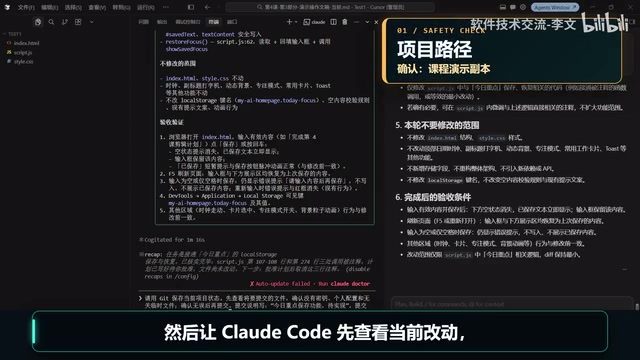
After reviewing the plan, don't rush to click "approve execution." There's an extremely important step here: first press ESC to close the card, because there's something more important before starting—save a starting point for the project.
Git is currently the most mainstream distributed version control system. Its core concept is storing the complete state of a project at each point in time as a "commit." A "baseline" refers to a confirmed, known-correct project state snapshot. In AI-assisted development, the significance of baselines is amplified further: since AI may modify multiple files at once and introduce unpredictable changes, without a pre-saved baseline, developers lose the ability to "return to the starting point." Git's diff command can precisely show differences between any two commits, and the checkout command can restore a single file to a specified commit's state—these are the foundational operations for achieving "reversible."
At this point, the page is still in the "save feature not yet implemented" state—exactly the right time to save a baseline. After switching back to menu mode, have Claude Code first check current changes, confirm there are no keys, personal configurations, or temporary files, then create the first Git commit with the message "Today's Focus save feature pending implementation."
The baseline must be established before development, not after the feature is complete. Without a starting point, subsequent rollbacks become impossible.
Step 3: Implement the Feature and Manual Acceptance
Only after the Git baseline is saved does Claude Code get to work. The instruction requires it to implement only local saving, refresh restoration, and page updates; modify only the files confirmed in the plan; add no new dependencies; and run the agreed-upon automated checks before stopping.
During execution, you don't need to read every line of code. Focus on three things: whether only the confirmed files were modified, whether no dependencies were added, and whether the automated checks truly cover scenarios like "empty content can't be saved, content appears immediately after saving, content persists after refresh."
Here's an important clarification: automated checks are repeatable verification scripts that Claude Code runs according to the plan—it doesn't count if it merely says "I've checked." If it didn't actually run them, require it to redo them. Only passing runs count.
Reviewing Diff and Browser Acceptance
After implementation, there's one final gate. First, go back to Cursor to review the Diff—this is Cursor's second role in this pipeline: visually presenting Claude Code's changes for review.
Diff (difference comparison) is one of the most fundamental and important code review tools in software engineering. It displays line-by-line differences before and after file modifications: green marks new lines, red marks deleted lines, making it easy for reviewers to quickly locate the scope of changes. In AI-assisted development scenarios, the importance of Diff review far exceeds traditional development. The reason is that AI-generated code may contain changes that look reasonable but actually introduce side effects—such as inadvertently modifying functions unrelated to the current task, changing variable scope, or introducing unnecessary dependencies. Through Cursor's visual Diff interface, developers can confirm in seconds that "AI only changed what it was supposed to change"—far more reliable than reading the AI's natural language summary.
When reviewing the Diff, focus only on: whether changes are only in script.js, whether the button logic before and after is consistent, and whether any unrelated files were mixed in.
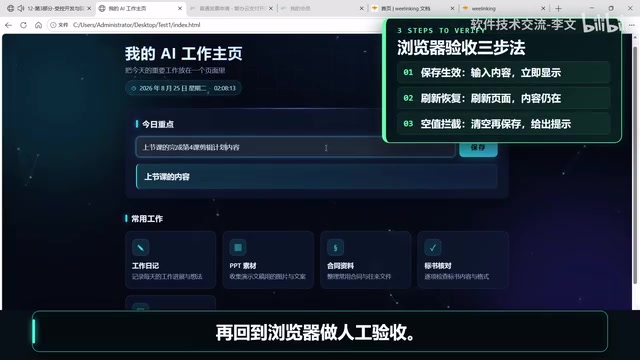
Then return to the browser for manual acceptance: enter content, click save—it appears immediately; refresh—content persists; clear the field and click save—a "cannot save empty content" prompt appears. Only at this point is the collaboration loop truly closed. The terminal showing "complete" only means this round of operations is finished—whether the feature actually works must be verified manually in the browser.
After acceptance passes, create the second Git commit with the message "Implement Today's Focus save and refresh restore." At this point, the repository has two clear versions.
Two Rollback Methods: Checkpoint for Emergencies, Git for Long-term
With two versions in place, we can demonstrate two "undo" scenarios.
Claude Code Checkpoint: Quick Rollback
Claude Code automatically takes a snapshot before each question. If something goes wrong, press ESC twice in the empty input box or type rewind to open the rollback menu and restore code to before the modification.
The Checkpoint mechanism is essentially a session-level file snapshot system. Each time a user initiates a new question, Claude Code automatically records the current state of files managed by its editing tools. This is similar to "undo history" in document editors, but the granularity is per conversation turn. It's especially important to understand its limitations: Checkpoints only track files modified by Claude Code through its own editing tools (such as write_file, edit_file, and other built-in tools). If the AI modified files through shell commands (like sed or echo redirection), or triggered side effects of external processes (such as database writes or API calls), these changes are outside Checkpoint's jurisdiction.
Its advantage is speed—no Git commands to remember, and something just broken can be immediately rolled back. But it's not omnipotent: it only manages files the AI modified with editing tools during the current conversation; command-line changes, databases, remote services, and network requests can't be undone. Moreover, checkpoints disappear once the conversation ends or expires. In one sentence—it can save you from immediate emergencies but can't manage long-term records.
Git Version Rollback: Reliable Long-term Insurance
Reliable long-term rollback depends on Git. Have Claude Code first display the diff of script.js between the two commits, confirm, then restore only that file to the specified commit without touching other files. After rollback, return to the browser to verify that the effect has actually disappeared or been restored.
Here's an important recommendation: During the learning phase, only perform the "restore a single file to a specified commit" operation—deleting commits or force-overwriting history should not be a regular beginner practice. This is because Git's reset --hard and push --force operations permanently alter commit history, and mistakes can result in losing existing correct versions. The checkout <commit> -- <file> single-file restore operation is safe: it only modifies the specified file in the working directory without affecting commit history or other files. Even if the operation is incorrect, you can restore again—risk is controllable.
Summary: The Core Philosophy of Small-Step Development
Let's review the entire pipeline: browser confirms goal → Cursor organizes task card → Claude Code verifies and implements → Cursor reviews Diff, browser acceptance → use Checkpoint for emergencies if errors occur, use Git to save versions after acceptance passes.
This workflow essentially applies the "small iterations, continuous verification" philosophy from agile development to AI-assisted programming scenarios. In traditional agile development, teams reduce risk through short iteration cycles (typically 1-2 weeks), continuous integration, and automated testing. In AI-assisted development, since AI output cannot be fully predicted, the iteration cycle is compressed to individual feature points—verify and archive after each small feature is implemented, ensuring every step stands on solid ground.
The final advice is highly practical: From now on, when building any small tool, don't start with "build the entire system at once." First select a small feature that can be reproduced, verified, and rolled back. Only after this small step is truly correct should you proceed to the next one. This is the essence of the "visible, controllable, reversible" philosophy.
Key Takeaways
Related articles

Apple HomeView Hands-On Review: Is the $300 Smart Home Hub Worth It?
Apple HomeView hands-on: a $300 smart home hub with facial recognition for quick account switching, but no App Store or voice recognition. Is the wall-mounted version worth it? Should you buy the first generation?

Meta Muse Wonder Launch: What It Means for Meta's Return to the Frontier AI Race
Meta releases Muse Wonder and WonderFull, benchmarks reach the frontier, community feedback is polarized. An in-depth look at Meta's return to the frontier AI race, its personal agent strategy, and Zuckerberg's different path.

Apple Home Smart Home Lineup Leaked: LG and Schneider Team Up, UWB Door Lock on Board
Apple Home ecosystem gains new LG and Schneider devices: UWB smart lock with proximity unlock, 2.5K dual-camera doorbell, privacy indoor camera, and AirPods-like seamless pairing.