Cursor from Beginner to Expert: A Practical AI Programming Workflow Guide
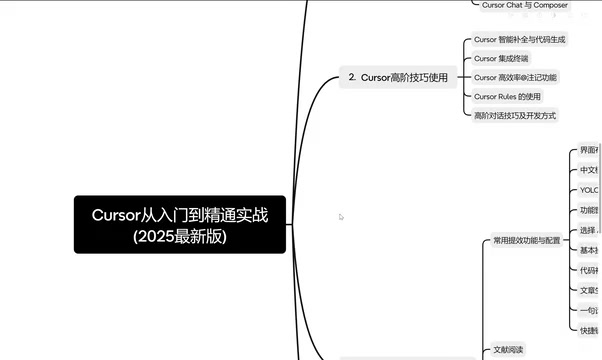
A systematic overview of Cursor setup, advanced techniques, and productivity scenarios, with a comparison of mainstream AI programming tools.
Based on a Bilibili creator's Cursor course series, this article distills a framework for selecting AI programming tools and an actionable workflow. It explains the core value of AI programming—using natural language conversation to involve large models in code generation, refactoring, and debugging to compress development cycles. It compares GitHub Copilot, Cursor, Windsurf, domestic free tools like Tongyi Lingma, and the plugin-type Codeium, then outlines Cursor's layered learning path from setup and model configuration to advanced completion, annotations, and practical scenarios. It concludes with learning advice and tool-selection guidance.
AI programming is evolving from "having AI generate a snippet of code" to "making AI a development partner." In a recent course series, a Bilibili creator systematically walked through Cursor's setup, advanced techniques, and productivity scenarios, while comparing mainstream tools like GitHub Copilot and Windsurf. This article distills an actionable Cursor workflow and tool-selection framework from that course.
Why Do We Need AI Programming Tools?
Traditional development requires programmers to master at least one language (Python, Java, C++, etc.) and to have a clear understanding of algorithms and complex logic. Writing code is highly specialized, has a high barrier to entry, and takes a long time. AI changes this model: developers can describe requirements in natural language, and large models generate code, explain logic, or even refactor projects.
In the video, the creator emphasizes that the core of AI programming isn't simply "letting AI write code"—it's using conversation plus a powerful underlying AI large model, combined with intelligent processing capabilities, to compress development cycles from weeks to days. This model lowers the barrier to programming, allowing non-professional users to participate in software development, while letting experienced developers focus on architecture and key decisions.
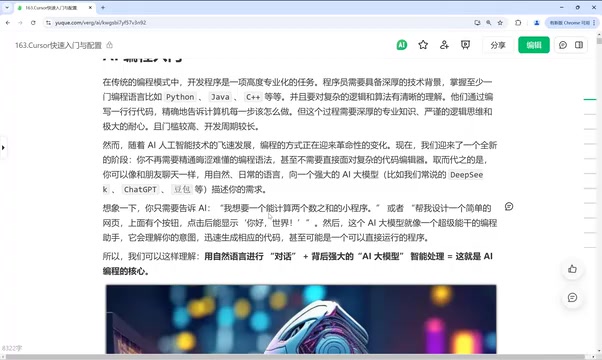
Large Language Models (LLMs) are the core technology behind AI programming tools. These models are trained on massive amounts of code and text data, enabling them to understand natural language instructions and generate syntactically correct code. Their typical ways of working include: completing code based on function signatures or comments, explaining code logic, translating natural language requirements into implementations, and refactoring across files. However, LLMs carry a risk of "hallucination"—they may generate code that looks plausible but is actually wrong—so developers still need review and debugging skills. In addition, the model's context window limit determines how much code it can "see," which is a key reason why different tools differ in their ability to understand codebases.
Comparison of Mainstream AI Programming Tools: How to Choose Between Cursor, Copilot, and Windsurf?
Before diving into Cursor's specific operations, the creator first compares several tools side by side to help learners build selection judgment.
GitHub Copilot: Mature Ecosystem, Strong at Completion
Copilot exists as an IDE plugin and supports mainstream editors such as VS Code and IntelliJ IDEA; its core capabilities are code completion and conversational modification. It supports models such as GPT-4 and Claude 3.5, with strengths in strong code completion, broad language support, and a mature community. Its limitations are limited understanding of the entire codebase and relatively weak refactoring capability.
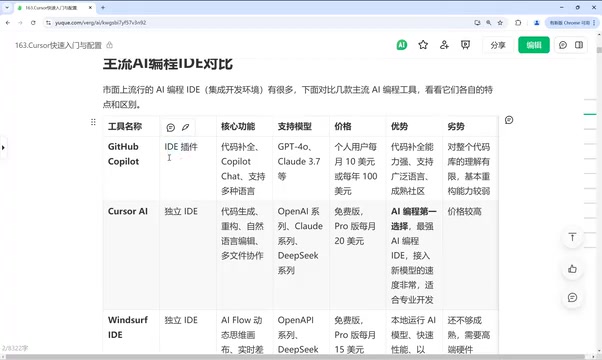
IDE plugins and standalone IDEs are the two main forms of AI programming tools. Plugin-type tools (such as GitHub Copilot and Codeium) attach to existing editors; their advantages are that they don't require changing development habits and have good ecosystem compatibility, but the context they can access is limited by the host IDE. Standalone IDEs (such as Cursor and Windsurf) integrate AI capabilities from the ground up, can deeply read project files, perform multi-file edits and terminal commands, and enable more complex task orchestration—but they require users to migrate their work environment. Which form to choose depends on how dependent developers are on their existing workflow and how deeply they need AI collaboration.
Cursor: The Preferred Choice for AI Programming
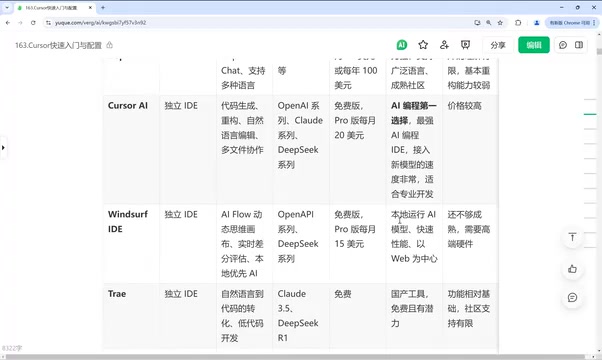
Cursor stands out in code generation, refactoring, natural language editing, and multi-file collaboration, and has solid knowledge base capabilities. The creator positions it as the preferred choice in AI programming today, but also notes that its price is relatively high.
Windsurf: Standalone IDE, Workflow-Driven
Windsurf is a standalone IDE whose core is the dynamic thinking canvas of the AI Flow workflow and real-time differential evaluation; it emphasizes local-first and is fast. However, the creator believes its features are not yet mature enough and that it has certain hardware requirements.
Domestic Free Tools: Tongyi Lingma and Others
If cost is a consideration, domestic AI coding tools such as Tongyi Lingma are currently free and fairly easy to use. The creator notes that the free version has everything needed for the core functions of writing and modifying code, but the completeness of supporting facilities and community support are relatively limited—for example, advanced features such as MCP may be missing.
Plugin-Type Tools: Codeium
Codeium supports almost all mainstream IDEs (VS Code, IDEA, PyCharm, etc.) as an IDE plugin, making it suitable for developers who don't want to switch editors.
Cursor Quick Start: Installation, Interface, and Model Configuration
The first chapter of the course focuses on quick start and configuration. The creator lays out a clear learning path: understand the differences between Cursor and other AI programming tools, complete installation and interface setup, configure model invocation, master the basic coding workflow and common commands, and learn to use the two core features, Chat and Compose.
For beginners, it's recommended to first complete model access configuration, then start with a simple project to get familiar with the "conversation—generation—modification" loop. The creator specifically mentions that understanding the division of labor between Chat and Compose is a prerequisite for later productivity gains: Chat is suitable for Q&A-style interaction and local modifications, while Compose is better for task orchestration at the multi-file level.
Chat and Compose are two core interaction modes in Cursor with different roles. Chat mode is used for Q&A, explaining code, or making local modifications to selected snippets in a conversational form, suitable for quick queries and single-point adjustments. Compose mode is oriented toward multi-file-level tasks: after the user describes a complete requirement, the AI plans and executes cross-file creation, modification, and deletion operations, essentially chaining multiple Chat steps into a single workflow. Understanding the boundary between the two can help avoid using Chat for complex refactoring (inefficient) or using Compose for simple problems (over-intervention), thereby improving overall collaboration efficiency.
Advanced Techniques: Completion, Terminal Integration, and Annotated Conversation
Chapter 2 moves into advanced skills, covering intelligent completion and code generation, terminal command-line tool integration, Add markers and annotation methods, as well as advanced conversation techniques and development approaches.
The value of these techniques lies in turning Cursor from a "chat window" into "part of the development environment." For example, by passing context to the model precisely through annotations, you can reduce ineffective conversation turns; terminal integration allows AI to participate directly in command execution and debugging processes. The creator summarizes these as key components of an efficient workflow rather than isolated feature points.
Annotations (Add markers) are the means in Cursor for precisely passing context to the model. By default, the model can only see the current file or a limited scope; by manually adding files, code blocks, or symbols as annotations, you can explicitly tell the AI "please refer to this content." This can significantly reduce erroneous assumptions the model makes due to missing context and cut down on repeated clarification turns. Annotations can also be used to specify the scope of modification, reference external documents, or lock down key logic—an important technique for advanced users to control AI behavior and improve generation accuracy.
Productivity in Practice: From YOLO Mode to Scientific Visualization
Chapter 3 is practical application scenarios. The creator lists several directions: configuring feature windows such as YOLO mode, trying code completion, web page generation, using shortcuts, and common scenarios such as literature reading, video topic selection, and outline writing. It also covers combining DeepSeekAd with Cursor for scientific research and data analysis visualization, as well as rapid development of personal websites.
These scenarios show that Cursor is positioned not just for writing code, but can be embedded in various workflows such as research, content creation, and prototype development. The creator says the course will continue to be updated and more scenarios will be explored.
Final Thoughts: Tool Selection and Learning Path Advice
Judging from this course plan, Cursor's learning curve is layered: first solve configuration and basic conversation, then master completion, annotations, and terminal integration, and finally move into scenario-based practice. On tool selection, if budget is sufficient and multi-file collaboration capability is the priority, Cursor can be the first choice; if you already have IDE habits, you can start with Copilot or the Codeium plugin; if you're cost-sensitive, you can first use domestic free tools to validate needs. The creator's comparison and course structure provide learners with a path that avoids detours, but the actual results still depend on prompt quality and project practice.
One-line Summary
A systematic overview of Cursor setup, advanced techniques, and productivity scenarios, with a comparison of mainstream AI programming tools.
Paragraph Summary
Based on a Bilibili creator's Cursor course series, this article distills a framework for selecting AI programming tools and an actionable workflow. It first explains the core value of AI programming—using natural language conversation to involve large models in code generation, refactoring, and debugging to compress development cycles. It then compares GitHub Copilot (strong completion and mature ecosystem but weak refactoring), Cursor (outstanding multi-file collaboration but relatively expensive), Windsurf (AI Flow workflow but not yet mature), domestic free tools (such as Tongyi Lingma), and the plugin-type Codeium. Next, following the course structure, it introduces Cursor's learning path: quick start and model configuration, advanced completion and annotated conversation techniques, and practical scenarios such as YOLO mode, web page generation, and scientific visualization. Finally, it offers layered learning advice and tool-selection judgment.
Related articles
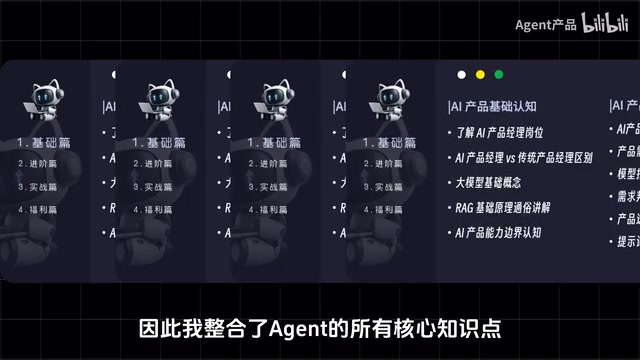
Bilibili's 748-Episode AI Agent Development Course: A Complete Guide from Zero to Real-World Projects
A comprehensive review of Bilibili's 748-episode AI Agent development course: from ReAct, planning, and memory to LangChain, AutoGen, and enterprise projects like customer service and data analysis agents, with learning path and resource advice for beginners.

LangChain from Scratch: A Deep Dive into a Hands-On RAG and Agent Tutorial
A deep dive into a Bilibili zero-foundation LangChain tutorial: analyzing the learning path around RAG and Agent scenarios, from basic calls to complete deployable projects. Suitable for students, career changers, and side-project developers.

From Zero to Agent Developer in 7 Days: A Deep Dive into Bilibili's 748-Episode Tutorial Series
A deep dive into Bilibili's 748-episode Agent app development tutorial: from zero foundation to enterprise deployment, covering how Agents differ from ordinary AI chat, MCP integration, customizing open-source projects, and the full deployment pipeline, with a learning roadmap and hands-on cases to help you get started with AI agents in seven days.