Cursor Full-Stack in Practice: From Rules Configuration to ERP Development, Doubling AI Coding Efficiency

Cursor leads AI coding with refactoring and multi-file collaboration; Rules configuration is key, but it's no silver bullet.
Based on a Bilibili creator's Cursor full-stack course, this article outlines how AI coding tools have upgraded from "code generation" to a collaboration model of "natural language conversation + strong models + intelligent processing," compressing project cycles from months to weeks. After comparing GitHub Copilot, Windsurf, Trae, and Tongyi Lingma, it notes that Cursor stands out in code refactoring, multi-file collaboration, and natural language editing but is pricey; Copilot excels at completion but is weak at refactoring; free tools suit those on a budget. The article stresses that Rules configuration is the watershed for unlocking Cursor's potential and introduces the course's three chapters (getting started and configuration, advanced skills, efficiency-boosting practice), while reminding readers that complex business logic like ERP still requires human control—AI is an assistant, not a replacement.
AI coding tools are reshaping the development workflow, and Cursor has become the tool of choice for many developers thanks to its powerful code generation and refactoring capabilities. A Bilibili creator recently released a Cursor full-stack practical course that claims to "crush traditional programming," taking learners from low-level Rules configuration all the way to ERP and visualization report development in an attempt to help them truly master AI coding. Based on the course content and multi-platform analysis, this article sorts out Cursor's core advantages, configuration essentials, and practical scenarios, and compares mainstream tools to help you decide whether it's worth the investment.
Why Have AI Coding Tools Become a Necessity?
Traditional programming is a highly specialized task: developers need to master at least one language (such as Python, Java, or C++) and have a clear understanding of complex logic and algorithms. Writing code is rigorous but has a high barrier to entry and a long cycle. With the development of AI technology, the way we code has undergone a revolutionary change—nowadays developers more or less rely on AI tools (such as DeepSeekAd, ChatGPT, and Doubao) to generate code or obtain solutions.
According to the Bilibili creator's observations, the core of AI coding has upgraded from "letting AI generate a snippet of code" to a collaboration model of "natural language conversation + powerful models + intelligent processing." This model can significantly shorten development cycles: a project that originally took one or two months can potentially be compressed to a week with AI tools; a one-year cycle may be shortened to three months. At the same time, the barrier to programming has dropped dramatically, and non-professional users can also quickly generate the programs they need through conversation to realize their ideas.
The YouTube channel TechLead also points out that the value of AI coding tools lies not only in code completion but also in refactoring and natural language editing capabilities—which happen to be Cursor's strengths.
Cursor vs. Mainstream AI Coding Tools: Who Comes Out on Top?
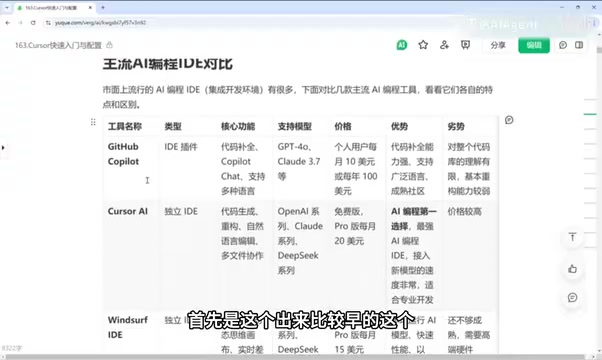
The course compares several tools, and here are the key conclusions:
- GitHub Copilot: As an IDE plugin, it supports VSCode, IDEA, and more. Its core features are code completion and chat-based code modification, and it supports models such as GPT-4 and Claude 3.5. Its advantages lie in strong code completion, broad language support, and a mature community, but its understanding of the entire codebase is limited and its refactoring capability is weaker.
- Cursor: Currently the preferred choice in the AI coding space, excelling at code generation, refactoring, natural language editing, and multi-file collaboration, with good knowledge understanding. The downside is that it's relatively expensive.
- Windsurf: A standalone IDE featuring an AI flow workflow and a dynamic thinking canvas, supporting real-time diff evaluation and running AI models locally for faster speed. However, its features are not yet mature and it requires high-end hardware.
- Trae: A recently released new version with good intelligence, supporting natural language code conversion, free to use, and supporting models such as Claude 3.5 and DeepSeek R1.
- Tongyi Lingma: A domestic free tool with complete core code-writing and code-modifying features, but its supporting features and community support are weaker than the paid versions.
- Kodu: An IDE plugin supporting mainstream IDEs such as VSCode, IDEA, and PyCharm.
The creator emphasizes that choosing a tool should be based on your own needs: if you want completion and community, choose Copilot; if you need deep refactoring and multi-file collaboration, choose Cursor; if your budget is limited, consider Trae or Tongyi Lingma.
AI flow workflow is an interaction concept proposed by Windsurf that emphasizes the AI continuously perceiving the developer's actions in the editor and proactively offering suggestions, rather than waiting for the user to initiate a conversation; the dynamic thinking canvas is used to visualize the AI's reasoning steps and code change proposals, and together with real-time diff evaluation lets users compare the effects of different modifications before applying them. This kind of design attempts to turn AI from a "passive tool" into a "proactive collaborator," but it relies on running models locally, which places high demands on hardware performance, and its feature maturity is still evolving.
Cursor Quick Start and Configuration Guide
The course is planned in three chapters: quick start and configuration, advanced skills, and efficiency-boosting practice. The introductory part covers installation, interface setup, model invocation configuration, coding basics, and common commands, with a focus on how to use the Chat and Compose features. The advanced part goes deeper into intelligent completion, integrated terminal command line, @ annotation references, Rules configuration, and advanced conversation techniques.
According to an analysis by another independent source, "AI Coding Frontline," Cursor's Rules configuration is the key to unlocking its potential—through custom rules, you can constrain the style and logic of AI-generated code and reduce subsequent modification costs. This is consistent with the course's emphasis on "low-level Rules configuration." Both sources agree that mastering Rules is the watershed between "usable" and "good to use."

Rules configuration is a custom instruction mechanism provided by Cursor that allows developers to create a .cursorrules file in the project root directory (or via the settings interface) to describe code style, tech stack constraints, file organization conventions, and more to the AI in natural language. For example, you can specify "all React components use functional style with TypeScript interfaces," "the any type is prohibited," and "API requests are uniformly encapsulated in the services directory." The AI will prioritize these rules when generating or modifying code, thereby reducing manual adjustments afterward. Rules essentially front-load team coding standards into the prompt layer, and are the key configuration that turns Cursor from a "general assistant" into a "project-specific assistant," especially suitable for multi-person collaboration or long-term maintenance projects.
The Compose feature is an interaction mode in Cursor for multi-file, cross-module editing, distinct from Chat, which focuses on Q&A and local modifications. Compose allows users to describe a complete requirement in natural language (such as "add CSV export functionality to the order module"), and the AI automatically analyzes the relevant files, plans the changes, and generates diffs for multiple files, which users can review item by item before applying. It is suitable for refactoring or feature development that requires coordinating multiple files, and is also the entry point for the "multi-file collaboration" capability emphasized in the course. When using it, it's recommended to first clarify the scope, provide context (by referencing files with @), and confirm step by step to avoid generating overly large changes at once.
Practical Scenarios: ERP, Visualization Reports, and More
The third chapter of the course focuses on efficiency-boosting applications, including YOLO mode, window configuration, code completion attempts, web page generation, shortcuts, as well as scenarios such as literature reading, video topic selection, and outline writing. Research data analysis visualization and rapid personal website development using DeepSeek + Cursor are also among the explorations.
As a supplement, regarding the specific practical details of "ERP/visualization reports," the course title mentions them but the original content does not elaborate. According to feedback from some students (single source), Cursor's multi-file collaboration capability can indeed improve efficiency in ERP development, but complex business logic still requires manual control.
YOLO mode is a switch in Cursor that allows the AI to automatically execute terminal commands without confirming each one (the name comes from "You Only Live Once"). When enabled, the AI can directly run operations such as installing dependencies, executing scripts, and starting services within the scope authorized by the user, significantly reducing interruptions from manual confirmation and improving automation. But this mode also carries risks: the AI may execute unexpected commands or modify system state, so it's recommended to enable it only in trusted projects with proper version control and when you understand what the commands do; in production environments or sensitive directories, it should remain off with each command reviewed individually.
How to Choose? A Rational View of AI Coding
AI coding tools have greatly lowered the barrier to development, but they are not a silver bullet. Cursor has clear advantages in refactoring and multi-file collaboration, suitable for developers with some foundation; Copilot has strong completion capabilities, suitable for rapid coding; free tools like Trae and Tongyi Lingma can meet basic needs. Whichever you choose, communicating effectively with AI (writing good prompts) remains the core of efficiency gains.
The course claims to "crush traditional programming," but the actual results depend on the user's engineering literacy. AI is an assistant, not a replacement. It's recommended to start from actual projects, try free tools first, and then upgrade according to your needs.
Related articles

Bilibili Hit Pi Agent Course: A Complete Guide to Building Agents from Scratch
In-depth analysis of the Bilibili Pi Agent course: four growth stages, differentiation from Claude Code and Codex, and key points for learning agent development from scratch.

Vibe Coding for Absolute Beginners: A Full-Stack AI Development Practical Guide
Analysis of Bilibili's 80-episode Vibe Coding beginner course: from directing AI to write code to full-chain product delivery, covering requirements analysis, UI design, front-end and back-end development, databases, testing and deployment, and AI automated operations, helping you master the full-stack AI development skills needed for a one-person company.

The Ultimate Bilibili Codex Guide: From Installation to Real-World Practice, Master It in One Sitting
A full breakdown of the Bilibili ultimate Codex guide: GPT account registration, desktop installation, login verification and network error fixes, .env file to solve 5 reconnects, PLUS quota mechanics, and Pro upgrades, plus practical usage tips.