Cursor @-Mentions Tips: Make Your Agent Target Files and Folders with Precision

Cursor's @-Mentions lets you manually specify files, folders, terminals, and branch diffs to lock down the modification scope precisely.
Cursor's Agent mode autonomously searches the codebase to locate relevant files, which is useful for exploring unknown problems, but when you already know the bug's file, such searching wastes tokens and latency and may cause misjudgment. @-Mentions solves this: typing @ in the chat box directly calls out a file (e.g., @auth.ts) or folder (e.g., @src/components), taking the locating authority back from the Agent. It can also reference terminal output and branch diffs to feed non-code context to the Agent. The boundary: when unsure which files matter, let the Agent search on its own—the key criterion is whether you can say roughly which module the problem is in.
Cursor @-Mentions Tips: Make Your Agent Target Files and Folders with Precision
AI coding tools are turning "knowing how to use the tool" into a new baseline skill. With the same Cursor, one developer can get the Agent to fix the right spot in a single sentence, while another goes back and forth for several rounds and still gets irrelevant answers—the gap often isn't in the model, but in whether you know how to define the "scope of work" for the Agent. Today we're talking about @-Mentions, an operation that many developers overlook but that can immediately shorten your debugging path.
The Problem: When the Agent Guesses at Files, It's Wasting Your Time
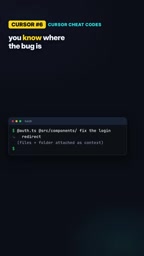
Cursor's Agent mode by default searches the codebase on its own to find the files it considers relevant. This is very useful when you're unfamiliar with the project, or when you don't know where the problem lies. But conversely, when you already know which file the bug is in, letting the Agent rummage through the entire repository is pure overhead.
As described by a YouTube creator in a video: "When you know where the bug is, making the agent search is a waste of time." This points out an often-overlooked cost of AI coding assistants—searching consumes tokens, adds latency, and may lead to misjudgment by matching side-branch code.
Agent search itself isn't a flaw; the problem is that by default it bundles two things together—"finding files" and "changing code." Human developers, however, have often already completed the first step and just need the Agent to do the second.
Agentic Mode is a working mode in Cursor. Unlike ordinary "conversational completion," it's given the ability to autonomously execute multi-step operations, including reading files, cross-file retrieval, creating/modifying code, and even running terminal commands. This mode relies on a "tool-calling loop"—the model first decides what to search for and which files to read, then decides the next step based on the results. Because of this, the Agent's default behavior is to "explore first, act later," and the exploration process repeatedly calls retrieval tools, each step consuming context window and tokens.
Understanding this is key: the Agent's "guessing at files" isn't the model being lazy—it's an autonomous planning step it's designed to complete. When you already have the locating information, this step becomes redundant overhead—not only costing extra tokens, but potentially drawing attention toward the wrong direction for edits because it retrieves similar but irrelevant code snippets. This is also why manually taking back the locating authority often immediately improves accuracy.
The Solution: Use @ to Directly "Call Out" Targets in the Conversation
The core logic of @-Mentions is very simple: type @ in the chat box, then specify the target you want the Agent to focus on. It takes the "file locating authority" out of the Agent's hands and returns it to you.
The two basic usages:
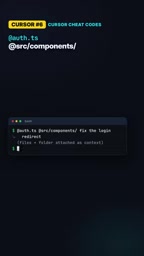
- Specify a single file: Type
@auth.ts, and the Agent will only work around this file - Specify an entire folder: Type
@src/components, and hand an entire directory to the Agent as context
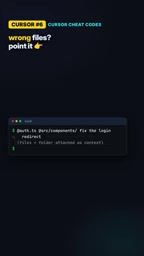
Folder-level references deserve special mention. For clearly structured folders like component libraries or utility function directories, a single problem often involves multiple files within them, so naming them one by one is inefficient. Using a folder reference is equivalent to telling the Agent "the scope is right here, don't look outside."
From an implementation perspective, @-Mentions is essentially context injection: it embeds the content of the referenced object directly into the prompt sent to the model, existing as high-priority context, rather than letting the model retrieve it itself.
This distinction brings three practical benefits. The first is determinism—referenced files are guaranteed to be within the model's view, and won't be missed due to poor retrieval ranking. The second is controllable tokens—you know exactly what content is injected, avoiding unnecessary consumption from the Agent's repeated searches. The third is focused attention—when only target files are in the context, the model is less likely to be distracted by side-branch code. Note that folder references inject the contents of the files in the directory as a whole; the larger the referenced directory, the more tokens injected, so you should still be cautious with very large directories, narrowing down to subdirectories or specific files when necessary.
Extended Capabilities: Besides Files, What Else Can You Call Out?
The capabilities of @-Mentions go beyond files and folders. The video also mentions two types of reference objects that are easily overlooked:
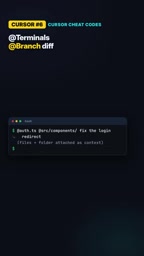
- Terminals: Incorporate terminal output into the context, so error messages and build logs can be read directly by the Agent
- Branch difference: Reference the diff between the current branch and the target branch, suitable for letting the Agent understand "what exactly this change modified"
The significance of these two is that they structurally feed "context beyond code" to the Agent. Terminal errors are the most direct diagnostic clues, and branch diffs help the Agent build an understanding of the change intent. Compared to letting the Agent explore from scratch, proactively providing these two types of information can significantly reduce comprehension cost.
Branch diff refers to the set of code changes between the current working branch and some baseline branch (such as main), usually presented in diff format, including added, deleted, and modified lines along with their context. For the Agent, a diff is a highly condensed "change intent specification": it doesn't need to read through the entire codebase to know which logic you touched this time and in which files you left traces.
This is especially valuable in two scenarios. First, code review or refactoring: let the Agent evaluate based on the diff whether the change is complete and whether it introduces side effects. Second, troubleshooting "it broke right after I changed it": hand the diff to the Agent, and it can quickly associate the failure with recent changes. Compared to having the Agent search the entire repository on its own, directly providing the diff is both time-saving and closer to the real problem boundary.
The Boundary: When to Give Up Manual Specification
There's an easily overlooked but crucial addition in the video: if you're not sure which files matter, don't force it—just let the Agent search on its own.
This is a reasonable boundary definition for @-Mentions, not a contradiction. Manual specification suits scenarios of "known problem location," while autonomous search suits scenarios of "exploring the unknown." Mixing the two up either wastes tokens having the Agent search blindly, or gives the wrong file scope and causes the Agent to miss the real source of the problem.
The criterion is actually simple: can you say roughly which file or module the problem is in? If yes, use @ to narrow the scope; if not, let go and let the Agent search.
Why This Tip Deserves Its Own Discussion
In the use of AI coding tools, the real efficiency gap often comes from "context feeding strategy," not the model itself. @-Mentions may seem like just a small piece of syntactic sugar, but behind it corresponds to a more universal principle: when you can clearly constrain the problem, constrain it proactively; when the problem itself is fuzzy, then hand over the exploration authority.
Cursor making it one entry in its "cheat codes" series also indirectly shows that this kind of operation has settled into experiential knowledge—not difficult, but you simply don't know it if you don't know it. For developers who routinely fix bugs and modify requirements in large codebases, spending two minutes getting familiar with this reference syntax may bring more direct benefits than switching to a stronger model.
One-line Summary
Cursor's @-Mentions lets you manually specify files, folders, terminals, and branch diffs, skipping Agent search and precisely locking down the modification scope.
Paragraph Summary
Cursor's Agent mode by default autonomously searches the codebase to locate relevant files, which is very useful when exploring unknown problems, but when you already know which file the bug is in, such searching just wastes tokens and latency and may lead to misjudgment by matching side-branch code. The @-Mentions introduced in the article is exactly the operation that solves this problem: typing @ in the chat box directly calls out a single file (such as @auth.ts) or an entire folder (such as @src/components), taking the file locating authority back from the Agent. Besides files and folders, it can also reference terminal output and branch diffs, structurally feeding context beyond code to the Agent. The author also gives the boundary: when you're not sure which files matter, you should let go and let the Agent search autonomously. The core criterion is whether you can say roughly which module the problem is in.
Related articles

Free Unlimited Claude Code Solution: Agnes AI + CC Switch Setup Guide
No paid subscription needed — pair the free AI platform Agnes AI with the open-source tool CC Switch to provide a backend for Claude Code, enabling unlimited free calls to text, image, and video models. This guide covers the full setup, test results, and usage boundaries.

A Complete Zero-Cost Guide to Getting Started with Claude Code for Beginners in China
A beginner's guide to Claude Code for users in China: two installation methods (command line and IDE plugin), full configuration steps for replacing the official API with the free domestic LongCat model, and a hands-on demo of building a small tool with natural language, plus tips.

When the NSA Gets Involved: The AI Supply Chain Crisis Behind Open-Source CVEs and API Key Hijacking
Multiple open-source projects disclosed severe CVEs in one day, PHP flaws alarmed the FBI, and Railway and OpenCode were breached with API keys stolen. This article breaks down the vulnerability window, AI-accelerated exploitation, and the AI supply chain crisis behind the API key black market, with a developer defense checklist.