Cursor vs Claude Code: Which Writes Better Code? The Real Difference Is Architecture

With model capabilities converging, the Cursor vs Claude Code difference lies in two workflow architectures: editor-first vs terminal-agent-first.
As top models' code generation quality converges, the core question in choosing an AI coding tool has shifted from "which model is smarter" to "how the tool organizes your engineering workflow." The article compares two product forms: Cursor is editor-first, built on a VS Code fork, embedding AI into the coding context and suiting manual deliberation, complex logic, and sensitive changes that need visibility; Claude Code is terminal-agent-first, emphasizing sub-agent orchestration and parallel execution, suiting batch refactoring, repo-wide lint, and CI/CD pipeline automation. The two aren't mutually exclusive; the key is matching tools to tasks. The author recommends piloting both on a small project, using actual development speed data to decide the division of labor, and forming a flexible tool combination.
Model Capabilities Are Converging — the Gap Has Moved to Architecture
As top-tier models (such as the Claude and GPT families) continue to narrow the quality gap in code generation, "which model is smarter" is no longer the core question when choosing an AI coding tool. What really affects day-to-day efficiency is how a tool organizes your engineering workflow — in other words, its product form and workflow architecture.
An editor's product design determines where AI steps in, how deeply it intervenes, and how much control you retain. This is also the starting point for understanding the differences between Cursor and Claude Code.
Cursor: An Editor-First Experience Built for Deep Focus
Cursor positions itself as "editor-first." Built on a VS Code fork, it embeds AI directly into the context of writing code: inline completions, context-aware code generation, and interactive edit suggestions all happen in the file you're currently viewing.
This form suits work that requires manual deliberation and preserving developer control and visibility. You're in the loop, and AI is an assistant rather than an executor. For complex logic, sensitive code, and changes that need careful review, the editor-first model lets you see and modify every step.
Claude Code: A Terminal Agent for High-Speed Delegation
Claude Code takes a different path: terminal-agent-first. It emphasizes agent orchestration — spawning sub-agents to refactor, test, and update multiple files in parallel.
The value of this design lies in delegation at scale. When you need to do batch refactoring at the codebase level, repo-wide linting, or scripted changes, handing off mechanical, repeatable work as a whole is far more efficient than reviewing line by line. Claude Code is also designed with pipeline-first integration, allowing it to be embedded into CI/CD processes for continuous automation.
Sub-agent orchestration is an architectural pattern in which a primary agent spawns multiple independent execution units as tasks require, advancing work in parallel. Each sub-agent has its own context window and tool permissions, can handle different files or sub-tasks simultaneously, and finally aggregates results back into the main flow. The benefit is breaking large tasks into parallelizable pieces, reducing serial waiting and preventing a single context from being overwhelmed by too much information. The cost is higher coordination overhead: sub-agents need clear boundaries, conflicting edits need merging, and failure retries need a strategy. Understanding this makes it clear why such capabilities suit batch, well-bounded, verifiable tasks rather than fine-grained changes that require line-by-line deliberation.
The Core Difference: Editor vs Terminal, Two Workflow Philosophies
| Dimension | Cursor | Claude Code |
|---|---|---|
| Product form | Editor-first (VS Code fork) | Terminal-agent-first |
| AI intervention | Inline completion, context generation, interactive editing | Sub-agent orchestration, parallel execution |
| Suitable scenarios | Manual deliberation, complex logic, sensitive changes | Batch refactoring, repo-wide lint, scripted changes |
| Developer role | Review in the loop, maintain visibility | Delegate execution, pursue speed and scale |
| Integration direction | In-editor workflows | CI/CD pipeline automation |
Behind this comparison table is a more fundamental judgment: model quality is already the "ticket in," and it's the tool's architecture that determines where AI can be most effective. Matching agents to the right tasks is more meaningful than arguing over which model is stronger.
CI/CD (Continuous Integration/Continuous Delivery) pipelines refer to the automated chain from code commit to build, test, and deployment. Embedding an AI agent into this chain means it can respond to trigger events (such as pushes or merge requests) unattended, perform fixed actions like linting, fixes, test generation, or refactoring, and return results as pipeline artifacts. The appeal of this path is scale and consistency: mechanical work doesn't have to consume developer attention. But it demands high predictability and rollback capability, making it better suited to tasks with clear rules and detectable failures rather than ambiguous changes that require human judgment.
When to Choose Cursor, When to Choose Claude Code
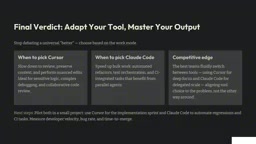
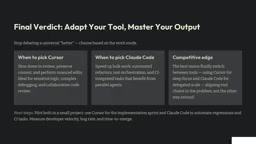
Signals for choosing Cursor: You need to slow down to review, preserve context, and handle subtle details. For sensitive logic and complex code review, in-editor visibility is irreplaceable.
Signals for choosing Claude Code: You need to accelerate batch work — automated refactoring, test orchestration, and CI/CD integration scenarios that benefit from parallel agents.
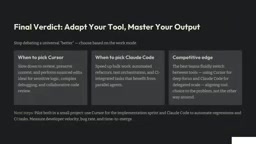
The key isn't choosing one over the other, but letting tool choice follow the problem itself rather than the reverse. The real competitive advantage lies in switching flexibly: use Cursor to stay focused, and Claude Code to handle delegable tasks.
Practical Advice: Start with a Small Pilot Project
A pragmatic approach: try both tools on a small project at the same time. Use Cursor for an implementation sprint, use Claude Code to automate integration and downstream processes, then measure development speed and time spent.
Don't expect to declare a winner right away. First run both workflows through your real tasks, use actual data to decide the division of labor, and gradually form your own tool combination.
FAQ
Can Cursor and Claude Code be used together? Yes, and it may be the best practice. Use Cursor for implementation that requires review, and Claude Code for delegable batch operations.
Which is better for team collaboration? It depends on the task type. Sensitive code requiring line-by-line review suits Cursor; automated processes in CI/CD suit Claude Code's pipeline integration.
Does model quality still matter? Yes, but it's already a baseline condition. When top models' capabilities are close, product architecture determines to a greater extent where AI is most effective.
Related articles

The Safety Blind Spot in Multimodal Image Editing: Text-Sensitive, Visually Blind
EditSafetyBench benchmarks image editing systems like Gemini, GPT, and Qwen, revealing a text-visual safety mismatch: high rejection of unsafe prompts but lax handling of unsafe images, calling for joint multimodal safety guardrails.

GLiDE: Fast, Calibrated Decision Models Distilled from Reasoning Teachers
GLiDE is a family of decision models distilled from reasoning teachers, ranging from 0.4B to 27B, achieving fast calibrated decisions in a single forward pass by removing causal masks and using soft-target distillation. The 27B model scores 71.52 on the hidden set with 2.0% calibration error and 92.9ms latency.

Build a Professional Website with Claude Code in Minutes: A Five-Step Practical Guide
Learn how to build a professional website with Claude Code in minutes: the complete five-step process from planning prompts and precise iteration to MCP image generation, design redos from reference images, and one-click deployment.