Customizing the Open-Source Earthworm English Learning Tool with Qoder: A Hands-On Secondary Development Guide
A Bilibili creator used Qoder in under half a day to add an article-to-course feature to the open-source Earthworm project.
The article covers how Bilibili creator A-Zhong used Qoder to do secondary development on the open-source English typing-learning project Earthworm. He had Qoder clone the project, install dependencies, and start the site, then described an "article-to-course" feature via a detailed prompt: pasted English articles are split by an LLM into words, word forms, phrases, and sentences, with Chinese prompts and phonetic transcriptions, generating an editable draft added to the original course pack. Qoder read the code and proposed a plan, then developed automatically with transparent task status. Four sentences produced 53 questions, and existing features were unaffected. The whole effort took under half a day and about 1,000 credits, yielding a methodology of "start from a specific small requirement, with AI executing and humans deciding."
Recently, a new English-learning approach called "see Chinese, type English" has taken off in the community: the screen shows a Chinese prompt, you type the corresponding English on your keyboard, and you progress step by step from words to phrases to complete sentences. You can also listen to the pronunciation and do dictation, with instant feedback that makes it feel like leveling up in a game. Behind this approach is an open-source project called Earthworm. However, the project's built-in features are fairly basic, and the practice content is mostly limited to its bundled courses. In a video, Bilibili creator A-Zhong demonstrated how to use Qoder to do secondary development on this open-source project, turning English articles he wanted to study into editable courses. The whole process took less than half a day and consumed about 1,000 credits.
From Clone to Run: A First Taste of Secondary Development with Qoder
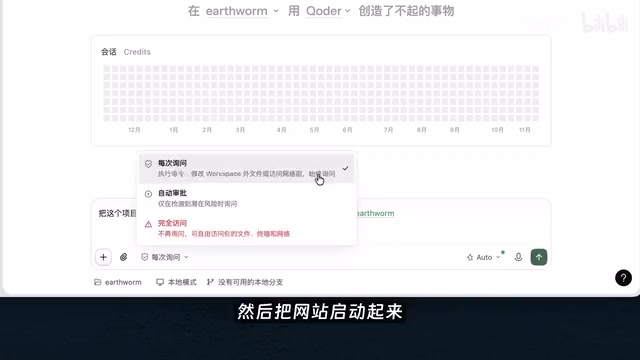
The creator first opened QoderAd and switched to coding mode. This mode is suited for building websites and modifying code, which is exactly what's needed to customize an open-source project. He sent Qoder the Earthworm repository URL and asked it to clone the project locally, install dependencies, and start the website. For permission settings, he initially used the default option and manually approved operations that required confirmation. This way, Qoder wouldn't act on its own without the user's knowledge, which felt safer.
After startup, he first tried the project's built-in courses; the original typing practice and dictation both worked normally. But the problem was obvious: if he wanted to practice an English article he had found himself, he'd first have to manually turn the article into corresponding exercises. This was the core pain point he wanted to solve—adding an "article-to-course" feature to the project.
Qoder's coding mode is Qoder's core workspace for code development scenarios. Unlike the ordinary chat mode, once authorized it can directly read and write local files, execute terminal commands (such as git clone and npm install), and start local services. Users can choose "default authorization" so that high-frequency read-only operations are automatically approved while sensitive operations still require confirmation, or they can approve each item manually, balancing efficiency and controllability. The value of this mode lies in handing off tedious steps that developers usually do by hand—cloning repositories, installing dependencies, getting the project running—to an AI agent.
Requirement Description and Plan Confirmation: Turning Ideas into Executable Instructions
The creator wrote the requirements into a detailed prompt and sent it to Qoder. The requirements included several key points: add features to the existing project while preserving the original courses and practice methods; add an entry point for pasting English articles; have the website call an LLM to break the article into words, word-form variations, phrases, and complete sentences; add Chinese prompts and phonetic transcriptions to each question; organize the practice in order from easy to hard; save a draft after generation, with editable content and the ability to remove questions you don't want to practice; and after confirmation, add the course to the original course pack list so that clicking into it uses the original typing and dictation interface.

After receiving the requirements, Qoder first read the project code to understand how the original courses and practice pages were organized, then worked out what needed to be modified based on those structures. The creator reviewed the plan it proposed and only let it continue once he confirmed nothing was missing. During development, the task list showed task status, which files were being modified, and which commands were being run, making the whole process fairly transparent.
LLM-based course splitting means handing an English article to a large language model and having it automatically divide the article into practice units such as words, word-form variations (e.g., wake→woke), phrases, and complete sentences according to a preset structure, while generating Chinese definitions and phonetic transcriptions for each question. Compared with manual preparation, the model can produce dozens of questions in seconds and fill in prompt information in bulk. However, model output can be unstable—there may be definition errors, missed word forms, or unreasonable difficulty ordering—so the article deliberately keeps a "save draft first, edit item by item, delete questions" step, making human review the quality backstop.
Testing and Verification: Both New and Existing Features Must Pass
After development was complete, the creator had Qoder run checks, restart the modified website, and connect the already-open browser to Qoder. Both Chrome and Edge support this kind of connection, and the original action state is preserved, saving the trouble of redoing everything.
He then checked the actual results on the webpage, focusing on two things: whether the new article-to-course flow worked end to end, and whether the original course and practice features had been affected. He tested with an English passage about immersion habits, only four sentences long. He pasted the content in, chose basic mode, clicked generate, and the four sentences produced 53 practice questions in total. Expanding the first sentence showed both words and their corresponding form variations—for example, wake was also practiced separately in its past tense woke—followed by phrases, gradually combining these expressions into longer sentences, and finally restoring the complete sentences from the original text. Every question had a Chinese prompt and both American and British phonetic transcriptions.

After generation, you can compare against the original text and directly edit any translations that don't fit well. Once you've checked everything, click confirm and add it to the course pack; back in the course list you'll find the course generated from that article. Clicking into it still uses the original typing practice interface—except now you're practicing content you imported yourself. This way, whenever you see an English passage you want to learn, you can turn it into a complete course of your own, edit and save it, and practice step by step from words to complete sentences.
The whole tool took 1,000 credits in total, and in Qoder you can see exactly which stages they were used for—clear at a glance.

Connecting the browser to Qoder means using a browser extension or debugging protocol to let Qoder directly observe and operate an already-open browser tab. It can read the page DOM, click buttons, fill in forms, and take screenshots, thereby verifying whether features work in the real interface rather than relying only on code-level inference. Because it connects to the browser instance the user is currently using, session information such as login state and page history is preserved, saving repetitive operations—which is why it's especially useful in regression testing.
Methodology Takeaways: Start from One Specific Requirement
The value of this hands-on exercise goes beyond a single English-learning tool. At the end of the video, the creator summarized his approach: if you come across a tool in your daily life that's just a bit short of what you need, try improving it starting from one specific small requirement, and start with an AI tool. For a tool like this, he spent less than half a day in total. For users unfamiliar with front-end development, Qoder's workflow of "describe the requirement—confirm the plan—automatically modify code—verify in the browser" significantly lowers the barrier to secondary development.
Of course, there are still places in the process that require human judgment: whether the plan is complete, whether translations are accurate, and whether existing features have been broken—all of these need to be checked by the developer. AI handles execution, humans handle decisions—this may be the more pragmatic approach to secondary development with AI at the current stage.
One-line Summary
A Bilibili creator used Qoder in under half a day to add an article-to-course feature to the open-source Earthworm project.
Paragraph Summary
The article describes the complete process by which Bilibili creator A-Zhong used Qoder to do secondary development on Earthworm, an open-source English typing-learning project. He first had Qoder clone the project, install dependencies, and start the website, then used a detailed prompt to describe the "article-to-course" requirement: after pasting an English article, the LLM splits it into words, word forms, phrases, and sentences, adds Chinese prompts and phonetic transcriptions, generates an editable draft, and adds it to the original course pack. Qoder first read the code and proposed a plan; after confirmation it developed automatically, with transparent task status throughout. In testing, four sentences generated 53 practice questions, and the original typing and dictation features were unaffected. The whole customization took less than half a day and consumed about 1,000 credits, from which the author distilled a secondary-development methodology of "start from a specific small requirement, with AI executing and humans deciding."
Related articles
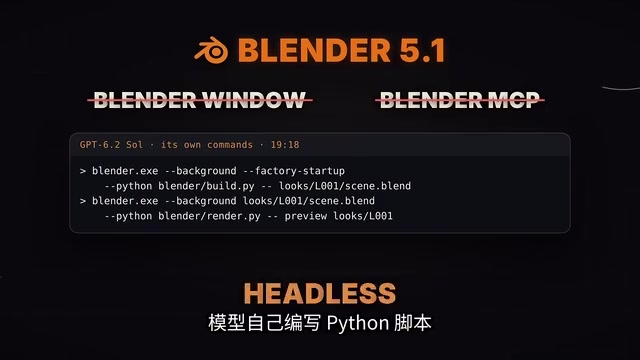
GPT-6.2 Dual-Model Hands-On Test: Astra Burns $419, Sol Just $5
OpenAI GPT-6.2 Astra vs Sol tested on Blender clock, neon shooter, and Formula racing. Astra costs $419, Sol $197, cheapest clock under $5. Cost comparison and selection advice.

After GPT-6 Ultra's Launch: A Complete Guide to Plus/Pro Subscriptions
How to subscribe to GPT membership after GPT-6 Ultra's launch? This article covers the complete Bilibili tutorial: registering a Google account from scratch, Alipay top-up walkthrough, and a comparison of Go, Plus, and Pro plans.

Real-World Test: Subscribing to ChatGPT Plus/Pro 5x/10x in China — Self-Service Channels and Account Maintenance Guide
A Bilibili creator tests self-service top-up channels for ChatGPT Plus and Pro 5x/10x in China, covering Session acquisition, plan selection, credit card and mobile in-app purchase pitfalls, plus account maintenance tips like fixed devices and networks to reduce ban risk.