DeepSeek Harness Desktop Hands-On: Adding Real Web Interaction to an AI Coding Agent via Plugins

DeepSeek Harness desktop adds real web interaction via MCP plugins using a host+plugin architecture.
DeepSeek Harness desktop is built around a host+plugin philosophy — all capabilities exist as plugin packages, so adding new features requires no code changes. It surfaces full agent trajectory visualization and cache hit rates for transparency. While built-in web tools are read-only, connecting TinyFish's MCP server via a patch file adds real browser navigation, form-filling, login handling, and structured data extraction. Real-world tests on complex Hugging Face filtering tasks were accurate, with per-task costs well under $1, validating the framework's extensibility advantage.
DeepSeek Harness is one of the fastest-growing agentic coding frameworks in the open-source space, and it recently launched a desktop version. Beyond continuing the terminal-plus-web-interface design of its predecessor, it stands out as a lean yet powerful coding assistant framework thanks to its plugin system and prompt caching. Drawing on a hands-on review by a YouTube tech blogger, this article breaks down the desktop version's architectural highlights and demonstrates how to extend it with real web interaction capabilities through a third-party plugin.
The Desktop App in a Nutshell: The Shell Is the Host, the Plugins Are the Product
The desktop version doesn't reinvent anything. At its core, it's a native shell wrapping the full Harness web application. When you launch it, it spins up a local Harness process in the background, auto-selects a port, and loads the interface in a window.
What's worth paying attention to is how everything is organized. The right mental model is: the app is just a host, the plugins are the product. Whether it's model routing, web search, a terminal, or the entire agentic loop — all of it exists as plugin packages.
The beauty of this design is its customizability. Each profile has a patch file where you can enable, disable, or configure plugins, and the app includes a dedicated plugin manager on top of that. In practice, adding a new capability to Harness usually means dropping a new file into the plugin system rather than changing any code. This is precisely the foundation for the web capability extension demonstrated later in this article.
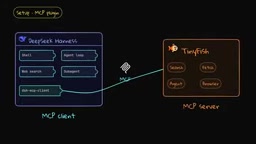
The "plugin system" here is closely tied to MCP (Model Context Protocol). MCP is an open protocol proposed by Anthropic in late 2024 to provide AI models with a standardized interface for context retrieval and tool invocation — think of it as the "USB port" of the AI application world. Any tool or data source that implements an MCP server can be called directly by any agent framework with an MCP client, with no custom integration needed on either side. DeepSeekAd Harness ships with a built-in MCP client plugin, meaning hundreds of existing MCP servers — from database queries to web automation — can be connected with a few lines of configuration, without developers writing any tool code themselves. This is the technical foundation behind the TinyFish web extension demo in this article.
Interface Highlights: Trajectory Visualization and Cache Hit Rate
The desktop chat interface looks similar to other tools, but it displays a full trajectory for every agent turn: the context you provided, the user message, every step the assistant took, the specific tool calls made, the token count per call, and the time elapsed. This makes the agent's inner workings more transparent than ever.
Even more noteworthy is that it shows the cumulative token usage so far — and especially the cache hit rate — a metric almost no other Harness-based tool surfaces. According to the blogger's tests, DeepSeek Harness performs impressively on cache retention, effectively preserving cached context and significantly reducing inference costs.
The desktop version ships with four modes:
- Standard Mode: The default mode for handling code files and information;
- PTC Mode: Includes everything in Standard, better suited for tasks requiring batch tool calls, filtering, organization, and deduplication;
- Minimal Mode: A minimal configuration with just a few terminal tools — a clean base to build on;
- Creator Mode: Lets you fully customize the entire agentic experience for specific needs. The blogger notes this is conceptually very close to Claude Code's mods feature.
"Prompt caching" is an important optimization in large language model inference. Because agents repeatedly send similar system prompts and conversation history across multiple turns, recomputing the key-value pairs (KV cache) for those tokens every time incurs substantial redundant cost. Prompt caching lets model providers cache these computations server-side and reuse them when a request with the same prefix arrives again, dramatically reducing latency and inference costs — cached tokens are typically billed at 50–90% less than regular input tokens. A higher cache hit rate means the framework is better at reusing existing context and avoiding redundant transmissions, a difference that becomes very significant in cost terms for high-frequency agentic tasks. DeepSeek Harness surfaces this metric directly in the UI, helping developers assess the economic efficiency of their prompt design.
The Limits of Built-In Web Tools
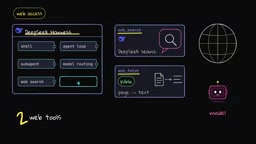
DeepSeek Harness ships with two web tools out of the box. WebSearch runs a DeepSeek search within the model turn; WebFetch downloads a public page and hands the text to the model — essentially capable of scraping any publicly accessible webpage.
But both are read-only tools. The Fetch tool is deliberately stateless — it can send requests but carries no cookies or credentials, and doesn't actually render the page like a real browser would. It's great for retrieving information, but it cannot let an agent perform actions in a browser, such as handling post-login tasks or clicking buttons. While there are experimental browser use and computer use plugins, they're not yet mature and require you to connect your own local browser.
The question then becomes: how do you give an agent "hands" for operating web pages without rolling your own solution?
Filling the Gap with TinyFish
The blogger partnered with TinyFish for this demo to show how to add that capability to Harness. TinyFish positions itself as "web infrastructure for agents" — think of it as a middleware layer between an agent and the real web: the agent decides what it needs, hands the web portion to TinyFish, and gets back clean, structured results without having to deal with messy HTML.
TinyFish offers four products under a single API:
- Web Search: Real-time web search results;
- Fetch: Takes a URL, renders it with a real browser, and returns clean text (both Search and Fetch are free across all plans and usage levels);
- Web Agent: Give it a goal in natural language, and it navigates, clicks, fills forms, handles logins, and returns structured JSON — powered by TinyFish's own Mako model, billed per step;
- Browser: A cloud browser you can drive with Playwright, with built-in anti-scraping protection and a credential vault so agents can log in without exposing passwords.
TinyFish's Web Agent product runs on its in-house Mako model, and the "per-step billing" model corresponds to the typical billing approach for agentic tasks: a complete web operation is broken down into atomic steps (navigation, clicking, form filling, waiting for rendering, etc.), each billed individually rather than by the number of tokens in the final output. This differs from the per-token model of standard LLM APIs and is closer to the billing logic of RPA (Robotic Process Automation) tools. For developers estimating costs, you need to think in steps rather than characters. The real-world tests in this article show that both the login task and the complex filtering task each cost well under $1 in total, suggesting that for non-bulk scenarios this billing model offers excellent value.
Hands-On: From Login to Complex Filtering Tasks
The integration is straightforward: TinyFish runs an MCP server, and DeepSeek Harness ships with an MCP client plugin. You simply add the MCP client plugin to your desktop profile's patch file, provide the server name, point it at the TinyFish endpoint, and pass your API key as a header. A safer approach is to read the key from an environment variable so the config file can be shared without exposing any credentials.
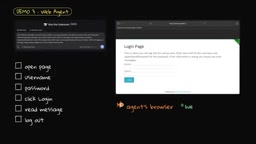
After restarting the app with this config, the real-world results were as follows:
- Search and Fetch: Scraped the Hacker News front page and returned the top stories almost instantly — clean text, no clutter, highly token-efficient;
- Login task: On a public test site, the agent automatically opened the page, entered a username and password, clicked login, read the information, logged out, and returned the result as JSON — exactly what the built-in tools cannot do;
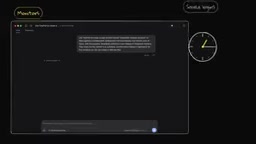
- Complex filtering: The blogger asked the agent to go to Hugging Face, filter for text generation models, sort by trending, and list the top five models with no more than 30B parameters. This task had deliberate traps: a model with "29B" in its name was actually labeled 31B by Hugging Face and should be skipped (it was); another called "27B" was actually a 7B model and should be included (it was correctly identified). The blogger also cross-validated against the official Hugging Face API — the order matched exactly.
This effectively gives DeepSeek Harness computer use capabilities for interacting with web interfaces — precisely the capability that most open-source frameworks and open-source models lack.
Monitoring and Password-Free Login
Two more features are worth mentioning. Monitors: You can have TinyFish check the DeepSeek Harness release page every six hours, establish a baseline of the current version, and only notify you when a meaningful change appears — essentially a persistent agent watching a webpage on your behalf. Saved login state: You manually log in once in a TinyFish browser session and save it as a profile; the agent reuses that session from then on without ever seeing your password.
On cost: Search and Fetch are free. The login task and the Hugging Face filtering task each consumed far less than $1 in agent step costs. Since these agentic runs typically take a few minutes, it's best to run them in the background — the desktop version already supports displaying background processes. One caveat: set reasonable check intervals for your monitors, or frequent polling while waiting can rack up token costs.
Conclusion
The core value of this demonstration isn't just that "DeepSeek Harness can do more things now" — it's the extensibility the whole exercise illustrates: through external plugins, you can introduce entirely new capabilities into a powerful agentic coding framework and connect it to whichever model you choose. The host-plus-plugin architecture, combined with transparent trajectory visualization and excellent cache efficiency, makes it a genuinely competitive player among open-source agentic coding tools. For developers who want their AI agents to actually "use" the web, this is a path well worth exploring.
Related articles

Free Unlimited Claude Code Solution: Agnes AI + CC Switch Setup Guide
No paid subscription needed — pair the free AI platform Agnes AI with the open-source tool CC Switch to provide a backend for Claude Code, enabling unlimited free calls to text, image, and video models. This guide covers the full setup, test results, and usage boundaries.

A Complete Zero-Cost Guide to Getting Started with Claude Code for Beginners in China
A beginner's guide to Claude Code for users in China: two installation methods (command line and IDE plugin), full configuration steps for replacing the official API with the free domestic LongCat model, and a hands-on demo of building a small tool with natural language, plus tips.

When the NSA Gets Involved: The AI Supply Chain Crisis Behind Open-Source CVEs and API Key Hijacking
Multiple open-source projects disclosed severe CVEs in one day, PHP flaws alarmed the FBI, and Railway and OpenCode were breached with API keys stolen. This article breaks down the vulnerability window, AI-accelerated exploitation, and the AI supply chain crisis behind the API key black market, with a developer defense checklist.