DeepSeek Harness Source Code Deep Dive: Everything Is a Plugin and the Event Bus

DeepSeek Harness centers on 'everything is a plugin'; this article outlines startup, open source strategy, and source reading path.
DeepSeek Harness is an agent development framework in development preview, with its core idea condensed as "everything is a plugin," including the model itself. The article introduces two startup methods: the installed version runs with one command, listens on port 3080 by default, supports --port, and updates automatically; the source version requires cloning the repo and using pnpm to install dependencies and build, with startup via pnpm dsh. Since the installed version defaults to port 3080, running the source version simultaneously requires a different port to avoid conflicts. The article also contrasts DeepSeek's open source strategy with foreign subscription models, noting that readable source lets developers debug and verify themselves. Source reading should follow three main lines: the plugin system, main loop, and event bus, and ultimately be put into practice by hand-writing a plugin to connect to MCP.
DeepSeek Harness is a development preview tool whose core philosophy boils down to five words—everything is a plugin. In a source code deep-dive video on Bilibili, the creator repeatedly emphasized that when observing new technology, you should first grasp the most striking keywords. This design means the model itself is also a plugin, and the entire system is built around the plugin mechanism.
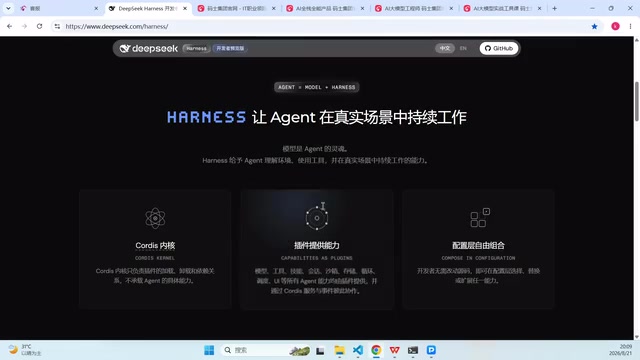
Quick Start: Two Ways to Launch
Installed Version: Run It with One Command
The prerequisite is having Node.js installed. After that, execute the official command in the terminal to start it. It listens on port 3080 by default, and you can see the interface by visiting 127.0.0.1:3080 in your browser. During the demo, the creator encountered a version update prompt—from 0.1 to 0.11-rc.1—showing that the project is still iterating rapidly.
If there is a port conflict, append the --port parameter to the startup command to change the port. This approach is consistent across platforms; Windows, Linux, and macOS can all use the same command.
Node.js is a JavaScript runtime based on the Chrome V8 engine that allows JavaScript to run outside the browser, whether on the server side or in a local terminal. Both the installed version and the source version of DeepSeekAd Harness depend on it, so the first step is to confirm that Node.js is installed on your machine and that the environment variables are configured. It is usually recommended to install the LTS (Long Term Support) version rather than the latest bleeding-edge release for more stable compatibility. After installation, you can run node -v and npm -v in the terminal to verify the version numbers. For developers who need to manage multiple Node versions, version management tools such as nvm or fnm can be used to switch flexibly between projects and avoid global dependency conflicts.
Source Version: Suitable for Debugging and Secondary Development
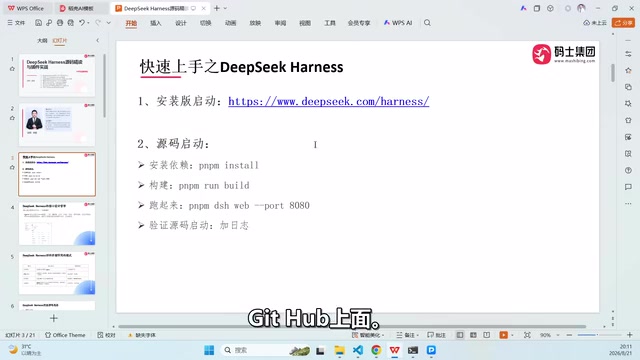
After cloning the repository from GitHub, install dependencies with pnpm and build. The creator mentioned that the first dependency installation takes about three to five minutes and the build about five to ten minutes; after that, startup usually completes within two minutes.
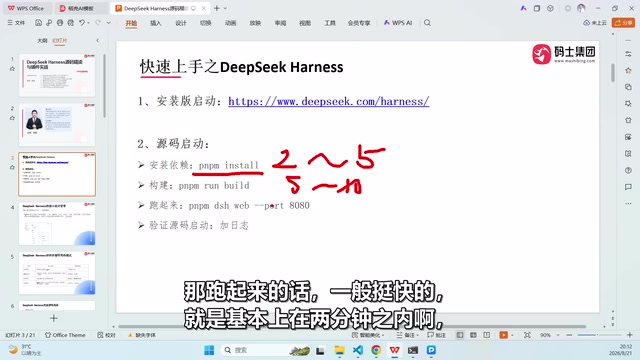
The source version starts with the pnpm dsh command, which also supports the --port parameter. The creator deliberately added a line of debug logging under apps/client/src/bin to distinguish source startup from installed-version startup.
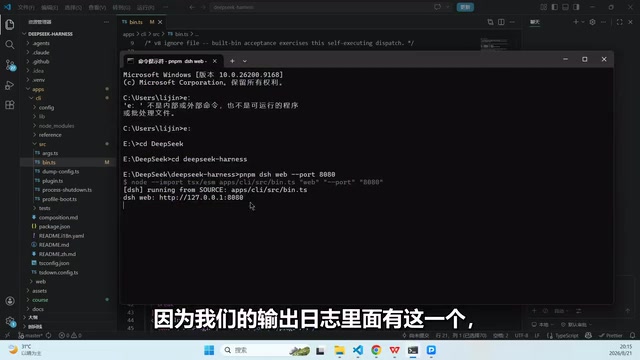
A practical detail: the installed version automatically updates the program and occupies port 3080 by default. If you run the source version at the same time, be sure to specify a different port (such as 8080) to avoid conflicts between the two instances.
pnpm is an efficient Node.js package manager. It belongs to the same category as npm and Yarn, but through content-addressable storage and hard links it greatly reduces disk usage and improves installation speed. It uses a strict node_modules structure that only allows access to dependencies declared by the project, thereby avoiding the "phantom dependency" problem. In the article, pnpm install pulls dependencies, pnpm build triggers the build process, and pnpm dsh is a predefined script alias in the repository that actually executes the command corresponding to the scripts field in package.json. Understanding this helps quickly determine whether a source startup failure is due to missing dependencies, incomplete build artifacts, or a problem with the script itself.
The Ecosystem Logic Behind the Open Source Strategy
There is an intriguing comparison in the video: DeepSeek open-sources its core directly, while many foreign products adopt a subscription model—first giving newcomers a few days of trial quota, then requiring paid subscriptions for enterprise-level and daily development use. The creator asks in return: if DeepSeek Harness were not open source, would Codex be open source? This rhetorical question highlights the forcing effect of open source on the industry's competitive landscape.
From a developer's perspective, readable source code means you can tune it yourself, run it yourself, and verify it yourself, rather than merely consuming a black-box service. This is also why the creator recommends prioritizing the source version for daily development.
How to Read the Source Code
Getting it running is only the first step. The creator's second question is: given the source directory, where should you start?
Following the title clues in the video, the reading path can be organized around three main lines: the plugin system—understanding how components such as models are registered and loaded as plugins; the main loop—grasping the core flow of request processing; the event bus—seeing how modules communicate in a decoupled way. Once you master these three parts, you can write a plugin by hand to connect to MCP and turn your understanding of the architecture into practice.
MCP (Model Context Protocol) is an open protocol for standardizing interaction between large models and external tools and data sources. It abstracts "what the model can call" into pluggable servers, allowing the model to obtain contextual resources such as files, databases, and APIs through a unified interface without having to write separate adapter code for each tool. When the article mentions "writing a plugin by hand to connect to MCP," it essentially means letting Harness's plugin system act as an MCP client or server and registering external capabilities into the framework as plugins. Understanding MCP's request-response model and capability declaration mechanism is key prerequisite knowledge for understanding Harness's plugin loading logic.
The event bus is a module-to-module communication mechanism based on the publish-subscribe pattern: the sender does not call the receiver directly but delivers events to the bus, and modules subscribed to those events handle them themselves. In agent frameworks, event buses are often used to decouple model calls, tool execution, logging, and other stages so that plugins can work together without being aware of one another. When reading the source code, focus on when events are registered, naming conventions, and whether there are differences between synchronous and asynchronous dispatch, because these details directly determine the execution order among plugins and how errors propagate.
Editor's Commentary
The value of this video lies in connecting the two stages of "getting it running" and "reading into it." Most source code analysis content tends to fall into line-by-line explanation, whereas this first addresses the engineering threshold of environment and startup, then provides a handle for entering the architecture, making it friendlier to developers who want to get started with agent frameworks. It should be noted that Harness is still in the development preview stage, and version numbers and interfaces may change, so when following along with the source code, rely on the repository's current state.
One-line Summary
DeepSeek Harness takes "everything is a plugin" as its core philosophy; this article outlines its startup methods, open source strategy, and source code reading path.
Paragraph Summary
DeepSeek Harness is an agent development framework in the development preview stage, with its core philosophy condensed into "everything is a plugin"; the model itself also exists as a plugin. The article introduces two startup methods: the installed version can run with a single command, listens on port 3080 by default, supports changing the port with --port, and updates automatically; the source version requires cloning the repository, then using pnpm to install dependencies and build, with the first run taking longer, and startup using the pnpm dsh command. Because the installed version occupies port 3080 by default, running the source version at the same time requires specifying a different port to avoid conflicts. The article also compares DeepSeek's open source strategy with foreign subscription models, pointing out that readable source code allows developers to debug and verify on their own. Source code reading is recommended around three main lines: the plugin system, the main loop, and the event bus, ultimately putting practice into effect by writing a plugin by hand to connect to MCP.
Related articles

AI SDK Workflow 2.0.95 Update: Stream Transform API Removed
AI SDK Workflow 2.0.95 removes the experimental_transform option from WorkflowAgent.stream() and the StreamTextTransform type export, as stream transforms cannot reliably cross workflow step boundaries. This article covers the reasons, migration points, and upgrade advice.

AI SDK Vue 4.0.163 Patch Released: Full Dependency Chain Update
AI SDK Vue releases patch 4.0.163, synchronously upgrading dependencies including ai@7.0.163 and @ai-sdk/provider-utils@5.0.75. This article analyzes the practical impact of this dependency chain update.

AI SDK Voyage 2.0.75 Patch Release: What the Dependency Chain Update Means
AI SDK's Voyage Provider releases patch version 2.0.75, syncing only @ai-sdk/provider and provider-utils deps. We analyze the impact and upgrade guidance.