DeepSeek + RAGFlow: A Complete Guide to Building a Local Personal Knowledge Base

Build a private, local knowledge base using Ollama + DeepSeek + RAGFlow with full RAG support.
This guide walks through building a local private knowledge base to solve two key pain points of web-based LLMs: data privacy and file upload limits. Using RAG technology, private documents are converted to semantic vectors via an Embedding model, enabling real-time retrieval at query time. The three-step setup covers running DeepSeek locally with Ollama (starting from the 1.5B model), deploying RAGFlow via Docker (full version includes a built-in Embedding model), and parsing uploaded files within RAGFlow. Users who don't need absolute privacy can skip local model deployment and connect RAGFlow to an online API instead.
Why Build Your Own Local Knowledge Base
The web version of DeepSeekAd is already quite capable, but once you involve private data, its limitations become apparent. The video author gives a vivid example: as an employee of "Xie Bao Wang," if you ask DeepSeek "how to receive a sardine," it will simply tell you to "put it in the refrigerator right away" — because the model has no idea about your company's internal policies and procedures.
To make a large language model understand your private content, the traditional approach is to upload attachments — but this introduces three unavoidable problems: first, data privacy, since all content gets uploaded to DeepSeek's servers; second, file upload limits that often require payment, making it impractical to build a knowledge base with hundreds of files; and third, managing context across conversations is tedious, since every new chat requires re-uploading attachments, and adding, removing, or editing content is cumbersome.
Local deployment addresses exactly two core needs: absolute privacy protection and personalized knowledge base construction. The former is achieved by running the DeepSeek model locally so requests never leave your own machine; the latter relies on RAG (Retrieval-Augmented Generation) technology. The author notes that this entire setup was originally his semester final project — a solution that has been practically validated.
RAG and Embedding: A Quick Primer
Both RAG and model fine-tuning aim to address the "hallucination" problem in large language models — where a model confidently makes up plausible-sounding answers when it doesn't actually know something. The author uses a great analogy: fine-tuning is like "studying before the exam," where the model absorbs knowledge into its parameters through training; RAG is like an "open-book exam where you frantically flip through your notes," searching the knowledge base the moment a question comes in.
For individuals and enterprises, locally fine-tuning a large model is prohibitively expensive, and fine-tuning a smaller model yields poor results. Therefore, deploying a distilled model locally + using RAG for targeted retrieval and generation has proven to be an excellent cost-performance tradeoff.
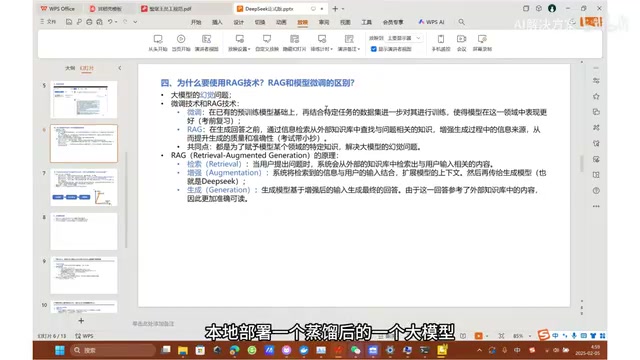
The RAG workflow has three steps: Retrieval finds content from an external knowledge base that's relevant to the question; Augmentation combines the retrieved results with the user's input to expand the model's context; Generation has the conversational model produce a final answer based on the augmented input.
So why do we also need an Embedding model? Because text is natural language — machines can't directly compute similarity relationships between text strings. The Embedding model's job is to convert text from PDFs and Word documents into high-dimensional vectors. The author uses the example of three terms: after embedding, semantically similar terms get mapped to nearby points in vector space, while unrelated terms end up far apart. A user's question is similarly converted into a vector, and the system uses metrics like cosine similarity to match the most relevant passages in the knowledge base. The author describes this as "generating a unique fingerprint for each passage, then matching the user's question fingerprint against the fingerprint database."
This also explains why web chat is free but uploading files costs money — file parsing, embedding, image and table processing all require additional storage and compute.
Hallucination is an inherent limitation of large language models: because a model's knowledge is "frozen" at its training data cutoff date, and the knowledge stored in its parameters isn't perfectly accurate, when asked about things outside its training data, the model tends to "confidently fabricate" plausible-sounding answers rather than admitting ignorance. RAG reduces hallucinations by dynamically injecting external documents at inference time, giving the model something to reference. That said, RAG doesn't eliminate hallucinations entirely — if the retrieved passages are irrelevant, or the model gets confused when integrating multiple chunks, incorrect answers can still occur. In practice, retrieval quality (the Embedding model's semantic understanding) and chunking strategy (how documents are split into segments) significantly impact the quality of final answers.
Local Deployment in Three Steps
The entire deployment process has three steps: pull and run the DeepSeek model with Ollama, deploy RAGFlow via Docker, and build the knowledge base in RAGFlow.
Step 1: Run DeepSeek with Ollama
Ollama is a tool for running and managing large language models locally — think of it as a platform for open-source models combined with a download-and-run utility. After downloading and installing from ollama.com/download, there are two key environment variables to configure:
- Set
OLLAMA_HOSTto0.0.0.0:11434: This step is essential. By default, Ollama only listens on localhost, which means RAGFlow running inside Docker can't reach it. Setting it to0.0.0.0makes it listen on all IPs. If a virtual machine still can't connect after this change, your local firewall may be blocking port 11434 — you'll need to allow it. - Model download path: Models can be tens of gigabytes — it's worth changing the default storage location.
The author specifically warns: after configuring environment variables, you must restart your computer. He once spent an hour downloading a model after making changes, only to discover the next day after restarting that the custom location had taken effect and the model list was wiped — "felt like the sky was falling."
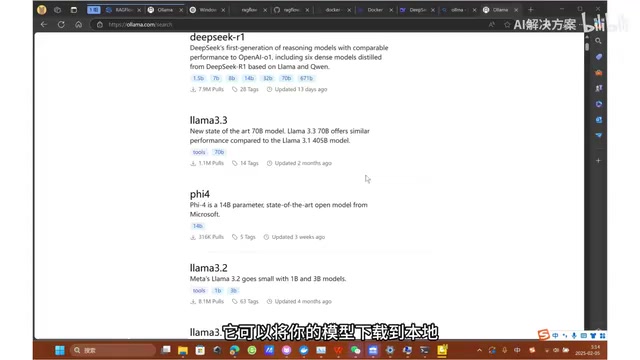
Once configured, go to ollama.com/models and select the DeepSeek R1 model. The full original model has 671B parameters and weighs 404GB — impossible to run on a personal computer. Start with 1.5B; if you have a dedicated GPU, try 14B or 32B (reportedly 32B already achieves very high quality). Copy the command and run it in CMD — if it responds normally, deployment is successful.
Model parameter count (B = Billion) directly determines both reasoning capability and the hardware resources required. For DeepSeek R1: the 1.5B model needs roughly 2–4GB of VRAM or RAM and can run on an ordinary laptop, though complex reasoning is limited; 7B/8B requires about 8GB VRAM; 14B needs around 16GB; 32B requires 24GB+ on a high-end GPU. Models also come in full-precision (FP16/BF16) and quantized versions (Q4, Q8, etc.) — quantization compresses size and VRAM usage by reducing the bit depth of each parameter, trading a slight loss in precision for the ability to run on consumer hardware. Models on Ollama are typically already quantized in GGUF format. 1.5B and 7B are the most common entry-level choices for personal users.
Step 2: Deploy RAGFlow with Docker
First, download the RAGFlow source code from GitHub (you can just Download ZIP and extract it), then download Docker for your operating system.
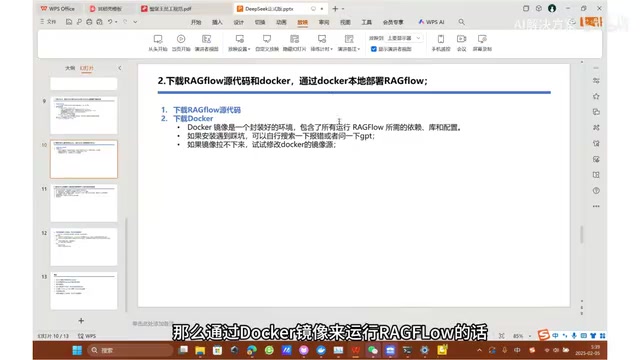
Why Docker? Because running RAGFlow requires databases (like ChromaDB, MySQL, Redis) and a large number of dependencies and configurations that would be extremely complex to set up manually. A Docker image is essentially a pre-packaged environment — "like installing a small computer inside your computer" — with all dependencies already included. If you can't pull the image, you can configure a Docker mirror source manually.
One critical configuration: go into the docker folder of the source code, open the .env file, and at around line 84 comment out the slim version and uncomment the full version. The slim version doesn't include an Embedding model, while the full version comes with one built in — ready to use without additional deployment. Save the file, then run the startup command in that directory. Docker will automatically pull the image and start the services. Once successful, navigate to localhost:80 in your browser to see the RAGFlow page and register/log in.
Docker is a containerization technology. The key difference from a virtual machine is that VMs simulate a complete operating system, while Docker containers share the host OS kernel and only isolate the application runtime — making them faster to start and less resource-intensive. A Docker Image is a packaged application snapshot; a Container is a running instance of that image. RAGFlow's
docker-compose.ymlfile defines multiple services (the RAGFlow main app, MySQL, Redis, MinIO object storage, etc.) — a singledocker compose upcommand pulls and starts all dependent services and automatically handles networking between them, eliminating the need to manually install and configure each component. Users in China who have trouble pulling from Docker Hub can configure a domestic mirror accelerator (such as those provided by Alibaba Cloud or Tencent Cloud) in Docker Desktop's settings.
Step 3: Build the Knowledge Base and Start Chatting
After logging in, add your local Ollama instance under "Model Providers." Set the model type to Chat (DeepSeek is a conversational model), copy the exact model name from ollama list; set the base URL to http://[your local IP]:11434 (find your IP using ipconfig and look for the IPv4 address); no API Key is needed for local deployment.
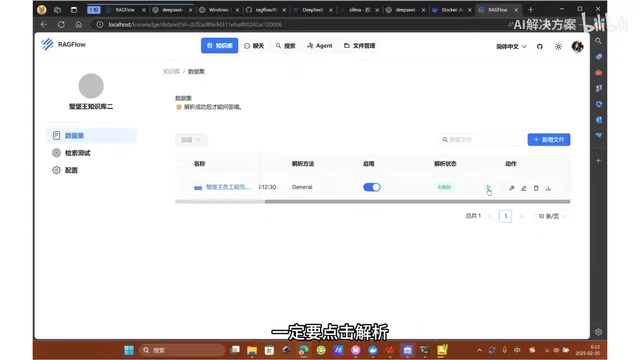
Then under "System Model Settings," set the chat model to the DeepSeek you just added, and set the embedding model to the Chinese model bundled with the full version (Large outperforms Small). Next, create a knowledge base — set the language to Chinese and the parsing method to General — upload your files, and make sure to click "Parse" after uploading. Without parsing, the model can't understand the file content.
Finally, create a chat assistant and bind it to the knowledge base. The default prompt instructs the model to say it doesn't know if no relevant content is found in the knowledge base; if you want the model to also draw on its own capabilities, you can remove that part of the system prompt. The author tested asking "how to receive a sardine" and confirmed the answer correctly cited the PDF content with source references.
Don't Want to Deploy Locally? There's an Easier Option
If you just want a personal knowledge base quickly and aren't concerned about absolute privacy, you can skip Step 1 (local model deployment) and go straight to Step 2 (deploying RAGFlow — which currently has no official hosted web version, so you still need to run it yourself).
Afterward, add any online model under "Model Providers" — whether Qwen, DeepSeek, or any other provider's Chat or Embedding model — by simply entering the API Key obtained from that platform. You can switch between different models at any time to compare performance and cost-effectiveness.
Both approaches involve tradeoffs:
- Online models: Easier to set up, stronger performance (far more parameters than local small models), but no guarantee of absolute data privacy, and costs money once the free tier runs out.
- Local deployment: Privacy controlled, works offline, no content restrictions — ideal for sensitive enterprise documents — but performance is limited by local hardware.
Regardless of which approach you choose, the core value is the same: building a long-lasting personal knowledge base that lets AI generate more accurate answers grounded in your private materials. Whether you're organizing personal notes or managing internal enterprise knowledge, this solution is highly practical.
Related articles

Qwen 4 First Test Leaks: Performance Rivals Opus 5.5, DeepSeek V4 Series Surfaces
Early Qwen 4 test outputs leak, with front-end generation said to rival Opus 5.5; DeepSeek V4 Mini, Flash, and Pro names appear in a code repo; Ant Group's Ling-3.1-flash surfaces too. Here's the latest on model tiering and on-device lightweight models.

OpenCode Makes DeepSeek V4.1 Flash Free, AI Daily Roundup
AI daily roundup: OpenCode makes DeepSeek V4.1 Flash free, StepFun Step5 Preview and Ling 3.1 Flash open-sourced, Grok Voice 3.0 tops speech leaderboard, Matrix Game 4.0 open-sourced, and the EU opens its first AI Act enforcement probe into OpenAI and Anthropic.

DeepSeek V4.1 Flash 1017 Released: Reasoning and Coding Upgrades, Search and Fetch API Now Available
DeepSeek releases V4.1 Flash 1017 with major gains in reasoning, coding, and agentic tasks, plus web search and fetch APIs at 5 yuan per 1,000 requests. Tencent Hunyuan open-sources High Memory 2.0, Perplexity open-sources multimodal decision models, and MOFCOM seeks comments on AI export catalog.