DeepSeek-Reasonix: An AI Coding Agent Built for DeepSeek That Cuts Costs by 80%

DeepSeek-Reasonix is an AI coding agent built for DeepSeek that slashes costs by 80% via smart caching.
DeepSeek-Reasonix is an open-source AI coding agent client purpose-built for DeepSeek models, earning 12K GitHub stars in just three days and official recognition from DeepSeek. It features five reasoning intensity levels, four execution modes (Plan, Review, Auto, YOLO), native MCP integration, and an intelligent prefix caching mechanism that reduces long-session costs to one-fifth. It also supports seamless session migration from Cursor, Claude Code, and Codex.
12K Stars in Three Days, Officially Listed by DeepSeek
DeepSeekAd-Reasonix is an AI coding agent client built specifically for DeepSeek models. Within just three days of going open source on GitHub, it racked up nearly 12K stars — and even more impressively, it has been officially listed in DeepSeek's documentation. With its minimalist design, powerful caching mechanism, and deep optimization for DeepSeek models, this tool is quickly becoming the go-to coding assistant for DeepSeek users.
This article provides a comprehensive breakdown — from installation and configuration, core features, model selection, and MCP integration to cost comparisons — explaining why this tool deserves your attention.
Dead Simple Setup: One API Key Is All You Need
Installation and Initialization
Reasonix currently comes in two versions: a desktop client (downloaded directly from GitHub) and a terminal version (installed via command-line tools). After cloning the project, you can create new sessions from the left panel. First-time setup requires just one DeepSeek API Key, and you're done — no complex environment variables, no tedious dependency installations. It's truly plug-and-play.
An API Key (Application Programming Interface Key) is a token string used for authentication that allows developers to call cloud-based LLM inference services. Traditional AI development tools often require configuring multiple environment variables (such as model endpoints, proxy addresses, token limits, etc.) and may depend on Python virtual environments or Docker containers, creating a steep learning curve for non-backend developers. Reasonix handles all of this internally — users only need to provide a DeepSeek API Key, and the tool automatically completes model endpoint binding, default parameter configuration, and network connection verification, delivering a truly "zero-configuration" experience.
Rapid Development Experience
Type a task description in the input box — for example, "build a student management system" — and Reasonix automatically generates the code. Based on demo results, the generated pages are complete, with editing features and parameter configurations working properly. While these are static pages, as a rapid prototyping tool, the efficiency is impressive.
Similarly, entering a wireframe requirement and clicking the execute button quickly generates the corresponding interface. This "describe-and-develop" experience, combined with DeepSeek's inherent coding capabilities, achieves a seamless synergy between tool and model.
Five Reasoning Levels + Four Execution Modes
Model Selection: Optimized Exclusively for DeepSeek
Reasonix offers only DeepSeek model options, including two base models — V3 Flash and V3 Pro — paired with five reasoning intensity levels. This is the most granular reasoning intensity selection among comparable tools.
DeepSeek V3 is DeepSeek's third-generation large language model, built on a Mixture of Experts (MoE) architecture with a total of 671 billion parameters, but only approximately 37 billion are activated per inference. This maintains powerful capabilities while dramatically reducing computational costs. V3 Flash is the lightweight inference version optimized for low-latency scenarios, ideal for code completion, simple Q&A, and other fast-response tasks. V3 Pro is the full-capability version, excelling at complex code generation, multi-step reasoning, and long-context understanding. The pricing difference between the two is significant — Flash's per-token cost is typically a fraction of Pro's — allowing users to choose flexibly based on task requirements and avoid overpaying for simple tasks.
Reasoning Effort is an important parameter introduced by the DeepSeek R1 series models. It controls the depth and breadth of Chain-of-Thought reasoning the model performs before generating its final answer. Lower reasoning effort means the model responds faster and consumes fewer tokens, but may fall short on complex logical deductions. Higher reasoning effort allows the model to conduct more thorough internal reasoning, producing higher-quality output at the cost of increased latency and expense. The underlying mechanism is similar to OpenAI o1's "thinking budget" concept — balancing speed and quality by allocating different computational budgets. Reasonix's five-level reasoning intensity is the finest granularity among comparable tools, enabling users to precisely calibrate reasoning resources for different tasks.
- Fastest mode: V3 Flash + lowest reasoning intensity, ideal for simple tasks
- Most powerful mode: V3 Pro + highest reasoning intensity, ideal for complex development tasks
Users can switch flexibly based on task complexity to find the optimal balance between speed and quality.
Four Execution Modes Explained
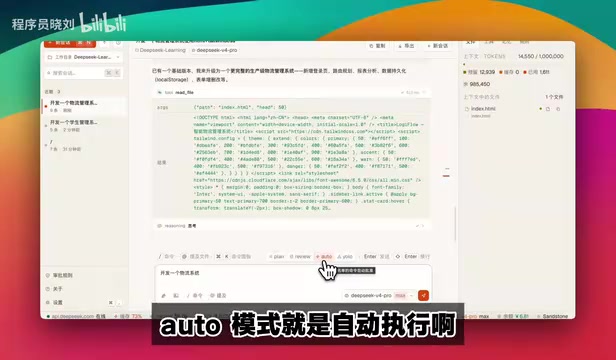
Through the interface toggle, Reasonix offers four execution modes:
- Plan Mode: Generates a complete development plan before executing any tasks, then implements it step by step. Ideal for the planning phase of large projects.
- Review Mode: Performs code analysis and review before each tool call, ensuring every step is sound.
- Auto Mode: Automatically executes most operations but still asks for user confirmation at critical steps. Whitelisted operations are auto-approved.
- YOLO Mode: Fully automatic execution — essentially placing complete trust in the AI's judgment, equivalent to auto-approving everything. Best for scenarios where you're confident in the results.
The name "YOLO mode" comes from the internet slang "You Only Live Once," and in the AI Agent context, it means completely letting the AI make decisions and execute autonomously. This mode touches on a core issue in the AI Agent field — the trust boundary in human-AI collaboration. In Agent architectures, tool use is the critical interface between the model and the external environment, encompassing operations like file read/write, command execution, and network requests. Different execution modes essentially set different levels of human approval thresholds for these operations: Plan mode requires planning before execution, Review mode reviews each step, Auto mode auto-approves low-risk operations via whitelisting, and YOLO mode skips approval entirely. The design of these four modes embodies the concept of progressive trust, allowing users to choose flexibly based on their confidence in AI capabilities and the risk level of the task.
MCP Integration and Ecosystem Compatibility
Seamless MCP Server Connection
In the settings panel, click MCP Servers to directly add external MCP services. For example, to add Context7, simply combine the corresponding command parameters and click Add — the tool handles the rest automatically. Once configured successfully, a green indicator appears on the right, signaling the MCP service is ready.
MCP (Model Context Protocol) is an open standard protocol introduced by Anthropic in late 2024, designed to provide large language models with a unified way to access external tools and data sources. Before MCP, every AI tool needed custom integration code for different external services (databases, search engines, file systems, etc.), leading to severe ecosystem fragmentation. MCP defines a standardized client-server communication protocol that allows any compliant MCP server to be called by any MCP client — similar to how the USB protocol unified peripheral interfaces. Context7, mentioned above, is a popular MCP server implementation that provides AI models with up-to-date technical documentation and library context, helping models generate more accurate code. Reasonix's native MCP support means users can easily extend the tool's capabilities.
Seamless Migration from Cursor/Codex
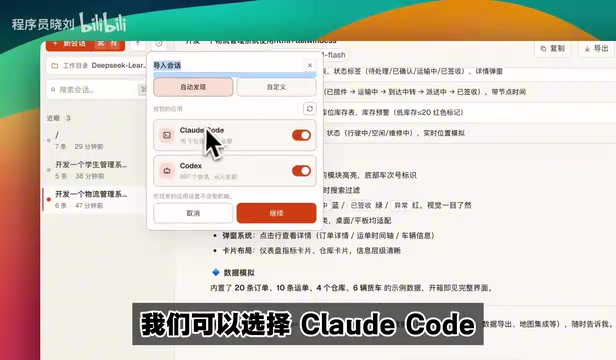
Reasonix supports importing session history from external tools, including Claude Code and Codex among other mainstream AI coding tools. Using Codex as an example, you can import hundreds of historical sessions with one click, making it easy to switch between tools without losing context and minimizing migration costs.
The ability to import history from Claude Code and Codex reflects the fierce ecosystem competition in today's AI coding tool market. Cursor, Claude Code (Anthropic's terminal-based AI coding tool), Codex (OpenAI's coding agent), and Windsurf have each built up user habits and historical data. Session records contain project context, code modification history, and preference patterns — all of which carry significant migration value. Reasonix's one-click import feature is essentially lowering switching costs, a classic strategy for late-entry products competing for existing users. This also means Reasonix has built multi-tool compatibility for session data formats, requiring the technical ability to parse different tools' session storage formats and perform standardized conversion.
Caching Mechanism: Reducing Long-Session Costs to One-Fifth
Intelligent Cache Hits

One of Reasonix's core competitive advantages is its intelligent caching mechanism. Cache hit details for each conversation are displayed in real time on the right panel, including which caches were hit and how much cache space remains.
The principle is straightforward: once an operation has been executed, subsequent calls retrieve results directly from the cache instead of running through the full inference pipeline again. This saves not only time but also dramatically reduces token consumption.
More specifically, this refers to Prefix Caching, a critical optimization technique in LLM API services. In multi-turn conversation scenarios, each request must send the complete conversation history (the context prefix) to the model for processing. Without caching, the model recalculates the attention representations for this historical content every time, resulting in massive redundant computation and token consumption. The core idea behind prefix caching is to save the KV Cache (Key-Value Cache — the key-value pair cache from the attention mechanism) of previously computed context on the server side. When the next request's prefix matches the cache, the previous computation results are reused directly, and only the new content requires inference. DeepSeek's official API offers substantial discounts on cache-hit tokens (typically one-tenth of the original price), which is the technical foundation enabling Reasonix to reduce long-session costs to one-fifth. However, cache hits require the request prefix to match exactly — any format conversion or parameter injection at intermediate layers can break prefix matching, which explains why caching frequently fails when calling through intermediaries like Azure.
Cost Comparison: Stability and Economy Combined
Compared to standard API calling methods (such as through intermediary layers like Azure), Reasonix's caching performance shows significant advantages:
- Standard approach: Cache frequently invalidates, prefix hits are unstable, costs fluctuate
- Reasonix: Stable prefix hits, costs reduced to just one-fifth
For long-session scenarios (such as continuously iterating on a project), this cost advantage becomes increasingly pronounced as conversation turns accumulate.
Other Highlight Features
Memory and Rules System
Reasonix includes a built-in long-term memory feature (similar to Codex's memory mechanism) and a rules configuration system. Preset rules are referenced before each tool call to ensure behavioral consistency. Skills configuration also supports customization.
Task Queue and Concurrency
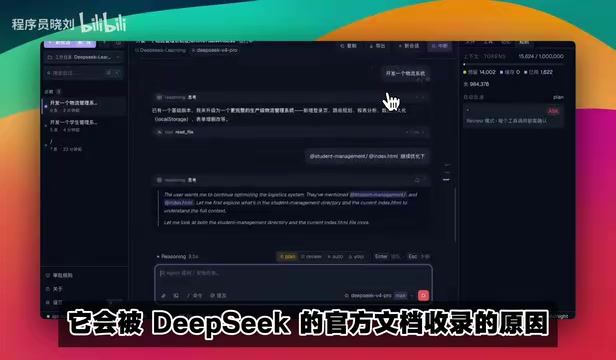
Multiple tasks can be submitted simultaneously, and the system automatically queues them for processing. In YOLO mode, you can see each task's execution status and thinking time in real time, enabling true batch development.
Keyboard Shortcuts and Themes
Command + N: New sessionCommand + K: Open command palette- Slash commands: View keys, create sessions, copy sessions, etc.
- Four theme options available, with light/dark mode switching
- Supports image attachment uploads and
@symbol to reference specific files for modification
Summary and Recommendations
As an open-source project that earned official recognition within just three days, DeepSeek-Reasonix demonstrates an exceptionally high level of completeness. Its core features already cover the key requirements of an AI coding agent: model invocation, MCP integration, cache optimization, multi-mode execution, session management, and more.
Ideal for:
- Heavy users of DeepSeek models
- Developers who care about API call costs
- Project development scenarios requiring long-session continuous iteration
- Users looking to migrate from Cursor/Codex to a more cost-effective solution
If you're looking for an AI coding client that's purpose-built for DeepSeek, cost-efficient, and feature-complete, Reasonix is well worth a try.
Related articles

Uber Deploys ChatGPT Work Company-Wide: AI in the Workplace Enters the Scaled Implementation Phase
Uber deploys ChatGPT Work to 30,000+ employees, extending it from engineering to all roles. We analyze its expert-engineer pairing, end-to-end automation, and questions of AI control and power concentration—insights for scaling AI in the workplace.

Shift at Midnight Hands-On: When "ID Verification" Becomes Alien Hunting
Shift at Midnight blends ID verification with horror survival in a four-player co-op game. We break down its inspection mechanics and chaotic humor.

Zelensky Recounts the Outbreak of War: I Need Ammunition, Not a Ride
Zelensky recalls the first day of war in a YouTube interview: farewell to family, rejecting Biden's evacuation offer with "I need ammunition, not a ride," and how Bucha shaped his stance on compromise and peace talks.