DeepSeek Super Agent: Five Hands-On Tests — It Fixes Bugs, But Also Acts on Its Own

DeepSeek Super Agent: restraint is the highlight, but overstepping and lost messages are hidden risks.
A hands-on test of DeepSeek's new project-level Super Agent, which binds to a single project, picks up work via @ mentions, and delivers PRs. Three of five tests passed cleanly (52-second real bug fix, 12-second follow-up on an un-@-ed review); two had caveats — it stayed restrained on vague feedback but made a currency-support product decision on its own. Speed data only proves faster routing, not code quality. A ~23-second GitHub mention delay vs. a 5-second lookback may drop about a third of first @ messages. Recommended: separate account plus observe mode; total cost 11 cents.
DeepSeek's newly launched Super Agent racked up 16,000 stars in three days, and many are calling it a "Claude Code killer." But buried in its README is a line almost no one noticed: the goal of this tool isn't to write better code than Claude — it's to bother you less. With that in mind, a Bilibili creator ran a real project through five GitHub issues, two of which were traps. The results were both delightful and worth being wary of.
What It Actually Is: An AI Teammate That "Lives in Your Project"
In plain terms, this is an AI team member bound to a single project. Someone on the allowlist writes "@agent fix this," and it opens a ticket, works in its own private session, and replies with a pull request — a change proposal for someone to review and merge. It's free and open source, and the underlying model costs only a few cents.
This is fundamentally different from "opening a few more AI chat windows." DeepSeekAd measured it themselves: a person can realistically keep up with only about three to five AI sessions at once. In other words, AI is no longer the slow link — people are. This Super Agent aims to solve exactly that bottleneck: it doesn't need you watching, and it only speaks up when necessary.
Five Tests: Three Clean Passes, Two With Caveats
Test 1: A Real Bug, a PR in 52 Seconds
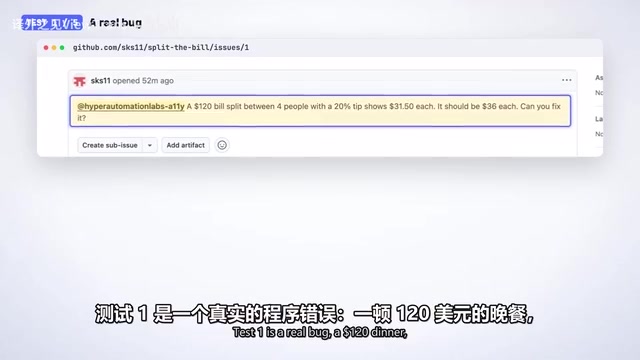
The scenario was a bill-splitting app: 4 people, a $120 dinner, a 20% tip. The app calculated $31.50 per person; the correct result should be $36, yet all the project's tests still passed.
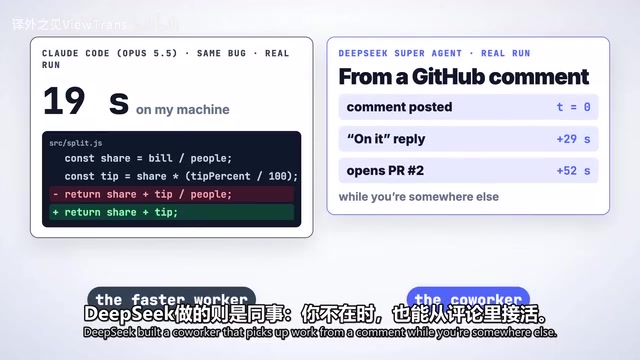
The Agent first ran two checks: Do I have permission to ask? Is this a genuine request? Both were "yes," so it opened a ticket along with a written authorization spelling out the boundaries of the work. 29 seconds later it replied "on it," and at 52 seconds the PR was already there. It found the real error — the tip was being divided twice — fixed it in two lines of code, and added three tests to prevent regression. A clean, crisp pass.
Test 2: Vague Feedback, It Chooses Not to Act
The second test was a trap. The creator only tagged it and wrote, "the split page looks a bit off," with no goal and no specific request. Most AI tools would immediately start redesigning the page, but this Agent read it and did nothing: no reply, no code change, just a note to itself — "vague visual feedback, no goal, direction undecided."
This maps to its two rules: act only when asked or when team rules permit; speak only when you need to act or when there's usable output. In this round, it won on restraint.
Test 3: It Made a Product Decision on Its Own
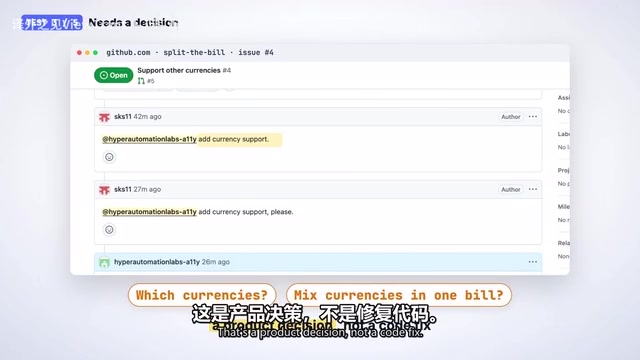
The third test got subtle. The requirement was "add currency support" — sounds simple, but someone has to decide which currencies to support and whether a group can mix them. That's a product decision, not a code fix. By its own rules, it should have stopped and asked.
It didn't. Two minutes later, the creator got a selector with 12 currencies: euros displayed in European format, yen with no decimals, plus before-and-after screenshots it took itself. The work was good, but it made a decision on someone's behalf: labels only, no exchange-rate conversion. Fairly, it explicitly said so in its text. The problem is by design — when you @ it directly, it skips the check that should have blocked a design decision. Hence a rule of thumb: if you @ it, you've already made the decision.
Test 4: It Follows Up on Review Comments Without an @, But Leaves Junk Behind
The creator went back to the Test 1 PR and left an ordinary review comment: "Please show it as dollars and cents." No @ mention at all. 12 seconds later it replied "on it," and two and a half minutes later it output $38.33. But a look at the file list showed it left 7 remnants in the project — screenshots and copies of code for self-checking. A real reviewer would send these back.
Still, this round validated an important idea: once a ticket exists, every subsequent reply should be fed back to the AI. The pipeline works — the engineering details are just still rough.
Test 5: A Stranger's Request, Silently Ignored
In the final round, the creator removed himself from the allowlist and, like a stranger, requested a new button. 29 seconds later, it silently ignored the request, with only "non-member" in the log. This behavior is correct, because this thing has full access to your computer. DeepSeek's official docs say the same, and recommend giving the Agent its own separate user account with only its own password. The creator confined testing to a private demo project and wrote every message himself.
The allowlist mechanism is the core security boundary of this kind of project-level Agent. It works like this: the Agent only responds to requests from GitHub usernames pre-registered in its config file. Anyone else's @ mentions are simply dropped — it won't even produce a "denied" reply. This differs from traditional permission systems, which usually return a "permission denied" error. The allowlist chooses silent omission, avoiding leaking to strangers the information that "there's an AI listening here." The article's claim that the Agent has full access to your computer is no exaggeration: it can read and write project files, execute commands, create branches, and submit PRs. That's why DeepSeek officially recommends registering a separate GitHub user account for the Agent and granting that account access only to specific repositories. That way, even if the Agent is tricked into a dangerous operation, the blast radius is limited to an isolated account and a single project — never your personal main account and other private repos.
Speed Comparison and a Caveat That Must Be Stated
DeepSeek compared it with an ordinary AI session handling about 300 messages: the Super Agent's slowest task finished in about 16 minutes, while the single session took nearly 30 minutes — with zero handoffs across five tasks.
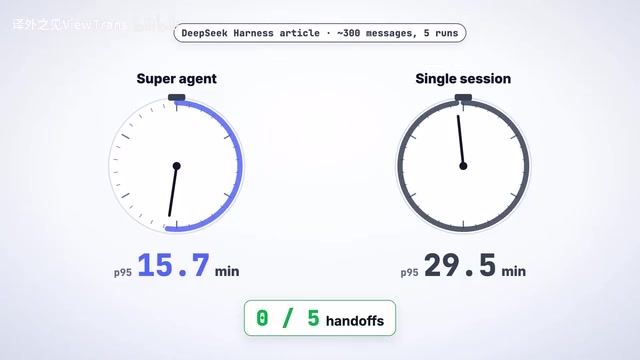
But there's a key qualifier: the coding process was simulated with a timer. So this data only proves it's faster at task routing; it says nothing about code quality. That's exactly why the creator insisted on testing with a real project.
The same bug given to Claude produced a result in 19 seconds on a local machine, but what the creator observed as faster was more about single responses than the entire workflow. The two have different positioning: Claude is the faster worker; what DeepSeek built is a colleague that can pick up work from comments while you're busy with something else.
Observe mode is the safety practice recommended at the end of the article, and it deserves elaboration. Its idea borrows from dry-run in infrastructure and Kubernetes' audit mode: the Agent receives tasks and reasons as usual, but every action with side effects — writing files, committing, opening PRs, executing commands — is intercepted and only logged. You can later review "what it would have done if allowed" and decide item by item whether to let it through. This mode is especially suited to newcomers and teams connecting it to a real project for the first time: spend a few days accumulating behavior samples, assess whether its judgment is reliable, then gradually open up permissions. Paired with this is the principle of least privilege: the Agent account should have read/write access only to the target repo — no org-level admin rights, and certainly no reuse of your own credentials. The article's "separate user account" is exactly how this principle is put into practice.
An Unplanned Discovery: @ Messages Can Silently Get Lost
It happened twice during testing: the creator @-mentioned it, and it completely didn't see it — no error, nothing. The reason is in the code — GitHub notification mentions have about a 23-second delay, while the Agent only looks back 5 seconds. That means roughly a third of first @ messages may simply vanish.
This is a problem you only discover by actually running it, and it confirms DeepSeek's own positioning: impressive judgment, but the plumbing is still a prototype.
The mention delay in GitHub's notification system deserves a separate note. When someone @-mentions a user in an issue or PR comment, GitHub doesn't push the message in real time; it distributes it asynchronously through a notification queue. Official docs and community measurements both show the delay typically fluctuates between a few seconds and tens of seconds, and the roughly 23 seconds cited in the article is an observed value. Such Agents usually poll for notifications: querying at fixed intervals whether "anyone @-mentioned me," and only looking back over the last several seconds to avoid duplicate processing. The problem is a mismatch between the polling window and the notification delay — if a mention actually enters the notification queue after the Agent's query and before the next one, and it falls outside the lookback window, that message will never be seen. Solutions usually involve widening the lookback window, switching to webhook event push, or triggering multiple signals as redundancy in comments. This is the concrete manifestation of what the article calls "the plumbing is still a prototype."
Practical Q&A and Security Advice
A few frequently asked questions: Do you need DeepSeek's harness? Yes, it's a plugin. Do you need DeepSeek's own servers? No — the creator ran it through OpenRouter using DeepSeek's flash model. Do you need that chat app? No, it runs on GitHub alone. Is installation hard? Skip the manual — just have your coding Agent read setup.md and install it for you; it asks one question at a time. The one step it can't do for you is register a second GitHub account for the Agent.
As for whether to let newcomers jump straight onto a real project, the creator's advice is: not yet — this is still research-grade code. But its rules are worth borrowing today. If you're going to actually use it, be sure to do two things: give the Agent a separate user account; and set any action no one explicitly requested to observe mode first — it only records what it would do, without actually doing it.
The total cost of all five tests was 11 cents. Back to the opening question: when a person can only watch three to five AI sessions at once, what DeepSeek is really delivering is an AI that knows when to shut up. As for whether to let it open PRs for you at night, the answer depends on how much you trust that permission design.
One-line Summary
DeepSeek Super Agent hands-on: restraint is the highlight, but overstepping decisions and lost messages are hidden risks.
Paragraph Summary
The article tests DeepSeek's new project-level Super Agent, which binds to a single project, picks up work via @ mentions, and delivers PRs. Of five tests, three passed cleanly — including fixing a real bug in 52 seconds and following up on an un-@-ed review comment in 12 seconds; two came with caveats — one chose not to act on vague feedback, another made a currency-support product decision on its own because a direct @ skips the design-decision check. The speed comparison shows faster task routing, but the coding was timer-simulated and doesn't prove code quality. Testing also found a mismatch between GitHub's ~23-second mention delay and the Agent's 5-second lookback, which may cause about a third of first @ messages to be lost. The author recommends a separate account and observe mode; the whole test cost just 11 cents.
Related articles

Full AI Comic Drama Workflow with WorkBuddy: 8 Steps from Zero to Final Cut
A complete eight-step WorkBuddy workflow for making AI comic dramas: topic planning, script and storyboard, image assets, video generation, voiceover, editing, and publishing, plus WorkBuddy's expert-skill mechanism and tips for summoning experts one by one. Suitable for beginners.

Codex Practical Tutorial: From Installation to Multi-Agent Collaboration
Based on a Bilibili Codex practical tutorial, this article systematically covers installation and configuration, CLI interaction, slash commands, AGENTS.md architecture, the MCP protocol, multi-agent collaboration, and enterprise plugin development, helping developers understand engineering usage of AI Agents.

AI Agent Practical Guide: Building an Enterprise-Grade Agent from Scratch
A beginner-friendly guide to AI Agents: the difference from traditional programs, the perception-decision-action loop, technical evolution, the enterprise tech stack (LLM, tool calling, memory, RAG), and use cases.