DeepSeek V4 Pro Hands-On: Impressive Benchmark Scores but Frontend Generation Still Has Bugs

DeepSeek V4 Pro scores 87.9 on Terminal Bench but still stumbles on frontend CSS positioning in real-world tests.
A community hands-on review of DeepSeek V4 Pro reveals impressive Terminal Bench scores (87.9) and extremely low API costs, but frontend code generation still shows CSS positioning bugs. The official Harness tool earns praise for its chain-of-thought visualization and fast response times. The model performs better in its native web interface than through third-party tools like Claude Code, suggesting developers should prefer official environments for optimal results.
DeepSeek V4 Pro Official Release Arrives, Along with Their Own Harness Tool
DeepSeekAd recently officially released the V4 Pro model, simultaneously launching Harness, their official development tool in developer preview. The timing is quite interesting — shortly after the official release went live, the community quickly began conducting various real-world tests. This article is based on a Chinese Bilibili content creator's first-hand experience, attempting to present the real performance of DeepSeek V4 Pro from an everyday user's perspective.
It's worth noting that this is an informal community review rather than a professional benchmark evaluation. The tester himself admits he "rarely uses it for frontend work" and mostly calls on models for lightweight daily tasks. Therefore, the value of this article lies not in rigorous benchmarking, but in presenting an authentic user's intuitive impressions of the new model.
T5 Test and Candy Test: Two Popular Community AI Evaluations
In China's AI community, two unofficial "grassroots" test projects are popular — the T5 Test (醍醐测试) and the Candy Test (糖果测试). The former primarily examines a model's ability to generate dynamic frontend pages, while the latter focuses on logical reasoning and computation.
The T5 Test originated from the Chinese AI community's need for a standardized evaluation of frontend code generation capabilities. The test typically requires a model to generate a complete HTML page in one shot, featuring complex CSS animations, responsive layouts, and interactive logic. It tests the model's comprehensive understanding of DOM structure, CSS positioning (such as position, flexbox, grid), and JavaScript animation APIs. The Candy Test leans more toward mathematical reasoning and multi-step logical chains, typically containing complex scenarios that require the model to track state changes across multiple variables.
In the Claude Code environment, the content creator used V4 Pro with the highest-tier "Thinking" reasoning mode for the T5 Test. The "Thinking" reasoning mode enables the model's extended thinking capability, allowing it to consume more tokens for deep reasoning before outputting results — a core technical feature introduced in the DeepSeek R1 series. The result took approximately 6 minutes and 48 seconds. The generated page had "great colors and animations" overall, but had one obvious bug: the page footer elements suddenly appeared in the top-left corner, with misaligned positioning for unknown reasons.
From a frontend technical perspective, this type of bug typically stems from incorrect handling of CSS positioning context — when child elements use absolute positioning but the parent container hasn't properly set relative positioning, elements will position themselves relative to the nearest positioned ancestor or the viewport, resulting in the "floating to the corner" phenomenon. This indicates that the model still has room for improvement in managing CSS positioning hierarchy relationships when dealing with complex nested layouts.
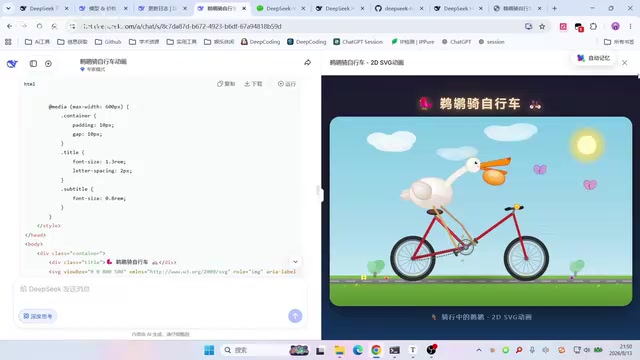
In comparison, the Candy Test performance was more satisfying. Within just over two minutes, V4 Pro delivered a fairly complete answer. The creator's overall assessment was "not bad," considering logical tasks to be a relatively stable strength of this model.
DeepSeek Web Interface Expert Mode Performs Better
Interestingly, when the tester used "Expert Mode" on DeepSeek's official web interface, he actually achieved better frontend generation results than when accessing via API through Claude Code. He mentioned that the web-generated page was "at least a pretty normal lantern design" — while lacking complex left-right animation effects, it had higher overall completeness.
The technical reason behind this lies in differences in the calling pipeline. Claude Code is a command-line development tool from Anthropic. When users connect DeepSeek V4 Pro to Claude Code, they're actually making calls through an OpenAI-compatible API interface, going through multiple stages including prompt template conversion, system prompt injection, and context window management. These intermediate layers may introduce additional prompt formatting discrepancies. DeepSeek's official web interface "Expert Mode," on the other hand, uses a natively optimized inference pipeline, including system prompts, temperature parameters, and sampling strategies tuned specifically for their own model's characteristics. Models are most sensitive to the prompt formats used during their native training, which explains why the native environment yields better results.
This phenomenon deserves developer attention: the same model can perform noticeably differently across different calling environments, and official native environments tend to provide better adaptation than third-party tool integrations.
Official Benchmark Data: Terminal Bench Score Reaches 87.9
DeepSeek officially published V4 Pro's benchmark results, with the most eye-catching being a Terminal Bench score of 87.9, only slightly below the top competing models.
Terminal Bench is a benchmark specifically designed to evaluate AI models' ability to execute complex development tasks in real terminal environments. Unlike traditional code generation benchmarks (such as HumanEval or MBPP), Terminal Bench simulates the complete workflows developers perform daily in the command line: including file system operations, Git version control, package manager usage, build system configuration, debugging, and troubleshooting. A score of 87.9 means the model can correctly complete the full pipeline from understanding tasks to executing commands in nearly 90% of test scenarios.
The content creator's reaction was both surprised and reserved: "Honestly, it's a bit scary," while also being straightforward that "this score personally feels a bit exaggerated." He emphasized that he judges models primarily by actual usage results rather than official scores.
This gap between "impressive benchmarks and questionable real-world performance" is precisely the common dilemma of the current large model evaluation ecosystem — there's often a chasm between leaderboard scores and real-world experience. The limitations of benchmarks lie in the fact that test case coverage and difficulty distribution may not fully represent the long-tail problems in real development, and vendors may have optimized specifically for certain benchmarks during evaluation. Users need to view vendor-published data rationally.
DeepSeek Harness Developer Tool: First Impressions
Another focus of this test was DeepSeek's simultaneously released official development tool Harness (developer preview). Installation is quite straightforward: visit the corresponding GitHub repository, follow the documentation to run the installation script, and launch it with a single command.
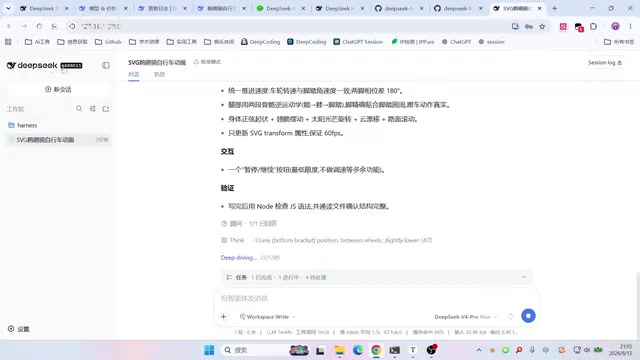
Harness is essentially a complete model control and workflow system provided officially by DeepSeek. Its technical positioning is similar to OpenAI's Codex CLI or Anthropic's Claude Code, belonging to the emerging "AI-native development terminal" tool category. Compared to the previous common practice of "connecting DeepSeek to Claude Code or Codex," an official native tool can theoretically better adapt to its own model — from prompt engineering and context management to output parsing, everything can be deeply optimized for their own model architecture.
Chain-of-Thought Visualization is Harness's Core Highlight
The content creator particularly praised Harness's ability to display the model's thinking process (chain-of-thought). He noted that in pure terminal environments, you often can't see the model's reasoning chain, but Harness exposes this process: "Although most people won't read it carefully, having this chain-of-thought feels quite advanced."
Chain-of-Thought (CoT) visualization is one of Harness's differentiating features. During large model inference, chain-of-thought refers to the intermediate reasoning steps the model takes before arriving at its final answer. The DeepSeek V3/R1 series models are known for their deep reasoning capabilities — internally, the model conducts extensive "self-dialogue": decomposing problems, verifying hypotheses, and backtracking corrections. Visualizing this process not only helps developers understand the model's decision logic and facilitates prompt debugging and error localization, but also provides intuitive basis for subsequent prompt optimization. For scenarios requiring models to complete multi-step complex tasks, observing the chain-of-thought helps users determine at which step the model "went off track."
In actual use, Harness's response speed received high praise — "generation speed is very fast, rendering speed is also fast" — noticeably faster than some other tools.
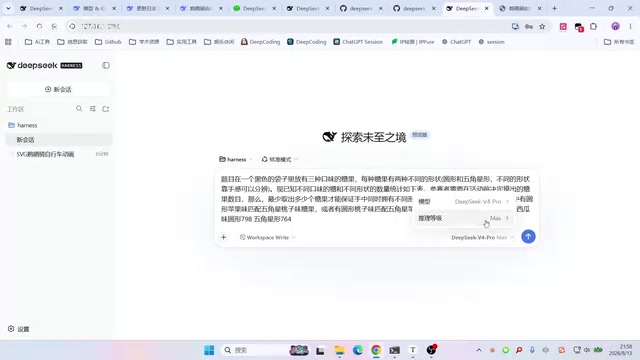
Additionally, Harness offers multiple operating modes, including standard mode, minimal mode, PTC mode, and others. The content creator admitted being "quite unfamiliar" with these professional terms but speculated that minimal mode might be the most suitable option for formal testing. The tool also supports adding workspaces, configuring multiple models, connecting to different API providers, as well as official plugins for web search, terminal access, and more — a relatively complete feature set.
DeepSeek V4 Pro Pricing and Usage Costs
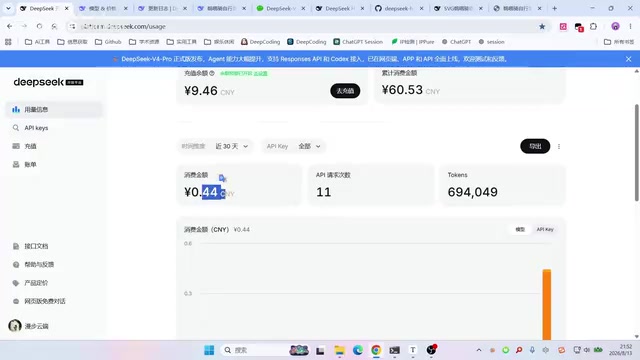
Cost was a pleasant surprise in this test. After completing the T5 Test, Candy Test, and a series of other tasks, the total cost was only about 0.44 RMB (roughly $0.06 USD), prompting the creator to exclaim "it's genuinely cheap," with hit rates also performing well.
However, he also discovered that V4 Pro does implement time-based pricing adjustments — adopting a time-of-day pricing strategy where peak hours are more expensive and off-peak hours are cheaper.
Time-of-Use Pricing is a common strategy among large model API service providers to address GPU computing supply-demand fluctuations. Large model inference relies on GPU clusters, and GPU resources face peak pressure during weekday daytime hours (particularly 10 AM to 6 PM Beijing time). DeepSeek's peak/off-peak differential pricing essentially uses price signals to guide users toward shifting non-urgent tasks (such as batch data processing, large-scale code refactoring) to off-peak hours, thereby improving overall cluster utilization. This approach is similar to Spot Instance pricing in cloud computing or peak-valley electricity pricing in energy markets. For cost-sensitive developers, using task schedulers for off-peak calls can significantly reduce long-term usage costs.
Conclusion: Writing Code May Be V4 Pro's True Strength
Based on this community hands-on test, DeepSeek V4 Pro delivers a relatively positive but not flawless performance:
- Strengths: Impressive official benchmarks, low usage costs, fast Harness tool response with chain-of-thought visualization, stable performance on logic tasks like the Candy Test
- Weaknesses: Frontend generation has detail bugs like element misalignment, gap between leaderboard scores and actual experience, Harness's professional modes present a learning curve for average users
The content creator's final assessment was quite balanced: "This model's real power is probably in writing code." For everyday frontend page generation, V4 Pro "is just okay"; but combined with its high Terminal Bench score and low pricing, its potential in code development scenarios is worth further verification by professional developers.
For users wanting to try it out, the recommendation is to prioritize using DeepSeek's official web interface Expert Mode or the accompanying Harness tool to get a better native experience than third-party integrations. Additionally, making smart use of the time-based pricing strategy by scheduling large-scale tasks during off-peak hours can maximize cost-effectiveness while maintaining quality of experience.
Related articles

Bilibili's Hit Dify Tutorial: A Practical Guide to Building 20+ AI Apps from Scratch
A distilled guide to Bilibili's top-rated Dify tutorial: Windows + Docker deployment, MySQL connection, five app types, model integration strategy, and publishing.

Agent Skills Beginner's Guide: From Concepts to Multi-Agent Collaboration in Practice
A comprehensive guide to Agent Skills: core concepts, components, the importance of Description, standardization, beginner learning paths, and multi-agent collaboration.

One Neuron Detects Both Cats and Cars? We Reproduced It and Found a New Explanation
The cat-car neuron reinterpreted: researcher Cammarata argues it distinguishes pointy from round, not cats from cars. We reproduced the experiment and found the new explanation holds on most inputs—but cars are the exception. The interpretability debate continues on language models.