DEV·TV: Turn GitHub and HN into a 10-Channel Retro Developer Television

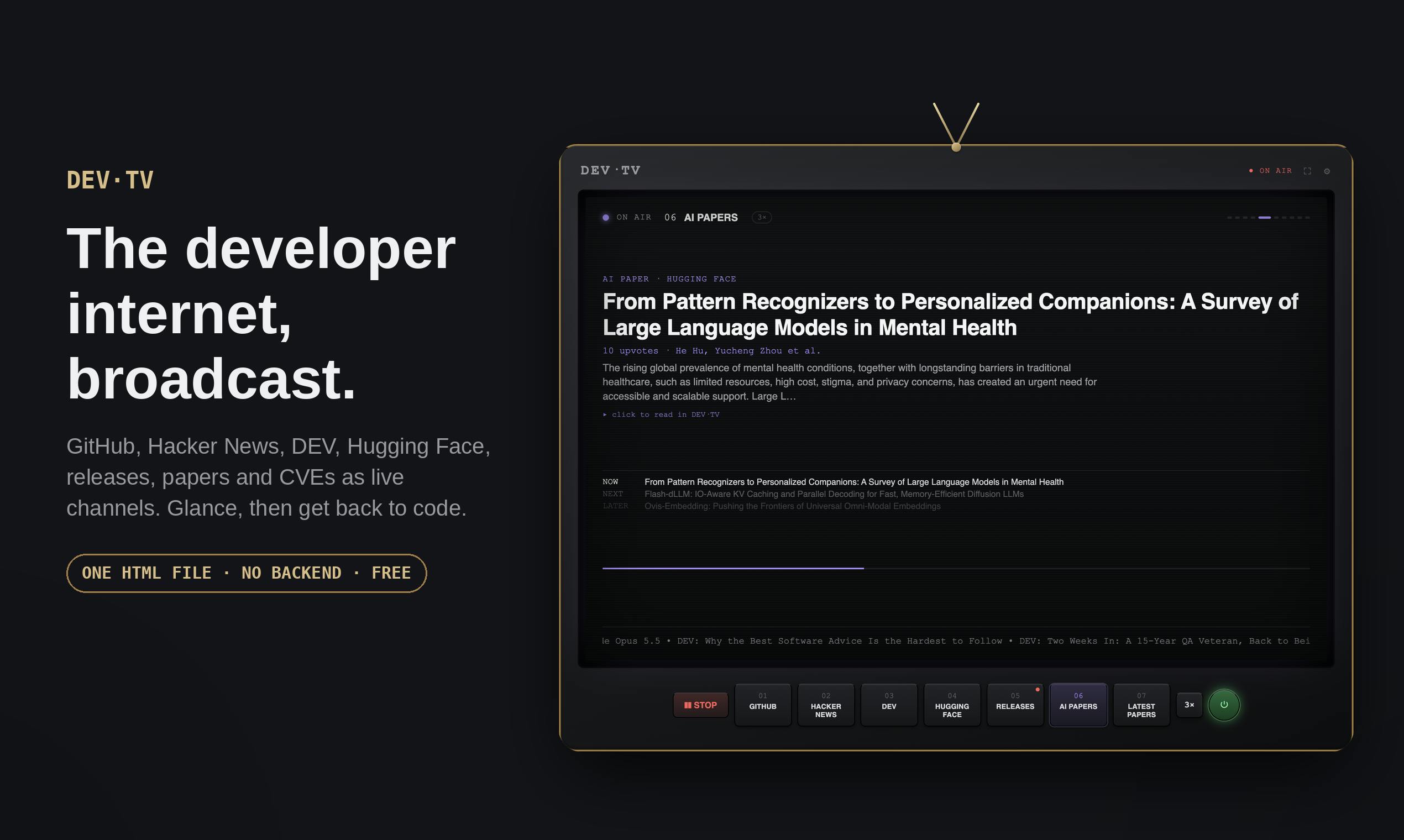
DEV·TV wraps GitHub, HN, and other dev sources into auto-rotating TV channels in a single HTML file.
DEV·TV, built by indie developer Souvik Palit, repackages high-frequency developer sources like GitHub, Hacker News, DEV, and Hugging Face into 10 auto-rotating "TV channels," letting tech news flow passively across your screen without any user interaction. The tool shifts information consumption from active searching to casual glancing, while also creating a shared information backdrop for office or remote teams. Technically, it's a single HTML file with no backend, no login, no build step, and no AI summaries — just raw content delivered directly. Fully open source under the MIT License, it can be forked, modified, or self-hosted by anyone.
An Open-Source Tool That Turns Tech News into "TV Channels"
Developers habitually scroll through GitHub, Hacker News, DEV, and Hugging Face every day, checking for new projects and trending topics. DEV·TV repackages these sources into 10 "TV channels" that auto-rotate like an old-school television — you just glance at the screen, catch something interesting, and get back to writing code.
Built by indie developer Souvik Palit, the project reached #5 on Product Hunt with 78 upvotes. Its positioning is clear: not another information aggregator that demands active searching, but a "passive" companion for staying informed.
Core Idea: From "Active Search" to "Passive Glance"
Traditional RSS readers and news aggregators still require users to actively open the app, browse, and filter. DEV·TV breaks that pattern — it "plays" content like a real TV, no clicking required. A quick glance at the screen is enough to catch what's trending right now.
There's an underappreciated use case behind this design: shared context. The author notes that if DEV·TV is displayed on a large office screen or kept as a persistent browser tab for a remote team, it becomes a shared information backdrop. Everyone can see what's heating up, and anyone can point at the screen and ask, "Did you see this?" — the kind of casual exchange that often sparks meaningful technical discussions.
Shared context is a long-neglected pain point in distributed team collaboration. Research in psychology and organizational behavior consistently shows that when team members share a common information background, communication friction drops significantly — no time wasted on "did you hear about this?" before diving into the real discussion. In a traditional office, this shared context naturally emerges from hallway conversations and break-room chatter. In remote environments, that channel nearly disappears entirely. By projecting a continuously scrolling stream of tech highlights onto a publicly visible tab or screen, DEV·TV essentially rebuilds this "ambient information resonance" for distributed teams at near-zero cost.
Minimalist Architecture: One HTML File Does It All
What makes DEV·TV especially noteworthy to developers is its radical technical simplicity:
- Single HTML file: No backend, no login flow, no build step
- Real data sources: Pulls live content directly from each platform, not secondhand reposts
- Built-in reader: Read content inline without constant tab-switching
- No AI summaries: Presents raw, original content — not text rewritten by a language model
At a time when nearly every information tool is rushing to add an "AI summary" feature, DEV·TV goes the opposite direction and explicitly states "no AI summaries." This is a deliberate stance — many developers are wary of AI-generated digests, worried that information gets distorted or loses critical nuance during compression. DEV·TV hands judgment entirely back to the user.
Open Source and Free: What the MIT License Actually Means
DEV·TV is fully open source under the MIT License, completely free to use. For the developer community, this has several practical implications.
First, a single HTML file under MIT means anyone can fork it, tweak channel configurations, self-host it in an internal environment, or add and remove sources to fit their team's needs. Second, with no backend and no login mechanism, privacy risks and maintenance overhead are both minimized — you don't have to worry about your browsing behavior being tracked, and you don't have to pay for a server.
This "just enough" product philosophy aligns with what many developers actually want from their tools: solve a specific problem, stay lean, ask nothing in return, and remain fully within your control.
The MIT License is one of the most permissive licenses in the open-source world. Its core requirement is simply to retain the original copyright notice. It allows users to freely use, copy, modify, merge, publish, and even commercially distribute the software without seeking the author's permission. Compared to GPL (which requires derivative works to also be open source) or Apache 2.0 (which includes explicit patent grant clauses), MIT imposes minimal legal constraints and is the most common choice for indie developers releasing utility projects. For a "single-file-as-product" tool like DEV·TV, the practical significance of MIT is even more direct: any engineer can download and run it locally or on an internal server, completely decoupled from the original author's infrastructure — no risk of the service going down and taking the tool with it.
Who Should Use DEV·TV
Given its feature set, several types of users stand to benefit:
- Engineers who need to stay technically aware: Keep a peripheral eye on industry trends without breaking their flow state
- Remote and distributed teams: Keep it as a persistent tab to create a sense of "shared information environment"
- Engineering managers and team leads: Display it on an office screen to naturally generate common talking points
- Information-anxious developers: Convert the urge to "actively scroll" into lightweight, passive consumption
A Quick Observation
DEV·TV doesn't introduce any groundbreaking technology. Its value lies in redesigning how developers consume information. Packaging high-frequency sources like GitHub, HN, and Hugging Face into auto-rotating channels is fundamentally about helping users fight the attention drain of information overload — instead of constantly switching tabs to hunt for something interesting, let the information flow past you and catch whatever genuinely pulls your attention.
For developers who value minimalism, care about privacy, and don't want AI summaries doing their thinking for them, this free, open-source, zero-dependency tool is worth adding to your bookmarks bar.
Related articles

Uber Deploys ChatGPT Work Company-Wide: AI in the Workplace Enters the Scaled Implementation Phase
Uber deploys ChatGPT Work to 30,000+ employees, extending it from engineering to all roles. We analyze its expert-engineer pairing, end-to-end automation, and questions of AI control and power concentration—insights for scaling AI in the workplace.

Shift at Midnight Hands-On: When "ID Verification" Becomes Alien Hunting
Shift at Midnight blends ID verification with horror survival in a four-player co-op game. We break down its inspection mechanics and chaotic humor.

Zelensky Recounts the Outbreak of War: I Need Ammunition, Not a Ride
Zelensky recalls the first day of war in a YouTube interview: farewell to family, rejecting Biden's evacuation offer with "I need ammunition, not a ride," and how Bucha shaped his stance on compromise and peace talks.