Developer Rebuilds Photoshop with Claude and Open-Sources It — AI Agents Can Now Drive the Entire Workflow

One developer rebuilt seven Adobe apps with Rust and Claude, letting AI agents control the full editing workflow.
Artcraft founder Brandon Thomas used Rust and Claude Opus to build open-source alternatives to seven Adobe flagship apps, including Photoshop and Lightroom. The standout feature isn't the functionality — it's the architecture: 500+ menu items and tools are unified as commands shared across the GUI, CLI, and MCP server, letting Claude Code drive the entire editing pipeline autonomously. Photocraft hit 29K GitHub stars in nine days. The project is still early Alpha, but clearly demonstrates a compelling blueprint for AI Agent-ready software.
One Person Rewrote Seven Adobe Apps with Claude
Artcraft founder Brandon Thomas did something remarkably bold: using Rust and Claude Opus, he rebuilt open-source alternatives to seven flagship Adobe applications — from Photoshop to Lightroom — and released the entire thing for free.
The most talked-about project, Photocraft (a Photoshop alternative), hit 29,000 GitHub stars in just nine days. That kind of growth is exceptionally rare in the open-source imaging space, and it signals strong developer interest in the direction of "AI-drivable creative tools."
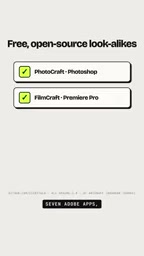
What's worth emphasizing is that this isn't a simple UI clone. The real story is the architectural design — built from the ground up for the AI Agent era.
Core Design: Everything Is a Command
The smartest thing about this project is its command-based architecture. Brandon abstracted every menu item and every tool into a discrete command — over 500 in total.
More importantly, the GUI, CLI, and MCP server all run on the exact same set of commands. Whether you're clicking through a menu with a mouse, typing in a terminal, or letting an AI Agent make the calls, the underlying logic is identical.

This unified command abstraction layer essentially turns creative software into a programmable, automatable system. In traditional software, functionality is buried deep within UI interactions and difficult to invoke programmatically. Photocraft, by design, exposes every feature as a standard interface from day one.
AI Agents Can Take Over the Entire Editing Workflow
Built on this architecture, Claude Code can directly drive these applications through an MCP (Model Context Protocol) server.
In practice, Claude can open a PSD file, add a curves adjustment layer, apply sharpening, and export the final image — without you ever touching the mouse. This is a complete, end-to-end editing pipeline executed independently by an AI.
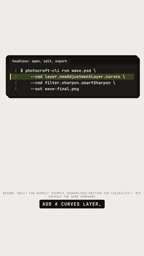
This is a prime example of the "AI Agent controlling professional software" paradigm. Most AI-driven image processing we've seen is generative (text-to-image, image-to-image). This project shows a different path: letting AI invoke specific functions in existing professional tools with near-human precision. For use cases requiring control and reproducibility, this approach is often far more practical than pure generative models.
MCP (Model Context Protocol) is an open protocol proposed by Anthropic to standardize communication between AI models and external tools or data sources. Think of it as the "USB port" of the AI world — once a piece of software implements an MCP server, any MCP-compatible AI client (like Claude Code) can call its features in a unified way, without custom integration code for every tool. Artcraft leverages this protocol so Claude can invoke editing commands as precisely as calling an API, rather than relying on fragile approaches like screenshot recognition or simulated mouse clicks. This dramatically improves the reliability and precision of AI-controlled software — which is exactly why this architecture is considered "built for the AI Agent era."
A Reality Check: Still Early Alpha
Beyond the hype, it's worth keeping a clear head. The developer himself is upfront about the project's current state.
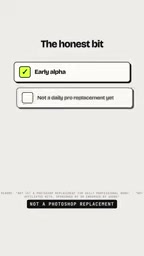
The team explicitly states it's still in early Alpha, not yet a replacement for Photoshop in daily professional use, and has no affiliation with Adobe whatsoever. In other words, this is more of a proof-of-concept for the future of creative tools than a production-ready product.
That said, a solo developer using AI assistance to rebuild software of this scale — and successfully running a complete AI-driven workflow — carries significance well beyond feature completeness.
How to Try It
For developers who want to experiment, the process is straightforward:
- Clone the Photocraft repository
- Build the CLI using Cargo (Rust's package manager and build tool)
- Add the compiled CLI as an MCP server in Claude Code
Once set up, your AI Agent can directly invoke this open-source image editor. The entire project is free and open-source; the main prerequisite is having a Rust build environment.
Cargo is Rust's official package manager and build tool — similar to npm in the JavaScript ecosystem or pip in Python. If you have no prior Rust experience, you'll first need to install the Rust toolchain via rustup (the official site provides a one-line install script). Once installed, run
cargo build --releasein the project directory to compile the binary. Rust's build process handles all dependencies automatically, though the first build may take several minutes and require significant bandwidth to download packages. The resulting binary can be used as a standalone CLI tool, or configured as an MCP server endpoint for Claude Code following the project's documentation.
A Signal Worth Watching
Setting aside the maturity of this specific product, the project sends a few clear directional signals.
Rust combined with powerful coding models is enabling small teams — even individuals — to rebuild complex software. And the combination of a unified command architecture with MCP may well become the standard approach for software adapting to AI Agents. When every feature becomes an AI-callable command, the interaction model shifts from "humans clicking" to "humans expressing intent, AI executing actions."
Projects like this are still early, and whether they reach maturity remains to be seen. But this one clearly sketches out a compelling vision of how creative tools and AI might deeply converge.
Related articles

WorkBuddy Full Tutorial: Build an AI Office Automation Agent from Scratch
A complete WorkBuddy tutorial: installation, three working modes, multimodal picture book video practice, expert team agent building, and workflow configuration for low-cost AI office automation.

WorkBuddy Agent Complete Guide: From Beginner to Automation in 7 Days
Based on Bilibili's 256-episode WorkBuddy masterclass, this systematically breaks down Tencent's AI office workbench core capabilities: Agent principles, Skill encapsulation, cross-platform connectors, scheduled automation, knowledge bases, and zero-code development, with learning path recommendations.

8 AI Accounts, 7 Failed: An Honest Review of Using AI to Get Work Done
Only 1 of 8 AI-run Bilibili accounts succeeded. We break down the real difference between "performing AI" and "using AI to get work done."