Devin Dynamic Workflows: A Practical Guide to Multi-Session Parallel Collaboration

Devin uses Python scripts to orchestrate multi-session collaboration, turning large tasks into parallelizable, resumable workflows.
Devin's Dynamic Workflows changes how AI coding assistants operate: instead of advancing step by step in a single session, Devin automatically writes a Python script to schedule multiple Devin sessions working in parallel like a team, then consolidates the output. It supports Parallel (merge after all complete) and Pipeline (each item flows independently through stages) modes, and uses a record-then-replay mechanism to guarantee resumability, restarting only unfinished parts after an interruption. The official demo uses an accessibility audit of 12 components to show real results: 12 review agents work in parallel, and a consolidation agent merges them into 10 deduplicated findings sorted by severity. The article also provides usage guidance: wide fan-out with a combine step, staged work, and mechanical batch modifications suit workflows, while a small number of tightly coupled sessions are better handled in regular mode.
Devin's new Dynamic Workflows feature is changing the way AI coding assistants tackle complex tasks. Instead of pushing forward one step at a time in a single session, it orchestrates multiple Devin sessions via a Python script, letting them collaborate in parallel like a team and then consolidating their conclusions.
From Solo Work to Team Collaboration
Traditional AI coding assistants usually run in single-session mode. For large tasks such as migrations, audits, and code reviews, this often means back-and-forth communication and manual stitching. The core idea of Dynamic Workflows is simple: let Devin write a Python script itself. That script schedules multiple Devin sessions, breaking a large task into subtasks that can run in parallel.
The script runs each subtask independently, passes results between stages, and finally consolidates all outputs. The whole process is repeatable and resumable — even if it is interrupted midway, completed agent calls are recorded and skipped on replay, so only the unfinished parts run. This provides a stable, engineering-grade path for migration, audit, or research work.
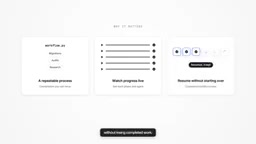
What is the "fan-out / fan-in" pattern?
This is a classic orchestration pattern in parallel computing and distributed systems. "Fan-out" means splitting a parent task into multiple independently executable subtasks and dispatching them simultaneously to multiple execution units. "Fan-in" means gathering each subtask's output into a unified result once all subtasks are complete. The accessibility audit demonstrated in the article is a typical example: one overall task fans out into 12 independent component reviews, then a consolidation agent merges them into a single deduplicated, sorted report. The advantage of this pattern is that it maximizes parallelism for the parts that can run in parallel, while compressing the parts that must be serial into the final merge step. The trade-off is that the merge step usually has to wait for the slowest subtask, so how evenly tasks are sized directly affects overall efficiency.
Real-World Case: Accessibility Audit of 12 Components
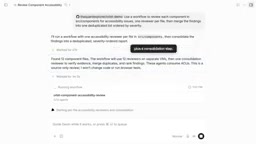
The official demo walks through a real task: check accessibility issues in every component of a small demo app and output a list of findings sorted by severity. The user only needs to tell Devin the requirement — assign an accessibility reviewer to each component, plus a step to merge the lists.
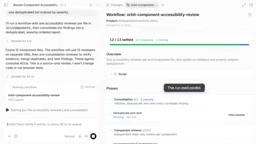
Devin then finds 12 files, plans 12 review agents plus a consolidation step. The workflow panel shows each phase, the agents involved, and their live status. The script Devin writes is also fully visible, so anyone can read the exact logic of that run.
Parallel vs. Pipeline: Two Orchestration Modes
Dynamic Workflows offers two core orchestration modes:
- Parallel mode: Wait for all parallel results to return before entering the merge step. The audit task in the demo uses this mode — the consolidation agent only starts after all 12 reviews are complete.
- Pipeline mode: Let each item flow independently through its own stages, suited for pipeline work with clear sequential dependencies.
The demo uses Parallel mode, where the final consolidation agent only starts after all 12 reviews are done. The 12 review results are merged into one report containing 10 deduplicated findings, sorted by severity.
The Essential Difference Between Parallel and Pipeline
Parallel is a "barrier-style" synchronization: all parallel branches must complete before the merge step can start, and any slow branch holds up the whole. Pipeline borrows from the pipeline concept in software engineering, where each item flows independently through its own stages. When the first item enters stage two, the second item can enter stage one at the same time, with no global barrier between stages. As a result, Pipeline is better suited for batch jobs where there are clear sequential dependencies within each item but items are independent of each other, enabling higher resource utilization and greater overall throughput. Parallel is better suited for scenarios where you want to "produce everything first, then consolidate and decide" — such as audit reports that need cross-cutting alignment, deduplication, and unified severity ranking. Which mode to choose depends on whether the merge logic must see all results.
When to Use Workflows vs. Regular Sessions
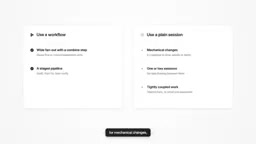
Not every task is suited to Dynamic Workflows. The official guidance offers clear criteria:
- Good for workflows: tasks with wide fan-out plus a combine step, staged work, mechanical batch modifications.
- Good for regular sessions: situations that only need a few sessions with tightly coupled tasks.
Each agent is essentially a session, so it is recommended to first try a slice to confirm the workflow is viable, then save it as a skill for reuse later.
Resumability and Auto-Approve
Dynamic Workflows includes targeted design for engineering reliability. Every agent call is recorded, and an interrupted run instantly replays completed agents, re-executing only the unfinished work. This means long-running audit or migration tasks will not lose all progress because of a single interruption.
In the Settings panel's preferences, the Auto-Approve Workflows option lets Devin skip per-step confirmation while running workflows, further increasing automation. For scenarios that require repeated runs — migrations, research, code review, codebase-level audits, or looping until tests pass — this mechanism can significantly reduce manual intervention.
The "Record-Then-Replay" Mechanism Behind Resumability
The reliability of Dynamic Workflows comes from treating every agent call as a persistable execution record. The general idea behind this kind of design aligns with "idempotent replay" in workflow engines such as Temporal and Airflow: write the outputs of completed steps to state storage, compare against that record on re-run, reuse cached results and skip actual execution when there is a hit, and only reschedule missing or failed steps. The direct benefit for users is that a very long audit or migration task spanning dozens of agents, even if it stops due to network interruption, process crash, or manual pause, only costs "the unfinished part" to recover rather than starting over. Note that this mechanism often requires designing each stage at the script level to be relatively independent and its results serializable, so that replay behaves consistently.
Impact on Development Workflows
The value of Dynamic Workflows is not just parallel speedup. It decouples "describing the work" from "orchestrating execution" — users only need to describe what to do, and Devin handles writing the orchestration script. The script itself is readable, reviewable, and saveable as a skill, giving AI-driven workflows transparency and repeatability similar to traditional CI/CD pipelines.
For codebase-level tasks that require cross-file, cross-module coordination, this multi-session collaboration model offers a new option between "a single conversation" and "manually writing automation scripts."
Background Notes
On Reusing "Skills"
The article mentions saving validated workflows as skills for later reuse. A skill here is essentially the solidification of executable, reliable orchestration logic into a callable asset: it usually includes trigger conditions, input parameters, the script body, and the expected output structure. Unlike a regular session, a skill is more deterministic — the same input follows the same orchestration path — making it better suited for mechanical tasks that need repeated execution, such as periodic audits, dependency upgrade migrations, and batch refactoring. Turning a one-off successful workflow into a skill is like upgrading an "ad hoc script" into a "team-shared automation tool," which is also why it resembles CI/CD pipelines in transparency and repeatability.
One-line Summary
Devin uses Python scripts to orchestrate multi-session collaboration, breaking large tasks into parallelizable, resumable workflows.
Paragraph Summary
Devin's Dynamic Workflows changes how AI coding assistants operate: instead of advancing step by step in a single session, Devin automatically writes a Python script to schedule multiple Devin sessions working in parallel like a team, then consolidates the output. It supports two orchestration modes — Parallel (merge after all complete) and Pipeline (each item flows independently through stages) — and uses a "record-then-replay" mechanism to guarantee resumability, restarting only unfinished parts after an interruption. The official demo shows real results with an accessibility audit of 12 components: 12 review agents work in parallel, and a consolidation agent merges them into 10 deduplicated findings sorted by severity. The article also provides usage guidance: wide fan-out with a combine step, staged work, and mechanical batch modifications suit workflows, while a small number of tightly coupled sessions are better handled in regular mode, and validated workflows can be saved as skills for reuse.
Related articles

Free Unlimited Claude Code Solution: Agnes AI + CC Switch Setup Guide
No paid subscription needed — pair the free AI platform Agnes AI with the open-source tool CC Switch to provide a backend for Claude Code, enabling unlimited free calls to text, image, and video models. This guide covers the full setup, test results, and usage boundaries.

A Complete Zero-Cost Guide to Getting Started with Claude Code for Beginners in China
A beginner's guide to Claude Code for users in China: two installation methods (command line and IDE plugin), full configuration steps for replacing the official API with the free domestic LongCat model, and a hands-on demo of building a small tool with natural language, plus tips.

When the NSA Gets Involved: The AI Supply Chain Crisis Behind Open-Source CVEs and API Key Hijacking
Multiple open-source projects disclosed severe CVEs in one day, PHP flaws alarmed the FBI, and Railway and OpenCode were breached with API keys stolen. This article breaks down the vulnerability window, AI-accelerated exploitation, and the AI supply chain crisis behind the API key black market, with a developer defense checklist.