Dify Beginner's Guide: Five Application Types and Workflow Hands-On Tutorial

Dify is an open-source AI app platform that wraps LLM calls and workflows into visual modules for rapid development.
Dify is an open-source AI application platform serving as middleware between developers and LLMs, wrapping model calls, prompt engineering, workflow orchestration, and knowledge retrieval into visual modules. It supports online, Docker, and source-code deployment. Its five application types — Chatbot, Text Generator, Agent, Chatflow, and Workflow — cover everything from simple Q&A to complex automation. For model integration, low-cost paid APIs like DeepSeek or Qwen are recommended over local models. Finished apps can be published as web apps, embedded in websites, or exposed via API.
What Is Dify
Dify is an open-source AI application development platform whose core value lies in enabling developers to quickly and easily build AI applications — whether for enterprise-grade production projects or personal utility tools.
In simple terms, Dify acts as an "AI application middleware" layer. It wraps complex processes like LLM calls, prompt engineering, workflow orchestration, and knowledge base retrieval into visual modules, so you can turn an idea into a working AI product without writing mountains of code from scratch.
For those looking to get started with AI application development, Dify has a relatively gentle learning curve: you can either try it directly on the official online platform or deploy it locally for private use. This article provides a systematic overview of Dify's deployment options, five core application types, and practical considerations for real-world use.
Dify Deployment Options Explained
Dify offers several deployment paths that you can choose based on your situation:
- Official online platform: No deployment needed — just register and start using it. Great for quick exploration. However, if your application needs to access a local database or local environment, you'll need an intranet tunneling tool to expose your local IP to the public internet.
- Local Docker deployment: Deploy Dify on Windows after installing Docker. Your local MySQL and other environments can be called directly by Dify.
- Source code deployment: Suitable for developers who need deep customization.
For production environments, it's recommended to deploy Dify on your own machine or your company's internal server. This gives you better control for internal enterprise use and stronger data security guarantees.
Why Install MySQL 8 Separately
Many users wonder: if Dify is already deployed, why do I still need to install a database separately?
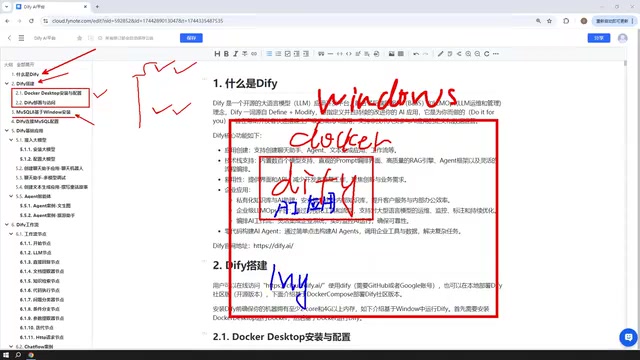
The reason is straightforward: AI applications you build in Dify often need to interact with databases — reading or writing business data. So you'll need a MySQL 8 instance in your environment for Dify to call.
Interestingly, where you deploy MySQL is very flexible — you can install it directly on Windows, run it via Docker, or even put it inside a VMware virtual machine. Once Docker is set up, Dify's network can communicate with MySQL running on Windows, in a container, or in a VM. The database can live anywhere — what matters is properly configuring the connection between Dify and the database.
Dify's Five Core Application Types
When creating an application in Dify, you have five main types to choose from. Understanding the purpose and differences between these five types is key to mastering Dify.

Chatbot: The Most Basic Conversational Application
The Chatbot is the simplest application form — essentially a conversational interface with an AI model. It's suitable for scenarios like customer service Q&A and knowledge consultation. Just configure a prompt and a model, and you can launch it quickly.
Text Generator: Focused on Content Production
The Text Generator is focused on content creation — having AI write articles, generate documents, or craft stories. It follows a "one input, one output" pattern and doesn't involve multi-turn conversation.
Agent: An Advanced Application That Can Use Tools
The Agent is the most capable of the three. Its key differentiator is that an Agent can invoke tools, systematically combining multiple tools to fulfill user instructions. For example, multi-step tasks like "first scrape a webpage, then analyze the content" need to be handled by an Agent.
These three types form Dify's "basic application" tier and cover the vast majority of common AI interaction needs.
An Agent's underlying logic is based on reasoning paradigms like "ReAct" or "Function Calling": the model repeatedly cycles through "think → select tool → call tool → observe result" until the task is complete. Dify includes built-in tools like search engines, web scrapers, code interpreters, and database queries. Developers can also connect internal enterprise systems to the Agent via custom tool interfaces. Compared to simple prompt-based applications, the core advantage of Agents is their ability to handle open-ended tasks where the steps can't be enumerated in advance — the model dynamically adjusts its actions based on intermediate results. Keep in mind that each Agent reasoning step consumes more tokens; the more complex the task and the longer the tool-calling chain, the higher the API cost. It's worth designing clear task boundaries to keep costs manageable.
Chatflow and Workflow: Advanced Workflow Applications
Beyond the three basic application types, Dify also offers a more powerful Workflow capability. Workflows come in two varieties:
- Chatflow: Supports multi-turn conversational interaction within a workflow. Ideal for scenarios where users need to keep asking follow-up questions with contextual continuity.
- Workflow: Oriented toward one-shot execution — input goes in, results come out, with no support for ongoing conversation. Best for batch processing and automation tasks.
The core difference between the two is simply whether conversational interaction is supported.

Dify's visual workflow editor uses a DAG (Directed Acyclic Graph) "node and edge" structure, where each edge represents the flow of data. Chatflow extends this by maintaining a "conversation memory" context — the system injects previous conversation turns as variables into subsequent nodes, enabling information to carry across turns. This makes Chatflow ideal for scenarios like "first gather user information, then progressively execute tasks" — for example, requirements-gathering bots or step-by-step form-filling assistants. Workflow is closer to a traditional automation pipeline, commonly used for scheduled batch document processing or trigger-based report generation. In Dify, both share the same node library; the key difference is only in how the entry node is triggered and whether session context is carried along.
Workflow Nodes: The Building Blocks of a Flow
When building Chatflows and Workflows, you assemble a complete process from individual modules — each module is called a Node. Nodes are the smallest unit of a workflow and cover a wide range of types including LLM calls, conditional branching, knowledge retrieval, code execution, and variable manipulation.
Mastering the functions and configuration of commonly used nodes is the foundation for designing complex AI workflows. Dify provides a rich library of node types, and in practice, a handful of frequently used nodes can cover the majority of business scenarios.
Dify Model Integration: Prioritize Paid APIs
All AI applications need to interact with large language models, so integrating a model is the very first step when using Dify. The clear recommendation here is: prioritize external paid model APIs over locally deployed small models.

Recommended model integration options include:
- DeepSeekAd: Paid API, but extremely affordable. In practice, after topping up ¥10, less than ¥1 was consumed over extended use.
- ERNIE Bot (Baidu): Offers free token credits upon registration.
- Qwen (Alibaba): Also provides millions of free tokens — more than enough for everyday use.
The "paid" aspect really shouldn't be a concern. Take DeepSeek as an example: the pricing is so low it's practically negligible, making it a minimal burden for individual learners and small-to-medium projects.
When Local Models (Ollama) Make Sense
Dify also supports integrating locally deployed models, such as those run via Ollama. However, there's a practical reality to be aware of: models that can run on a personal computer are typically small in parameter count, and their actual performance is often underwhelming.
There are exceptions, of course. If your machine is powerful, or if you're running Ollama on an enterprise-grade cluster capable of running large open-source models from DeepSeek (such as models hundreds of gigabytes in size), then using a local model for enterprise applications is entirely viable — larger parameter models naturally deliver better results.
Ollama is an open-source local LLM runtime framework that supports one-click downloading and running of mainstream open-source models like Llama, Mistral, and DeepSeek on Windows, macOS, and Linux, with llama.cpp powering CPU/GPU hybrid inference under the hood. Its core advantage is that data never leaves your machine, making it ideal for scenarios with strict data privacy requirements. To connect Dify with Ollama, simply fill in Ollama's local service address (default: http://localhost:11434) under "Model Providers," and you can call local models in your workflows just like a cloud API. In practice, models under 7B parameters show a noticeable gap compared to commercial models like GPT-4o and DeepSeek-V3 in instruction following and long-context reasoning. They're better suited for lightweight tasks like text classification and simple Q&A; for complex multi-step workflows, paid APIs remain the recommended choice.
Publishing and Integrating Dify Applications
Applications you build don't have to stay within Dify's interface. Dify provides multiple publishing options to reach a wider audience:
- Publish as a public web app: Generate a publicly accessible link that anyone can use (local deployments require intranet tunneling).
- Embed in an existing website: Integrate the application as a component within your own website.
- Call via API: Integrate into other systems or products through an API for flexible connectivity.
This flexible publishing mechanism means Dify is not just a development tool — it's a complete platform capable of delivering AI capabilities externally.
Summary: A Dify Learning Roadmap
The overall learning path for Dify can be summarized as: Understand the platform's purpose and deployment options → Configure databases and model integrations → Master the five application types → Deep dive into workflows and node orchestration → Finally, publish your applications.
For developers looking to build AI workflows quickly, Dify dramatically lowers the barrier from idea to implementation. Combined with low-cost paid APIs like DeepSeek, even individual learners can get started with AI application development at minimal cost. From here, it's simply a matter of working through each of the five application types hands-on, practicing with concrete examples, and gradually building a complete Dify development skill set.
Related articles

Lightpanda: A Headless Browser Built for AI and Automation
Lightpanda is a headless browser built from scratch in Zig for AI and automation, with 37,852 GitHub stars. This analysis covers its technical approach, design choices, and use cases.

From Will Smith Eating Spaghetti to AI Short Films: The Astonishing Pace of AI Video Evolution
Tracing AI video's evolution: from Runway's 2019 short film *The Orange* to the Will Smith spaghetti video, a Twitter comparison reveals the astonishing pace of technological progress in just a few years.

Opus 4.6 Chat Experience: Why Do Older Models Feel More "Human"?
A Reddit user shares a late-night chat with Opus 4.6, noting older models feel more personable. We analyze the causes of model personality differences and the balance between capability and experience.