Dify Complete Guide: From Deployment to Building AI Agents

A full beginner's guide to Dify — from deployment to building AI agents across five application types.
Dify is an open-source AI application platform that acts as middleware connecting large models, data, and business logic, supporting hosted, Docker, and source-code deployments. This tutorial covers Windows Docker setup with MySQL 8, and explains Dify's five core app types: Chat Assistant, Text Generation, Agent (with tool-calling), ChatFlow (multi-turn workflows), and Workflow (one-shot node pipelines). For model integration, paid cloud models like DeepSeek and ChatGPT are recommended, with free-tier options like ERNIE Bot and Qwen for learners. Finished apps can be published as public websites, embedded in custom sites, or accessed via API.
Dify is an open-source AI application development platform that lets developers — whether building enterprise-grade applications or personal AI tools — get up and running quickly with a low barrier to entry. This article is based on a systematic tutorial series from Bilibili, walking through the complete workflow from installing and deploying Dify to building intelligent agents, designed to help AI beginners establish a clear technical foundation.
What Is Dify: An All-in-One AI Application Builder
At its core, Dify is an AI application development platform whose key value lies in enabling users to rapidly build all kinds of AI applications without writing large amounts of code from scratch. It's suitable for both enterprise-scale deployments and everyday personal use.
For beginners, understanding Dify's positioning is crucial — it's not a model itself, but rather a middleware platform that connects large language models, data, and business logic. You can either use the official hosted online version or deploy it to your own local environment. The two are nearly identical in interface; the main difference lies in data access: the online version, if it needs to call a local database or environment on your machine, typically requires an intranet penetration tool to expose your local IP to the public internet.
For production environments, the tutorial recommends a local deployment approach. This allows Dify to directly access local databases like MySQL, making it more convenient and controllable for internal company use.
Intranet Penetration refers to using a third-party server to map a service inside a local area network to a publicly accessible address. Common tools include frp, ngrok, and the Chinese service Pagoda (花生壳). The principle is: a local client maintains a persistent connection to a public server, and when external requests arrive at that server, they are forwarded through the connection to the local machine. For scenarios where Dify is deployed locally and you want external users to access it, intranet penetration is the most common solution — but it also introduces security risks. Services exposed to the public internet need access authentication configured to prevent unauthorized access to local databases or sensitive data.
Environment Setup: Docker Deployment and MySQL Configuration
The tutorial uses a Docker-on-Windows deployment approach. Dify also supports other methods such as source code deployment, and users can choose based on their own situation.
After deployment, a key step is configuring the database. Since AI applications built in Dify often need to read data from a database to complete interactions, the database environment needs to be set up in advance. The tutorial demonstrates this using MySQL 8 on Windows as an example.
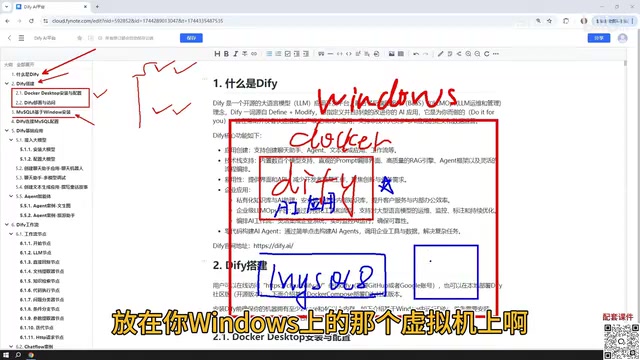
It's worth noting that MySQL's deployment location is quite flexible: it can be installed directly on the Windows host, deployed via Docker, or even placed inside a VMware virtual machine — all work fine. Once Docker is installed, Dify's network can communicate normally with MySQL running on the Windows host, so the physical location of the database isn't a limiting factor.
Once the database is ready, you'll also need to configure Dify's connection to MySQL — this step is the bridge between the AI application and your business data.
The Five Core Application Types Explained
Dify's feature system can be organized into five core application types. Understanding these five types is the key to mastering the entire platform.
Basic Applications: Chat Assistant, Text Generation, and Agent
The first three are basic application types. The Chat Assistant is the simplest and most direct — it's a conversational interface for interacting with an AI model. Text Generation focuses on content production: writing articles, generating documents, creating fiction and stories — all of this can be accomplished through this type.

The Agent is the most capable of the three. Its fundamental difference from Chat Assistants and Text Generation lies in the fact that an Agent can call tools to complete user instructions. For example, you can have an Agent first crawl web content, then analyze the results — multi-step tasks that require external tool collaboration are exactly where Agents shine.
The core mechanism of an Agent is the "Reasoning-Action" loop (the ReAct framework): the model analyzes the current state at each step, decides whether to call a tool, processes the tool's return value, then continues reasoning — until the task is complete. This is fundamentally different from the single "input → output" pattern of ordinary conversation. Agents in Dify can be bound to tools such as search engines, code executors, database queries, and HTTP requests, giving them the ability to interact with the external world. Because Agents need to call the large model multiple times for reasoning, their token consumption is typically far higher than a standard chat assistant — be mindful of costs when using paid models.
Advanced Applications: ChatFlow and Workflow
Beyond the three basic types, Dify also provides two workflow-based applications: ChatFlow and Workflow.

The core difference between the two lies in interaction style: ChatFlow supports multi-turn conversations throughout the workflow execution, while Workflow is a one-shot execution mode that runs through to completion and outputs a result directly. Workflows are composed of nodes, each of which acts as a functional module; combining multiple nodes builds out the complete process. Mastering the use of common nodes is the foundation for building complex AI applications.
Workflow's node-based design shares the same philosophy as low-code/no-code platforms: breaking complex logic into standardized functional units and combining them into a complete process through visual connections, thereby lowering the programming barrier. Common node types in Dify include LLM nodes (calling large models), conditional branching nodes (if/else), code nodes (executing Python/JavaScript snippets), knowledge retrieval nodes (RAG vector search), and HTTP request nodes. ChatFlow adds conversation state management on top of this, allowing users to provide additional information or make choices during workflow execution — making it ideal for complex scenarios that require human-AI collaborative decision-making.
Connecting Large Models: Prioritize Paid Cloud Models
Since all of the applications above require interaction with a large model, connecting to one is a necessary step before using Dify.

On model selection, the tutorial offers clear guidance: prioritize paid cloud models such as DeepSeekAd and ChatGPT. There are also options that provide free tokens — Baidu's ERNIE Bot and Alibaba's Qwen, for example, typically grant millions of free tokens upon registration, which is more than enough for everyday learning.
In contrast, the tutorial advises beginners against using local models directly. Although Dify supports integration with models deployed locally via Ollama, the actual performance of small local models is often unsatisfactory due to the limitations of personal hardware. That said, if you have high-performance equipment or an enterprise-grade Ollama cluster capable of running larger parameter models, using Dify to connect local models for enterprise applications is entirely feasible.
Ollama is an open-source local large model runtime framework that supports one-click downloading and running of mainstream open-source models like Llama, Mistral, and Qwen, abstracting away the complexity of configuring GPU drivers and inference engines. Its local service listens on port 11434 by default and provides an API compatible with the OpenAI interface specification, so Dify can connect to local Ollama models using a unified interface format. Model parameter count roughly correlates with required VRAM: a 7B parameter model needs approximately 8GB of VRAM, 13B needs about 16GB, and 70B and above requires multiple GPUs or high-end consumer cards. For personal devices with only integrated graphics or low-end dedicated GPUs, performance and response speed will often fall short of practical requirements — which is the main reason the tutorial recommends beginners start with cloud-based models.
Publishing Applications: Multiple Ways to Go from Local to Public
Applications built in Dify aren't limited to use within the local deployment environment. The platform provides multiple publishing methods to help applications reach a broader audience.
The most straightforward approach is to publish an application as a public website, generating a link that anyone can access. Note that if you're running on a local deployment, this also requires intranet penetration to bridge the internal and external networks.
Applications can also be embedded into your own website, or called via API (such as through the Python API). This flexible publishing mechanism allows applications built with Dify to integrate seamlessly into all kinds of business scenarios, greatly increasing their practical value.
Summary
This Dify tutorial series covers the complete journey from zero to one: platform overview, environment deployment, database configuration, the five core application types, large model integration, and application publishing. For AI beginners, Dify lowers the technical barrier to building AI applications, enabling more people to turn large model capabilities into real, usable products. Each subsequent section will come with detailed examples — it's recommended to practice hands-on as you learn to truly master the essence of this toolset.
Related articles

Random Pruning of the DPO Computation Graph: 1.4x Training Speedup and Lower Peak Memory
DPO training too slow and memory-hungry? This paper proposes a random pruning framework for the DPO computation graph, sampling independently across position, sequence, and branch dimensions; branch pruning achieves a 1.426x step-time speedup and cuts training time by about 30%, with in-depth attribution of memory and time gains.

Why Does JEPA Underperform MLM in Longitudinal EHR Representation Learning?
New study compares JEPA and MLM for longitudinal EHR representation learning on MIMIC-IV: three JEPA variants train stably without collapse but underperform MLM; target size, not heterogeneity, drives prediction error.

Transfer Learning + Visible Light Communication: A New Approach to Energy-Efficient Indoor Positioning
A study proposes a transfer learning-based visible light communication indoor positioning method, achieving 47% accuracy improvement on the BOSCH factory dataset, 67.5% model efficiency under high noise, and introducing the ME composite metric for energy-efficient positioning in energy-constrained industrial IoT scenarios.