Dify Deployment Tutorial: Set Up Your AI Application Development Platform in Three Steps

Deploy Dify 1.8.0 locally in three simple steps using Docker Compose to build your AI development platform.
This tutorial walks through deploying Dify 1.8.0, an open-source AI application development platform, on your local machine. It covers the platform's positioning versus Coze and other tools, explains its five application types including Workflow and Chatflow, and provides a streamlined three-step deployment process using Docker Compose that requires virtually no manual configuration.
What is Dify: An Open-Source AI Application Development Platform
For newcomers to AI development, Dify is a name you'll encounter everywhere. Simply put, Dify is an open-source AI application development platform whose core value lies in enabling developers to rapidly build various AI applications without writing massive amounts of code from scratch.
From a technical standpoint, Dify falls into the category of LLMOps (Large Language Model Operations) platforms. Traditional AI application development requires developers to handle model invocation, prompt management, context window control, vector database integration, API gateway setup, and a host of other infrastructure tasks on their own. Dify abstracts these underlying capabilities into visual modules and configuration options, allowing developers to accomplish through drag-and-drop and configuration what would otherwise require thousands of lines of code. This "low-code + AI" approach is becoming the mainstream trend in AI application development.
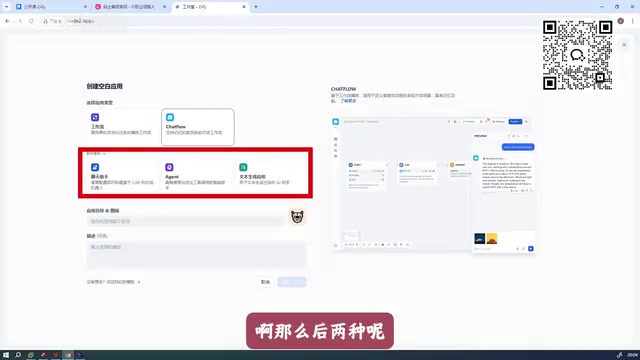
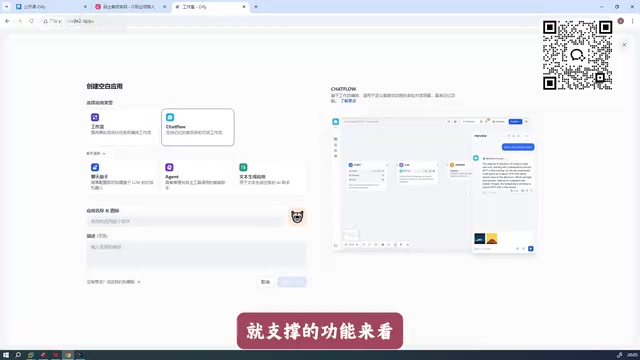
Compared to Coze, Dify offers more diverse application type support. While Coze primarily supports two AI application formats, Dify provides five application types:
- The first three are beginner-friendly quick application builders;
- The latter two are Workflow and Chatflow, both essentially workflow-based, but Dify distinguishes between them to accommodate different use cases.
Specifically, Workflow is a stateless task orchestration mode suited for one-shot input-output tasks such as document summarization, data analysis, and batch content generation—execution ends once complete. Chatflow is a stateful conversational orchestration mode with built-in conversation memory, context management, and multi-turn interaction logic, making it ideal for building customer service bots, intelligent assistants, and other scenarios requiring ongoing dialogue. Both are built on a DAG (Directed Acyclic Graph) node orchestration engine, but Chatflow additionally integrates session management and message history mechanisms.
Dify vs Coze: Why Dify Ranks as the Top Enterprise Choice
When it comes to selecting enterprise-grade AI application development tools, there's a commonly recommended hierarchy in the industry. According to the analysis by "Bao Ge," an instructor at Ma's Education on Bilibili, Dify typically ranks first in real-world enterprise applications, with Coze in second place, followed by other tools like RAGFlow and n8n.
It's worth noting that each of these tools has its own focus: RAGFlow is an open-source tool specializing in RAG (Retrieval-Augmented Generation), with core strengths in document parsing, chunking strategies, and fine-grained control over vector retrieval—ideal for scenarios demanding extremely high knowledge base Q&A quality. n8n is a general-purpose workflow automation platform that originated in IT operations and business process automation, only later adding AI node support. n8n's advantage lies in its 400+ third-party service connectors, but its AI capabilities are "add-on" rather than "native," making it less professional than Dify for AI-specific scenarios like prompt debugging, model switching, and RAG integration.
Advantages of Chinese-Made AI Development Tools
Compared to foreign alternatives like n8n, Chinese-made tools like Dify and Coze are more competitive in several dimensions:
- More comprehensive features: Broader AI application scenario coverage with stronger out-of-the-box capabilities;
- Better usability: Gentler learning curves and lower barriers for beginners;
- Better localized ecosystem: Superior adaptation to mainstream Chinese LLMs (such as Tongyi Qianwen, ERNIE Bot, etc.).
For developers in China, mastering Dify and Coze essentially covers the practical needs of most AI application development scenarios.
Dify 1.8.0 Local Deployment: Done in Three Steps
This deployment is based on Dify version 1.8.0. Compared to older versions, the new release has significantly simplified the deployment process, and previously frustrating configuration issues and bugs have been fixed.
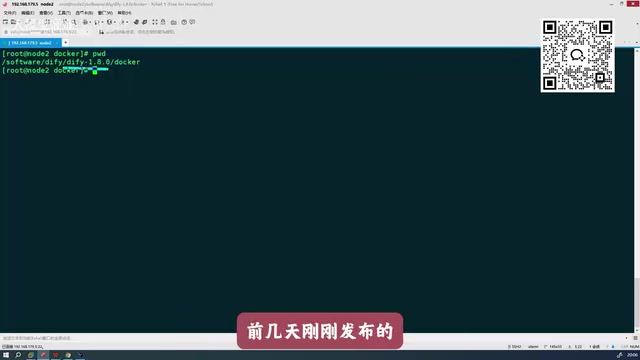
Step 1: Extract the Installation Package and Enter the Directory
Extract the downloaded Dify installation package, then navigate to the Dify project directory via command line:
cd dify/docker
Step 2: Configure the Environment Variables File
Once inside the docker directory, you'll see an example configuration file named .env.example. Simply rename it to .env:
mv .env.example .env
Key improvement in the new version: In older versions, the
.envfile often required extensive additional environment variable configuration to run properly. Version 1.8.0 requires virtually no extra configuration—it launches with default values right out of the box, significantly lowering the deployment barrier.
Step 3: One-Click Launch with Docker Compose
Run the following command to spin up the entire Dify service:
docker compose up -d
Docker Compose is Docker's official multi-container orchestration tool that defines the dependencies, network configurations, and storage volumes of multiple services through a single YAML file. Dify's complete service stack includes multiple containers: Web frontend (Nginx), API backend (Flask/Celery), vector database (Weaviate/Qdrant, etc.), relational database (PostgreSQL), cache (Redis), sandbox execution environment, and more. The docker compose up -d command starts these services sequentially according to their dependencies, with the -d flag running them in detached daemon mode.
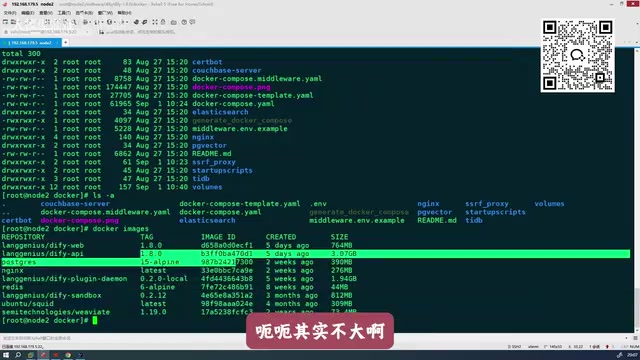
Regarding image sizes, all images for this version total approximately 5-6GB (mainly from the Python runtime, machine learning dependency libraries, and vector database engines)—10GB of disk space is more than sufficient. The new version has optimized image sources, making downloads much faster than before. Typically, all image pulls and service startups complete within a few minutes.
Logging into Dify and Core Feature Modules
Once the services are successfully started, open your browser and navigate to the IP address or domain name of the deployment node to access Dify's web interface.
After logging in, the interface contains four core modules:
| Module | Description |
|---|---|
| Explore | Browse official application templates and examples |
| Studio | The core workspace for creating and managing AI applications |
| Knowledge | Manage document data used for RAG retrieval augmentation |
| Tools | Configure and manage various plugins and external tools |
Studio is the most critical module—this is where Dify's core value of building AI applications is realized.
The Knowledge module implements a complete RAG (Retrieval-Augmented Generation) pipeline. The core idea behind RAG is: before a large model answers a question, it first retrieves document fragments relevant to the user's question from an external knowledge base, injects these fragments as context into the prompt, enabling the model to generate answers based on real data. This effectively addresses LLM "hallucination" issues and knowledge timeliness problems. The technical pipeline includes: document upload → text chunking → vectorization (embedding) → storage in vector database → semantic similarity retrieval when users ask questions → injecting Top-K results into the prompt → model generates the answer. Dify supports multiple chunking strategies and embedding models, allowing developers to configure flexibly based on document types.
Creating Your First AI Application
In Studio, click "Create Blank Application" and select an application type to start building. The recommended learning path is:
- Start with the most basic beginner-friendly application types to familiarize yourself with the interface and fundamental operations;
- Gradually transition to Workflow orchestration;
- Eventually master the complex interaction design of Chatflow.
Summary
As a Chinese-made open-source AI application development platform, Dify has become one of the top choices for enterprise-grade AI application development thanks to its comprehensive feature set and excellent usability. Version 1.8.0 includes extensive deployment experience optimizations:
- Eliminates tedious environment variable configuration—default values work out of the box;
- Dramatically improved image download speeds;
- Fixed multiple legacy bugs.
These improvements enable even complete beginners to finish Dify's local deployment in just a few minutes. We recommend completing the deployment process outlined in this article first, then starting from a blank application in Studio to progressively explore Workflow and Chatflow orchestration capabilities, ultimately building AI applications that solve real business problems.
Key Takeaways
Related articles

Apple HomeView Hands-On Review: Is the $300 Smart Home Hub Worth It?
Apple HomeView hands-on: a $300 smart home hub with facial recognition for quick account switching, but no App Store or voice recognition. Is the wall-mounted version worth it? Should you buy the first generation?

Meta Muse Wonder Launch: What It Means for Meta's Return to the Frontier AI Race
Meta releases Muse Wonder and WonderFull, benchmarks reach the frontier, community feedback is polarized. An in-depth look at Meta's return to the frontier AI race, its personal agent strategy, and Zuckerberg's different path.

Apple Home Smart Home Lineup Leaked: LG and Schneider Team Up, UWB Door Lock on Board
Apple Home ecosystem gains new LG and Schneider devices: UWB smart lock with proximity unlock, 2.5K dual-camera doorbell, privacy indoor camera, and AirPods-like seamless pairing.