Dishylink: A Free Open-Source Desktop Monitoring Tool for Starlink — Runs Locally, No Cloud Required

Dishylink is a free open-source desktop app for monitoring Starlink, running entirely on your local network.
Dishylink is an open-source desktop monitoring tool for Starlink that runs entirely on your local network without any cloud dependency or account registration. Supporting macOS, Windows, and browsers, it offers real-time signal monitoring, antenna alignment angles, 3D satellite views, obstruction timeline analysis, per-device data usage tracking, and power consumption history — filling the gap left by Starlink's mobile-only official app.
The Missing Desktop Monitoring Tool for Starlink
Starlink's global adoption has been nothing short of remarkable, but one long-overlooked pain point persists: the official monitoring tool is only available as a mobile app. To make matters worse, the web-based management portal that power users once relied on was shut down in 2024, with no official replacement offered.
Starlink is SpaceX's Low Earth Orbit (LEO) satellite internet service. By deploying thousands of small satellites in a constellation network at approximately 550 kilometers above Earth, it provides low-latency, high-bandwidth internet access to users worldwide. Compared to traditional Geostationary Earth Orbit (GEO) satellites with round-trip signal delays of 600 milliseconds or more, LEO satellites compress latency down to 20-40 milliseconds, making real-time applications like video calls and online gaming feasible. As of 2024, Starlink has deployed over 6,000 satellites, serving more than 70 countries with over 3 million users — yet such an enormous user base has long lacked a proper desktop-grade monitoring tool. This is, frankly, a product-level oversight.
For users who rely on Starlink for home offices, RV travel, remote workstations, or even small businesses, checking device status through a phone app simply isn't enough. When you want to monitor signal quality over extended periods, track power consumption and data usage, or troubleshoot connectivity issues from your desktop, the absence of a professional desktop tool becomes a glaring shortcoming.
Dishylink, an open-source project created by developer David Herbert, targets exactly this gap. It returns in the form of a native desktop application, supporting macOS, Windows, and browsers, putting advanced monitoring capabilities back in users' hands.
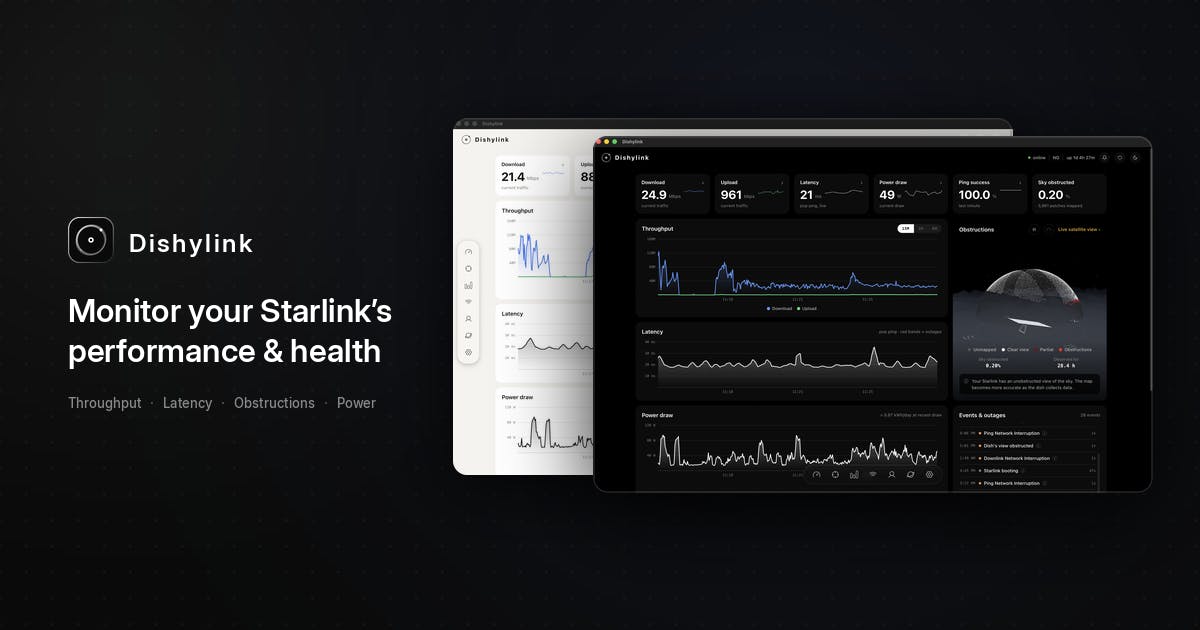
Privacy-First Architecture: Local Execution, No Cloud Required
Dishylink's most commendable design choice is that it runs entirely on your local network. It reads data directly from your dish antenna and router over your own network — no account registration required, no cloud service dependencies.
From a technical standpoint, Dishylink achieves pure local data access because Starlink's dish antenna and router expose a gRPC (Google Remote Procedure Call) interface on the local network. gRPC is a high-performance remote procedure call framework built on HTTP/2 and Protocol Buffers serialization, allowing clients to request data from remote services as if calling local functions. Starlink devices listen for gRPC requests at the default address 192.168.100.1, providing detailed telemetry including antenna status, signal quality, obstruction data, and GPS coordinates through this interface. Although this interface has no official documentation, the community has reverse-engineered most of the available data endpoints, laying the technical foundation for tools like Dishylink.
This "local-first" architecture delivers several direct benefits:
- Privacy control: Your device status, location, and traffic data never leaves for third-party servers;
- Zero latency: Data is read directly from local devices, offering better real-time performance;
- No account barrier: Open and use immediately — no email binding or subscription required.
For the Starlink user community, which inherently values network autonomy, this design philosophy aligns perfectly with their mindset of not wanting to be locked into a single vendor. Combined with the project being fully open-source, users can audit the code themselves and verify that no data is being secretly uploaded — earning significant trust points.
Dishylink Core Features in Detail
Dishylink isn't simply a replica of the official app — it adds substantially more monitoring dimensions. Here are its core capabilities:
Real-Time Signal Status and Antenna Alignment Angles
The application displays real-time statistics and presents antenna alignment angles in degrees. This is extremely useful for users who need to manually adjust antenna orientation to find optimal signal positions (especially in RV and mobile scenarios) — you can know precisely how many degrees off you are.
Starlink user terminals employ phased array antenna technology — a system that electronically controls beam direction without mechanical rotation to rapidly change signal reception orientation. The antenna consists of thousands of tiny antenna elements arranged in an array, achieving beam steering by precisely controlling the phase difference of each element's signal. Alignment angles (azimuth and elevation) reflect the deviation between the antenna's main beam and the optimal reception direction. In fixed installations, the antenna typically maintains stable angles after completing automatic alignment; in mobile scenarios, however, the antenna must continuously track satellites, causing frequent angle changes. Excessive deviation leads to signal attenuation or even connection loss, making real-time monitoring of this value critical for mobile users.
3D Satellite View and Obstruction Timeline Analysis
More advanced still, Dishylink includes a 3D satellite view that lets users visually see the distribution of currently connectable satellites. It also provides an obstruction time lapse feature that uses time-lapse recording to help determine whether trees, buildings, or other obstacles are blocking signals during specific time periods, enabling antenna placement optimization.
Satellite signal obstruction is one of the most common performance bottlenecks Starlink users face. Since LEO satellites orbit at approximately one revolution every 90 minutes, the antenna needs to track satellites across the entire sky hemisphere. If obstacles like trees, buildings, or hills exist in the antenna's field of view, brief disconnections occur when satellites pass through those areas — typically lasting a few seconds to tens of seconds. While each individual interruption may seem minor, frequent occurrences severely impact real-time applications like video conferencing and online gaming. The official Starlink app provides a simple obstruction scan tool, but it's only a static snapshot. Dishylink's obstruction timeline feature records obstruction patterns over time, which is far more valuable for actual installation optimization — for example, a particular tree might only cause obstruction during specific afternoon hours when satellite orbits pass through that direction. Timeline analysis can pinpoint the problem precisely, helping you decide whether to trim branches or adjust the installation position.
Per-Device Power Consumption and Data Usage Tracking
On the operational cost front, Dishylink supports:
- Per-device data usage statistics: See which device in your home is the biggest data consumer;
- Power consumption monitoring: View device energy consumption with daily and monthly historical records.
This is particularly important for RV and camping users who depend on solar panels or battery power. The standard Starlink dish averages about 50-75 watts, and can exceed 100 watts during startup and snow-melt mode. For a typical RV solar system (usually 400-800 watt panels with 200-400Ah lithium batteries), Starlink may consume 30%-50% of the total energy budget. Precisely understanding its actual power consumption curve directly impacts energy planning for off-grid scenarios — such as whether to shut down the antenna at night or limit usage during overcast days.
Smart Alert System
Additionally, it features an auto-clearing alert system — when abnormal conditions resolve, alerts automatically clear. This eliminates the hassle of manually dismissing notifications and keeps the monitoring interface consistently clean.
The Trend of Open-Source Communities Filling Official Product Gaps
Dishylink received 91 upvotes on Product Hunt — not exactly a viral hit, but it reflects a noteworthy trend: when official products leave functional gaps, open-source communities are often the first to step in.
Starlink has a large, technically savvy user base with naturally high expectations for device observability. The official strategy of "mobile-first, simplified features" has inadvertently created living space for community tools. Dishylink's positioning as free, open-source, account-free, and cloud-free hits exactly the points this user segment cares about most.
From a broader perspective, third-party monitoring tools built around hardware ecosystems are becoming a common pattern — from smart homes to routers to satellite internet, wherever devices expose local interfaces, developers will build more specialized tools around them. This follows a deep tradition in the tech community: from early DD-WRT and OpenWrt providing advanced router management, to Home Assistant unifying monitoring and automation for hundreds of smart home device types, to Grafana and Prometheus being increasingly adopted by home users for network observability — the pattern remains consistent. Hardware vendors simplify official tools to reduce support costs, while technical user communities need deeper data insights and automation capabilities, and community tools naturally grow in this gap.
Summary: An Open-Source Project Worth Bookmarking for Starlink Users
Dishylink fills the gap in Starlink's desktop monitoring with a lightweight, open-source, cross-platform desktop application. It integrates professional features like signal alignment, 3D satellite views, obstruction analysis, and power and data usage tracking into a locally-running app that respects user privacy while delivering observability far beyond the official app.
For any serious Starlink user, this is an open-source project worth bookmarking. It proves once again: the ones who truly understand user needs often aren't the official teams, but the community developers who are "using it themselves."
Related articles
LLaMA-Factory in Practice: A Complete No-Code Guide to Fine-Tuning Large Models
An introduction to LLaMA-Factory, the open-source fine-tuning tool: its 60.1K-star background, supported models and algorithms, local vs. cloud deployment, and CUDA setup steps.

Zeng Ming's Deep Retrospective: Why OpenAI May Not Be the Ultimate Winner — and Why the Corporate System Will Disappear
Zeng Ming's deep retrospective on the AI endgame: model companies are just infrastructure, OpenAI and Anthropic won't be the final winners; the next battle is the Agent entry point standard; the corporate system will disappear as AI restructures collaboration, and only mission-driven companies can survive the cycle.
OpenHands v1.28.0: OpenCode and PI Added as Built-in Agents, API Keys Requestable In-Conversation
OpenHands ships 5 releases in 21 days: v1.27.0 adds OpenCode and PI as built-in agents, v1.28.0 enables in-chat key requests. ACP integration, credential reuse, model list changes, and upgrade advice.