Does Proxmox Really Kill Your Boot Drive? Community Data Calls the Bluff

Community data debunks the myth: Proxmox background writes are just ~0.27 TB/year, posing no real threat to modern SSDs.
An article claiming Proxmox rapidly destroys boot SSDs went viral on Reddit, but community members recalculated the article's own figures and found actual background writes amount to just ~0.27 TB/year — a fraction of a typical SSD's 300 TBW rating. The discussion also corrected a common ZFS mirror misconception and identified the real culprits behind heavy writes: swap, databases, and runaway processes. Users recommend a simple 24-hour smartctl test to measure real write rates firsthand.
A clickbait-style article recently sparked heated debate on Reddit — "Your Proxmox boot drive is probably dying faster than you think." The title is alarming enough, but once community members ran the actual numbers and pulled up real SMART data, the conclusion was a striking reversal: this turned out to be a whole lot of nothing.
Where the Controversy Starts: Proxmox Does Write in the Background
There's no disputing that Proxmox continuously writes to the boot SSD even when idle. The sources include pmxcfs (the cluster filesystem), RRD statistics, system logs, and other resident services. These writes form the basis of the so-called "write amplification" problem the article builds its case on.
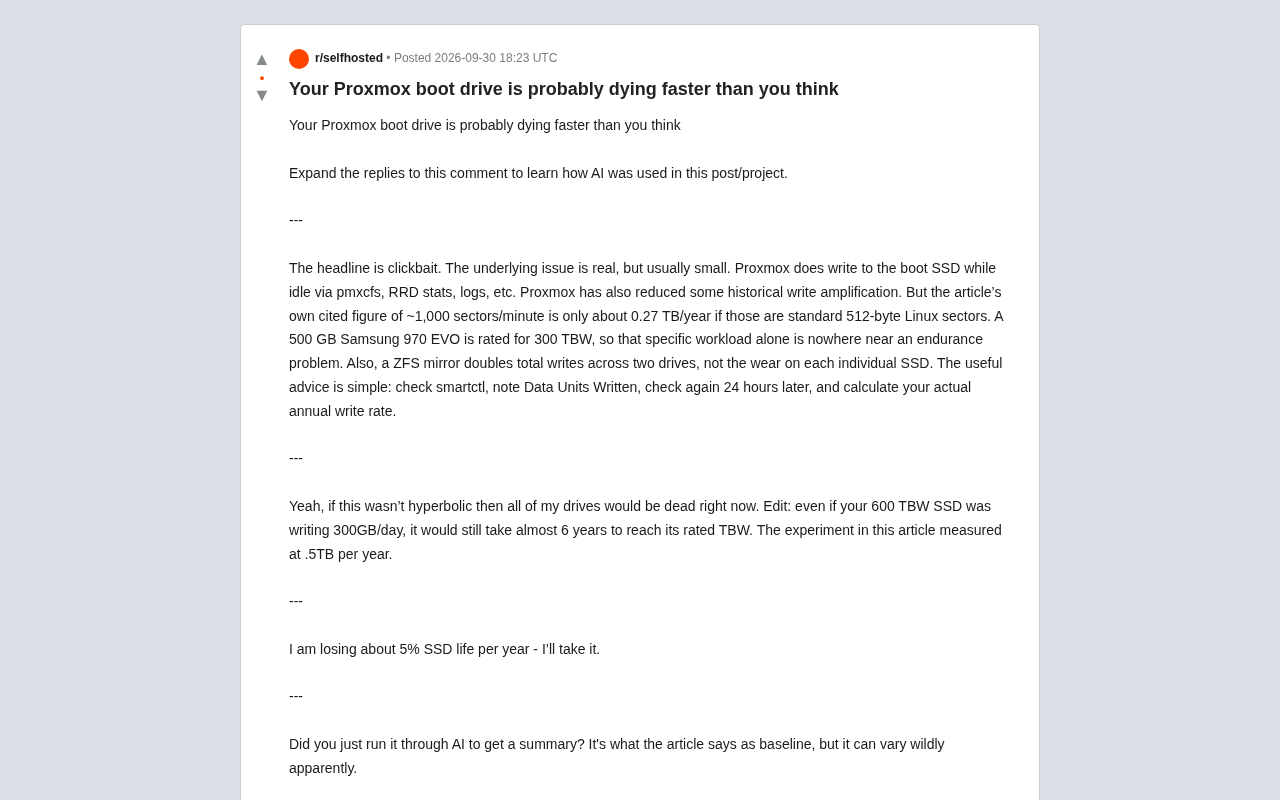
But there's an important distinction to make: "Proxmox writes to disk" and "Proxmox will destroy your disk" are two entirely different claims. The Proxmox team has also reduced historical write amplification issues through recent optimizations. The real question is — how much data is actually being written?
pmxcfs is Proxmox's FUSE-based cluster filesystem, designed to synchronize configuration data across cluster nodes. It relies on Corosync for communication and persists data locally to a SQLite database. Even in single-node (non-cluster) deployments, pmxcfs keeps running and periodically flushes its in-memory state to disk. RRD (Round Robin Database) is the time-series database Proxmox uses to record performance metrics like CPU, memory, and network usage. Its "circular overwrite" design prevents files from growing indefinitely, but it also means a write is triggered at fixed intervals. These two components, combined with continuous system log writes, make up the primary sources of background disk activity during Proxmox idle time — the concrete reality behind the "write amplification" concern.
Let the Data Speak: What Does 0.27 TB/Year Actually Mean?
The most valuable reply in the thread took the numbers the article itself cited and recalculated them. The article's own chart showed approximately 1,000 sectors per minute written. Converting that using the standard 512-byte Linux sector size, the write rate works out to roughly 0.27 TB per year.
Compare that against real hardware specs: a 500GB Samsung 970 EVO is rated for 300 TBW (Terabytes Written). At a background workload of 0.27 TB/year, the drive's longevity isn't even a conversation worth having — it would theoretically take over a thousand years to reach its rated TBW.
Another user offered an even more intuitive calculation: even a 600 TBW SSD writing 300GB per day would take nearly six years to hit its TBW limit. The measured workload in the article was just 0.5 TB per year — orders of magnitude apart.
A Common Misconception About ZFS Mirrors
The discussion also cleared up a technical misunderstanding: ZFS mirroring doubles the total data written across both drives, but that doesn't mean each individual SSD wears out twice as fast. Each drive handles roughly the same write load as it would in a single-drive setup — mirroring simply writes the same data to two drives simultaneously. Conflating these two concepts can lead to a badly miscalibrated sense of durability risk.
TBW (Terabytes Written) is the endurance rating SSD manufacturers list in product specs, representing the total amount of data a drive can handle over its lifetime. This figure stems from the limited erase/write cycle count of NAND flash cells — as cells are repeatedly erased and rewritten, the insulating layer gradually degrades, eventually compromising data retention. Most consumer SSDs are rated between 150 and 600 TB TBW; enterprise drives can reach several thousand. Note that TBW reflects host write volume, not actual NAND erase cycles — due to write amplification inside the SSD controller, each byte written by the host may translate to several bytes of actual NAND activity. Even so, at the 0.27 TB/year scale, the write amplification factor has virtually no practical impact on the final conclusion.
What Should You Actually Worry About?
Workloads vary enormously — that's the consensus across the discussion. But the key insight is this: if a machine that should be idle is genuinely writing hundreds of gigabytes per day, the culprit is almost certainly not Proxmox's normal background activity. Something else needs to be investigated.
Experienced users offered a practical checklist:
- Swap pressure: Insufficient RAM causing frequent disk swapping
- VM/container disks: I/O from virtual machines and containers themselves
- Databases: High-frequency database write operations
- Logging: Excessively verbose or high-frequency log output
- ZFS writes: ZFS metadata and transaction group writes
- Misbehaving services: A runaway process writing continuously to disk
In other words, blaming heavy write activity on "Proxmox default behavior" is looking in the wrong place.
Verify It Yourself: A Simple, Reliable Method
Rather than letting a clickbait article scare you, just run the test yourself. The community-recommended approach is dead simple and accessible to anyone:
- Run
smartctlto read the SSD's SMART data - Record the current Data Units Written value
- Wait 24 hours and read it again
- Use the difference to calculate your real annualized write rate
The value of this method is that it gives you measured data for your specific machine, rather than numbers from someone else's chart that may be skewed by their particular environment. One user shared their own results showing about 5% SSD lifespan consumed per year, adding "I'm completely fine with that rate." Another posted an even more compelling case: two Kingston A400 480GB drives in a ZFS mirror running a production Proxmox server with two Windows 7 VMs for six or seven years — still running without a single issue.
smartctl is the core command in the smartmontools package. It reads SMART (Self-Monitoring, Analysis and Reporting Technology) attributes exposed by drive firmware to assess disk health. For NVMe SSDs, the Data Units Written field in smartctl -a /dev/nvme0 output records cumulative write volume in units of 1,000 512-byte sectors — approximately 512 KB per unit. For SATA SSDs, the equivalent SMART attribute is typically Total_LBAs_Written. Take the difference between two readings, scale it to an annualized figure, and compare against the drive's rated TBW to get a clear picture of expected remaining lifespan under your current workload. This approach is grounded entirely in first-party firmware data, making it more accurate than any third-party software estimate.
A Side Note on "AI Summaries"
The discussion also surfaced a very contemporary phenomenon. Someone questioned whether the original poster had simply fed the article to an AI, generated a summary, and posted it to spark engagement — which led to a broader debate about "using LLMs to fact-check" versus "posting clickbait for traffic." One side argued the poster was simply sharing a link from a credible source; another quipped, "That's the internet now — some people aren't here to discuss, they just want to be proven right."
Setting aside the friction, this side conversation carries a real lesson: when faced with alarming technical claims, whether you use AI to help crunch the numbers or just run smartctl yourself, hands-on verification is always worth more than passing along the panic.
Conclusion
This community discussion is a textbook example of data calling out a clickbait headline. Proxmox does write to disk in the background — that's a fact. But the write volume is negligible relative to the endurance of any modern SSD. The real risks to watch for are abnormal write sources like swap pressure, databases, and runaway processes — not system default behavior. Want to know whether your drive is actually at risk? Run smartctl over 24 hours. The answer will be right there.
Related articles

Free Unlimited Claude Code Solution: Agnes AI + CC Switch Setup Guide
No paid subscription needed — pair the free AI platform Agnes AI with the open-source tool CC Switch to provide a backend for Claude Code, enabling unlimited free calls to text, image, and video models. This guide covers the full setup, test results, and usage boundaries.

A Complete Zero-Cost Guide to Getting Started with Claude Code for Beginners in China
A beginner's guide to Claude Code for users in China: two installation methods (command line and IDE plugin), full configuration steps for replacing the official API with the free domestic LongCat model, and a hands-on demo of building a small tool with natural language, plus tips.

When the NSA Gets Involved: The AI Supply Chain Crisis Behind Open-Source CVEs and API Key Hijacking
Multiple open-source projects disclosed severe CVEs in one day, PHP flaws alarmed the FBI, and Railway and OpenCode were breached with API keys stolen. This article breaks down the vulnerability window, AI-accelerated exploitation, and the AI supply chain crisis behind the API key black market, with a developer defense checklist.