Doubao Work Hands-On Test: Turn Three Messy Tables into a Reporting Dashboard with Zero Code
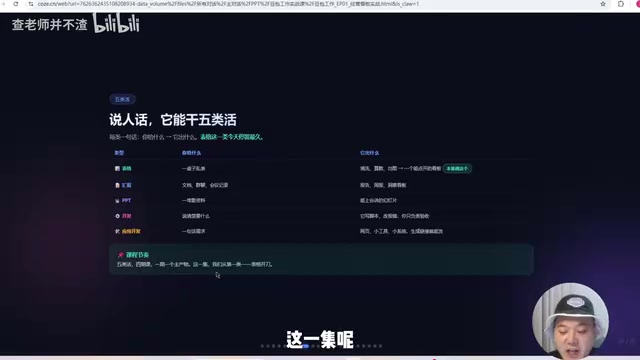
Treat AI as a colleague to delegate work to, not a chat box—a six-step method from messy tables to a reportable dashboard.
Based on the Bilibili creator's *Doubao Work Tutorial*, the article proposes a key shift in AI usage: from the "ask a question, get an answer" chat mode to treating AI as a colleague beside your desk to delegate work to. The core method is the "six-step delegation method"—feed materials, state requirements, watch it work, accept, revise, take away the finished product—applicable to any AI tool. The demo uses three tables with messy formats as materials, uses structured prompts to have the AI first produce a page structure list before starting, and after multiple rounds of revising fonts, colors, and style, ultimately produces a business dashboard containing GMV, order count, average order value, and refund rate—without writing a single line of code. The article also emphasizes being cautious and verifying when modifying the skeleton, holding the three red lines before delivery, and provides a three-level learning path.
Most people still use AI at the "ask a question, get an answer" stage. When they get a highly capable Agent, their first instinct is still to treat it like a chat box. But in the Bilibili creator's Doubao Work Tutorial, a key shift is proposed: treat AI as a colleague sitting next to your desk—turn around and delegate the work to them, letting them break down the steps, find materials, and deliver a finished product. This six-episode course starts with spreadsheet processing and demonstrates the complete workflow from messy tables to a reportable dashboard.
From "Giving Advice" to "Being Able to Execute": The Watershed in AI Usage
The creator opens with a pointed question: You've learned a lot about AI over the past two years—has your workload gotten smaller? The answer is usually no. The reason is that most AI only gives advice, and "advice isn't valuable; execution is." Doubao Work's positioning is exactly to shift from "only giving advice" to "being able to execute"—you delegate the work, it does the work.
This also explains why you shouldn't use a powerful Agent as a chat box. The creator uses an analogy: you hired a driver but made him sit in the passenger seat. He reads the map accurately, but you're still the one driving. The right way is to treat him as a colleague—even when you don't speak, he knows to turn the steering wheel. Because a chat box will only tell you how the table should be cleaned, while the colleague next to you will clean the table and put it on your desk.
Agent (Intelligent Agent) differs fundamentally from ordinary chatbots in its autonomous execution capability. Chatbots follow a single-turn "input-output" model, while Agents possess goal decomposition, tool invocation, multi-step planning, and self-correction abilities. They can call external APIs, read and write local files, operate software interfaces, and dynamically adjust strategies based on intermediate results. The "delegation" model demonstrated by Doubao Work in this article is a typical manifestation of Agent capabilities: users only need to provide high-level goals, and the Agent autonomously completes a series of operations including data reading, cleaning, and visualization. This paradigm shift means human-AI collaboration moves from "human leads every step" to "human sets goals, AI handles the execution path," and the core requirement for users upgrades from "knowing how to write prompts" to "knowing how to define tasks and acceptance criteria."
The Six-Step Delegation Method: From Three Messy Tables to One Dashboard
The core method taught in the course is the "six-step delegation method," which applies to any AI tool. The demo materials are three tables with plenty of problems: customer names don't match, amounts mix yuan and ten-thousand yuan, date formats are inconsistent, and there's embedded text.

Step one is feeding the materials—drag the order table, product table, and customer table into the tool. Step two is stating the requirements. The creator prepared a structured prompt: first have the AI do a data audit, then clarify that the audience is the boss and business managers, and require it to first provide a page structure list—which modules contain which metrics and what charts to use—and only start after the user nods. Step three is watching it work—observe the AI's thinking process, including local data access, skill invocation, semantic understanding, and verification of unmatched rows. Step four is acceptance—check whether what was produced is correct. Step five is revision—raise modifications for anything unsatisfactory. Step six is taking away the finished product.
The first version of the dashboard included GMV, order count, average order value, refund rate, and a one-sentence conclusion explaining what happened this week. The creator admits that this kind of data used to take at least a week. But the first version had a white background and small fonts, so he added a prompt asking the AI to take on the role of a senior front-end UI/UX expert and switch to a modern style with larger fonts. The second version had larger fonts but the colors still weren't ideal, so the third version was adjusted to a tech style. Not a single line of code was written throughout the entire process.
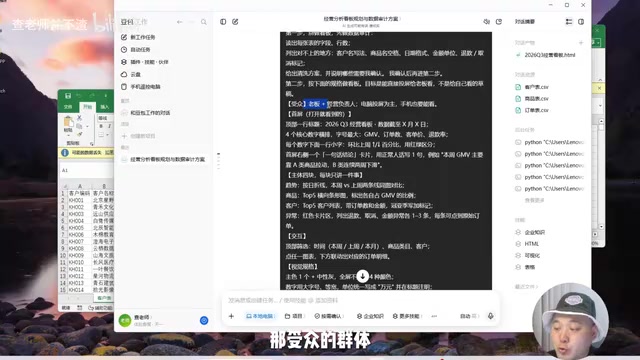
Structured prompts refer to instructions organized according to a fixed framework, typically including elements such as role setting, task objectives, audience description, output format requirements, and constraints. Compared with a casual "help me make a dashboard," structured prompts can significantly reduce AI comprehension deviations. The creator's prompt specifically requires "provide a page structure list first before starting," which actually applies the "step-by-step confirmation" strategy—having the AI output a plan first, which is reviewed by a human before execution, avoiding the one-shot generation of large amounts of uncontrollable content. This approach is called "human-in-the-loop" in Agent collaboration and is a key means of balancing efficiency and controllability. The more structured the prompt, the less room for the AI to improvise, the closer the output to expectations, and the lower the rework cost.
The More Specific the Instructions, the Less the AI Improvises
In the revision phase, the creator gives an important piece of advice: you can safely let the AI modify components, such as adjusting colors or changing fonts—that's fine as long as the overall framework stays the same. But be very cautious about modifying the skeleton—adding modules, changing data sources, changing statistical definitions—these must be checked and verified to confirm whether the previous data had errors.
In particular, beware of the phrase "you figure it out." Once you say it, you've handed over the steering wheel, and the AI will truly improvise. Save a version before modifying the skeleton, or you won't even have a way back.
Statistical definitions refer to the calculation rules and definition boundaries of data metrics—for example, whether "GMV" includes refunded orders, whether the denominator for "average order value" uses order count or user count, and whether the time dimension follows natural weeks or rolling 7 days. Inconsistent definitions are the most common reason why data dashboards "look right but are actually wrong." When users ask the AI to "change the data source" or "add a module," the AI may carry over old definitions on new data, or it may infer a new definition on its own—the conclusions from these two cases can be completely different. Therefore, after skeleton-level modifications, key metrics must be sampled and checked against the original data. The emphasis on "save a version before modifying the skeleton" is essentially establishing a rollback-friendly version management habit, consistent with version control thinking in software engineering.
Three Red Lines Before Delivery
After the product is finished, you can generate a link through the sharing feature. It can be viewed in real time on mobile, the data is clickable, and it's compatible with platforms like Feishu. The creator reminds of three red lines: first, be clear about who should and shouldn't see the link—data still in gray release should not be made public directly; second, backend data is not promised to go directly to production—taste it first; third, demo data should not be shown directly to colleagues or others. When delivering to the boss, you can say: "Boss, this is this week's business dashboard. Click to view it—it opens on both mobile and desktop."

Learning Path: Three Steps
The course plans three levels of progression. The first step is the three messy tables plus one dashboard demonstrated here—after completing it, you'll have a link in hand. The second step is building web pages, environment decision diagrams, and installing skills, connecting Feishu and insight dashboards. The third advanced step turns scattered tables into a system that can input, share, and automatically schedule. The creator also mentions that registration comes with a 30-day subscription, the tool supports Windows and Mac, and there's a 78-page illustrated green book covering everything from installation and download to office work, self-media, and knowledge management.
This course aims to let people take away three things: a reportable dashboard, a set of methods, and a path. In the creator's words, one person can now do the work that used to require a team. The real shift is from "a person who asks AI questions" to "a person who delegates work to AI." The method itself isn't complicated—what's hard is being willing to hand over the work. What needs to change isn't your hands, but your mind.
One-line Summary
Treat AI as a colleague to delegate work to rather than a chat box to ask questions—a six-step method from messy tables to a reportable dashboard.
Paragraph Summary
Based on the Bilibili creator's Doubao Work Tutorial, this article proposes a key shift in AI usage: from the "ask a question, get an answer" chat mode to treating AI as a colleague beside your desk to delegate work to. The core method is the "six-step delegation method"—feed materials, state requirements, watch it work, accept, revise, take away the finished product—applicable to any AI tool. The demo uses three tables with messy formats as materials, uses structured prompts to have the AI first produce a page structure list before starting, and after multiple rounds of revising fonts, colors, and style, ultimately produces a business dashboard containing GMV, order count, average order value, and refund rate—without writing a single line of code. The article also emphasizes being cautious and verifying when modifying the skeleton, holding the three red lines before delivery, and provides a three-level learning path.
Related articles

The Truth Behind Titanic's Sinking: Key Decisions and Communication Failures in the National Geographic Documentary
National Geographic's The Unsinkable Ship uses survivor testimony to reconstruct Titanic's fatal decisions—from the missing MSG telegram prefix and the broken boiler-room-to-bridge link to how 'unsinkable' thinking delayed damage control and evacuation.

74M-Parameter Open-Source Model Partially Outperforms Jev AI in Testing
Fastino AI's Glider 2.5 models, with just 74M–300M parameters, reportedly outperform Jev AI in some guardrail benchmarks per YouTube testing, run on consumer hardware, and even play Doom. We analyze small models' competitiveness and deployment value on specific tasks.

Gemini 4 Argon Hands-On: Aggressive Pricing, 3D Capabilities Need Coaching
Gemini 4 Argon hands-on: limited-time $2/$10 pricing, million-token output, strong 3D and reverse-engineering work, but weak front-end aesthetics and zero-shot ability need coaching.