DOYT: The iOS App That Pins Your To-Dos to the Dynamic Island — Complete Them Without Opening the App

DOYT pins your to-do to the iPhone Dynamic Island and Lock Screen, replacing "open the app" with a long-press. Core features free forever.
DOYT is an iOS productivity tool targeting the core contradiction of to-do apps: the problem isn't poor task management, but that tasks were never seen. It pins the current task to high-frequency system channels like the Dynamic Island and Lock Screen, letting users long-press to complete or move to Later without opening the app. It offers a 30-minute to 8-hour focus timer, history calendar, and Siri/Shortcuts integration, with restrained feature trade-offs and no team collaboration or complex project management. Pricing is free-forever core features with a one-time Pro purchase including a 3-day no-credit-card trial, no registration, no ads. It currently has 53 upvotes and ranks #19 on Product Hunt, still in early exposure.
In a category as saturated as to-do apps, it's not easy for an indie developer to stand out. DOYT chose a narrow but very specific path: pin your current task to the iPhone's Dynamic Island and Lock Screen, so users can manage their to-dos without ever opening the app. The product recently earned 53 upvotes on Product Hunt, ranking #19 for the day in the iOS, productivity, and task management categories.
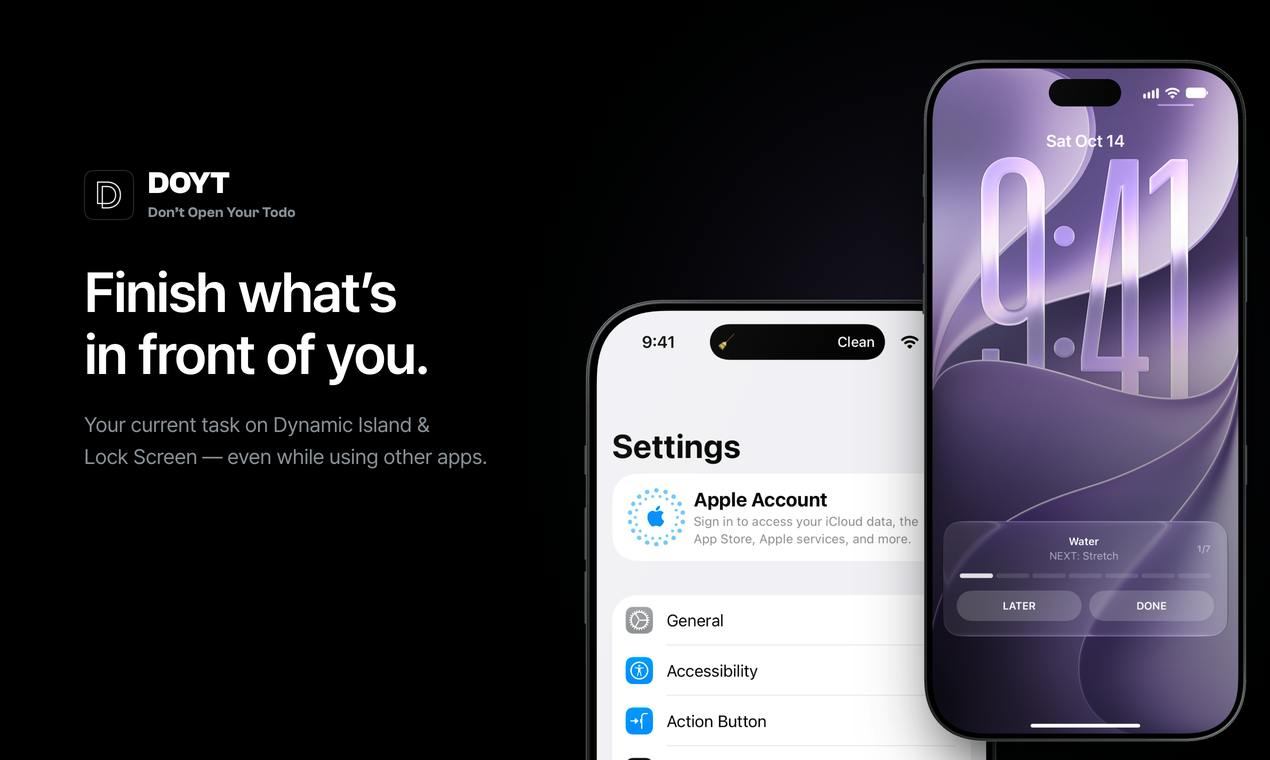
The Core Contradiction of To-Do Apps: Recording Is Easy, Reviewing Is Hard
Most to-do apps don't fail at the "write it down" step — they fail right after. The user closes the app, switches to WeChat or short-form video, and that to-do item sinks to the bottom of the list until it's completely forgotten. DOYT's entry point targets exactly this break in the chain: it assumes users won't proactively open any to-do app, so it simply pushes tasks onto system-level interfaces users already look at repeatedly.
Since its introduction with the iPhone 14 Pro, the Dynamic Island has long been used to display real-time status like music playback, timers, and food delivery progress. By putting to-dos in this spot, DOYT essentially borrows the system's highest-frequency visual channel. Combined with Lock Screen persistent display, tasks remain visible while texting, scrolling feeds, or watching videos. What makes this design decision radical is that it abandons the completeness of the in-app experience in exchange for exposure frequency.
Dynamic Island is a system-level interactive area introduced by Apple on the iPhone 14 Pro series, located around the front camera cutout at the top of the screen. It's not a simple notification bar, but a Live Activities container coordinated by the system that changes shape and size depending on context — displaying music playback, timers, calls, delivery progress, and other ongoing tasks. The key limitation of the Dynamic Island is that typically only one app can occupy its primary display slot at a time, with priority determined by the system based on activity type and user interaction. This means whether a third-party to-do app can display reliably depends on system scheduling and competition with other Live Activities — a system-level uncertainty that products like DOYT must confront.
Lock Screen persistent display leverages iOS's Live Activities and Lock Screen widget mechanisms to keep information visible without unlocking. Compared to the Dynamic Island, Lock Screen display works on a wider range of devices and is more stable in presentation, but is less visually prominent. DOYT uses both channels simultaneously, essentially maximizing exposure touchpoints within what the system allows.
Interaction Design: Long-Press to Complete, Not Tap to Open
DOYT's operation logic deliberately avoids the "enter the app" path. On the Dynamic Island, users can long-press to complete the current task, or move it to Later — the whole process involves no navigation or page loading. This may seem like just saving one tap, but what it actually changes is the psychological cost: when completing something goes from "unlock — find app — enter — check off" down to a single long-press, the probability of the behavior happening differs significantly.
This interaction also carries an implicit constraint — DOYT is naturally suited only to managing a small number of tasks at once. It's not a warehouse for storing fifty to-dos; it's meant to answer "what should I do right now." For users accustomed to using to-do apps for long-term planning, this positioning may take some adjustment.
Feature Set: Focus Timer, History Calendar, and System Integration
Beyond the core features, DOYT offers several supporting capabilities:
- Optional focus timer, ranging from 30 minutes to 8 hours, covering everything from a single meeting to a full workday
- History calendar, for reviewing task completion records
- Siri and Shortcuts support, allowing tasks to be added and managed via voice or automation flows
These feature trade-offs are relatively restrained. It doesn't add team collaboration, tag systems, subtask trees, or other common extensions, instead building a closed loop around "this one thing right now." From an indie developer's resource allocation perspective, this is a reasonable choice.
Shortcuts is an automation tool Apple provides on iOS, letting users chain operations across multiple apps into a single workflow, triggered via Siri voice, home screen icons, automation triggers, and more. For an app to integrate with Shortcuts, the developer must actively expose specific Actions — such as "Add Task," "Complete Task," or "Query Today's To-Dos." For DOYT, supporting Shortcuts means users can add tasks with a single sentence or automation flow without opening the app, which aligns perfectly with its "don't enter the app" product philosophy.
Siri integration makes voice another input channel, ideal for quick recording while walking, driving, or when hands are occupied. Combined, DOYT's input and completion paths no longer depend on a graphical interface, but are distributed across system-level entry points. This also explains why it doesn't need complex in-app navigation: the user's touchpoints with the product happen outside the app.
Business Model: Core Features Free Forever, Pro as One-Time Purchase
DOYT's pricing strategy is worth noting in today's environment of subscription overload. According to the official description: core features are free forever, Pro is a one-time purchase with a 3-day trial and no bank card required. It also promises no registration and no ads.
A one-time purchase is a pragmatic positioning for small utility apps. To-do apps have high user churn, and subscription models easily breed resentment after users go idle for a few months; a one-time purchase lowers the psychological barrier and better matches a "lightweight, long-term, occasional use" scenario. The no-registration design directly eliminates the development and maintenance costs of an account system — for an indie developer, the math is very clear.
One-time Purchase differs from subscriptions not just in payment method, but in how it shapes a product's long-term evolution logic. Subscriptions require continuously delivering new value to reduce churn, suitable for products with server costs, ongoing content updates, or team collaboration features; one-time purchases suit tools with clear feature boundaries that rely mainly on local capabilities. DOYT has no registration, no ads, and its data is likely stored locally or in iCloud, keeping server costs extremely low — which makes the one-time purchase financially viable.
For indie developers, a one-time purchase also sidesteps common subscription headaches like refund disputes and renewal reminder spam, lowering the user's psychological barrier. The cost is that revenue lacks compounding effects — if the product goes without updates for a long time, new revenue will gradually dry up. That's why this model typically pairs with a "lightweight, stable, occasional use" positioning rather than a fast-iteration feature expansion path.
Points Worth Watching
DOYT's public data is currently limited: 53 upvotes, 3 comments, and #19 ranking on Product Hunt — it's in an early, small-scale exposure phase. The developer is credited as Roa Lee. Several points need further verification: the Dynamic Island's display priority at the system level isn't fully controlled by third-party apps, so can a to-do still reliably hold its spot when the user is simultaneously running a timer, navigation, or music? Is the long-press-to-complete interaction reliable when using the phone one-handed or with it in a pocket? And does the history calendar support data export?
From a product-thinking perspective, DOYT's value isn't in the number of features, but in the concrete rebuttal it offers to the core assumption of to-do apps: the problem may not be that tasks aren't being managed well enough, but that they were never seen at all.
Frequently Asked Questions
Which devices does DOYT support? Based on category information, DOYT is an iOS app, and the Dynamic Island feature relies on iPhone 14 Pro and later models that support the Dynamic Island; Lock Screen display may work on a wider range. For the specific compatibility list, refer to the App Store page.
Do I need to register an account to use it? The official description explicitly states no registration is required, and there are no ads.
What's the difference between the free version and Pro? Core features are free forever, and Pro is unlocked via a one-time purchase, offering a 3-day trial with no credit card required.
Who is it best suited for? It's better suited for individual users who want to always see "the one thing right now" and don't need complex project management. If your needs involve multi-level project breakdowns or team collaboration, DOYT's positioning doesn't cover those scenarios.
Related articles

Build an AI Super Employee System at Zero Cost: A Full Breakdown of Automated Agent Workflows
A deep breakdown of the AI super employee system demoed on Bilibili: agent orchestration, digital human voiceovers, map and enterprise lead generation, 24/7 customer service, and legal modules. We analyze the business logic and compliance risks behind zero-cost signup to help entrepreneurs judge the real ROI of this AI digital employee system.

The Essential Difference Between Chatbots and AI Agents: Crossing from Conversation to Execution
What's the difference between a chatbot and an AI agent? Based on the MCP series on the Learn Tech channel, this article uses examples like booking flights and summarizing notes to explain: a chatbot only gives answers, while an agent actually completes tasks through a think-act-observe loop. It breaks down the four core components—model, tools, memory, and goal—as well as MCP's role as a bridge, and discusses agents' applicable boundaries and permission risks.

Free GitHub Repo: 342 Hours of AI Courses, from Math to MCP Servers
A free GitHub repo offers 342 hours of AI courses: 523 lessons across 20 phases, from math fundamentals to agent building and MCP servers. Nearly 100,000 learners have started.