The Essential Difference Between Chatbots and AI Agents: Crossing from Conversation to Execution

A chatbot only gives answers, while an AI agent can call tools to complete multi-step tasks—the essence lies in execution capability.
Based on the third installment of the MCP series on the YouTube channel Learn Tech, this article analyzes the essential difference between chatbots and AI agents: a chatbot only has a "mouth" and can only generate answers; an agent has both a "mouth" and "hands" and can call tools to get tasks done. An agent operates through the think-act-observe Agent Loop until the goal is achieved, and its structure consists of four core components: model, tools, memory, and goal. The MCP protocol serves as the bridge connecting agents with external tools, enabling services like the Note Server to be called by the model as standard tools. The article also lists deployment scenarios such as coding, research, and customer service, and offers pragmatic advice: use a chatbot when you only need an answer, and introduce an agent only for multi-step tasks; at the same time, grant only the necessary tool permissions and require user confirmation before sensitive operations.
The Essential Difference Between Chatbots and AI Agents: Crossing from Conversation to Execution
In a Nutshell: One Can Only Talk, the Other Can Take Action
You may already be used to asking a chatbot questions or having it draft emails, but have you ever wondered: why can't it just book a flight for you? According to the third installment of the MCP series on the YouTube channel "Learn Tech," the most fundamental difference between a chatbot and an AI agent is this—a chatbot only has a "mouth," while an agent has both a "mouth" and "hands."
A chatbot's mode of operation is extremely straightforward: you ask, it answers. For example, ask "How far is it from Lahore to Karachi?" and it will give you the distance; say "Help me write an email," and it will generate a draft. But that's where it ends—it cannot open your files, save notes, or complete any booking for you on a website. It only "speaks"; it does not act.
An AI agent, on the other hand, not only answers questions but gets the task done. Take booking a flight: a chatbot might toss you a website link, but an agent will search for flights itself, compare prices, pick the best option, and then ask you: "Would you like me to book it for you?"

How an Agent Works: The Think–Act–Observe Loop
There's no magic inside an agent—just a three-step loop that repeats continuously. According to the video's breakdown:
- Think: The agent examines the goal and decides what to do next;
- Act: It calls a tool, such as search, file reading, or database queries;
- Observe: It reviews the result returned by the tool and determines whether the task is complete. If not, it returns to step one and continues the loop.
This loop keeps running until the goal is achieved. The video calls it the Agent Loop. It is precisely this loop that gives an agent the ability to drive tasks forward autonomously, rather than merely producing single-turn responses like a chatbot.

The ReAct paradigm: This "think–act–observe" loop is not the video's own invention—its academic origin is the ReAct (Reasoning + Acting) framework proposed in 2022. The core idea of ReAct is to have the model alternately generate reasoning traces (Thought) and concrete actions (Action), then adjust the next step based on environmental feedback (Observation), thereby transforming a pure language model into a decision-maker that can interact with its environment. Compared with Chain-of-Thought, which outputs an answer in one pass, ReAct introduces external feedback to significantly reduce hallucinations and allows errors in multi-step tasks to be detected and corrected in a timely manner. Most mainstream agent frameworks today (such as LangChain and AutoGPT) use this loop structure at their core, and the Agent Loop described in the video is precisely its engineering expression.
The Four Core Components of an Agent
A complete agent is supported by four parts, and the video provides clear analogies:
- Model: The agent's "brain," such as Claude, responsible for reasoning and decision-making;
- Tools: The agent's "hands," such as search, file systems, and databases;
- Memory: Allows the agent to remember what it has done before, maintaining task continuity;
- Goal: The task you assign, which drives the direction of the entire loop.
All four components are indispensable. Without a model, there is no judgment; without tools, there is no way to act; without memory, multi-step tasks become difficult; and without a goal, the loop loses its meaning.
MCP: The Bridge Connecting Agents and Tools
In earlier installments of the MCP series, the video's author had already built a Note Server. This episode reveals its true role: the Note Server is essentially a tool for the agent. And the role of MCP (Model Context Protocol) is precisely to connect agents with various tools.
The video demonstrates a real scenario: giving Claude the instruction—"Find customer-related entries in my notes, generate a summary, and save it as a new note." Claude first calls the "list notes" tool to read all notes, filters out customer-related entries, writes a summary, and then calls the "add note" tool to save the new note. One instruction, three operations, no manual copy-pasting required.
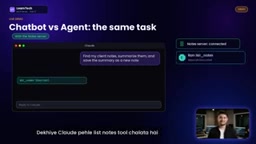
This demonstration intuitively shows that MCP enables models to "reach" into external systems to perform operations, rather than merely generating text.
What is MCP? MCP (Model Context Protocol) is an open protocol proposed by Anthropic in late 2024, designed to standardize the way large language models communicate with external data sources and tools. You can think of it as the "USB-C port" of the AI world: whether the backend is a note-taking system, a database, or a calendar service, as long as it implements the MCP specification, the model can invoke it in a unified way. MCP uses a client-server architecture—the agent side acts as the client and initiates requests, while the tool side acts as the server and exposes capabilities (such as "list notes" and "add note"). This differs from traditional Function Calling, which requires writing separate adapter code for each tool; MCP allows tools to be "plug-and-play," greatly reducing the development cost of agent integration. It also explains why the Note Server in the video can be called directly by Claude as a standard tool.
Where Agents Are Already Being Deployed
The video lists several types of agent applications that are already common:
- Coding agents: Automatically detect and fix issues in code;
- Research agents: Read multiple websites and then generate reports;
- Customer service agents: Look up order status and reply directly to users.
The author also encourages viewers to build their own agents using their own tools. This reflects a trend: agents are moving from experiments to everyday productivity tools.
When Should You Use an Agent? Boundaries and Risks
The video offers a pragmatic criterion: If you only need an answer or an idea, a chatbot is entirely sufficient; only when a task involves multiple steps and requires calling tools is it worth introducing an agent.
But an agent's autonomy also brings risks. Because it makes decisions on its own, the video recommends granting it only the tool permissions it truly needs, and requiring confirmation before performing sensitive operations such as deleting files or transferring money—just as Claude proactively seeks the user's permission in the demonstration.

This reminder hits the core contradiction of agent deployment: the more capable it is, the more constraints it needs.
Next Up: Building Your First Agent from Scratch
According to the video's preview, the next installment in the series will involve writing code by hand to build a first AI agent that selects tools on its own and completes tasks. For developers who want to move from understanding to practice, this will be a key hands-on step.
To review the core of this episode: a chatbot only gives answers, while an agent completes tasks; an agent operates through the "think–act–observe" loop and consists of four parts—model, tools, memory, and goal; and MCP is the bridge connecting agents with tools. Understanding this dividing line is the prerequisite for judging when to introduce an agent and how to control its risks.
One-line Summary
A chatbot only gives answers, while an AI agent can call tools to complete multi-step tasks—the essence lies in "execution capability."
Paragraph Summary
Based on the third installment of the MCP series on the YouTube channel "Learn Tech," this article analyzes the essential difference between chatbots and AI agents: a chatbot only has a "mouth" and can only generate answers; an agent has both a "mouth" and "hands" and can call tools to get tasks done. An agent operates through the "think–act–observe" Agent Loop until the goal is achieved, and its structure consists of four core components: model, tools, memory, and goal. The MCP protocol serves as the bridge connecting agents with external tools, enabling services like the Note Server to be called by the model as standard tools. The article also lists deployment scenarios such as coding, research, and customer service, and offers pragmatic advice: use a chatbot when you only need an answer, and introduce an agent only for multi-step tasks; at the same time, grant only the necessary tool permissions and require user confirmation before sensitive operations.
Related articles
LLaMA-Factory in Practice: A Complete No-Code Guide to Fine-Tuning Large Models
An introduction to LLaMA-Factory, the open-source fine-tuning tool: its 60.1K-star background, supported models and algorithms, local vs. cloud deployment, and CUDA setup steps.

Zeng Ming's Deep Retrospective: Why OpenAI May Not Be the Ultimate Winner — and Why the Corporate System Will Disappear
Zeng Ming's deep retrospective on the AI endgame: model companies are just infrastructure, OpenAI and Anthropic won't be the final winners; the next battle is the Agent entry point standard; the corporate system will disappear as AI restructures collaboration, and only mission-driven companies can survive the cycle.
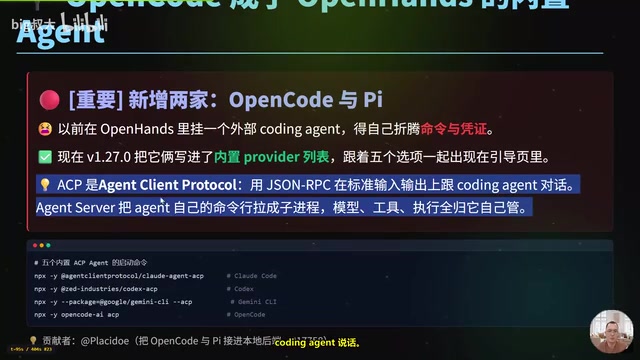
OpenHands v1.28.0: OpenCode and PI Added as Built-in Agents, API Keys Requestable In-Conversation
OpenHands ships 5 releases in 21 days: v1.27.0 adds OpenCode and PI as built-in agents, v1.28.0 enables in-chat key requests. ACP integration, credential reuse, model list changes, and upgrade advice.