dsh-agent-studio Goes Open Source: Visually Configure AI Agent Prompts, Tools, and Skills

dsh-agent-studio lets you visually assemble clean-context multi-Agent systems with per-sub-agent model and thinking intensity control.
dsh-agent-studio is an open-source visual plugin for AI Agent developers, built to solve the "context pollution" problem in multi-Agent scenarios. It lets developers build zero-preset Agents from scratch, freely combining prompt sets, tool sets, MCP services, and Skills, while independently configuring each sub-agent's model, thinking intensity, and fallback model. The workflow is structured into four clear steps: initialization, prompt creation, tool set management, and Agent binding — with support for global and local config import/export. Explicit tool authorization makes Agent behavior boundaries transparent and predictable, significantly lowering the barrier to building sophisticated multi-Agent systems.
In the practice of building AI Agents, "context pollution" has long been a headache for developers — redundant prompts, irrelevant tool calls, and tangled sub-agent relationships all drag down model performance. A Bilibili creator has developed and open-sourced the DSH plugin (dsh-agent-studio) to address exactly this pain point. It provides a visual Agent assembly solution that lets you freely combine prompts, tools, MCP, Skills, and fallback models.
Core Idea: Clean, Controllable Context
The plugin's most fundamental value lies in making an Agent's context "clean and controllable." You can create a pristine Agent with zero preset context, building your desired capability stack from scratch — rather than inheriting a pile of default configurations you don't need.

Going further, the plugin supports assembling a complete "Agent team." Each sub-Agent can be individually configured with its own model, thinking intensity, and fallback model. This means a sub-agent handling simple tasks can use a lightweight model, while one dealing with complex reasoning can invoke a model at high thinking intensity. This fine-grained resource allocation helps control costs while improving overall collaboration efficiency. Configuration files also support global and local import/export, making it easy to reuse setups across different projects.
"Context pollution" is a concrete engineering problem in AI Agent development: every LLM inference is bounded by a context window. When that window is filled with irrelevant system prompts, unused tool descriptions, or unnecessary conversation history, the space actually available for reasoning within the limited token budget shrinks — leading to degraded instruction-following, confused tool selection, or unstable outputs. In multi-Agent orchestration scenarios, when a parent agent passes calls to sub-agents, redundant context stacks up at each layer, and the pollution compounds exponentially across levels. Designing each Agent to carry only "just enough" context is therefore one of the core strategies for improving the reliability of the overall system.
Practical Workflow: From Initialization to Agent Creation
The entire configuration process breaks down into a few clear steps. After installation, the first step is initialization — which also serves as the plugin's refresh mechanism. Simply say anything in the official standard mode to complete it.
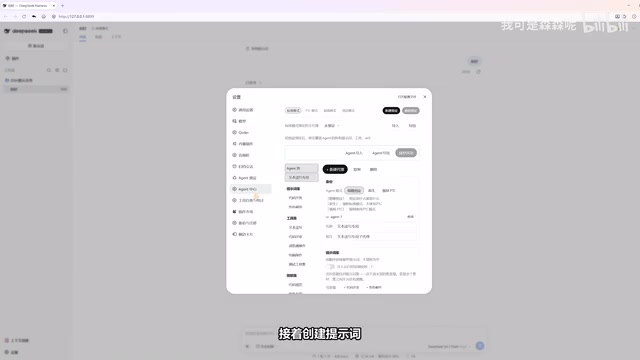
Next, create your prompts. Multiple prompts are concatenated in the order you define, then sent to the AI together. The plugin comes with a solid set of built-in prompts; you can consult the official prompt list documentation and check off the ones you need.
Managing Tool Sets and MCP
The tool set section displays the tools generated during initialization. If you add new MCP tools afterward, a single follow-up conversation is enough to trigger a refresh. Some tools are official built-ins, and you can likewise check off what you need by referencing the official tool list.
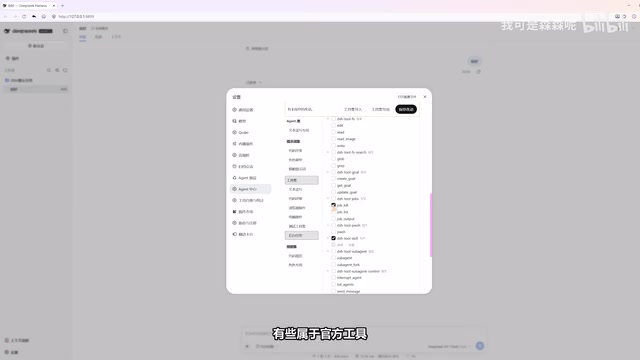
One notable detail: checking a tool on means the AI can autonomously invoke that capability. This explicit authorization model gives developers clear boundary control over what the Agent can and cannot do.
MCP (Model Context Protocol) is an open standard protocol introduced by Anthropic in late 2024, designed to give large language models a unified way to connect to external tools, data sources, and services. Traditionally, each tool integration required developers to write custom code for a specific model or platform. MCP's standardized server/client architecture allows the same set of tools to be reused across models and platforms. In MCP-enabled Agent frameworks, adding an MCP server means expanding the set of capabilities available to the model — without modifying core code. dsh-agent-studio integrates MCP tool refresh into the conversation-trigger mechanism, dramatically lowering the barrier to dynamically expanding a tool set.
Independent Configuration for Sub-Agents
Once your prompt sets, tool sets, and Skills are ready, you can formally create an Agent. The flow is: give it a name, then bind the prompt sets, tool sets, and Skills you prepared earlier. The binding panel also lets you control which sub-Agents within the team are allowed to be called, giving you fine-grained control over intra-team invocation relationships.
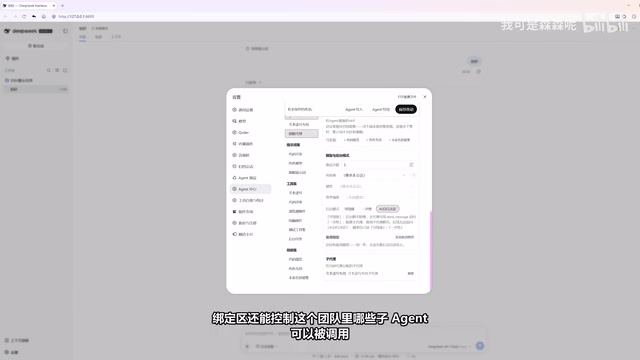
Next, configure the runtime parameters for when this Agent acts as a sub-agent: which model to use, what thinking intensity, what background mode, and what the fallback model is. This independent configuration mechanism is the key to making "each sub-agent own its role." Finally, select an existing preset or create a new one — if you're not sure what a special mode does, just copy the standard mode and use that.
"Thinking intensity" (also called reasoning effort) is a tunable parameter exposed to callers by certain reasoning-capable models (such as Claude 3.7 Sonnet and OpenAI's o-series). It controls how deeply the model engages in internal chain-of-thought reasoning before responding, and how many tokens that process consumes. High thinking intensity suits tasks requiring multi-step reasoning, code generation, or complex planning — but comes with higher latency and cost. Low intensity is better for lightweight tasks like classification, routing, or simple Q&A. In multi-Agent systems, tuning this parameter independently for sub-agents with different responsibilities is a common engineering practice for balancing performance and cost.
Verifying the Result
Once configured, you can validate directly. Select the preset you just created, send a message, and you'll see that the prompts, tools, and Skills are exactly the custom ones you defined — with no extraneous noise. This what-you-see-is-what-you-get feedback makes Agent behavior transparent and predictable.
For developers who want fine-grained control over their AI Agents, dsh-agent-studio transforms what would otherwise be tedious hand-written configuration into a visual point-and-click workflow, significantly lowering the barrier to building multi-Agent systems. The project is now open source — interested readers can follow the creator's channel for installation guides and documentation.
Related articles

ChatGPT Space Launches: Team Collaboration and New Pages Features Explained
ChatGPT Space is OpenAI's new team collaboration feature with Pages, real-time collaboration, and Slack/Google Drive sync. We break down its privacy design, multi-platform integration, and the full workflow from conversation to document.

Migrating Apache Spark UDFs to GPU Acceleration with AI Agents
NVIDIA developer blog explains how AI Agents rewrite Apache Spark UDFs for GPU acceleration, covering migration criteria, agent rewriting and verification workflows, plus pitfalls like result consistency and CPU-GPU transfer overhead.

Zed Editor v0.40.4-rc2 Released: Usage Credits Now Available Without Upgrading
Zed editor releases v0.40.4-rc2, allowing users to use usage credits for AI features without upgrading to a paid plan, lowering the trial barrier.