EasySwitch Review: A Cross-Device Collaboration Tool That Manages All Your Computers with One Keyboard, Mouse, and Secondary Screen

EasySwitch combines KVM keyboard/mouse sharing with secondary display extension in one lightweight Rust-based tool.
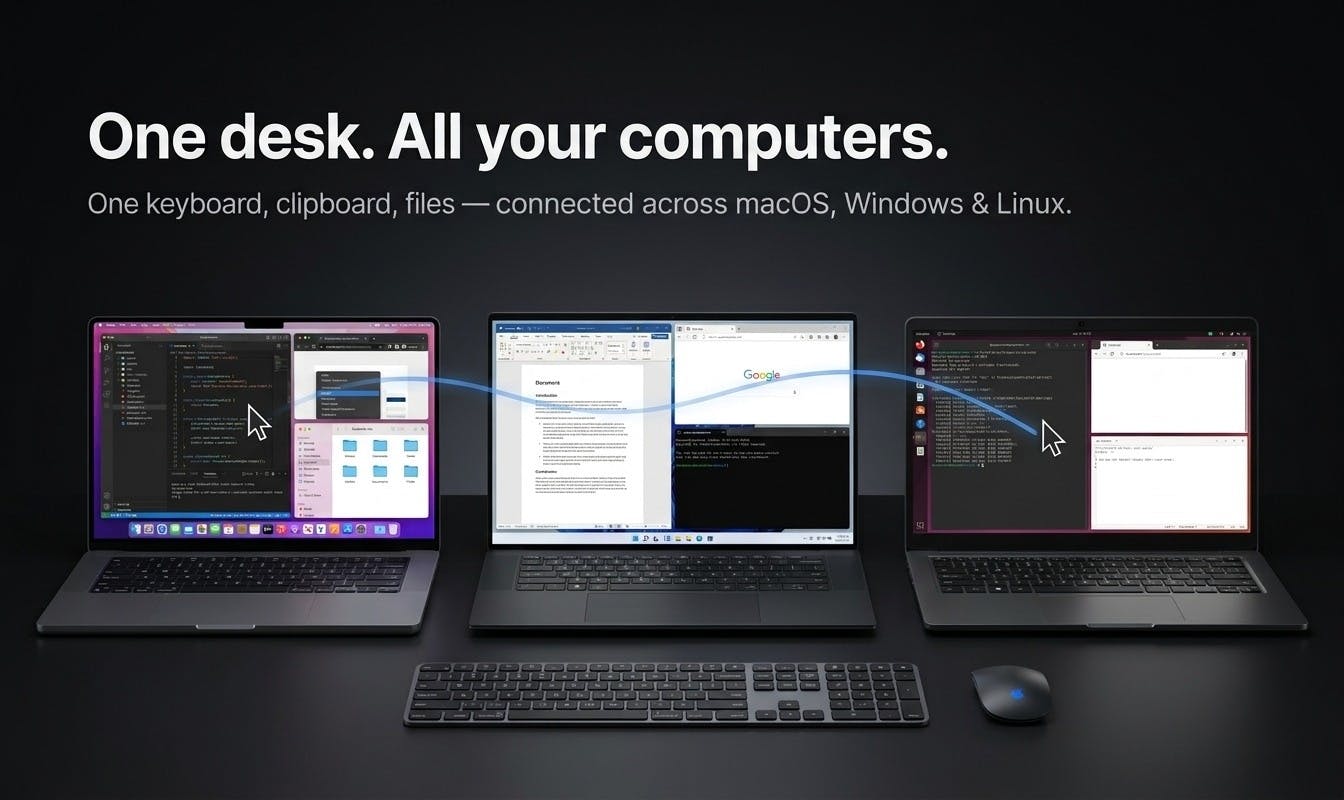
EasySwitch is a cross-platform collaboration tool built natively in Rust that uniquely combines software KVM functionality (keyboard/mouse sharing across computers) with secondary display extension in a single application. Supporting Mac, Windows, Linux, and Wayland, it uses only 19MB of memory and offers free end-to-end encryption. It fills a market gap where users previously needed separate tools for input sharing and display extension.
In an era where multi-device collaborative work is increasingly common, seamlessly controlling multiple computers with a single set of peripherals has long been a pain point for developers and productivity-focused professionals. EasySwitch, which recently launched on Product Hunt, offers an ambitious answer: it not only lets your mouse and keyboard move freely between multiple computers but also turns that idle machine nearby into an extended secondary display. After launching, the tool quickly garnered 76 upvotes, ranking #16 on the daily leaderboard.
Breaking the "Choose One" Dilemma Between KVM and Secondary Display Tools
For a long time, multi-device control tools have suffered from a clear functional divide. The EasySwitch team hits the nail on the head regarding this industry pain point: existing tools always force you to make a choice.
One category is software KVM solutions, such as Synergy, Deskflow, and Mouse Without Borders. KVM stands for Keyboard, Video, Mouse — traditional hardware KVM switches share input/output devices across multiple computers via physical cables, while software KVM achieves similar functionality through network protocols. The core principle of these tools is capturing mouse and keyboard events on the host machine, forwarding them to client machines via TCP/UDP protocols, where the client simulates input device injection into the system. They let you share your mouse and keyboard, with the cursor sliding between multiple computers, but since they only transmit input commands rather than video frames, they have extremely low bandwidth requirements yet cannot transmit video — you can operate the other machine, but there's no way to turn it into a display.
Synergy was the pioneer in this field. Released in 2001, it dominated the market for years until licensing changes triggered a community split, spawning alternatives like Deskflow (formerly Barrier). Microsoft's Mouse Without Borders is a free Windows-only solution that transmits input events over the local network.
The other category is secondary display applications, such as Duet, spacedesk, and Luna. These excel at turning an idle device into an additional monitor to expand your desktop space, but they don't support input sharing — you still need a separate keyboard and mouse for that machine. The core mechanism of secondary display applications involves a virtual display adapter plus video stream transmission: a virtual display is created on the host, the operating system outputs the rendered image to this virtual device, the application captures frame data and transmits it encoded over the network to the client for decoding and display. Raw 1080p 60fps image data amounts to approximately 375MB per second, requiring H.264/H.265 encoding compression for real-time transmission over a LAN — this is the fundamental reason why secondary display solutions typically have perceptible latency.
EasySwitch's "Have It All" Strategy: Keyboard/Mouse Sharing + Secondary Display Combined
EasySwitch's core selling point is simultaneously achieving keyboard/mouse sharing and secondary display extension. Users can move their cursor across multiple computers, type text, paste content, and drag files on any machine, while also extending their desktop directly to the computer beside them. This means a single device serves as both a controlled terminal and an extended display, truly bridging both input and display.
For developers, designers, and content creators who simultaneously use multiple Mac, Windows, or Linux devices, this integration can significantly reduce the number of peripherals on the desk and switching costs, making multi-machine collaboration more fluid and natural.
Privacy Protection and Technical Implementation Highlights
Beyond functional integration, EasySwitch demonstrates a distinctly different attitude from competitors in privacy protection and technology choices.
Free Encryption for All Users, No Paywall
Notably, EasySwitch explicitly states that encryption is free for all users, rather than being a marketing hook for premium subscriptions. In an era of increasing data sensitivity, mouse operations, keyboard input, and even file contents transmitted across devices can all involve privacy concerns.
In software KVM and secondary display scenarios, network-transmitted data contains extremely sensitive information: keyboard input may include passwords, private keys, and chat messages; mouse trajectories may reveal user behavior patterns; video frames may contain any confidential documents displayed on screen. In LAN environments, attack methods like ARP spoofing and WiFi sniffing can intercept unencrypted transmission data. End-to-end encryption (E2EE) ensures that even if data is intercepted during transmission, it cannot be decoded, by encrypting at the sender and decrypting at the receiver.
Many competitors offer end-to-end encryption as a paid upgrade — Synergy transmitted data in plaintext in early versions and later made encryption a paid feature, a decision that drew widespread community criticism and became one of the catalysts for the open-source fork Barrier. EasySwitch provides encryption as a baseline guarantee for every user, which demonstrates genuine commitment in product philosophy.
Native Rust Development, Only 19MB Memory Usage
In terms of technical architecture, EasySwitch chose native Rust development, completely abandoning Electron. This decision is directly reflected in resource consumption: official data shows it uses only 19 MB of memory when idle.
Electron is a cross-platform desktop application framework developed by GitHub that essentially packages a complete Chromium browser engine and Node.js runtime into every application. This means even a simple utility carries approximately 150-200MB of runtime environment, consuming at least 100-300MB of memory at startup. Well-known applications like VS Code, Slack, and Discord are all built on Electron. While Electron dramatically lowers the barrier to cross-platform development, its memory usage and CPU overhead are unacceptable for system-level tools.
Rust, developed by Mozilla, is known for zero-cost abstractions and memory safety without a GC (garbage collector). It compiles to native machine code and requires no virtual machine or interpreter at runtime. Rust's performance in systems programming is comparable to C/C++, while its ownership system eliminates memory safety vulnerabilities at compile time — making it particularly suitable for utility software that needs to run in the background long-term and handle sensitive input data.
Compared to Electron applications that routinely consume hundreds of MB of memory, EasySwitch's 19MB lightweight footprint is quite impressive. For system tools that need to run in the background for extended periods, extremely low resource overhead means less performance drag, which is especially friendly to users with limited hardware or those pursuing maximum efficiency.
Native Wayland Display Protocol Support
Additionally, EasySwitch specifically emphasizes support for Wayland. Wayland is a Linux display server protocol designed to replace X11 (X Window System), which has over 30 years of history. The X11 architecture has redundant communication paths between client and server, and a weak security model — any X11 application can listen to keyboard input from other windows. Wayland adopts a more streamlined architecture where the compositor directly manages window buffers, eliminating the performance overhead of X11's intermediate layer, and isolates inter-application input event access at the protocol level.
Ubuntu has defaulted to Wayland since 22.04, and Fedora switched even earlier in version 25. However, Wayland's strict security model actually becomes a development obstacle for KVM-type tools: under X11, global capture and injection of keyboard/mouse events is trivial, but Wayland requires specific portal interfaces or compositor extension protocols to achieve similar functionality — this is why many cross-platform KVM tools have broken functionality or are completely unusable under Wayland.
EasySwitch's proactive Wayland adaptation demonstrates its commitment to the Linux ecosystem and provides Linux users with a previously scarce multi-device collaboration option.
Product Positioning and Market Competitiveness Analysis
EasySwitch is currently categorized under Mac, Productivity Tools, and Developer Tools, built by developer Sharif. From a product positioning perspective, it targets professional users with strong needs for multi-device workflows.
Filling the Market Gap in KVM and Secondary Display Integration
From an industry perspective, KVM software and secondary display applications have long operated in separate silos, with users often needing to install two separate tools to get the complete experience. EasySwitch merges these two categories into one, essentially filling an integration gap that the market has overlooked. If it can continuously refine stability and cross-platform compatibility, it could very well become a permanent fixture on multi-device users' desktops.
However, as a newly launched product, it still needs to prove itself in real-world usage scenarios — video transmission latency performance (balancing video encoding quality with network bandwidth), consistency across platforms (especially behavioral differences between macOS, Windows, and various Linux distributions), and long-term operational stability will all be key factors determining whether it can truly replace existing solutions like Synergy and Duet. Currently, the product has only 1 review, and market feedback remains to be accumulated.
Conclusion: A New Option Worth Watching for Multi-Device Office Users
EasySwitch addresses the real pain points of multi-device users with the clear concept of "one keyboard, mouse, and secondary screen to manage all your computers." Free encryption, a lightweight native Rust implementation, and Wayland support all demonstrate this tool's pursuit of user experience and technical quality beyond mere functionality. For developers and productivity-focused professionals who constantly switch between multiple machines, it is undoubtedly a noteworthy new multi-device collaboration solution.
Related articles

Cursor AI Programming in Practice: Build a Student Management System from Scratch in 30 Minutes
A Bilibili creator demonstrates Cursor AI programming: generating a student management system in 30 minutes with natural language. Details on Agent mode, Claude selection, prompt techniques, and thresholds.

Top 20 AI Coding Tools Ranking: From Rock-Solid to Lackluster, a Scored Matrix
Bilibili creator releases top 20 AI coding tools ranking, tiered T0–T4 from rock-solid to lackluster, with Claude Code and Codex tied at T0. This article details the scoring dimensions (capability, reliability, robustness, durability, cost, domestic availability) and tool performances to help developers choose the right AI coding assistant.

Vibe Coding Systematic Tutorial: Master AI-Assisted Programming from Zero
A three-month Vibe Coding tutorial from a Bilibili creator covering Codex, ClaudeCode, and Cursor, from core logic to commercial project practice for beginners.