Expand Board for macOS: An Infinitely Nested Spatial Whiteboard Tool
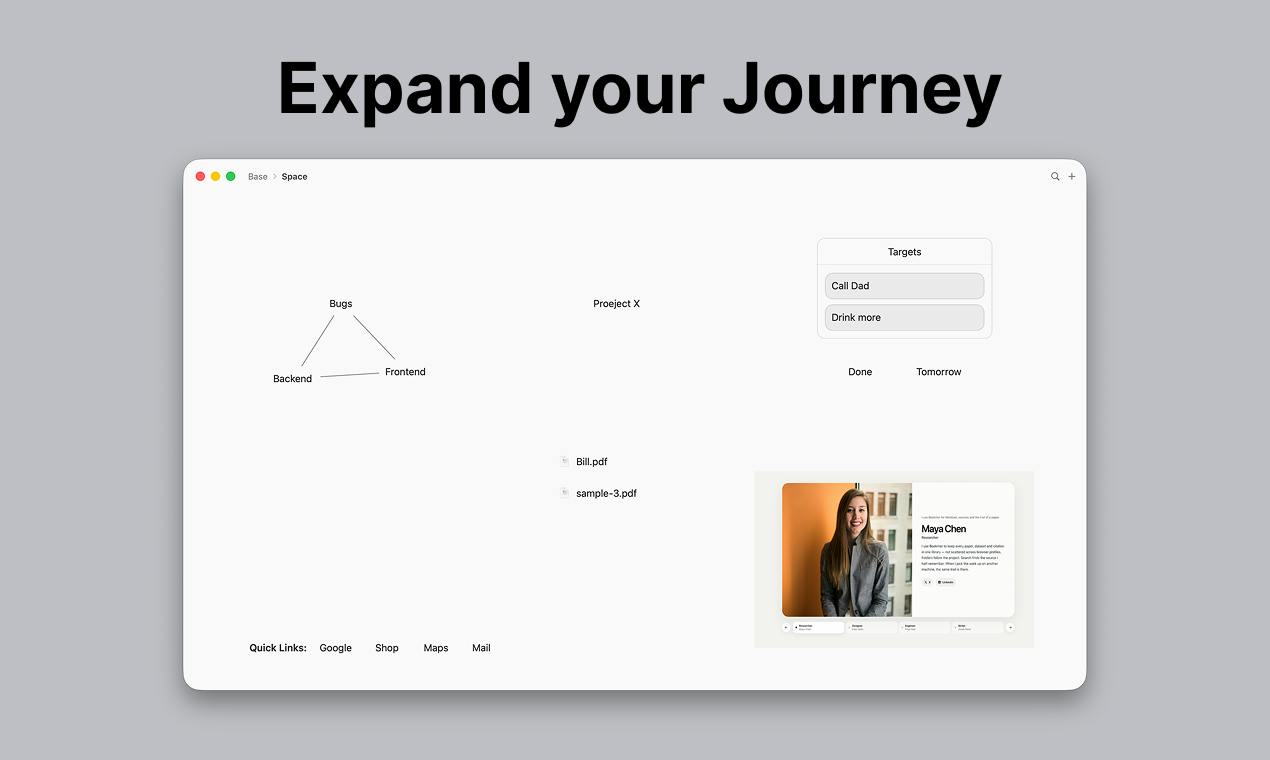
Expand is a macOS spatial whiteboard app with infinite canvas and enterable nested board layers.
Expand is a native macOS spatial whiteboard app by indie developer Gabriel that ranked #5 on Product Hunt on launch day. Its standout feature combines an infinite canvas with enterable nested whiteboards: users can freely arrange text, images, files, and shapes, then "walk into" any whiteboard to expand content within it, navigating between levels via breadcrumb navigation. This design elevates traditional flat information organization into a deep, layered spatial experience — well-suited for product managers, developers, and knowledge workers handling complex information. The product is still in early stages, with collaboration and cross-device sync capabilities yet to mature.
What Is Expand?
Expand is a spatial board application built exclusively for macOS. Its core philosophy is to give you an open canvas where you can freely arrange ideas, concepts, and plans. On its Product Hunt launch day, it ranked #5 with 95 upvotes, earning placements across three categories: Mac, Productivity, and Developer Tools.
Unlike traditional note-taking or mind-mapping tools, Expand centers on a distinctive combination: an infinite canvas paired with nestable whiteboards you can actually "walk into." You can place text, images, files, and shapes on the canvas — and you can also treat any whiteboard itself as a space to enter, expanding new layers of content within it.
The "spatial board" is a category of information-organization tools that has gained traction in recent years. Its core idea draws from spatial cognition theory — the human brain is naturally wired to remember and associate information through positional relationships. Unlike linear documents or tree-structured outlines, spatial whiteboards let users freely place content on a two-dimensional (or even multi-dimensional) plane, expressing relationships between concepts through position, distance, and grouping. Notable examples include Miro, Muse, and FigJam. Expand builds on this foundation by introducing "enterable nested levels," so the whiteboard is no longer confined to a single flat surface but instead forms an information space with genuine depth. This approach shares similarities with Notion's page nesting, but leans far more toward a visual, spatial experience.
Core Interaction Design
Expand's interaction model is built around a spatial metaphor and carries a low learning curve:
- Double-click the canvas to quickly add an element
- Right-click to choose between text, image, file, or shape
- The plus button in the toolbar adds content from the top of the window
- Drag and drop to freely rearrange objects on the canvas
What truly sets it apart from similar tools is its nested whiteboard mechanism. Once you open a whiteboard, you can continue working inside it. When you want to go back up a level, simply use the breadcrumb navigation in the title bar to step back through the hierarchy. This design keeps the layer structure clear and traceable, avoiding the chaos that can occur when information sprawls endlessly across a flat canvas with no way to manage it.
Breadcrumb navigation is a classic hierarchical-position pattern — its name comes from the fairy tale Hansel and Gretel, where breadcrumbs are used to mark a path. In web and app design, it typically appears as "Home > Category > Current Page," helping users understand where they are in a hierarchy at any moment and quickly jump back to any parent level. In Expand's nested whiteboard context, this mechanism is especially critical. When users dive deep into multiple nested layers, breadcrumbs serve as the essential lifeline against getting "lost in the whiteboard," ensuring that no matter how deep the nesting goes, you can always return to any ancestor node in a single step.
Who Is Expand For?
Its category tags — Productivity and Developer Tools — make its audience clear: knowledge workers and technical users who need to organize complex information.
For product managers and designers, the infinite canvas combined with nested structure is ideal for mapping out product concepts and breaking down feature modules. For developers, it can serve as a space to plan system architecture and organize technical proposals, progressively decomposing large plans into nested sub-whiteboards. For individual users, it also handles brainstorming and project planning effectively.
"A whiteboard you can actually walk into" is Expand's most imaginative selling point — it upgrades flat, two-dimensional information organization into a spatial experience with genuine depth, letting you freely switch between zooming into details and stepping back to see the big picture.
A Few Things Worth Noting
As a native macOS application, Expand typically has an edge over web-based tools in interaction smoothness and system integration. It was built by indie developer Gabriel and is currently in an early stage — community feedback is still limited (5 reviews), and long-term stability, collaboration capabilities, and cross-device sync are all areas that remain to be proven.
If you're looking for a thinking tool that balances freedom with structure, and you prefer a local native experience, Expand's "infinitely nested whiteboard" approach is worth trying. It represents an intriguing direction for the intersection of spatial computing and information organization.
Related articles

AI Agent Fundamentals: The Three Core Components — Brain, Memory, and Tools
A beginner's guide to AI Agents: covering the three core components (brain, memory, tools), four stages of LLM deployment, and why Agents matter for real business use cases.

Boycotting Software That Doesn't Support Linux: One Developer's Philosophy of Choice
A Linux-only developer shares his philosophy of boycotting non-Linux software — without sacrificing productivity — and explains how coding agents like Claude Code are closing the gap with commercial tools.

Why Do All AI-Generated Projects Look the Same? The Aesthetic Homogenization Problem in Vibe Coding
Why do vibe coding projects all use purple gradients and dark glassmorphism? We break down the technical roots of AI aesthetic homogenization and how to escape it.