Findy: Search Mac Files with Natural Language — A New Local AI Experience

Findy searches Mac files with natural language and processes locally for privacy, but accuracy awaits validation.
Findy is a Mac file search tool that lets users describe a file's content, source, time, or type in everyday language to locate it — for example, "pdfs from gmail last week." It combines NLU, metadata extraction, file content indexing, and OCR to recognize text in images and PDFs. All processing is local with no cloud upload, emphasizing privacy and low latency. The product received 70 upvotes on Product Hunt (ranked 15th) and was built by indie developer Adrian Topka. Its differentiation lies in understanding fuzzy semantics and multimedia content, but actual performance around search accuracy, non-English support, and indexing resource usage still needs verification.
Mac users often face this frustration: they remember what a file contains but can't recall its name or location. Traditional Spotlight search relies on exact keywords and often falls short when faced with vague descriptions like "PDFs from Gmail last week" or "videos over 1GB." Findy, a new product on Product Hunt, aims to solve this pain point — it lets users search files on their Mac using everyday language and can even recognize text inside images and PDFs.
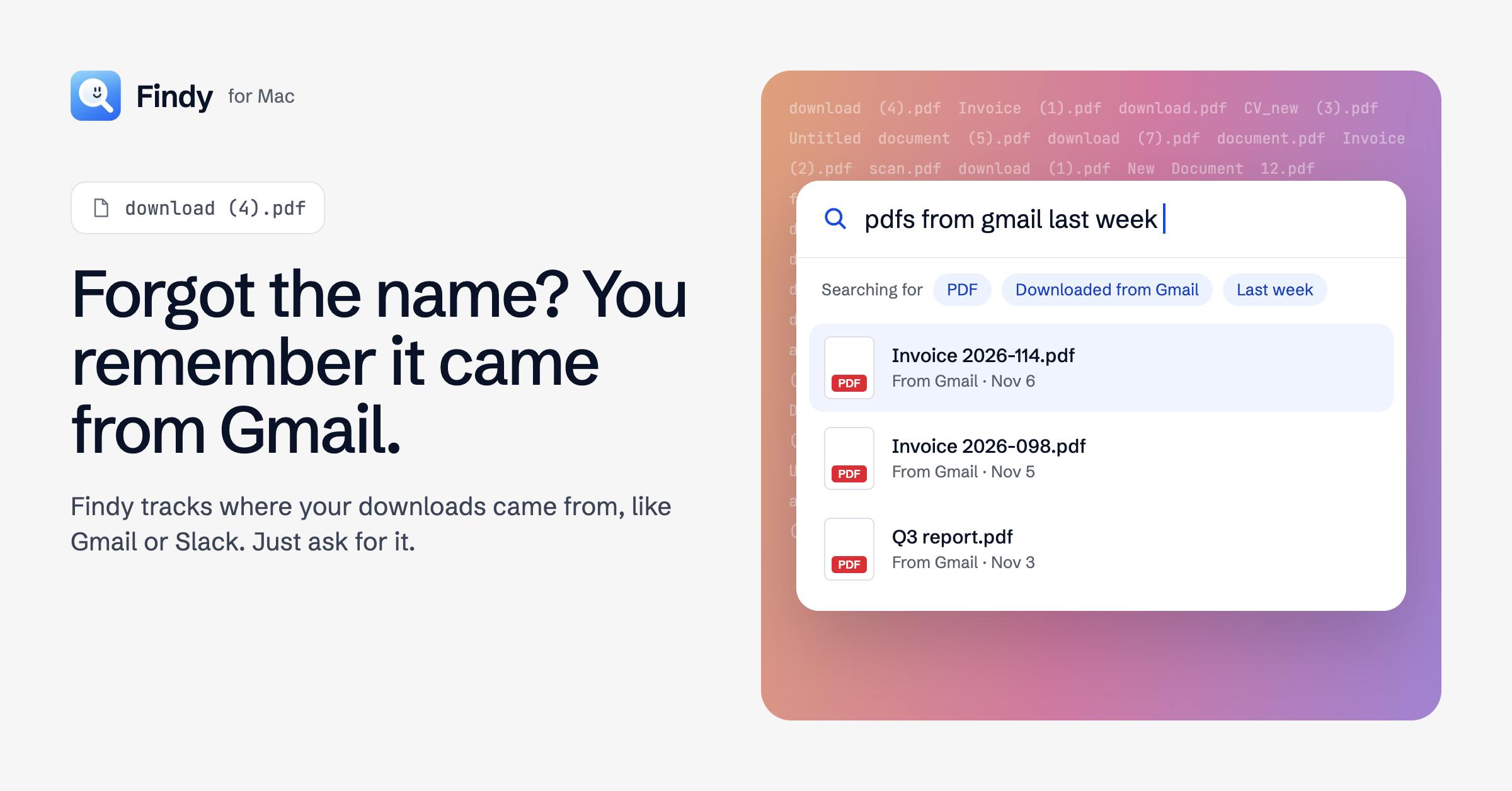
Natural Language Search: From "File Name" to "Memory Cue"
Findy's core capability is translating conversational queries into precise file locations. Official examples include "pdfs from gmail last week," "videos over 1GB," and "photos from Greece." This means users don't need to remember file names — they simply describe the file's content, source, time, or type, and Findy returns matching results.
This search approach requires blending multiple technologies: natural language understanding, metadata extraction, file content indexing, and OCR recognition for images and PDFs. Findy claims all processing happens locally and files are never uploaded to the cloud — an appealing proposition for privacy-conscious users.
Natural Language Understanding (NLU) is the technology that enables computers to grasp human language intent. In file search scenarios, NLU must parse conversational queries into structured conditions: for example, "pdfs from gmail last week" would be broken down into file type (PDF), source (Gmail attachment), and time range (last week). This involves subtasks such as intent recognition, entity extraction, and semantic role labeling. Traditional search relies on inverted indexes and keyword matching, whereas NLU-driven search combines pre-trained language models (such as BERT variants) to map queries and file metadata into the same semantic space, enabling fuzzy matching.
OCR (Optical Character Recognition) is the technology that converts text in images into editable text. Findy claims it can recognize text inside images and PDFs, which means it must preprocess files: for images, extract text regions and recognize characters; for PDFs, distinguish between text layers and scanned documents, the latter requiring page-by-page rendering before OCR. OCR accuracy is affected by image resolution, font, language, and layout complexity. Local OCR typically relies on lightweight models (such as Tesseract or Apple's Vision framework), and its speed and accuracy must be balanced on resource-constrained Macs.
Local Processing and Privacy Advantages
"Everything stays on the Mac" is the selling point Findy emphasizes. At a time when AI applications generally depend on the cloud, local processing means lower latency and better data control. For users handling sensitive documents (such as contracts or personal photos), this feature could be the key reason to choose Findy.
However, local processing also brings challenges: indexing large numbers of files may consume disk space and computing resources, and the accuracy of OCR and semantic search depends heavily on the capabilities of local models. Findy's actual performance still needs validation from more users.
Local AI models refer to machine learning models that run directly on the user's device without sending data to the cloud. These models are typically compressed through quantization, pruning, and other techniques to reduce size and computational requirements. In file search scenarios, local models must handle semantic encoding, OCR, and query parsing. Advantages include low latency, offline availability, and privacy protection; challenges include limited model capacity, which may affect accuracy on complex queries, and updates that depend on app version releases rather than real-time cloud optimization. Apple's Core ML framework provides developers with a toolchain for deploying local models.
Product Positioning and Market Opportunity
Findy received 70 upvotes on Product Hunt, ranking 15th for the day in the Productivity and UX category. Its target users are clearly Mac users with disorganized files who don't want to spend time sorting folders. Compared to traditional tools like Spotlight and Alfred, Findy's differentiation lies in its understanding of fuzzy semantics and multimedia content.
Currently Findy has only one official review, and community discussion is limited. As an indie developer product (Maker: Adrian Topka), whether it can iterate consistently and expand file type support will determine its long-term value.
Potential Limitations and Points to Verify
Despite the appealing concept, several questions about Findy remain: How accurate is the search? How well does it support non-English queries? Are indexing speed and resource usage reasonable? Additionally, the size and update mechanism of the local AI model are not detailed on the page.
For efficiency-minded Mac users, Findy offers a new approach to file retrieval. If you frequently get frustrated by "can't remember the file name," it's worth keeping an eye on this product's future development.
One-line Summary
Findy searches Mac files with natural language and keeps processing local for privacy, but accuracy remains to be verified.
Paragraph Summary
Findy is a Mac file search tool that lets users describe a file's content, source, time, or type in everyday language to locate it — for example, "pdfs from gmail last week." It combines natural language understanding, metadata extraction, file content indexing, and OCR to recognize text inside images and PDFs. All processing happens locally with no files uploaded to the cloud, emphasizing privacy and low latency. The product received 70 upvotes on Product Hunt, ranking 15th, and was built by indie developer Adrian Topka. Its differentiation lies in understanding fuzzy semantics and multimedia content, but real-world performance — search accuracy, non-English support, and indexing resource usage — still needs verification.
Related articles
VP ≠ VNP: A Major Breakthrough in Computational Complexity Theory
A study claiming to prove VP ≠ VNP over every field sparks heated discussion on Hacker News. This article analyzes the algebraic complexity background of VP and VNP, the proof approach, community controversy, and its potential impact on computational complexity theory.

Developer Naming Woes: The Technical Names That Drive Us Crazy
Why is technical naming so maddening? From Nginx and Vite to Qt and Sudo, a YouTube creator rants about the chaos of developer naming and pronunciation, revealing the tug-of-war between creators' intentions and community habits, and the cultural roots behind spelling traps like PyPI and GNOME.

Figma Workplace Scandal: Employee Sues CEO for Forcing Confrontation with Harasser
Figma and its CEO are sued by a current employee alleging sexual harassment and discrimination, and forcing the victim to confront her harasser. This article outlines the background, potential impact, and industry reflection.