FluidDocs CLI: An AI-Powered Tool That Makes Documents Conversational and Accountable
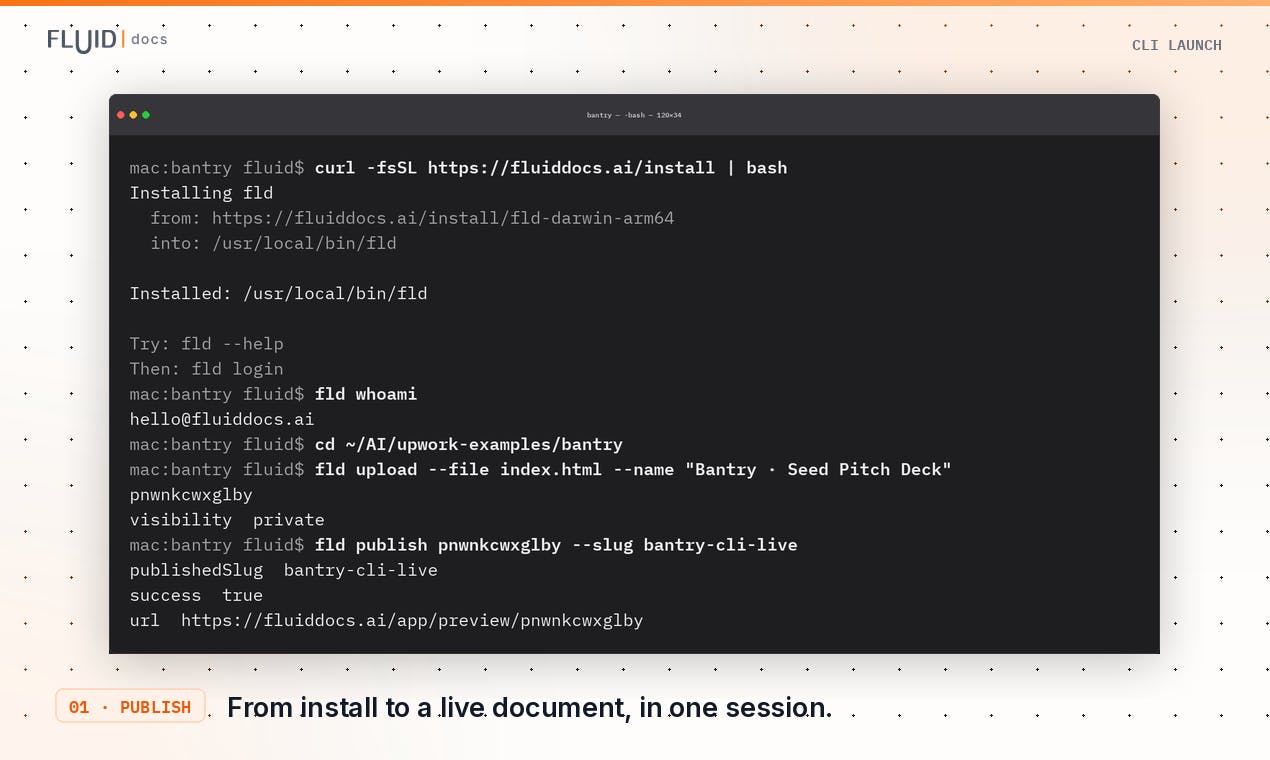
A CLI tool that turns documents into AI-powered interactive experiences with built-in Q&A and reader analytics.
FluidDocs CLI is a command-line tool that transforms static documents into interactive, AI-powered experiences. With one command, users can publish documents that readers can ask questions to via built-in AI Q&A, while authors receive analytics on who read what and which questions were asked. Designed for pitch decks, proposals, and reports, it bridges content creation, reader engagement, and author insight in a single workflow.
When Documents Learn to "Talk"
The lifecycle of a traditional document is essentially frozen the moment it's published: you craft a proposal, a Pitch Deck, or a quarterly report, export it as a PDF or slide deck, send it off—and then fall into a long silence. Did they open it? How far did they read? Did they have questions? You're left almost entirely in the dark.
FluidDocs CLI aims to break this "send and lose contact" predicament. This tool, which landed at #15 on Product Hunt's leaderboard (earning 84 upvotes), redefines documents as interactive vessels that can proactively answer questions and report usage data back to the author. It's categorized under Design Tools, Productivity, and Artificial Intelligence simultaneously—a positioning that speaks to its cross-cutting nature spanning content creation, efficiency tooling, and AI applications.
Product Hunt's Ranking Mechanism and Its Value for Product Validation: Product Hunt is one of the world's most influential platforms for discovering new products, with thousands of products launching daily to compete for visibility. Its leaderboard uses a time-decay voting algorithm (similar to Hacker News), where the number of upvotes a product receives within 24 hours of launch determines its daily ranking. Achieving #15 with 84 votes means FluidDocs placed in the top 2% (typically 500–800 products launch each day). More importantly, Product Hunt's user base consists primarily of early adopters, entrepreneurs, and tech professionals. Approval from this audience often signals that a product addresses real-world pain points rather than being a mere tech demo. For early-stage products, a strong Product Hunt ranking serves as both market validation and a critical channel for acquiring seed users.
Core Philosophy: From Static Documents to "Fluid" Documents
The word "Fluid" in the product name isn't marketing fluff. It points to a fundamental shift in how documents work: a document is no longer a one-time, fixed artifact but a dynamic entity that can be continuously updated, interact with readers, and channel those interactions back to the author. This aligns with the broader trend of AI-native tools—embedding generative AI capabilities into the most fundamental workflow touchpoints.
The Product Design Philosophy of AI-Native Tools: "AI-native" doesn't mean simply slapping a chat widget onto an existing product. It means fundamentally rethinking product architecture so that AI becomes the core capability rather than an add-on. AI-native tools typically share three characteristics: 1) both input and output rely on natural language or unstructured data (rather than traditional forms and buttons); 2) product logic is driven by AI reasoning, not hardcoded if-else rules; 3) the product improves automatically through use (via continuous fine-tuning from user feedback). FluidDocs embodies this philosophy: Prompts replace traditional editors, RAG-based Q&A replaces static FAQs, and behavioral analytics replace manual follow-ups. The core challenge for such products lies in managing uncertainty—will AI-generated formatting always meet expectations? Could Q&A responses mislead users? Products must strike a balance between "intelligent flexibility" and "traditional software predictability," typically by retaining human review or fallback mechanisms at critical junctures.
A Minimalist, CLI-Driven Document Publishing Workflow
FluidDocs' most distinctive feature is its use of a CLI (Command-Line Interface) as the primary interaction method—a notably unconventional choice in a document tools market dominated by visual editors.
The CLI Renaissance in Modern Development Workflows: Command-line interfaces may seem "retro" in an era of graphical interfaces, but they're making a strong comeback in the developer tools space. This resurgence stems from several core advantages: scriptability, integration with CI/CD pipelines, traceability (every command leaves a clear record), and minimal resource consumption. The success of tools like Vercel CLI and GitHub CLI demonstrates that for repetitive, automation-ready tasks, CLI often outperforms GUI. FluidDocs' choice of CLI as its primary interaction method aligns with the workflow philosophy of Git, npm, and similar tools—treating document publishing like code deployment. This design is especially friendly to technical teams: document publishing can be embedded into CI pipelines so that corresponding technical docs are automatically updated after every code merge, achieving true "Docs as Code."
One-Line Install, One-Command Publish
According to the official description, the entire workflow has been compressed to its absolute minimum:
- One-line command to install the CLI tool
- One command to publish an interactive document
- Edit via prompt, with the same link automatically syncing updates
This design clearly targets developers and technical content creators. For users comfortable with the terminal, there's no need to drag, drop, and format in a browser—simply describe your needs using natural language prompts, and the tool converts them into structured, interactive documents.
Prompt-Driven Editing and the Natural Language Interface Paradigm Shift: "Prompt as content" represents the next paradigm shift in content creation tools after WYSIWYG (What You See Is What You Get). Traditional editors require users to precisely control every formatting detail (fonts, spacing, alignment), whereas in a prompt-driven editing model, users simply describe their intent in natural language—"make this section more formal," "add a three-column comparison table"—and the AI handles the semantic-to-structure conversion. This relies on large language models' (LLMs) instruction-following capabilities and understanding of document structure. The core value of this approach lies in separating "what to say" from "how to present it": creators focus on content strategy while AI handles formatting. Products like Notion AI and Gamma have already validated this path. FluidDocs extends it into the CLI environment, essentially implementing a "GitHub Copilot for documents" in the terminal.
Same Link, Always Fresh Content
An easily overlooked but highly valuable detail: edits sync to the same link. This means the URL you share with a client always points to the latest version, permanently eliminating the chaos of "attachment_final_v3_revised.pdf." For scenarios requiring frequent proposal and report iterations, this delivers tangible efficiency gains.
Built-In AI Q&A and Reading Analytics
If CLI-based publishing represents an innovation in form, the intelligent capabilities on the reader side are where FluidDocs truly differentiates itself.
Built-In AI Q&A: Readers Can Ask Questions Directly
FluidDocs includes AI-powered Q&A functionality on the reader side. When a recipient opens a document, they're no longer limited to passive reading—they can ask questions directly and receive instant, content-based answers. Imagine sending a technical proposal to a client: when they have questions about a specific module, instead of waiting through email exchanges, the document itself can provide answers. This dramatically shortens communication loops and elevates documents from "information containers" to "interactive interfaces."
The Technical Implementation of Document Q&A and RAG Architecture: The technology enabling documents to "answer questions" is Retrieval-Augmented Generation (RAG). The workflow consists of three steps: 1) The document is split into semantic chunks, converted into vector embeddings, and stored in a vector database; 2) When a user asks a question, the question is similarly converted into a vector, and the most relevant document segments are retrieved; 3) The retrieved content is fed as context to a large language model, which generates an answer grounded in the source material. Compared to having an LLM answer directly, RAG ensures answers are "verifiable," reduces hallucination, and can handle proprietary knowledge beyond the model's training data. FluidDocs' built-in Q&A is essentially a lightweight RAG system deployed on the reader side, which requires maintaining a vector index of the document and re-embedding whenever content is updated—this also explains why "automatic syncing via the same link" is so important: it ensures consistency between the vector store and the displayed content.
Document Reading Analytics: Automatic Reporting Back to the Author
The other half of the capability flows back to the content creator. FluidDocs includes built-in analytics that let authors see:
- Who opened the document
- How far readers progressed
- What questions readers asked
The value of these three data categories shouldn't be underestimated. "Who opened it" helps you assess reach; "how far they read" reveals engagement drop-off points—if most readers bail at page three, something there might be problematic; and "what questions were asked" directly exposes unclear sections or areas of greatest reader concern, providing precise guidance for subsequent iterations. For sales, consulting, investment, and other scenarios that heavily depend on document persuasiveness, these insights are essentially "user behavior tracking" embedded in every document.
The Ethical Boundaries of Document Analytics and User Behavior Tracking: Document reading analytics are similar to Google Analytics in the web context, but applying them to documents involves more nuanced privacy considerations. Tracking "who opened" requires some form of identity identification (email, IP, or device fingerprinting), "how far they read" requires recording scroll positions and dwell time, and "what questions they asked" directly captures user input. While this data has clear commercial value in B2B scenarios (such as sales teams tracking client intent), a lack of transparent disclosure could run afoul of privacy regulations like GDPR. Mature document analytics products (such as DocSend) typically display a "this document is being tracked" notice on the reader side and offer anonymous viewing options. As an early-stage product, FluidDocs' data collection granularity, storage location, and whether readers can opt out remain unclear—these represent both room for product improvement and compliance points that users should explicitly clarify during evaluation. For scenarios involving sensitive information (such as undisclosed fundraising materials), authors need to weigh analytical value against the risk of exposure.
Use Cases and Target Users
The official site explicitly lists several typical applications: Pitch Decks (fundraising presentations), proposals, reports, and board updates. These scenarios share a common thread—after sending a document, the author desperately wants to know the recipient's reaction but typically lacks any feedback channel.
- Founders and Fundraising: After sending pitch materials to investors, being able to see whether they read the whole thing, which page they stalled on, and what aspects raised questions—this information is strategically invaluable for follow-up.
- Sales and Consulting: Reading data from proposals helps gauge deal intent, while Q&A records reveal client concerns.
- Corporate Leadership: Board updates and internal reports can confirm whether information was actually received and understood by the relevant parties.
From a user profile perspective, the command-line interaction method means FluidDocs skews toward tech-savvy users or professionals willing to accept a modest learning curve in exchange for efficiency.
FluidDocs CLI: Strengths and Challenges
FluidDocs CLI represents a product approach worth watching: rather than reinventing the document editor, it injects an AI interaction layer and a data feedback layer into documents. It stitches together three previously disconnected stages—content generation, reader interaction, and author insight—into a minimalist command-line workflow.
Of course, as an early-stage product (with only 1 comment on Product Hunt), it faces real-world tests: Will the CLI barrier turn away non-technical users? Is the AI Q&A accurate enough to confidently place in front of clients? How will privacy compliance around analytics data be handled? All of these need to be validated through actual use.
But the direction is undeniably on point: "making documents conversational and accountable" hits a genuine pain point for knowledge workers. As AI gradually permeates every content touchpoint, what we share may no longer be static files but intelligent vessels capable of ongoing dialogue and continuous learning. FluidDocs offers a compelling glimpse of that future.
Related articles

Uber Deploys ChatGPT Work Company-Wide: AI in the Workplace Enters the Scaled Implementation Phase
Uber deploys ChatGPT Work to 30,000+ employees, extending it from engineering to all roles. We analyze its expert-engineer pairing, end-to-end automation, and questions of AI control and power concentration—insights for scaling AI in the workplace.

Shift at Midnight Hands-On: When "ID Verification" Becomes Alien Hunting
Shift at Midnight blends ID verification with horror survival in a four-player co-op game. We break down its inspection mechanics and chaotic humor.

Zelensky Recounts the Outbreak of War: I Need Ammunition, Not a Ride
Zelensky recalls the first day of war in a YouTube interview: farewell to family, rejecting Biden's evacuation offer with "I need ammunition, not a ride," and how Bucha shaped his stance on compromise and peace talks.