Free Access to Gemini 4 Argon: $300 Google Cloud Credits + Antigravity in Practice

Use Google Cloud's $300 trial credit and Antigravity natural-language configuration to get started with Gemini 4 Argon at zero cost.
The article explains how to use Google Vertex AI's flagship model Gemini 4 Argon without paying. The core path: claim $300 in trial credit with a new account, then in the Antigravity development environment use natural language to let an AI agent automatically configure the API Key, install the SDK, and run tests — two prompts and it works. It emphasizes that the trial credit covers only Google's own models; third-party models like Claude are charged directly. Budgets & Alerts must be set up in advance, preferably combining Forecast and Actual, to prevent bills from spiraling after the credit runs out. Google Developer Program offers additional monthly credit. The approach suits learning, testing, and prototyping, not long-term production reliance.
Introduction: How to Access a Premium Flagship Model "For Free"
Google's Gemini 4 Argon is one of the flagship models on the Vertex AI platform, billed per token, and Google does not offer free quota officially. But if you know how to leverage Google Cloud's trial mechanism and developer benefits, you can run it without spending a dime.
A YouTube creator (Hindi channel) demonstrated the full process: claiming $300 in trial credits with a new account, configuring the API Key in Antigravity (Google's AI coding environment), and then using natural language to let the AI handle SDK integration and testing by itself. No line of code was written by hand — two prompts and it was done.
A note on sourcing: this article combines that video's hands-on demo with cross-verification against Google Cloud's publicly documented billing rules. The specific UI and numbers in the video will change over time, but the underlying mechanics are stable.
1. The $300 Trial Credit: Low Barrier, But With Limits
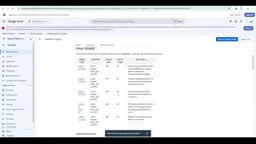
Google Cloud offers new users a one-time $300 trial credit valid for 90 days. Using this to call Gemini native models on Vertex AI does not incur actual charges until the credit runs out.
The video's author showed his billing console: a day's usage corresponded to roughly $260 of credit partially consumed, with about $26,000 rupees equivalent remaining (displayed in rupees in the video, corresponding to the dollar credit). This shows that high-intensity use will consume the credit quickly — it is not "unlimited free."
The key limitation is: the $300 trial credit only covers Google's own models. The Gemini series and Imagen image models are fine, but third-party models accessed through Vertex AI Model Garden — such as Anthropic's Claude series — are not covered by the trial credit and will be charged directly to your payment method. Many tutorials do not emphasize this, but plenty of people have been burned by it.
Key steps:
- Claim the trial credit when first logging into Google Cloud Console with a new account
- Enable the required APIs in Vertex AI
- Test with small amounts first to confirm the charges come from the trial credit, not your linked credit card
The relationship between Vertex AI and Model Garden: Vertex AI is Google Cloud's unified machine learning platform. It hosts Google's own models such as Gemini and Imagen, and also aggregates a large number of third-party open-source and commercial models through Model Garden. Models in Model Garden fall into two categories by source: Google first-party models and partner models (such as Anthropic Claude, Meta Llama, etc.). The $300 trial credit's coverage is strictly limited to first-party models; partner models are charged directly at standard rates to your linked payment method. When selecting a model in the Model Garden interface, the model card indicates the billing party — be sure to confirm before enabling.
2. Natural Language Configuration in Antigravity
Antigravity is Google's agent-first development environment, whose core idea is to let an AI agent handle coding and configuration tasks for you. This is where the video's easiest part comes in.
The author's process was very direct: open Antigravity, sign in with a Google account, then tell it in natural language — "I got a Gemini 4 Argon API Key from Google Cloud and want to use it here. How do I do that?"
Antigravity offered two options: call it directly in the project code, or integrate via the Python SDK. The author chose the latter automated path, and the AI itself completed dependency installation, .env file creation, and environment variable injection.
The only manual step was pasting the API Key into the corresponding field in the .env file. After that, the AI automatically ran a test: asking Gemini to introduce itself in Hindi and English respectively, and the model returned responses normally. From two prompts to a fully working setup, the whole process took less than a few minutes.
The value of this interaction model is that it lowers the barrier to Vertex AI. The traditional process requires reading docs, configuring IAM, installing the SDK, and handling authentication — each step can trip up developers unfamiliar with GCP. Letting the agent look up docs and write configuration itself is a real efficiency gain.
Agent-first development environment: Antigravity's "agent-first" refers to an interaction paradigm where the AI agent is the executing subject and humans express intent in natural language. Unlike traditional IDE code completion, the agent can plan steps autonomously, call tools, read and write files, and execute commands. In API integration scenarios, the agent retrieves documentation itself, determines SDK package names and versions, generates dependency installation commands, creates configuration files, and runs tests. This relies on the underlying model's understanding of function calling and long context. The trade-off is that the agent may hallucinate or execute unexpected commands, so critical steps still require human review in production environments.
3. Model Switching and Agent Building Capabilities
Antigravity's interface lets you switch the underlying model directly. The author demonstrated switching between Gemini 4 Argon and other Gemini models — lightweight models for simple conversations, switching back to Argon for complex coding tasks, without changing code.
The interface also exposes an Agent Builder entry point. You can directly describe the tool form you want, such as "make a speech-to-text tool" or "generate a JUnit test generator," and the Agent platform will attempt to build the corresponding application skeleton. In the video, the author showed an example of generating Java unit tests, with a sidebar listing various preset capability templates.
Judgment on this feature's value should be conservative: the demo looks smooth, but agents actually usable in production still need substantial debugging. It is better treated as a prototyping tool than a finished solution.
4. Budget Alerts: The Fuse Before Free Credit Runs Out
This is the most practical and most easily overlooked part of the entire video. Once the $300 credit is exhausted, billing automatically switches to your linked payment method — and without alerts, the bill can spiral before you notice.
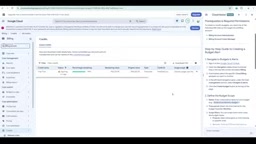
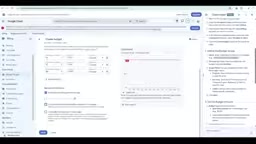
The author demonstrated the setup process: go to the Billing page in Google Cloud Console, find Budgets & Alerts under Cost Management, and create a budget. You can set a monthly amount threshold, say 1,000 rupees equivalent, and then trigger email notifications at the 50%, 90%, and 100% marks respectively.
For alert type, it is recommended to choose "Forecast" rather than only "Actual." Forecast predicts the end-of-month bill based on the current burn rate, providing early warning before actual overspending; Actual only triggers after costs have already been incurred. The author's advice is to enable both: Forecast at 50%, and Actual at 90% and 100%, balancing early warning and accuracy.
Notification recipients can specify the billing admin and specific email addresses. If you use multiple GCP services simultaneously (such as Cloud Storage or other AI services), it is advisable to check all relevant services in Scope rather than monitoring only Vertex AI, so other services' costs are not missed.
Another supplementary channel worth knowing: if you join Google Developer Program's Gemini-related plan, you receive a certain amount of credit top-up each month (the video mentions about 995 rupees equivalent per month). After the trial credit runs out, this can sustain lightweight use. With both sources combined, the actual available free period will be longer than 90 days.
The difference between Forecast and Actual alerts: Google Cloud Budgets & Alerts supports two threshold-based trigger types. Actual alerts are based on costs actually incurred and notify when a set percentage is reached — the advantage is accuracy with no false positives, the disadvantage is lag, since the cost has already occurred. Forecast alerts predict the end-of-month total based on current burn rate and remaining days, providing early warning before actual overspending, but predictions fluctuate with usage patterns and may produce false positives. The two are complementary: Forecast for early warning, Actual for post-hoc confirmation. Also note that budget alerts are only a notification mechanism — they do not automatically stop services or limit calls. For hard stop-loss, you need to combine them with Cloud Billing quota limits or programmatically disabling APIs.
5. Realistic Assessment: Who This Approach Suits
Frankly, "free use of Gemini 4 Argon" is more of a trial strategy with a time window than a long-term solution. A few points that must be made clear:
Suitable scenarios: learning and testing, prototype validation, small personal projects, evaluating model capabilities. For individual developers, $300 is more than enough for dozens of medium-scale experiments.
Unsuitable scenarios: any user-facing production service. Once the credit expires or runs out, costs suddenly appear, and Vertex AI's pricing is not friendly to high concurrency.
Third-party model trap: to reiterate, the trial credit does not cover partner models like Claude. Confirm the billing source before selecting a model in Model Garden.
Conclusion from multi-source cross-verification: the Antigravity automated configuration process demonstrated in the video is consistent with the agent capabilities described in Google's official documentation; the $300 trial credit's coverage and limitations are clearly stated in Google Cloud's official billing documentation, matching the video's description. The only caveat: the interface layout and menu names in the video may change as the product evolves — refer to the actual console when operating.
For developers who want to get started with Vertex AI at low cost, this combination is worth half an hour of your time. The prerequisite is to set up budget alerts first.
Related articles

Free Unlimited Claude Code Solution: Agnes AI + CC Switch Setup Guide
No paid subscription needed — pair the free AI platform Agnes AI with the open-source tool CC Switch to provide a backend for Claude Code, enabling unlimited free calls to text, image, and video models. This guide covers the full setup, test results, and usage boundaries.

A Complete Zero-Cost Guide to Getting Started with Claude Code for Beginners in China
A beginner's guide to Claude Code for users in China: two installation methods (command line and IDE plugin), full configuration steps for replacing the official API with the free domestic LongCat model, and a hands-on demo of building a small tool with natural language, plus tips.

When the NSA Gets Involved: The AI Supply Chain Crisis Behind Open-Source CVEs and API Key Hijacking
Multiple open-source projects disclosed severe CVEs in one day, PHP flaws alarmed the FBI, and Railway and OpenCode were breached with API keys stolen. This article breaks down the vulnerability window, AI-accelerated exploitation, and the AI supply chain crisis behind the API key black market, with a developer defense checklist.