Free Automated Email Marketing: n8n + Google Sheets in Practice

Use n8n with Google Sheets and SMTP to automate scheduled batch email newsletters for free.
A free email newsletter automation solution using Google Sheets as a content calendar, n8n to check dates and fetch the day's content, and SMTP to send in batches with delays to avoid spam flags. Compared to subscriber-based paid platforms, n8n is open-source and self-hostable with low upfront costs, but requires maintaining server and SMTP stability. Includes tips on date formats, SPF/DKIM, test lists, and notes missing features like unsubscribe management and open tracking.
Sending email newsletters manually is time-consuming and labor-intensive, especially as your subscriber list grows and repetitive tasks become a burden. A tutorial from TechFix with Nadia demonstrates a free solution: using n8n automation workflows combined with Google Sheets for content scheduling and SMTP for sending, achieving scheduled batch processing of email marketing without paid tools.
Core Workflow: From Spreadsheet to Inbox
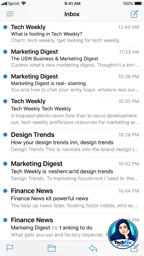
The entire process is built around three components: Google Sheets as the content calendar, n8n as the automation engine, and an SMTP service as the sending channel. Nadia explains in the video that users simply schedule the content and send date for each newsletter issue in the spreadsheet, and n8n periodically checks the current date, fetches the pending content for the matching date, and then sends the emails via SMTP.

This design separates content creation from send execution—editors can plan multiple newsletter issues in advance while the sending process is fully automated. For small teams or individual creators, this eliminates reliance on paid platforms like Mailchimp.
n8n is an open-source workflow automation tool that uses node-based visual programming: each node represents an operation (such as reading a spreadsheet, sending email, or conditional logic), and nodes are connected by lines that define data flow. It supports self-hosting (Docker deployment) or the official cloud service, includes hundreds of built-in app integrations, and also allows calling any API through HTTP request nodes. Unlike SaaS automation platforms like Zapier and Make, n8n's community edition can be deployed for free on your own server, and workflow definitions are saved as JSON for easy version management and migration. Its trigger mechanisms include scheduled triggers (Cron), Webhook triggers, and app event triggers—this article's solution uses scheduled trigger nodes to periodically poll Google Sheets.
Key Mechanisms: Date Checking and Batch Sending
The core logic of the workflow is date matching. n8n nodes trigger on a schedule, query Google Sheets for records whose date equals today, and if any exist, proceed to the sending branch. According to Nadia's demonstration, the SMTP node is used for sending with batching and delays configured to avoid being flagged as spam due to sending too many emails in a short period.
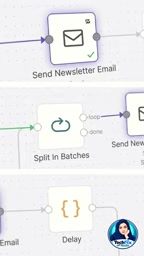
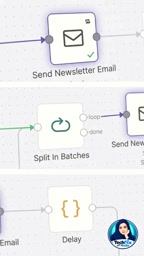
"We added batching and set a delay between each email," Nadia emphasizes in the video. This detail is critical for deliverability—most SMTP services have rate limits, and reasonable intervals reduce the risk of being blocked.
SMTP (Simple Mail Transfer Protocol) is the standard protocol for sending email over the internet, responsible for delivering mail from a client or application server to the recipient's mail server. When sending via an SMTP node, you need to provide the host address, port, username, and password (or app-specific password); common ports are 465 (SSL) and 587 (STARTTLS). Unlike hosted email services like Mailchimp, sending directly via SMTP means your sending reputation depends on the domain of the mailbox or email service you use, so the sending domain needs SPF, DKIM, and other verification records configured—otherwise emails are more likely to land in spam. Personal Gmail accounts have daily sending limits via SMTP, so batch sending scenarios typically require a professional SMTP relay service.
SPF and DKIM are two email authentication mechanisms used to prove sender identity and improve deliverability. SPF (Sender Policy Framework) uses DNS TXT records to declare which servers are authorized to send email on behalf of a domain, and receivers verify whether the sending IP is in the authorized list. DKIM (DomainKeys Identified Mail) attaches a private-key-based digital signature to emails, and receivers verify the signature using the public key published in DNS to confirm the content hasn't been tampered with and genuinely originates from that domain. Used together with a DMARC policy, these significantly reduce the probability of emails being classified as forged or spam. Self-hosted SMTP sending solutions lacking these records may be widely blocked even when the content is legitimate.
Why Choose n8n Over Paid Tools?
n8n is an open-source automation tool that can be self-hosted, giving you full control over your data. Compared to services like Mailchimp that charge by subscriber count, the n8n approach has low upfront costs and suits budget-conscious creators. However, self-hosting also means you're responsible for maintaining server and SMTP service stability.
Nadia's tutorial provides a complete step-by-step setup guide, with links available on the TechFix channel. For users who want to escape monthly fees and have some technical capability, this is an alternative worth trying.
Self-hosting means deploying software on a server or cloud host you control, rather than using a vendor-hosted service. For n8n, self-hosting is typically done via a Docker image, with data (workflows, execution logs, credentials) stored in your own database and disk without passing through third-party servers. Advantages include data sovereignty, no per-subscriber pricing, and deep customization; the trade-off is that you're responsible for server security updates, backups, availability monitoring, and troubleshooting. For email marketing scenarios that handle personal data like subscriber email addresses, self-hosting also makes data flows easier to explain from a compliance perspective, but it poses a real barrier for users lacking operations experience.
Practical Tips and Limitations
When setting up, note the following: Google Sheets date formats must be consistent with n8n's query logic; choose a reputable SMTP provider and configure SPF/DKIM records; and validate the workflow with a test list before the first run.
This solution currently covers basic sending needs but lacks advanced features such as unsubscribe management and open-rate tracking. If your email list grows, you may need to add corresponding modules or evaluate a more professional platform.
This article is based on the TechFix with Nadia tutorial video; please refer to the original video for complete steps.
One-line Summary
Use n8n with Google Sheets and SMTP to automate scheduled batch email newsletters for free.
Paragraph Summary
The article introduces a free email newsletter automation solution from TechFix with Nadia: use Google Sheets as a content calendar to schedule issues in advance, have n8n periodically check dates and fetch the day's pending content, then send in batches via an SMTP node. Batching and inter-email delays are configured to reduce the risk of being flagged as spam. Compared to platforms like Mailchimp that charge by subscriber count, n8n is open-source and self-hostable, giving you data control and low upfront costs, but you must maintain server and SMTP stability yourself. The article also offers practical tips such as matching date formats, configuring SPF/DKIM, and validating with a test list first, and notes that the solution lacks advanced features like unsubscribe management and open-rate tracking.
Related articles

Free Unlimited Claude Code Solution: Agnes AI + CC Switch Setup Guide
No paid subscription needed — pair the free AI platform Agnes AI with the open-source tool CC Switch to provide a backend for Claude Code, enabling unlimited free calls to text, image, and video models. This guide covers the full setup, test results, and usage boundaries.

A Complete Zero-Cost Guide to Getting Started with Claude Code for Beginners in China
A beginner's guide to Claude Code for users in China: two installation methods (command line and IDE plugin), full configuration steps for replacing the official API with the free domestic LongCat model, and a hands-on demo of building a small tool with natural language, plus tips.

When the NSA Gets Involved: The AI Supply Chain Crisis Behind Open-Source CVEs and API Key Hijacking
Multiple open-source projects disclosed severe CVEs in one day, PHP flaws alarmed the FBI, and Railway and OpenCode were breached with API keys stolen. This article breaks down the vulnerability window, AI-accelerated exploitation, and the AI supply chain crisis behind the API key black market, with a developer defense checklist.