From Models to MCP: A Complete Guide to the Underlying Logic of AI Tool Calling

A complete walkthrough from LLM basics to MCP, explaining how AI tool calling actually works.
This article traces the full evolution of AI tool calling: from understanding LLMs as static weight data requiring inference engines, through their inherent limitation of text-only I/O, to Function Calling which lets models output structured tool invocation instructions. It then explains how MCP (Model Context Protocol) standardizes the communication between clients and external tool services, enabling plug-and-play tool discovery and invocation for building scalable AI agents.
MCP (Model Context Protocol) is one of the hottest concepts in AI right now, but many developers still have a fuzzy understanding of what it actually does — they've heard the name but can't clearly explain what problem it solves. This article follows a complete path from "What is a model → How to use a model → Bottlenecks in usage → Function Calling → MCP" to help you fully understand the origins and purpose of MCP.
The Essence of Large Models: A Pile of Static Weight Data
When we download a large language model from ModelScope or Hugging Face, what we actually get is a bunch of weight files ending in .safetensors. These files are essentially massive collections of floating-point numbers — static weight data distilled from the training process. They can't do anything on their own, let alone generate text directly.
.safetensors is a safe, efficient model weight storage format introduced by Hugging Face. Compared to the previously common pickle serialization format (.bin), it avoids the security risk of arbitrary code execution during deserialization while supporting zero-copy memory-mapped loading, significantly improving large model loading speed. A typical large language model may contain billions or even hundreds of billions of floating-point parameters — for example, the LLaMA-70B model's weight files total over 130GB.
To bring this "dead data" to life, you need an inference engine. Inference engines (such as vLLM, llama.cpp, TensorRT-LLM, Ollama, etc.) serve a very straightforward purpose: load the weight data into GPU or CPU memory, receive input text (a tokenized sequence of tokens), execute the matrix operations, attention computations, and sampling strategies within the Transformer architecture, and ultimately decode the output text step by step. With weight data and an inference engine, a model can be deployed and run.
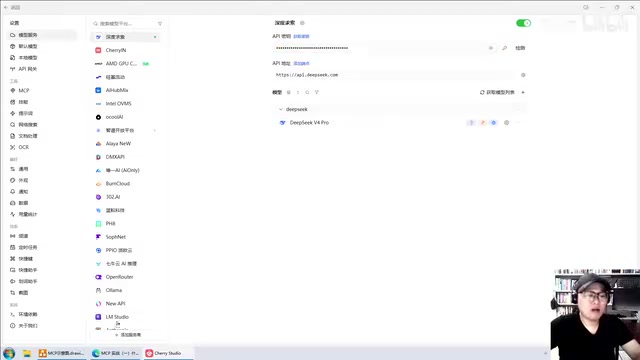
Whether deployed on a remote server or a local machine, once deployment is complete, the model exposes an access endpoint (typically a URL). We send data to this endpoint, and it invokes the model behind the scenes to generate responses. But calling the API directly requires passing numerous parameters, which is quite cumbersome. In practice, we often use AI clients like Cherry Studio: just enter your API Key to configure it, and you can chat with the model directly through a graphical interface. The client automatically handles API calls, request sending, and result rendering for you.
The Inherent Limitations of Large Models: A Bookworm That Can Only Chat
Once you start using it, an obvious bottleneck quickly emerges: ask the model to write a poem or marketing copy, and it handles it with ease; but ask "What's the weather in Beijing tomorrow" or tell it to "read the local readme.md file and summarize its contents," and the model will either give an irrelevant answer or simply fabricate information.
The reason is that a large model's core capability is limited to receiving text and outputting text. It inherently cannot access the internet, nor can it read/write local files, send emails, or perform any such tasks. At its core, it's a closed, static knowledge system — for instance, a model trained on 2023 data has its knowledge frozen at that point in time. Whenever a question falls outside the training data's scope, the model frequently produces "hallucinations."
"Hallucination" is one of the core challenges in the field of large language models. From a technical standpoint, the generation process of large models is essentially probability-based next-token prediction — the model calculates the conditional probability of each token in the vocabulary based on context, then samples the output. When a question involves knowledge not covered or sparsely covered in the training data, the model will still "confidently" generate seemingly reasonable but factually incorrect content based on the probability distribution. This is because the model lacks a reliable self-awareness mechanism for "I don't know." The hallucination problem has given rise to multiple mitigation strategies, including RAG (Retrieval-Augmented Generation), knowledge graph injection, and the focus of this article — Function Calling for external tool invocation — which replaces the model's "guessing" with real-time, real data.
In one sentence: a large model is essentially a "bookworm that can only chat" — it can only generate text based on existing knowledge and cannot go online, read files, or invoke any external functionality.
Function Calling: Giving the Model "Hands and Feet"
To break through this limitation, the industry introduced the Function Calling mechanism. Function Calling was first officially introduced by OpenAI in June 2023 with the GPT-3.5/GPT-4 API update, and quickly became an industry standard. Its technical implementation relies on the model learning structured output formats during training (typically during instruction fine-tuning and RLHF stages) — the model is trained to output tool invocation instructions conforming to a predefined JSON Schema when it recognizes its own capabilities are insufficient, rather than fabricating answers. Today, virtually all major LLM providers (Google Gemini, Anthropic Claude, Meta LLaMA, Alibaba Qwen, Baidu ERNIE, etc.) support Function Calling. In the open-source community, specialized tool-calling fine-tuning datasets like Hermes and Gorilla have also given open-source models reliable function calling capabilities.
Core Concept
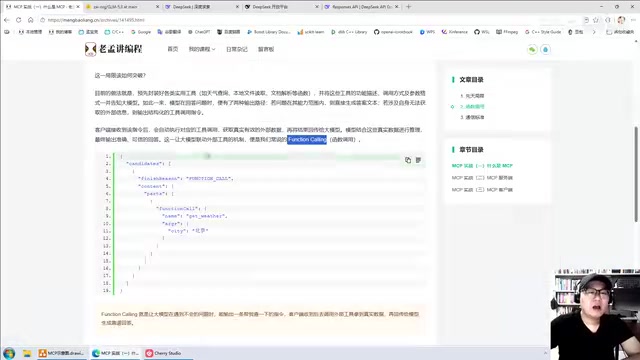
We pre-package various tool functions — such as a function to check the weather, read local files, parse documents, send emails, etc. (examples are written in Python). When conversing with the model, we provide the model with information about these tools, how to call them, and their parameter formats.
This way, the model's output goes from "text only" to two possibilities:
- If it can answer the question, it generates a text response directly;
- If the question is beyond its capabilities, instead of making things up, it outputs a tool invocation instruction.
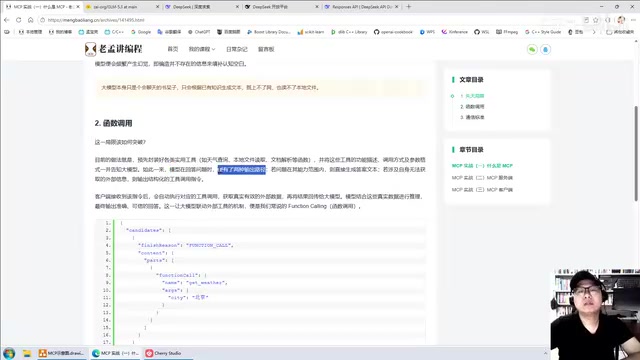
Structure of Tool Invocation Instructions
This instruction is essentially a piece of JSON. In OpenAI's API specification, when the model decides to call a tool, the finish_reason field in the response is set to tool_calls (instead of the usual stop), and the message object contains a tool_calls array. Each element includes id (call identifier), type (fixed as function), function.name (function name, such as get_weather), and function.arguments (parameter string in JSON format, such as {"city": "Beijing"}).
There's a key point that's often misunderstood: the actual tool execution is not performed by the large model. The model is only responsible for "telling you" which tool to call and what parameters to pass; the actual execution of the tool function is handled by the client (such as Cherry Studio). After the client gets the result, it needs to construct a message with role set to tool, carrying the corresponding tool_call_id and execution result, and send it back to the model. Only then, armed with this fresh information, can the model provide an accurate, trustworthy response. This multi-turn conversation structure is the protocol foundation that enables Function Calling to work reliably.
The Complete Function Calling Workflow
The entire process can be summarized as:
- User question + tool information → sent to the large model
- Model determines it cannot answer → returns a tool invocation instruction
- Client parses the instruction → calls the corresponding tool → obtains real data
- Client sends data back → model generates the final answer
From Function Calling to MCP: Standardizing Tool Services
Function Calling established the mechanism that "models can extend their capabilities by outputting instructions," but it didn't specify where tools should be deployed or how they should be implemented. This left a critical architectural choice open.
Tools Inside or Outside?
Embedded within the client: Tools are tightly coupled with the client, enabling quick implementation but limiting extensibility and cross-application reuse. For example, tools built into Cherry Studio can't be used by other clients.
Deployed externally as independent services: Flexibility and cross-platform reuse capabilities are greatly enhanced. Once tools are deployed as standalone services, any client can connect and use them; tools can be written in any language like Python, Go, etc.; adding or removing tools is also very convenient, and clients can quickly detect changes in available tools.
Clearly, deploying tools externally is the superior approach.
The Core Problem MCP Solves
But once tools are separated externally, the client and tool services become two independent programs, which immediately raises communication issues: How does the client send the tool name and parameters to the server? How does the server return results after execution? Function Calling didn't specify any of these communication details.
MCP (Model Context Protocol) was created precisely to fill this gap. MCP was officially released and open-sourced by Anthropic in November 2024, using JSON-RPC 2.0 as the underlying message format. It supports two transport mechanisms: one based on stdio (standard input/output) for local process communication, suitable for local tool services (such as filesystem operations, database queries, etc.); and one based on SSE (Server-Sent Events) over HTTP for remote communication, suitable for cloud-deployed tool services.
MCP's architecture consists of three roles:
- Host (host application): Such as an IDE or AI client — the program the user directly interacts with;
- Client (MCP client): Each Client maintains a one-to-one connection with a Server, handling message sending and receiving at the protocol level;
- Server (MCP server): Provides specific Tools, Resources, and Prompts.
The protocol defines standard methods covering:
- How tools are registered and discovered (via the
tools/listmethod, clients can automatically retrieve all available tools and their parameter descriptions from the server) - How clients send invocation requests (via the
tools/callmethod, tool names and parameters are packaged in JSON-RPC format for transmission) - How execution results are returned (the server sends back results or error messages in a standardized response format)
With MCP, the connection between large models and external tools becomes standardized and unified: clients can automatically discover all available tools on the server through the protocol, achieving true "plug-and-play, connect-and-use" functionality. This also lays a solid foundation for building scalable intelligent applications (AI Agents).
Currently, MCP has emerged at a critical juncture as the AI Agent concept explodes in popularity. The core idea behind agents is enabling large models to not only converse but also autonomously plan tasks, invoke tools, perceive their environment, and iteratively execute — a fundamental departure from traditional single-turn Q&A. In this context, standardizing the tool ecosystem has become crucial: OpenAI has introduced GPTs and Actions mechanisms, Google has released its Agent Development Kit, and MCP, as an open protocol, is becoming the de facto standard for cross-platform tool interoperability. Currently, mainstream AI applications like Cursor, Windsurf, Claude Desktop, and Cline already natively support MCP, and thousands of open-source MCP Server projects have emerged on GitHub, covering databases, search engines, code repositories, calendars, CRM systems, and many other use cases, forming a rapidly growing tool marketplace ecosystem.
Summary: MCP Is the Standardized Implementation of Function Calling
With this chain of reasoning laid out, MCP's positioning becomes very clear:
You can think of MCP as a specific, unified, and widely recognized implementation standard for Function Calling.
- Large models can only "read and write text" — their capabilities are closed;
- Function Calling indirectly extends model capabilities by having the model output invocation instructions;
- MCP goes further by specifying communication protocols for tool registration, invocation, and result return, enabling tool services to interface with any client in a standardized way.
For developers, understanding the evolutionary path of "Model → Inference Engine → Client → Function Calling → MCP" is an essential foundation for building AI applications and agents. The next step? Start building your own MCP tool services.
Related articles

GPT-Next Leak, Gemini 4 Argon Imminent: AI News Roundup
GPT-Next leak suggests extreme efficiency; OpenAI's 28-day shipping pledge boosts speed 50%; Gemini 4 Argon nears release; Anthropic subscription value report sparks debate.

GPT-Next Leaked, Gemini 4 Argon Speeds Up, Fable 5.5 May Launch Today
OpenAI's GPT-Next model leaks, expected to be extremely low-cost and possibly part of the 28-day release plan; Gemini 4 Argon internal testing accelerates, NanoBanana 2.1 is live; Semi Analysis tests show Claude Max's equivalent API value is about 5 times that of ChatGPT Pro; Fable 5.5 may launch today.

Gemini 4 Argon Launches Globally: Key Highlights from the AI Daily Brief
Google opens Gemini 4 Argon globally across Pro and Ultra subscriptions and the API, and demonstrates robot control. This article rounds up open-source models, Agent infrastructure, cost transparency, and safety governance updates.