The 5-Step AI Programming Method: A Complete Workflow from Requirements to Delivery

A structured 5-step workflow for reliably building software with AI coding tools.
This article presents a 5-step AI programming workflow — environment setup, product design, technical design, product implementation, and manual verification — that transforms vague AI coding requests into a reliable engineering process. It emphasizes three non-negotiable principles: Git version management, AI self-testing capability, and hands-on human verification to ensure consistent, high-quality software delivery.
Many people think AI programming is simple — just install Codex or Claude Code, fire off a command like "build me a note-taking app," and wait for the finished product. But reality tells a different story: what the AI delivers is often nothing like what you had in mind, riddled with bugs, and requiring endless rework.
Bilibili creator Mark shared a complete AI programming workflow in one of his videos. His core argument: delivering high-quality products with AI doesn't depend on a single magical prompt, but on a reusable process. This article systematically walks through this methodology and analyzes what each step truly solves.
Why a Single Instruction Can't Get AI to Write Good Code
Give AI a single instruction and it can indeed "build" software, but the problems are:
- What you envisioned and what AI delivers may be two entirely different things;
- The product is full of bugs, far from expectations;
- The more you try to fix, the messier it gets, until you've become nothing more than a bug-hunting tester for the AI.
The root cause is that text descriptions carry too little information density, and AI lacks the ability to self-verify. The solution is to break development into clear steps, locking in expectations and controlling quality at each stage. Mark distills the entire process into a five-step method: environment setup, product design, technical design, product implementation, and manual verification. Let's walk through each step using the example of building an e-book reader called "Mark Reader" from scratch.
Step 1: Environment Setup — Git and agents.md
Environment setup really only involves two things: Git and agents.md.
Version Management with Git
After creating the project folder, the first thing to do is have the coding agent initialize the current directory as a Git repository. Git is a distributed version control system created by Linux creator Linus Torvalds in 2005, originally designed to manage Linux kernel development. Its core concept is recording every project change as a "snapshot" (commit), forming a timeline that developers can freely navigate between any points. Each completed feature is saved as a version snapshot, so if the code gets mangled, you can roll back to a previous working state with one click.
In AI programming scenarios, Git's value is amplified even further — because the uncertainty of AI-generated code is far higher than human-written code, a single bad modification can ripple across multiple files, and without version management there's no safe way to roll back.
Mark strongly recommends: manage all code projects with Git, and if possible, push to GitHub (a cloud-based hosting platform built on Git that provides remote backup and collaboration features) to prevent local code loss from wiping out your hard work.
Setting Rules for AI with agents.md
agents.md is essentially a "project manual" written for the AI. Each time a new session starts, the agent reads its contents first to quickly understand the project background and development conventions. From a technical perspective, agents.md is essentially a persistent form of "System Prompt." In traditional software development, teams use files like CONTRIBUTING.md or .editorconfig to standardize coding conventions; agents.md extends this concept to AI collaboration scenarios. Major AI programming tools like Claude Code, OpenAI Codex, Cursor, and others all support placing similar configuration files in the project root directory. The Agent automatically reads them when starting a new session, so developers don't need to repeat rules every time, reducing the risk of context gaps.
Mark included two hard rules in his:
- A corresponding git commit must be created after every change, enabling tracking and rollback;
- Tests must be written or updated after every change, and all tests and acceptance checks must pass before delivery.
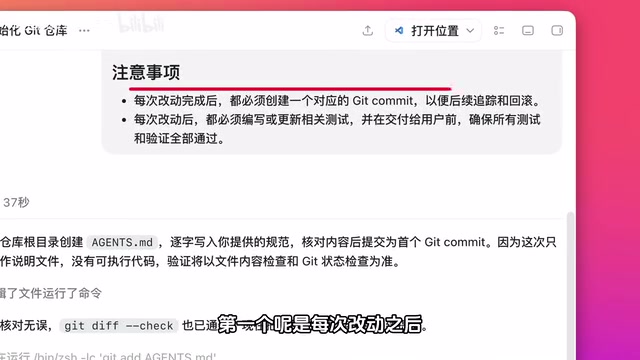
The second rule is especially critical — it requires the AI to run and test its own code first after writing it, continue fixing any issues found, and only deliver once it confirms there are no obvious problems. This catches a significant number of obvious bugs upfront, saving substantial human effort.
Step 2: Product Design — Converging Requirements with MVP Thinking
You know you want to build an e-book reader, but what exactly it should look like — you don't really have a clear answer. Mark's approach is to discuss product design with AI first.
Start with MVP and Subtract
The MVP (Minimum Viable Product) concept was first systematized by Eric Ries in his book The Lean Startup, with the core idea of validating key assumptions with minimal development cost. In AI programming scenarios, MVP thinking takes on new practical significance: large language models are prone to "hallucination" when handling complex, ambiguous requirements — generating code that appears reasonable but is actually incorrect. The larger and more ambiguous the requirements, the higher the probability of AI errors. Therefore, subtracting first and focusing on core functionality isn't just a product strategy — it's an engineering technique for reducing AI error risk. The first version should only include the most essential features, getting the main flow working and quickly validating the direction at low cost — if you spread features too wide from the start and the direction is wrong, a lot of work goes to waste.
Interestingly, when AI suggested features, Mark kept doing "subtraction":
- AI suggested supporting ePub format; he changed it to "only support the simplest txt first";
- Since txt has no concept of table of contents or chapters, the TOC parsing feature was also removed;
- Only light theme for now; eye-care and dark modes deferred;
- Non-essential features like bookmarks all postponed.
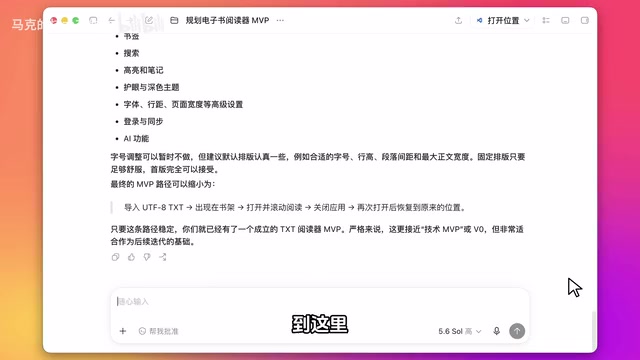
After several rounds of back-and-forth, once both sides reached clear consensus on "what to build and what not to build in version one," he had the AI compile a product design document as the unified reference for subsequent development. Note that he explicitly requested "not too detailed" — just enough to ensure alignment on the general direction, with details left for iteration.
Should You Build a Demo First?
For products with complex backends (like a personal knowledge base involving document processing, retrieval, and model invocation), Mark will first have AI build a frontend-only demo with simulated data to validate whether the interactions feel right, while also providing a visual reference for subsequent implementation.
But the decision criterion is simple — look at the backend implementation cost. The e-book reader has a very lightweight backend (just importing txt files), so building a dedicated demo would be redundant effort; better to build the complete product directly and adjust from there.
Step 3: Technical Design — Determining the Tech Stack and Architecture
Once the product direction is set, the next step is determining the technical approach. Mark recommends starting a new session specifically for technical discussions to keep the context focused (though he also notes that top models' long context capabilities are getting increasingly strong, and running continuously for several hours usually isn't a problem).
The approach is the same — first discuss direction with AI: have it read the product design document, then ask about suitable tech stacks. In this case, AI recommended Electron + React + TypeScript + Vite + Electron Forge and compared alternatives like Tauri.
Here's a brief explanation of this tech stack: Electron is an open-source framework developed by GitHub that allows building cross-platform desktop applications using web technologies (HTML, CSS, JavaScript). Well-known apps like VS Code, Slack, and Discord are built on it. Its strengths are a mature frontend ecosystem and good cross-platform consistency; its weakness is higher memory consumption (since each app embeds a Chromium browser and Node.js runtime). Tauri is a rising alternative that uses Rust as the backend and the system's native WebView as the frontend rendering engine, with much lower memory usage and package size than Electron, though its ecosystem maturity and community resources don't yet match Electron's. React is Meta's open-source UI library, TypeScript is a type-safe superset of JavaScript (catching errors at compile time through static type checking), Vite is a next-generation frontend build tool (known for extremely fast cold starts and hot reloading), and Electron Forge is Electron's officially recommended project scaffolding and packaging tool.
Once the direction was confirmed, he similarly had AI produce a technical design document stored in the docs folder as a reference during coding.
Mark admitted he's not particularly knowledgeable about this area himself — "as long as the general direction is right, that's fine" — which perfectly illustrates the value of the process: even if you're not a technical expert, you can control project quality by aligning key decisions with AI.
Step 4: Product Implementation — Letting AI Self-Verify Its Code
Before actually writing code, there's an extremely important prerequisite: giving AI the ability to verify its own results.
Using Codex as an example, Mark recommends installing at least two plugins:
- Computer Use: for operating the computer;
- Chrome: for viewing Chrome pages.
The Computer Use capability originated from a technology of the same name introduced by Anthropic in 2024, which allows AI models to operate computers like humans — moving the mouse, clicking buttons, typing text, and taking screenshots. The significance is that AI no longer just "writes code and calls it done" but can launch applications, perform operations on the interface, observe results, and form a complete "write → run → verify → fix" loop. Combined with the Chrome plugin to read browser page content, AI can verify whether web interface rendering matches expectations. This effectively equips AI with an automated QA (Quality Assurance) environment, dramatically reducing low-level errors that would otherwise require manual investigation.
With these two plugins, most features can be left to AI to self-verify. This is one of the core principles of the entire AI programming methodology: without a verification environment, AI is extremely prone to writing piles of bugs — after all, humans writing code without verification would also miss errors constantly.
Then start a new session, have AI read both the product design and technical design documents, and implement the product based on them. Code writing takes a while, and once complete, AI performs various self-tests according to agents.md requirements, ensuring the code passes verification.
Step 5: Manual Verification — AI Self-Testing Can't Replace Hands-On Testing
No matter how thorough AI self-testing is, it can't cover every issue. When the product actually runs, the first npm start threw an error right away — which perfectly illustrates that "AI isn't 100% reliable, even with self-testing capabilities."
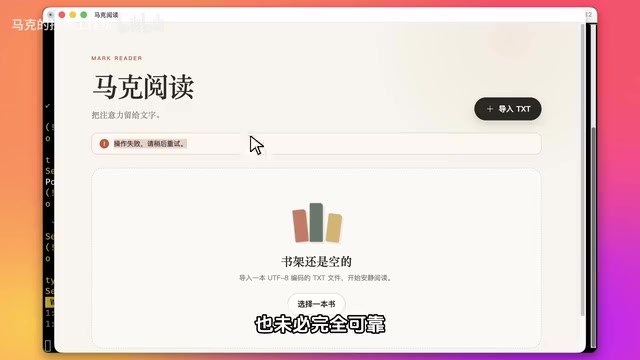
Feed the error back to Codex, it fixes it and tries again — error gone, txt file successfully imported, MVP complete.
AI self-testing has limitations on multiple levels. First is the distinction between "known unknowns" and "unknown unknowns": AI can only verify scenarios it can anticipate, while real user operation paths often exceed preset ranges (such as rapid consecutive clicks, usage under extreme network conditions, or inputting files in unexpected formats). Second is subjective judgment at the experience level — whether animations are smooth, whether interactions are intuitive, whether information hierarchy is clear. These dimensions involving human cognition and aesthetics are things current AI cannot reliably evaluate. Finally, there's the context bias problem: AI's self-testing is based on its understanding of the requirements, and if AI misunderstood from the start, its test cases themselves are wrong, creating a blind spot of "writing your own test and grading your own answer."
Interaction experience, edge cases — these types of issues are easily missed by AI self-testing. Whether the product is actually good to use and truly what you wanted ultimately requires trying it yourself to know.
Three Non-Negotiable Principles in AI Programming
The five-step process can be flexibly trimmed based on needs: for simple, low-stakes requirements, you can skip product design and technical design, set up the environment, let AI implement, and verify; for complex, high-stakes requirements, complete all five steps to ensure quality.
At its core, this is a tradeoff between development efficiency and outcome controllability: the more you participate, the stronger your control, but the more time it takes; the less you participate, the faster and easier it is, but the higher the probability of results deviating from expectations.
Regardless of adjustments, Mark emphasizes three things that must never be skipped:
- You must have a version management tool (like Git). AI can't write correct code every single time, and it may even break previously working features during modifications (known in software engineering as "regression defects" — fixing one problem while introducing new ones). Git is what enables rollback at any time.
- You must give AI self-testing capability. Otherwise you become the tester yourself, going back and forth finding bugs for the AI — an extreme waste of time.
- You must perform manual verification. AI self-testing can't cover all issues; interaction experience and edge cases are especially easy to miss.
Conclusion
The true value of this five-step method lies not in any specific tool (it works with Codex, Claude Code, or any other agent), but in decomposing the vague notion of "have AI write software for me" into a controllable, reusable engineering process.
As Mark puts it, this is simply a reasonably effective method explored at the current stage — not the only answer. As large model capabilities continue to evolve, AI programming paradigms will keep changing. But the three foundational principles — "version management, AI self-testing, and manual verification" — will remain the cornerstone of stable delivery for the foreseeable future.
Related articles

GPT-Next Leak, Gemini 4 Argon Imminent: AI News Roundup
GPT-Next leak suggests extreme efficiency; OpenAI's 28-day shipping pledge boosts speed 50%; Gemini 4 Argon nears release; Anthropic subscription value report sparks debate.

GPT-Next Leaked, Gemini 4 Argon Speeds Up, Fable 5.5 May Launch Today
OpenAI's GPT-Next model leaks, expected to be extremely low-cost and possibly part of the 28-day release plan; Gemini 4 Argon internal testing accelerates, NanoBanana 2.1 is live; Semi Analysis tests show Claude Max's equivalent API value is about 5 times that of ChatGPT Pro; Fable 5.5 may launch today.

Gemini 4 Argon Launches Globally: Key Highlights from the AI Daily Brief
Google opens Gemini 4 Argon globally across Pro and Ultra subscriptions and the API, and demonstrates robot control. This article rounds up open-source models, Agent infrastructure, cost transparency, and safety governance updates.