Gemini 3.5 Transcribe Hands-On Review: Free Real-Time Translation for 85 Languages Tutorial
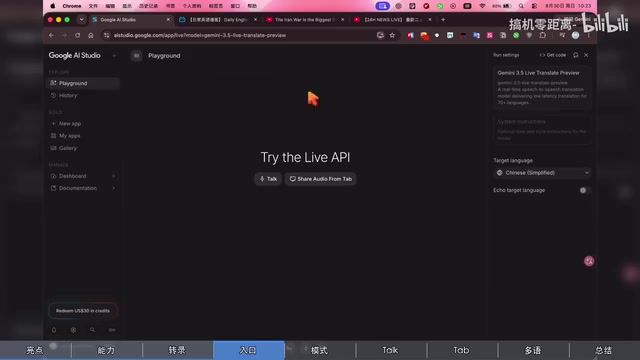
Gemini 3.5 Transcribe offers free smart transcription and real-time translation across 85 languages.
Google's Gemini 3.5 Transcribe is a free speech-to-text model available in Google AI Studio that goes beyond simple transcription. It automatically detects 85 languages, identifies multiple speakers, removes filler words and misspoken phrases using semantic understanding, and offers real-time browser audio translation. While there's a 5-10 second delay for live translation, it's a powerful tool for meeting notes, language learning, and consuming foreign-language content.
Speech-to-Text Enters the "Smart Transcription" Era
In the past, the standard for evaluating speech-to-text tools came down to one thing — accuracy: whether every word could be clearly recognized. But in the AI era, word-for-word accuracy has become the bare minimum. What truly sets tools apart is whether the model can understand semantics, remove misspoken words and filler, and organize content into a format that's ready to use.
In fact, Speech-to-Text (STT) technology has gone through three major phases: early statistical methods based on Hidden Markov Models (HMM) that could only handle limited vocabularies and specific speakers; the rise of deep learning after 2012, where end-to-end neural network models (such as Baidu's Deep Speech and OpenAI's Whisper) dramatically improved recognition accuracy, bringing speech recognition error rates below 5% in general scenarios; and now the third generation, built around large language models, which layers semantic understanding on top of transcription — editing and polishing content much like a human editor would.
Google's newly released Gemini 3.5 Transcribe targets exactly this pain point and belongs squarely to this third generation. Based on hands-on testing, this model not only delivers high-accuracy transcription but also adds "semantic understanding" capabilities, producing output that can be used directly without further editing. More importantly, it's currently completely free for all users and can be experienced directly in Google AI Studio.
Four Core Features of Gemini 3.5 Transcribe
Automatic Detection of 85 Languages
Gemini 3.5 Transcribe supports over 85 languages, covering the vast majority of the world's major languages. The key feature is automatic detection — you don't need to tell the model which language is being spoken. The model independently identifies the language, regional accent, and even dialect. This is especially useful for users who frequently mix languages like Chinese and English in their speech.
Automatic Multi-Speaker Identification
For pre-recorded audio, the model also supports automatic Speaker Diarization, labeling which speaker said what. It currently supports up to eight speakers. However, Google notes that identification with more than three speakers is still in the experimental stage, so accuracy should be monitored in practice.
From a technical perspective, speaker diarization is a classic challenge in speech processing. Its core task is answering "who said what and when." It typically involves three steps: first, Voice Activity Detection (VAD) distinguishes between speech and silence segments; then speaker embeddings are extracted from each segment using models like x-vector and ECAPA-TDNN; finally, clustering algorithms (such as spectral clustering or PLDA) group similar voice prints to the same speaker. Scenarios with more than three speakers are more difficult because overlapping speech, interruptions, and varying speech rates significantly increase clustering complexity.
Smart Transcription: Automatic Removal of Misspoken Words and Fillers
This is Gemini 3.5 Transcribe's biggest highlight. Traditional speech-to-text works on a "you say it, it writes it" basis, faithfully recording every slip-up, filler word, and rambling thought. Gemini 3.5 Transcribe adds an extra layer of semantic understanding:
- When you say "Let's meet on Tuesday — no, Wednesday," the model recognizes this as a self-correction and keeps only the final result: "Wednesday";
- Filler sounds like "um" and "uh" are automatically removed;
- Natural pauses in speech are not incorrectly interpreted as periods or sentence breaks.
In the field of Natural Language Processing (NLP), filler words like "um," "uh," and "you know" are classified as "disfluencies." Traditional transcription systems typically rely on post-processing rules or specially trained classifiers to filter these out, but they risk accidentally deleting meaningful interjections. The advantage of large language models is their ability to make judgments based on contextual semantics: for example, "Hmm, I agree" — the "hmm" here expresses agreement rather than serving as filler, and should be preserved. Correcting misspoken words involves even more complex semantic reasoning — the model needs to identify self-correction patterns like "not X, but Y" (the reparandum-interregnum-repair structure) and retain only the corrected information. This capability fundamentally requires the model to have comprehensive abilities in dialogue intent understanding and discourse analysis.
This means the transcribed text is clean and readable, making it ideal for meeting minutes, note-taking, and similar scenarios.

Hidden Feature: Real-Time Browser Audio Translation
A practical feature rarely mentioned in the official documentation is Share Audio from Tab. It can capture audio from any browser tab and transcribe and translate it in real time into your desired language.
This feature is implemented using the browser's Screen Capture API and Audio Capture API. Starting from Chrome version 92, the browser supports capturing audio streams from individual tabs via the getDisplayMedia() method, without needing to capture the entire desktop or install additional plugins. The captured audio is processed through the Web Audio API, then transmitted in real time to Google's cloud-based Gemini model for inference via WebSocket or WebRTC protocols. This architecture means all computation happens in the cloud — the local device is only responsible for audio capture and displaying results. This keeps hardware requirements extremely low but does create some dependency on network stability.
In other words, the next time you encounter a foreign-language video without subtitles, you can simply open the free AI Studio, switch to the Gemini 3.5 real-time translation model, and see translated content synchronized in real time.
Hands-On Tutorial: Three Steps to Start Using Gemini 3.5 Transcribe
Step 1: Enter AI Studio and Select the Model
Go to the Google AI Studio website, click on the Audio option in the upper right corner, then select the latest Gemini 3.5 real-time translation preview model (Live Translator Preview). Once inside, you'll see two working modes: Talk and Share Audio from Tab.
Google AI Studio is a free AI experimentation platform from Google designed for developers and general users. Think of it as the "trial gateway" for Google's Gemini model series. Users don't need to write any code — they can access text generation, image understanding, audio processing, and other AI capabilities through a web interface. It complements Google's Vertex AI (designed for enterprise deployment): AI Studio handles low-barrier experimentation and prototype validation, while Vertex AI provides production-grade security, scalability, and SLA guarantees.
Step 2: Set the Target Language
The interface provides seven preset prompts that usually don't need modification. What you actually need to set is the target language — the language you want the transcription or translation output in, which defaults to English. You can freely choose from 85 languages, such as switching to Simplified Chinese. The model automatically identifies the source language — you only need to specify your desired output.
Step 3: Choose Your Working Mode
Talk Mode: Directly captures speech from your current microphone for real-time transcription. In testing, when the target language matches the spoken language, it doesn't translate — instead, it cleanly converts speech to text, automatically removing unnecessary filler words and fillers. This is perfect for meeting transcription and dictated notes.
Share Audio from Tab Mode: Captures audio from other browser tabs. In testing, English news from YouTube, Japanese news, and Chinese videos from Bilibili were all tested, and the model successfully identified the source language and translated it into the set target language.

Hands-On Experience and Performance Details
After testing across multiple platforms, Gemini 3.5 Transcribe revealed several noteworthy details in practical use:
Intelligent Volume Balancing: When translation is enabled, the model automatically lowers the volume of the original tab while increasing the audio output volume on the AI Studio side. The original audio is kept at a very low level as background, so it doesn't interfere with hearing the translated content.
Tone and Wording Preservation: Whether it's a news anchor's tone and word choice, or distinguishing between male and female voices, the model automatically identifies and processes accordingly, maintaining the naturalness and consistency of the translated content.
Cross-Platform Compatibility: It works not only with YouTube — Bilibili and virtually all other audio websites can be captured as well.

Current Limitations
Testing also revealed a notable shortcoming — latency. Real-time browser translation has approximately 5 to 10 seconds of audio delay, which can be noticeable when watching movies or other content where real-time performance matters. However, for quickly understanding content in unfamiliar languages or for language learning purposes, this level of delay is generally acceptable.
This latency primarily comes from three sources: First, audio buffering — the model needs to accumulate a certain length of audio to make accurate semantic judgments, typically requiring a 1-3 second context window; second, network transmission — audio data is uploaded from the browser to Google's cloud servers and results are sent back, affected by network bandwidth and geographic distance; third, model inference — the large language model itself requires computation time for semantic understanding and translation. For reference, professional simultaneous interpreters typically have a 2-4 second delay, while traditional machine translation APIs (like Google Translate's streaming mode) have about 1-2 second delays — but the latter lacks Gemini's deep semantic understanding and contextual coherence. As model optimization and edge computing technologies advance, this latency is expected to decrease further in the future.
Conclusion
Gemini 3.5 Transcribe represents the evolution of speech-to-text from "accurate recording" to "intelligent understanding." With automatic detection of 85 languages, speaker identification, smart transcription that removes filler, and real-time browser translation, it stands out as a highly practical free speech tool.
For everyday users, the biggest appeal is that it's completely free and has an extremely low barrier to entry — all you need is a browser. While the real-time translation does have a few seconds of delay, in today's world of increasingly abundant multilingual content, it provides tremendous convenience for cross-language learning and information access. The next time you encounter a foreign-language video without subtitles, we might truly be able to say: subtitles are no longer a necessity.
Related articles

Bilibili's Hit Dify Tutorial: A Practical Guide to Building 20+ AI Apps from Scratch
A distilled guide to Bilibili's top-rated Dify tutorial: Windows + Docker deployment, MySQL connection, five app types, model integration strategy, and publishing.

Agent Skills Beginner's Guide: From Concepts to Multi-Agent Collaboration in Practice
A comprehensive guide to Agent Skills: core concepts, components, the importance of Description, standardization, beginner learning paths, and multi-agent collaboration.

One Neuron Detects Both Cats and Cars? We Reproduced It and Found a New Explanation
The cat-car neuron reinterpreted: researcher Cammarata argues it distinguishes pointy from round, not cats from cars. We reproduced the experiment and found the new explanation holds on most inputs—but cars are the exception. The interpretability debate continues on language models.