Gemini 4: Niang or Carbon? Comparing the Three Membership Tiers
Want Niang in Gemini app — Pro is enough; Carbon requires Ultra; in Antigravity, check the corner pillar.
The article answers which membership tier unlocks Niang and Carbon. To select Niang in the Gemini app chat window, paid Pro suffices; Carbon is Ultra-only in both the Gemini app and Antigravity, though Pro users may see Carbon via the Search AI Mode entry in some countries. In Antigravity, Niang is available to paid Pro and eligible trial users on designated high-end devices, so verify device eligibility and trial status. Niang's 61 points is its highest thinking level; aligned, Niang high and Carbon high both score 60. Antigravity uses a 5-hour refresh window with a weekly cap, so judge by your own usage.
Introduction: Available on Mobile, Grayed Out on Desktop — What's Going On?
If you can already see the Niang model on your phone but it's grayed out when you go back to your computer to write code, don't rush to buy another month of membership. Although both places use the same account, they're actually looking at two different permission tables. This article walks through the two menus — the Gemini app and Antigravity — to answer the most money-saving question: which membership tier do you actually need to unlock Niang and Carbon?
1. Just Want to Use Niang in Gemini? Pro Is Enough
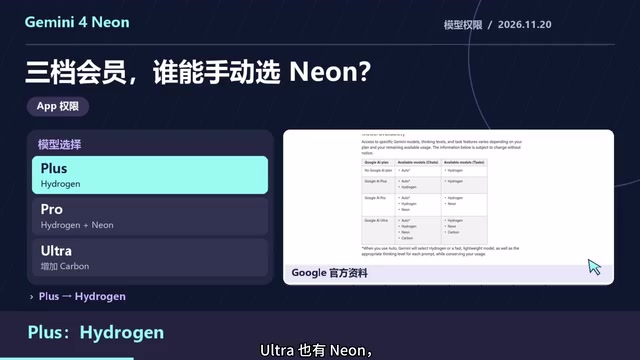
The easiest place to get confused is that small print on the coding tool row. Open the model menu in the Gemini app, and from top to bottom you'll see Auto-select, Everyday Help, Deep Analysis, plus Code and Complex Work. Everyday Help corresponds to Hydrogen, and Deep Analysis corresponds to Niang.
For example, shortening a meeting notice — the everyday model can take a first pass. But swap in two project reports with different wording and ask it to find the numbers that don't match and point out where in the original text, that's when I'd manually switch to Niang.
According to the Gemini app help page, Plus can use Hydrogen among these selectable models; the Pro menu adds Niang, and Ultra also has Niang and can additionally select Carbon within this app (see screenshot: and can additionally select Carbon within this app). So if your goal is just one thing — selecting Niang in the chat window — paid Pro already gets you in the door. Buying Ultra just to get that button means the extra money you spend is mainly buying something else.
One thing worth correcting, since it's easy to miscommunicate: in both the Gemini app and Antigravity, Carbon is Ultra-only. But if someone says "I'm on Pro and I've seen Carbon," they're not necessarily misremembering — Google's Pro full page also lists a different entry point: Google Search AI Mode in some countries. Compare the two images and check the address bar first; a model someone uses in Search won't automatically appear in another person's chat window.
Thinking levels are a key setting that affects model performance and quota. The same model can switch between different "thinking amounts" across tasks: low levels respond fast and save quota, good for simple rewrites; high levels unfold longer reasoning chains, good for complex analysis or coding, but slower and more quota-hungry. The "61 points" in this article comes from Niang's highest thinking level — when comparing against Carbon's high level, you must first align the levels, otherwise the conclusion is distorted. When evaluating models, fix the same level for the same task to get comparable results.
2. Antigravity Model Permissions: The "Corner Pillar" Next to the Pro Badge Is What Matters
Switch to Antigravity on your computer. Paid Pro can select Niang, Ultra can too, and Carbon is included in its plan. If a new conversation hasn't had a model manually selected yet, Niang will be the default; conversations that have already made a selection retain your choice. Looking further down, Carbon and the option to orchestrate tasks with Carbon are in the Ultra column. When you're about to have it process a repository continuously, first check whether you want Niang or this specific Carbon entry (see screenshot: or this specific Carbon entry) — don't just look at the "Pro" written on the desktop.
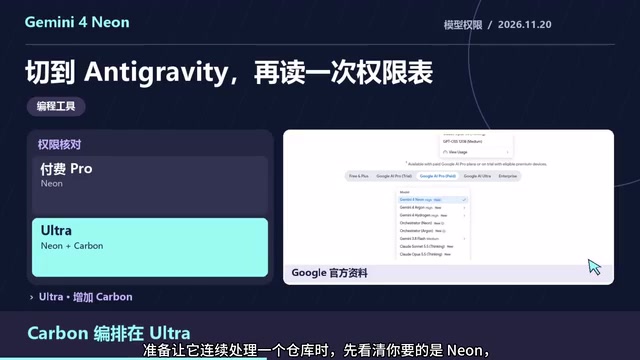
What many people miss is the small symbol next to Pro. In Antigravity, Niang is available to paid Pro, and also to eligible trial users on designated high-end devices. A regular trial can't be judged by a Pro badge alone. Looking at Hydrogen and Claude 5.5, they require non-trial paid Pro in this table. The official path is: request to end the trial, switch to paid, or upgrade to Ultra. Before buying, check the corner pillar and you'll know which action actually helps.
Conversely, don't apply the coding tool's corner pillar to your phone. The Gemini app help page lists models by plan and doesn't write the same device restriction there.
Cross-Validation: One User's Actual Experience
One user reported that a carrier-gifted Pro could see Niang in the Gemini app but showed as unavailable in Antigravity. That's their own experience — you can check these three places yourself: subscription status, the product you're using, and that product's model menu.
If you're using AI Studio, Google's release page states that Pro and Ultra subscribers can try Niang there (see screenshot: Google's release page states). As for what specific trial accounts can see, it depends on their own entry point.

But writing programs to call the API is a separate bill. The pricing page lists Niang's standard text tier at $3 per million input tokens and $15 per million output tokens, with no free tier. Don't use the membership monthly fee to estimate API call counts.
API calls and membership subscriptions are two separate billing systems. The monthly membership fee buys you model access and quota within the app or coding tool, while calling models programmatically through the API is priced separately per million input/output tokens — Niang's standard text tier is $3 input and $15 output with no free tier. You can't reverse-engineer API call counts from the membership fee, nor expect a subscription to include API quota. If you need programmatic calls, check the pricing page first and estimate costs based on actual token usage.
3. Niang's 61 Points Beats Carbon? First Check the Ranking Source and the Level
Now let's address a catchy headline: "Niang's 61 points beats Carbon." First, look at where the ranking comes from. Google's release post says third; the evaluation site page you provided lists it as sixth out of 95 models for that period. The 61 points is the result of Niang's highest thinking level. Align the levels, and Niang's high is 60 points while Carbon's high is also 60 points — on this index, you could say the two are close. Mix the results of two models and two levels together, and you get a different story.
One developer posted timings for the same coding task: Niang at 5 minutes 53 seconds, Sonnet 5.5 at nearly 25 minutes, both passing that validation (see screenshot: at least on his particular problem). This image shows that, at least on his particular problem, Niang did save time.
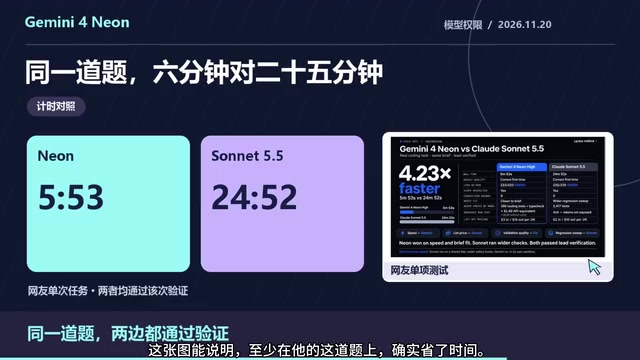
Swap in a different set of problems and the feedback changes. Someone preferred another model's changes in a blind implementation review; the evaluation site also noted that Niang was slower and produced longer output on his task set. Comparing with a requirement you've actually modified yourself, timing both composition and backtick time together, gives a more useful reference.
4. Quota and Decision: How the 5-Hour Window Works
Antigravity has a 5-hour refresh window and a weekly cap. The 5 hours refers to the quota refresh time window; how much a single task consumes within it varies with the task and thinking level. This is a personal usage record: the poster first used mid-level then switched to high-level, and self-reported using up this window in about 4 hours. Your tasks differ from theirs — what you should really record is the model used at the time, the thinking level, and how much useful work got done.
Decision Checklist
- If you only analyze files in the Gemini app, look at Pro first.
- If you're on a Pro trial and can't see Niang in Antigravity, first verify device eligibility and trial status before deciding whether to convert to paid.
- Only when you explicitly need Carbon in the app or coding tool, or your existing quota is truly insufficient, does Ultra solve a specific problem.
Next issue, we'll use bills to calculate exactly how much more this step costs.
One-line Summary
Want Niang in the Gemini app — pick Pro; need Carbon — you need Ultra; in Antigravity, watch the corner pillar.
Paragraph Summary
The article answers the money-saving question of which membership tier unlocks Niang and Carbon. The conclusion: to select Niang in the Gemini app chat window, paid Pro is enough; Carbon is Ultra-only in both the Gemini app and Antigravity — if you see Carbon on Pro, it may come from a different entry point via Search AI Mode in some countries. In Antigravity, Niang is available to paid Pro and to eligible trial users on designated high-end devices; a regular trial can't be judged by the Pro badge alone — verify device eligibility and trial status. On rankings, Niang's 61 points is the highest thinking level result; aligned, its high level and Carbon's high level are both 60 points. On quota, Antigravity has a 5-hour refresh window and weekly cap, with consumption varying by task and thinking level — judge by your own actual usage records.
Related articles

Ternary Bonsai 2.5 27B: 27B Coding Power Packed into 5.9GB, Code Stays Local
Ternary Bonsai 2.5 27B uses ternary quantization to compress 27B parameters into 5.9GB, enabling local coding with code staying on-device. We analyze its approach, vendor benchmarks, and multi-turn progress.

Self-Host Google Photos with Open-Source Immich: Privacy and AI Combined
Learn how to self-host a Google Photos alternative with open-source Immich: automatic backup, local AI search, and remote access—private and smart.

Astrophysicist Pokes Fun at Supermoons: The Difference Between a 16-Inch and a 15-Inch Pizza
Astrophysicist Neil deGrasse Tyson criticizes the terms supermoon and micromoon, using a 16-inch vs. 15-inch pizza analogy to show the visual difference is negligible, and calls out exaggerated labels in science communication.