Gemini Canvas Demonstrates Parametric 3D Design and STL Export Workflow

Gemini Canvas demonstrated an app-level 3D printing workflow from parameter adjustment to STL export, but it is not equal to general-purpose CAD.
Gemini Canvas showcased an app-based workflow where users adjust mathematical parameters in a Canvas-built app, preview 3D changes in real time, and export geometry as an STL file. The capability is app-implemented, not a universal native feature of Canvas or Gemini. It suits repeatable object families with clear variables like dimensions, curvature, and wall thickness, and can support retail accessories, product variant testing, and limited customization. Potential benefits include faster iteration, less manual rework, and lower modeling barriers, but dimensions, geometry, material, printer compatibility, and quality still need verification before printing. Teams should treat the Canvas app and its geometric rules as the core solution, not a general-purpose CAD platform ready for direct production.
Gemini Canvas recently showcased a complete path from conversational design to 3D print output: users adjust mathematical parameters of objects like vases within an app built on Canvas, preview the 3D form in real time, and export the geometry as an STL file. This demo opens up new possibilities for Canvas in lightweight custom products, prototyping, and design tools, but there remains a clear boundary between it and "Gemini as a built-in general-purpose CAD."
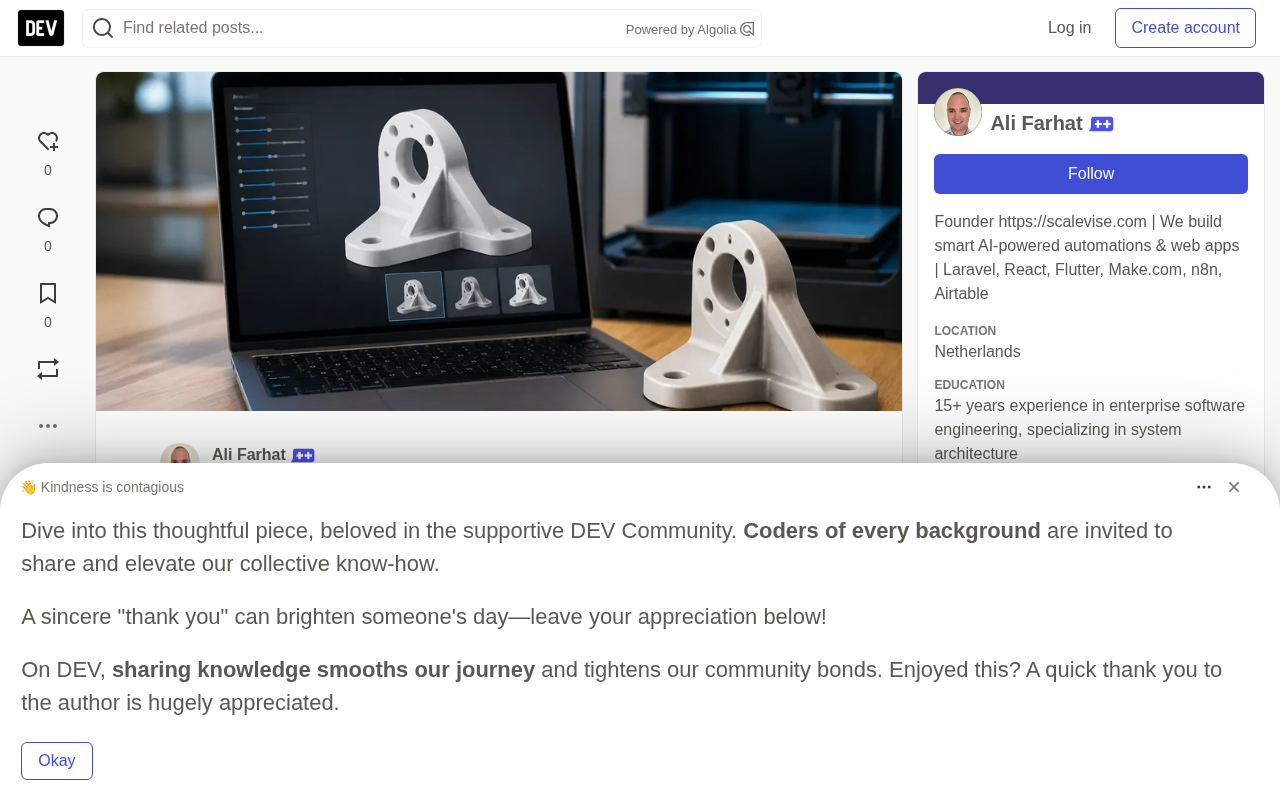
What the Gemini Canvas Demo Showed
Canvas is the space within Gemini for creating and running code-based applications. In this demonstration, the app is able to define 3D geometry, expose adjustable parameters, render the updated shape, and serialize the result into STL format — a format common to many 3D printing workflows.
The value of the vase example lies in showing the difference between a static image and a parametric object. Instead of regenerating a new design from scratch with every change, users modify the mathematical inputs that determine the object's form and immediately see the updated 3D result. A Canvas app can implement this interaction using web-based 3D code, paired with an STL exporter to generate the file.
The workflow elements confirmed by the demo include:
- A Canvas app can generate and display 3D geometry;
- The app can expose parameters that change the shape;
- The 3D model can be exported as an STL file from within that app;
- The demo aligns with Gemini's broader narrative around code and real-world design tasks.
For business teams, this is more about shortening the distance from "idea" to "testable object" than about replacing professional CAD in every scenario. Custom apps can make a limited set of approved design options easier to explore, without requiring every user to directly operate a traditional modeling interface.
A Targeted Application, Not General-Purpose CAD
What the available evidence supports is a "3D design workflow embedded within Canvas," not "Gemini Canvas natively converts any prompt, image, or Canvas output into a production-grade STL." The geometry must be created by the app, and the export pipeline must be implemented by the app. This is a meaningful capability, but the quality of the result depends on the design logic, geometric rules, and code used by the app.
This constraint also defines the boundaries of where the approach applies. It suits repeatable object families with clear variables — such as dimensions, curvature, wall thickness, or decorative patterns. Based on the demo alone, it is not clearly suited to highly complex engineering assemblies or unrestricted mechanical design.
| Workflow Element | What the Demo Supports | What the Demo Does Not Establish |
|---|---|---|
| 3D Design | A Canvas app can generate and visualize parametric 3D geometry | Canvas can fully replace general-purpose CAD software |
| Parameter Adjustment | Users can change mathematical parameters and see the shape update | All design variables or object types work out of the box |
| STL Output | A Canvas app can export generated geometry as an STL file | All Gemini Canvas outputs have universal native STL export |
STL (Stereolithography) is one of the most universal file formats in 3D printing, introduced by 3D Systems in 1987 alongside its stereolithography printing technology. It approximates the surface geometry of a 3D object through a triangle mesh, recording only the surface shape without color, material, tolerances, assembly relationships, or modeling history. This minimalist structure means STL is accepted by nearly all slicing software, but it also means the exported file is essentially a "shape snapshot" rather than an engineering model that can continue to be edited parametrically. If you need to preserve dimensions, a feature tree, or the ability to make further modifications, you typically need to switch to CAD exchange formats such as STEP or IGES. Therefore, when using STL at the end of a workflow, teams should treat it as a "one-time output handed to the printer," not as the design asset itself.
"Parametric design" refers to defining geometry using a set of adjustable numerical values and constraint rules, rather than directly drawing each vertex or face. When parameters change (such as radius, wall thickness, or number of spiral turns), the model regenerates according to preset logic, so the same code can derive infinitely many variants. This approach has long been mature in professional CAD — for example, FreeCAD's spreadsheet-driven modeling, OpenSCAD's script-based modeling, and Rhino's Grasshopper visual programming. The vase demonstrated in Canvas is a lightweight version of this paradigm: the geometric rules are written in the app's code, and users only interact with a few intuitive parameters. Its advantage is packaging parametric capability into an easy-to-use interface; the trade-off is that flexibility is limited to the variables and object families the developer has predefined, and it cannot freely construct arbitrary shapes the way general-purpose CAD can.
Where This Workflow Fits Best
When teams need to repeatedly create variants of a known design, parameter-driven 3D apps can be very valuable. For example, a retailer developing simple 3D-printed accessories, a studio testing product variants, or a design firm offering limited customization services. Instead of manually rebuilding each variant, the business defines numerical values that customers or employees can modify, and generates the corresponding model.
This is especially helpful at the handoff between design exploration and manufacturing, particularly when the object is intentionally constrained. Real-time 3D preview lets users understand the impact of parameters before generating an STL. The STL file can then enter existing printing or prototyping workflows, though it still needs the usual checks for printability and final quality.
The potential practical benefits are fairly direct:
- Faster iteration for controlled design variants;
- Less manual rework when the same design logic is reused;
- Easier exploration for employees who only need to choose parameters rather than start modeling from a blank workspace;
- A clearer prototype path when a usable STL is exactly the handoff format needed.
These benefits are potential outcomes, not guarantees. The business still needs to decide which parameters matter, how much variation is safe, and whether the final geometry suits its printer, material, and intended use. The demo does not establish automatic validation of dimensions, strength, tolerances, or print settings.
What Teams Should Verify Before Using STL Output
STL is a common 3D printing file format, but export alone does not make a model production-ready. Teams should review generated files against their actual manufacturing workflow, confirming in particular that the geometry matches expected dimensions, that the design suits the target material and printer, and that any required post-processing or testing steps have been considered.
The broader implication of Canvas is that businesses can potentially build custom interfaces around repeatable design decisions. This is different from asking a general-purpose AI tool to manufacture arbitrary physical products. The strongest implementations will have bounded inputs, reusable geometric rules, and clear review steps before printing.
While the demo focuses on a single-piece object like a vase, printability is always the practical threshold for STL output. Common checks include: whether the model is a closed manifold (watertight), otherwise slicing software cannot determine inside from outside; whether wall thickness exceeds the minimum required by the printer nozzle diameter and material strength; whether overhang angles require support structures; and whether overall dimensions fit within the print bed. In addition, different printing processes (FDM fused deposition modeling, SLA stereolithography, SLS selective laser sintering) impose different requirements on models, and the same STL may succeed or fail very differently across machines. This explains why the original article emphasizes that "exporting STL does not equal being production-ready": parametric apps can iterate shapes quickly, but process fit still depends on the team's actual validation against the target printer and material.
Frequently Asked Questions
Can Gemini Canvas export STL files?
Apps built with Canvas can export the 3D geometry they generate as STL files. The demonstrated capability is app-based, not a universal native export feature available for every Canvas output.
What does parametric 3D design in Gemini Canvas mean?
It means the app can expose mathematical values that control 3D form. Changing those values updates the generated model, letting users inspect different versions.
Will Gemini Canvas replace CAD software?
The demo supports a targeted, programmable 3D design workflow. It does not establish that Canvas can replace general-purpose CAD software across all design and engineering work.
What should businesses check before 3D printing an exported STL?
They should verify dimensions, geometry, material suitability, printer compatibility, and any quality checks required for the target object.
Conclusion
Gemini Canvas shows how a custom parametric 3D app can move from interactive design choices to STL export. Its significance lies in offering a focused tool for repeatable design tasks, not in proving that Gemini is a general-purpose CAD platform. Businesses considering this workflow should treat the Canvas app and its geometric rules as the core of the solution, then validate every output against their real printing process.
One-line Summary
Gemini Canvas demonstrated an app-level 3D printing workflow from parameter adjustment to STL export, but it is not equivalent to general-purpose CAD.
Paragraph Summary
Gemini Canvas showcased an app-based workflow: users adjust mathematical parameters that determine an object's form within a Canvas-built app, preview 3D changes in real time, and export the geometry as an STL file common in 3D printing. This capability is implemented by the app itself, not as a universal native feature of Canvas or Gemini. It suits repeatable object families with clear variables such as dimensions, curvature, and wall thickness, and can be used for retail accessories, product variant testing, and limited customization services. Potential benefits include faster iteration, less manual rework, and a lower modeling barrier, but dimensions, geometry, material, printer compatibility, and quality still need to be verified before printing. Teams should treat the Canvas app and its geometric rules as the core of the solution, rather than viewing the demo as a general-purpose CAD platform ready for direct production.
Related articles

Free Unlimited Claude Code Solution: Agnes AI + CC Switch Setup Guide
No paid subscription needed — pair the free AI platform Agnes AI with the open-source tool CC Switch to provide a backend for Claude Code, enabling unlimited free calls to text, image, and video models. This guide covers the full setup, test results, and usage boundaries.

A Complete Zero-Cost Guide to Getting Started with Claude Code for Beginners in China
A beginner's guide to Claude Code for users in China: two installation methods (command line and IDE plugin), full configuration steps for replacing the official API with the free domestic LongCat model, and a hands-on demo of building a small tool with natural language, plus tips.

When the NSA Gets Involved: The AI Supply Chain Crisis Behind Open-Source CVEs and API Key Hijacking
Multiple open-source projects disclosed severe CVEs in one day, PHP flaws alarmed the FBI, and Railway and OpenCode were breached with API keys stolen. This article breaks down the vulnerability window, AI-accelerated exploitation, and the AI supply chain crisis behind the API key black market, with a developer defense checklist.