Getting Started with Claude Code: A Complete Tutorial for the Terminal-Native AI Programming Assistant

A complete guide to Claude Code, the terminal-native AI Agent that replaces IDE-dependent workflows.
This tutorial covers Claude Code from installation to advanced usage, explaining its Protocol Shell architecture that enables seamless multi-model switching between providers like OpenAI, DeepSeek, and others. It demonstrates core features including in-terminal code generation, intelligent legacy code analysis, automated refactoring, and session recovery — all without leaving the command line.
Rethinking Claude Code: Far More Than Code Completion
If you're a developer who lives in the terminal, Claude Code is absolutely worth your time. Don't let the name fool you — this isn't a simple code completion plugin. It's a genuine terminal productivity revolution.
Think back to those frustrating early days of exploration: being locked into an overpriced model, watching Tokens burn through cash, dealing with configurations so complex you wanted to smash your keyboard. Many people tried it once and uninstalled. But now, we've officially entered the era of "terminal-native" — tools that are lightweight, powerful, and exist as mature Agents, putting an end to the previous chaos of cobbling things together.
The Agent paradigm is fundamentally different from traditional "question-and-answer" AI assistants. An Agent can autonomously perceive its environment, formulate plans, execute actions, and adjust strategies based on feedback. When you ask it to "add a logging module to the project," it autonomously completes the entire pipeline — from scanning the project structure, identifying entry files, and understanding the existing code style, to generating matching code and inserting it in the correct location. This end-to-end autonomous execution capability marks a qualitative leap from Copilot-style completion to Agent-style collaboration.
The Essence of Claude Code: A "Protocol Shell"
The name "Claude Code" is actually quite deceptive. Architecturally, it doesn't mean "you can only use Claude." Its core essence is a supremely powerful Protocol Shell — it simply comes with Claude's brain installed by default, but the entire framework is designed to let you seamlessly swap out the engine inside.
A Protocol Shell is a classic software architecture design pattern. The core idea is to completely decouple the "interaction interface layer" from the "backend execution engine." Similar to how a Shell (like Bash or Zsh) in an operating system serves as a bridge between the user and the kernel, a Protocol Shell in the AI tooling context means: the tool itself only defines standardized input/output protocols and calling interfaces, without binding to any specific model implementation. Developers can swap out the underlying inference model at any time — like changing a car engine without altering the driving experience.
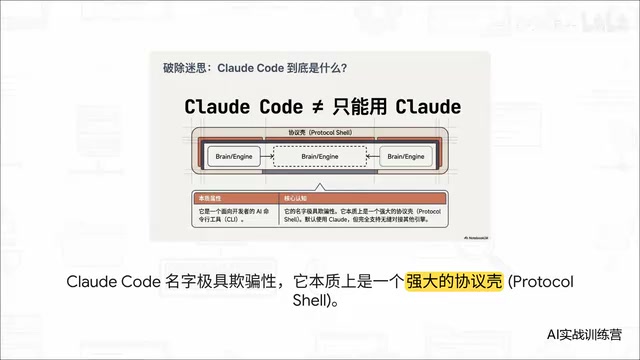
Because it's a Protocol Shell, its underlying model invocation logic is extremely flexible. When you type commands, it can dynamically route to various APIs. Beyond OpenAI, developers in China can also smoothly connect to Zhipu GLM, Kimi, or the recently wildly popular DeepSeekAd, balancing rapid response with ultra-low costs. For both your wallet and development efficiency, this is a double safety net.
Installing and Deploying Claude Code: Dead Simple from Scratch
The prerequisites for deployment are minimal — you only need two things: Node.js and Git. Whether you're on Windows, Mac, or Linux, these are absolute essentials. Honestly, if you don't even have these two installed, you might be in the wrong tutorial.
Once ready, just type this installation command in your terminal:
npm install -g <package-name>
After installation, run the version command to confirm. On first run, it will smartly display a workspace security confirmation prompt — a safety mechanism where the AI politely asks "Is this a project you trust? I'm about to have read/write access," ensuring code read/write operations are absolutely controlled. Very thoughtful.
Configuring Your API Key: Fueling Up with "AI Gas"
The tool itself is free, but running inference consumes Tokens. You'll need to grab your API Key from the developer console of your chosen model platform.
Here's a quick explanation of Tokens: A Token is the basic unit that large language models use to process text. One Token roughly corresponds to 3-4 characters in English, while in Chinese, about 1-2 characters equal one Token. Billing is typically based on input Tokens and output Tokens separately — for example, GPT-4's input pricing is around $30 per million Tokens, while domestic models like DeepSeek might be one-tenth or even less. A single complex code generation request might consume thousands of Tokens, and without restraint, monthly costs can skyrocket. Understanding this mechanism is the first step to controlling development costs.
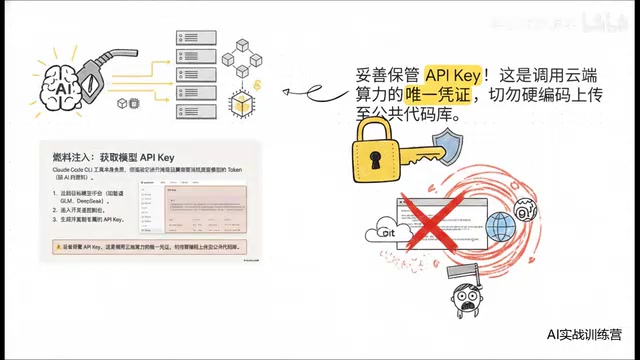
A serious reminder here: Guard your Key carefully and NEVER hardcode it then casually push to a public Git repository. Trust me, that's the kind of ultimate nightmare that can prematurely end a career. GitHub has disclosed that its platform detects thousands of accidentally committed keys every day. Once a Key is maliciously exploited, attackers can burn through tens of thousands of dollars in API credits within hours. Industry-recommended security practices include: storing Keys using environment variables or secret management services (like AWS Secrets Manager or HashiCorp Vault); excluding all files containing sensitive information in .gitignore; enabling Git pre-commit hooks to automatically scan for sensitive data; and using separate Keys with usage limits for different projects.
Multi-Model Engine Management: Say Goodbye to Tedious Environment Variables
Let's face reality — managing multiple models used to be an absolute disaster. Imagine you're using GLM to write backend logic, then want to switch to Kimi for reading long documents, and later want DeepSeek for brain-burning algorithms. What did you do before? You had to repeatedly modify .bashrc, .zshrc, or .env files — tedious and error-prone. Worst of all, this kind of operation instantly breaks your flow state, cutting efficiency in half.
Why is flow state so important? Flow State is a concept proposed by psychologist Mihaly Csikszentmihalyi, describing the optimal experience of being completely immersed in an activity. For programmers, entering flow means highly focused thinking with code flowing like water. Research shows that after a single flow interruption, it takes an average of 23 minutes to re-enter the state. Every configuration file switch or environment variable debug is a fatal blow to this precious cognitive state.
CC Switch: The Ultimate Zero-Code Model Switching Solution
This is why we need a visual management hub — CC Switch. It supports multi-ecosystem compatibility and multi-model aggregation, and the best part is zero-code switching: completely farewell to nasty environment config files. One click, seamless model switch, environment variables take effect instantly.
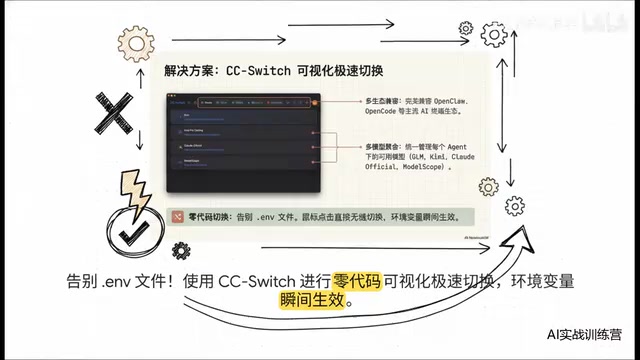
For developers who frequently jump between multiple models, this elegant switching experience significantly protects your development flow state.
Core Features in Action: How Capable Is Claude Code Really?
With configuration done, let's look at the most exciting hands-on section.
Seamless In-Terminal Conversation and Code Generation
No need to switch to some complex interface — just type "write a Python HTTP server" directly in the terminal, and the response speed rivals a pro gamer's god-tier micro. The AI instantly produces Python code with complete comments, even clearly explaining how to run it locally and how to access it. You just state your requirements, and it handles everything else.
The Ultimate Legacy Code Lifesaver: Intelligent Code Analysis
Suppose you just inherited an open-source project that's a complete mess and you have no idea where to start. Don't panic — type an explain-style command in the root directory, and it automatically scans the entire workspace context. Within seconds, it lays out the code structure, dependency relationships, and core logic — instantly transforming into the most knowledgeable technical mentor for that project.
Even more powerful is its refactoring capability: casually say "add a logging module to the project," and it pinpoints the entry file as if it had eyes, injects the code, with before-and-after changes crystal clear. Say "write a Dockerfile," and it glances at the project's language stack and instantly generates a usable containerized deployment configuration. From writing code to deployment — smooth as silk.
This demonstrates the essential difference between an Agent and traditional completion tools: it's not "completing the code you're writing" but rather "understanding your intent and then autonomously completing the entire task chain." It proactively explores the file system, analyzes dependencies, understands the project architecture, and then makes globally optimal modification decisions.
Advanced Usage: Team Standards and Session Recovery
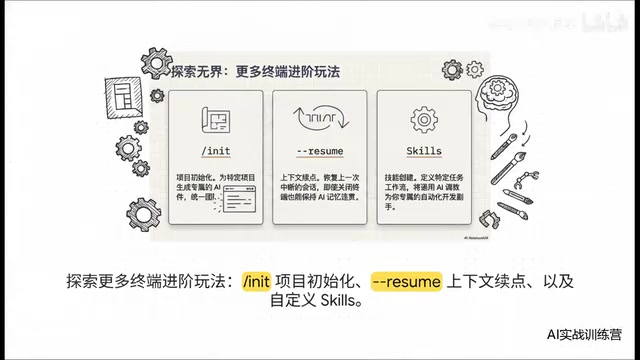
For power users who love to tinker, there are even more advanced techniques. For example, using init to unify your team's AI standards. But the feature most worth celebrating is the --resume parameter: it restores your previously interrupted session. Even if you accidentally close the terminal window, reopening it with this parameter means the AI's memory remains completely coherent — nothing lost. Combined with custom scenario features, you can train a hardcore automated sidekick that becomes more addictive the more you use it.
The technical significance of session recovery goes far beyond "convenience." A large model's reasoning depends on historical information within the context window. Once a session is lost, the model loses all understanding of the current task. The --resume mechanism essentially persists the session state, ensuring that even if the process is interrupted, all previously accumulated context — including analyzed files, understood architecture, and decisions made — can be fully restored, avoiding the redundant communication cost of starting from scratch.
Deep Summary: The Future of Terminal-Native AI Development
At the end of the day, Claude Code is far more than a small tool. Through its model-agnostic protocol layer, it has truly built a terminal-native Agent framework: extremely open, ready to connect to whatever engine suits you best; while simultaneously creating a rapid closed loop — handling generation, modification, explanation, and execution directly in the terminal. It completely eliminates the pain of constantly jumping between browsers and IDEs, unleashing top-tier computing power right in the command line.
This "terminal-native" philosophy actually echoes the Unix philosophy of "everything is a text stream." When AI capabilities are integrated into the terminal in the form of standardized protocols, they naturally merge into the workflows developers know best — pipes, redirections, and script automation. In contrast, traditional IDE AI integrations are often "embedded" — the AI is confined to the IDE's sandbox, unable to freely combine with system-level toolchains.
A provocative question to close: When your terminal already has a built-in AI brain that can self-improve and fully understand your entire engineering context, are those traditional, bloated, multi-gigabyte-RAM-eating IDEs already on the countdown clock?
I strongly encourage everyone to experience it firsthand in the terminal and find the answer through practice.
Related articles

Uber Deploys ChatGPT Work Company-Wide: AI in the Workplace Enters the Scaled Implementation Phase
Uber deploys ChatGPT Work to 30,000+ employees, extending it from engineering to all roles. We analyze its expert-engineer pairing, end-to-end automation, and questions of AI control and power concentration—insights for scaling AI in the workplace.

Shift at Midnight Hands-On: When "ID Verification" Becomes Alien Hunting
Shift at Midnight blends ID verification with horror survival in a four-player co-op game. We break down its inspection mechanics and chaotic humor.

Zelensky Recounts the Outbreak of War: I Need Ammunition, Not a Ride
Zelensky recalls the first day of war in a YouTube interview: farewell to family, rejecting Biden's evacuation offer with "I need ammunition, not a ride," and how Bucha shaped his stance on compromise and peace talks.