Getting Started with Claude Code: Agent SDK and Planning Mode in Practice

Claude Code's Agent SDK enables programmatic access, while Plan Mode's structured Q&A tool elevates human-AI collaboration.
This article covers two often-overlooked capabilities in Claude Code. First, the Agent SDK: developers can programmatically access the full Claude Code runtime with just an API Key, no CLI required — Anthropic's own CoWork product is built on the same SDK. Second, the Ask User Question tool in Plan Mode: by explicitly prompting Claude to use it, the model proactively surfaces edge cases and unaddressed requirements through a structured interview. Instructor Lydia stresses that deliberately triggering this tool maximizes the value of each interaction cycle, making planning more thorough and reducing costly rework later.
Claude Code is far more powerful than just a command-line tool. In an introductory session by Anthropic instructor Lydia, she highlighted two key capabilities: how the Agent SDK works independently of the CLI, and how to use the Ask User Question tool during the planning phase for more effective collaboration with the model. Both are highly valuable for developers who want to get the most out of Claude Code.
Agent SDK: Accessing the Claude Code Runtime Without the CLI
Most people start with Claude Code through the command-line interface (CLI). But as Lydia points out, if you'd rather not rely on the official CLI or any pre-built tooling, you can still access the Claude Code runtime directly via the Agent SDK.
The "runtime" here refers to the underlying execution environment in which the model operates. Through the Agent SDK, you can still issue queries, invoke tools, and perform all the operations you'd normally do in Claude Code — the difference is that you can wrap the runtime programmatically within your own toolchain.
The integration is straightforward: all you need is an API Key. In other words, the Agent SDK exposes the core capabilities of Claude Code to developers, allowing it to be embedded in custom applications and automated workflows without being tied to a fixed user interface.
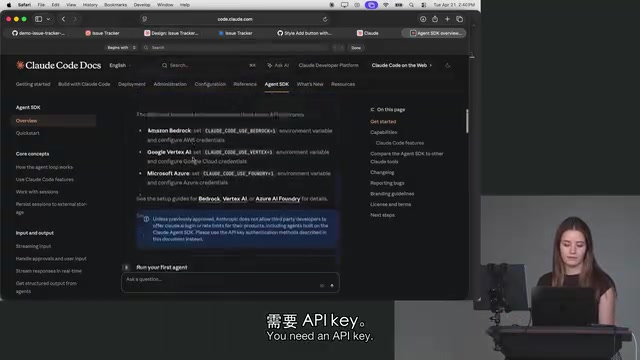
Worth noting: Anthropic's internal CoWork product is built on top of the Agent SDK. The fact that the company's own collaboration tooling runs on the same SDK is a strong signal of its maturity and reliability. For teams looking to integrate Claude's agent capabilities into their own systems, this is an important reference point.
From a broader architectural perspective, the Agent SDK represents an implementation of the "model as runtime" paradigm. Traditional LLM APIs typically follow a stateless, single request-response pattern. The Agent SDK builds on top of that by encapsulating the tool-use loop, context persistence, and multi-step reasoning coordination. What developers get from the SDK isn't just a text generation call — it's a complete execution environment capable of autonomously deciding which tool to invoke next and whether further reasoning is needed. This puts it in the same category as OpenAI's Assistants API and Google's Agent Builder, all pointing toward the same trend: pushing agent orchestration down from the application layer to the platform layer, so developers can focus on business logic rather than hand-rolling ReAct loop implementations.
The Ask User Question Tool in Planning Mode
Lydia also highlighted one of her personal favorite workflows: in Plan Mode, explicitly instructing Claude to use the Ask User Question tool.
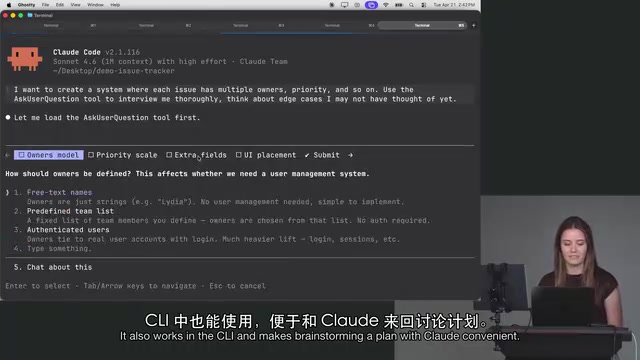
She demonstrated this with an issue-tracking system example — a feature requiring each issue to support multiple assignees, priority levels, and other fields. When describing the requirements, she explicitly includes in her prompt:
Use the ask user question tool to thoroughly interview me and think through edge cases I might not have considered yet.
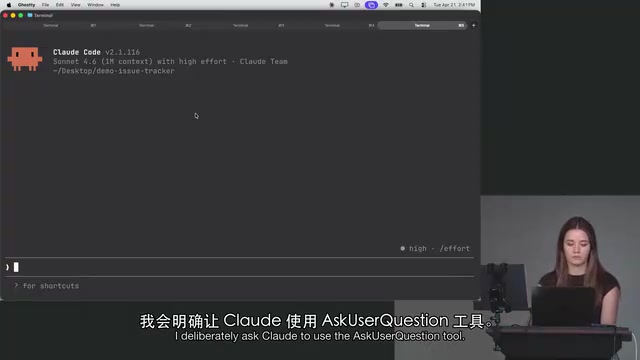
At its core, this tool acts as a structured callback — it surfaces a set of questions in the interface, prompting the user to confirm design details one by one. Whether you're in a GUI or the CLI, this interactive back-and-forth is visible. It creates a genuine dialogue between the user and the model, collaboratively refining the plan.
Why You Should Invoke This Tool Deliberately
Lydia acknowledges that Claude will sometimes surface these questions on its own — but not always. That's why she prefers to explicitly request the tool in her prompts, ensuring that every planning session enters this deep interactive mode.
During the demo, the model raised numerous considerations she hadn't initially thought of — things like where UI elements should be placed and how assignees should be identified. She described it as "it thought of a lot of things I hadn't yet" — which is exactly the value of planning mode.
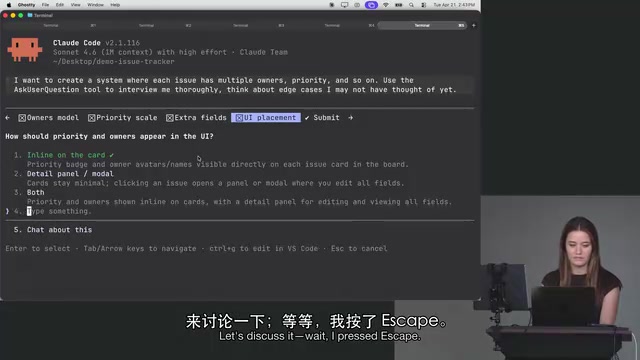
She also pointed out a small but important UX detail: pressing Esc mid-session exits the entire Q&A flow, effectively skipping all remaining questions — so be careful with that.
Plan Mode is a special operating state in Claude Code where the model is required to output a structured execution plan before generating or running any code. This design draws on the "design before implement" philosophy in software engineering, and aligns with findings in prompt engineering research on Chain-of-Thought reasoning — having the model reason explicitly before producing a final answer significantly reduces the chance of missing critical constraints. In planning mode, the Ask User Question tool plays the role of a "requirements review": it externalizes ambiguities and potential edge cases that the model has identified during internal reasoning, presenting them as a structured questionnaire for the user. This transforms implicit assumptions into explicit design decisions, preventing rework later caused by misunderstood requirements.
Key Takeaways
Lydia emphasizes that even without explicitly naming the tool, simply asking Claude in your prompt to "thoroughly explore edge cases" will often trigger follow-up questions naturally. But she still chooses to invoke the Ask User Question tool deliberately — the goal is to not waste any interaction cycles, making every round of dialogue as productive as possible.
This reflects a more mature mindset toward working with AI: rather than letting the model jump straight to a solution that might miss critical details, use a structured interview first to clarify requirements and edge cases — then move into actual development. The more thorough the planning, the lower the cost of rework down the line.
For developers just getting started, this session delivers two core insights: first, Claude Code isn't just a CLI — the Agent SDK enables flexible, programmatic access; second, making deliberate use of Plan Mode and tools like Ask User Question elevates human-AI collaboration from "giving commands" to "designing together."
Related articles

Free Unlimited Claude Code Solution: Agnes AI + CC Switch Setup Guide
No paid subscription needed — pair the free AI platform Agnes AI with the open-source tool CC Switch to provide a backend for Claude Code, enabling unlimited free calls to text, image, and video models. This guide covers the full setup, test results, and usage boundaries.

A Complete Zero-Cost Guide to Getting Started with Claude Code for Beginners in China
A beginner's guide to Claude Code for users in China: two installation methods (command line and IDE plugin), full configuration steps for replacing the official API with the free domestic LongCat model, and a hands-on demo of building a small tool with natural language, plus tips.

When the NSA Gets Involved: The AI Supply Chain Crisis Behind Open-Source CVEs and API Key Hijacking
Multiple open-source projects disclosed severe CVEs in one day, PHP flaws alarmed the FBI, and Railway and OpenCode were breached with API keys stolen. This article breaks down the vulnerability window, AI-accelerated exploitation, and the AI supply chain crisis behind the API key black market, with a developer defense checklist.