Getting Started with Claude Code: What It Is and How to Use It Across Platforms

Anthropic engineer Lydia explains Claude Code as a multi-platform AI Agent, not just a CLI tool.
This article is based on a workshop by Lydia, a member of Anthropic's Claude Code team. The core argument: Claude Code is not a command-line tool but an AI Agent that runs across terminals, IDEs (VS Code/JetBrains), browsers, and desktop apps. Drawing on her own experience as a non-AI-background engineer, Lydia argues that using Claude Code well requires a solid mental model — understanding agent non-determinism and the underlying logic of CLAUDE.md, Skills, and sub-agents — rather than deep AI theory. The workshop follows a progressive path from fundamentals to permissions to extensibility.
Claude Code Through the Eyes of an Anthropic Team Member
In this workshop led by Lydia, a member of the Anthropic Claude Code team, she opens with a perspective many developers can relate to: even when you're working on the front lines of AI tooling, engineers without a deep AI background can still feel lost and uncertain. Lydia previously worked at Vercel, then at the JavaScript runtime Bun — which happens to be the runtime that Claude Code is built on. After Anthropic acquired Bun, she joined the Claude Code team.
She openly admits that when she first stepped into the AI world, she felt like an impostor: "I barely understood how AI actually worked, yet here I was building an AI tool." That mindset points to something real — unlike the relatively deterministic world of traditional software engineering, Claude Code is "a new beast" that requires an entirely new mental model to use effectively.
Why Building a Mental Model Matters
Lydia returns to one key idea throughout the workshop: traditional software engineering feels intuitive because it's deterministic — there's a clear, predictable chain of logic between input and output. Claude Code, as an AI Agent, doesn't behave with that same predictability, which can easily frustrate engineers accustomed to deterministic programming.
She highlights a common pattern: "It's easy to start prompting with Claude Code, but you often don't really understand what's happening under the hood." Many developers are already using features like CLAUDE.md, Skills, sub-agents, and plugins — but without a solid grasp of how the underlying mechanics work. The goal of the workshop is to close that gap, building each concept on top of the last to form a complete cognitive framework.
Understanding the principles matters because it directly affects how well you use the tool. When you know why a tool behaves the way it does, you can better anticipate its actions, write more effective prompts, and configure permissions and extensions with intention. Lydia frames this leap — from "knowing how to use it" to "understanding how it works" — as the real key to mastering Claude Code.
Claude Code Is Far More Than a CLI
For those just getting started, Lydia offers a clear definition: Claude Code is fundamentally an Agent, not just a command-line interface (CLI). While most people encounter it through a terminal, its runtime environments are far richer than that.
She walks through several ways to use it:
- Terminal CLI: The most common entry point, and Lydia's personal preference;
- IDE integration: Works directly inside VS Code or JetBrains editors;
- Browser: No local environment needed;
- Claude desktop app: A standalone desktop experience.
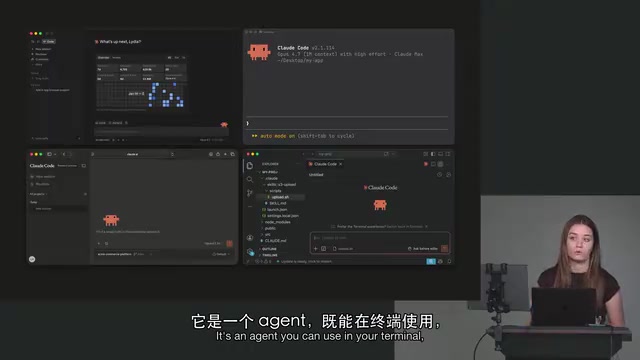
One notable distinction is where it runs: both the desktop app and the CLI can run locally on your machine, but Claude Code also supports running in the browser. Lydia specifically highlights the convenience of the web mode — if you have a GitHub repository, you can connect it directly and use Claude Code right in your browser, skipping all the local setup. This "use it anywhere" flexibility means developers with very different workflows can all find an entry point that fits.
An AI Agent is a program that can perceive its environment, plan autonomously, and execute a sequence of actions to accomplish a goal — fundamentally different from the traditional single-call "input → output" pattern. As an Agent, Claude Code can independently decide which tools to invoke (such as reading and writing files, running commands, or searching a codebase), iterating across multi-step tasks without requiring the user to manually intervene at every step. This is the core distinction between Claude Code and earlier AI code completion tools like GitHub Copilot's inline suggestions: the latter is essentially "assisted typing," while Claude Code is closer to a collaborator capable of independently completing sub-tasks. Understanding this helps explain why its behavior isn't as predictable as a traditional CLI — an Agent's autonomy means its execution path shifts dynamically based on context.
Three Things to Learn First: Fundamentals, Permissions, and Skills
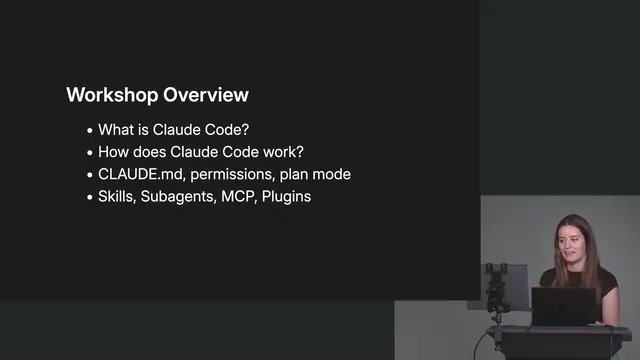
Based on the overall structure of the workshop, Lydia breaks the Claude Code learning path into progressively layered core topics. While this session focuses primarily on establishing a foundational understanding of what Claude Code is, she previews the deeper areas to come:
- Fundamentals: Understanding how the Agent operates and building the right mental model — a prerequisite for using any advanced features effectively;
- Permissions and configuration: Including project config files like CLAUDE.md, which determine the context and boundaries the Agent works within in your codebase;
- Skills and extensibility: Skills, sub-agents, and plugins form Claude Code's capability extension system, enabling it to handle more complex task scenarios.
This "start shallow, layer deeper" structure is exactly the learning approach Lydia recommends. Rather than blindly stacking prompts, she believes you should first understand the nature of the tool, then gradually work toward configuration and extension — that's how you unlock Claude Code's real value in day-to-day development.
CLAUDE.md is Claude Code's project-level configuration file, typically placed in the root of a repository. It gives the Agent persistent context — things like project architecture overviews, coding conventions, commonly used commands, and directories that should be off-limits. Every time a session starts, Claude Code automatically reads this file, essentially handing the Agent a "project briefing" so you don't have to re-explain the background in every prompt. Skills are reusable task templates or tool extensions that let developers encapsulate common operations as named capabilities the Agent can invoke when needed. Sub-agents take this further by supporting task decomposition — the primary Agent can break a complex task into pieces and delegate them to multiple sub-agents running in parallel, then aggregate the results. This is well-suited for scenarios like large-scale codebase refactoring or cross-module analysis. Together, these three mechanisms form Claude Code's "programmability" layer — the key to moving from basic usage to efficient, customized workflows.
Takeaways
For developers encountering Claude Code for the first time, the core message from this workshop is clear: don't think of it as a simple command-line tool — understand it as an AI Agent that can run across terminals, IDEs, browsers, and desktop apps. Building the right mental model is more important than getting up and running quickly.
Hearing this from an engineer without a deep AI background who works on Claude Code every day makes it all the more convincing — it shows that using this tool well doesn't require advanced AI theory. What it does require is a clear cognitive framework and a step-by-step learning path.
Related articles

Gaussian Process Bandit Optimization: Exploration Strategies and Inference Regret Guarantees
Cumulative regret guarantees in Bayesian optimization fail to reflect final recommendation quality. This article examines a new study that provides inference regret guarantees for Gaussian process bandit optimization through exploration query strategies and fill distance analysis, validated on hyperparameter optimization and control tasks.

The Most Detailed Codex Guide on Bilibili: From Installation to Real-World Practice
The most detailed Codex guide on Bilibili: from app store installation to daily work mode configuration, with a real coffee shop project demonstrating file organization, data extraction, dashboard creation, and other practical tasks. Learn to use Plan Mode and desktop pets to leverage Codex efficiently.

Appearance Compensation in Volume Rendering: Why RGB Accuracy Cannot Guarantee Density Correctness
Volume rendering research reveals that volumetric data perfectly reproducing external RGB views may still contain density errors: appearance compensation can double central density and keep external rays unchanged even when L2 error exceeds 14.52%. Density recovery depends on appearance capacity, spatial resolution, and measurement design.