Getting Started with LangGraph: Building AI Agent Workflows with Graph Structures

A practical intro to LangGraph: build AI Agent workflows with nodes, edges, and routing functions.
This article explains LangGraph's core concepts—nodes, edges, and routing functions—through a weather-query Hello World example. It covers StateGraph, MemorySaver, and ToolNode in practice, clarifies how LangGraph relates to LangChain, and explores the ReAct pattern, checkpoint mechanism, LCEL, and multi-Agent workflow design.
What is LangGraph
LangGraph is a relatively independent component within the LangChain ecosystem, designed specifically for building AI Agents using a "graph" approach. Although it belongs to the LangChain family, it has its own dedicated domain and a complete, self-contained set of development conventions, with clear distinctions from the LangChain core library.
The core idea of LangGraph is to abstract an Agent's execution logic into a Directed Graph: the graph contains a starting node, several processing nodes, and an ending node, with nodes connected by "edges" to form a complete workflow. A directed graph is a fundamental data structure in graph theory, composed of vertices and directed arcs, where each edge has a clearly defined start and end point—naturally describing "dependency relationships" and "execution order," and supporting loops, conditional branching, and parallel execution. Notably, traditional workflow tools (such as Apache Airflow) typically only support acyclic Directed Acyclic Graphs (DAGs), whereas LangGraph explicitly supports cyclic graphs—which is crucial for AI Agents, since Agents often need to repeatedly loop between "calling tools → observing results → reasoning again" until a task is complete.
This looping execution pattern corresponds precisely to the widely recognized ReAct pattern (Reasoning + Acting) in academia, formally proposed by Google DeepMind in the 2022 paper "ReAct: Synergizing Reasoning and Acting in Language Models." The core idea of ReAct is to have the language model alternately generate "Thought steps" and "Action instructions" during reasoning, and feed the action results (Observation) back into the model, forming an iterative loop until a final answer is reached. This pattern is inherently cyclic execution logic, and represents the essential advantage LangGraph holds over traditional DAG tools. Compared to the chain-based (Chain) invocation pattern of early LangChain, the graph structure makes previously hard-to-trace LLM invocation paths visualizable and debuggable, better aligning with the actual runtime logic of complex Agents. This "node + edge" modeling approach is also the underlying source of ideas for visual drag-and-drop platforms like Dify.
LangGraph's main capabilities can be summarized in a few points: loops and branching (based on the natural properties of graphs), persistence (state checkpoints between nodes), human-in-the-loop interaction (breakpoint execution), streaming invocation handling, and deep integration with LangChain and LangSmith. Compared to low-code drag-and-drop platforms, LangGraph enables more precise process control through code, giving it an advantage in complex business scenarios.
Learning Path Recommendations
Since LangGraph is an independent system, its official documentation is also maintained separately. Beginners are advised to proceed in the order of "concept introduction → installation examples → tutorial cases → API reference." The official documentation provides a wealth of cases, including advanced patterns such as RAG, Cyclic Agent, and Plan-and-Execute. When studying in depth, you can consult them by category, while details of interfaces and classes can be found in the Reference section of the documentation.
Understanding the Development Pattern from Hello World
The best way to get started is to run a minimal example. This Hello World program simulates a "weather query" tool call: when user input contains "Shanghai," the tool returns simulated weather information, allowing developers to intuitively understand how to define custom tools and invoke them through LangGraph.
Environment Setup Notes
There's one key detail to note: if you already have the latest version of LangChain 0.3 installed, be sure to upgrade LangGraph to a matching version simultaneously, otherwise you'll trigger Pydantic v1 warnings.
It's worth explaining the deeper cause of this version conflict. Pydantic v2 was officially released in June 2023, with its underlying core engine (pydantic-core) rewritten from pure Python to a Rust implementation, boosting parsing performance by up to 17x. But the cost was breaking API changes: the validator decorator in v1 was split into field_validator and model_validator, the __fields__ dictionary was replaced by model_fields, and the dict() method was replaced by model_dump(). While LangChain 0.3 fully embraced v2, it still needed to remain compatible with a large number of community plugins developed on v1, so it introduced a pydantic.v1 compatibility layer. When versions don't match, mixing the two sets of model classes leads to inconsistent serialization behavior—this is the root cause of the warning. Although it doesn't affect the runtime results, upgrading avoids unnecessary noise.
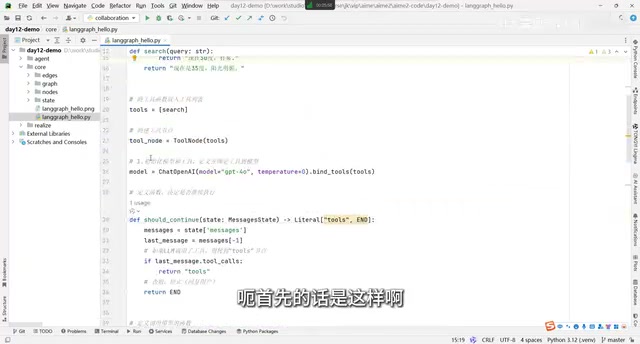
The example code needs to import several core components: typing for defining node flow configuration, message-passing-related classes, the OpenAI large model library, and LangGraph's core classes—MemorySaver (checkpointing), StateGraph (state graph), MessagesState (message state), and ToolNode (tool node).
Core Concepts: Nodes, Edges, and Routing Functions
The key to understanding LangGraph lies in fully grasping three concepts: nodes, edges, and routing functions.
A Node Is Essentially a Function
In LangGraph, all tasks that need to be executed must be encapsulated into nodes. The example defines two nodes: the agent node is responsible for calling the large model and deciding whether to trigger a tool call, while the tools node is responsible for executing the specific tool logic. Simply put, a node is "a function that does work."
Here's a detail: tool nodes are handled differently from regular nodes. A regular large model call can use a function directly, but tool calls need to be wrapped using the ToolNode class specifically provided by LangGraph, because tools are usually in list form and require special handling.

State Flows Between Nodes
LangGraph enables data sharing between nodes through MessagesState. You can understand it with a vivid analogy: node execution is like clearing levels in a video game—each level cleared produces a "save file," and this save file is passed to the next level. MemorySaver (officially called Checkpoint) is precisely the component responsible for this persistence.
The design philosophy of the checkpoint mechanism originates from the field of distributed systems. Its theoretical foundation can be traced back to the distributed snapshot algorithm proposed by Chandy and Lamport in 1985. In the modern big data field, Apache Flink developed it into the "Asynchronous Barrier Snapshotting" algorithm: periodically inserting barriers into the data stream to trigger all operators to serialize their current state to distributed storage (such as HDFS, S3), and replaying from the most recent checkpoint during failure recovery to guarantee Exactly-Once semantics. LangGraph introduces this idea into Agent execution: after each node execution, a complete state snapshot is serialized and stored, keyed by thread_id. The default implementation is in-memory storage (MemorySaver), which can be replaced in production environments with persistent backends such as langgraph-checkpoint-postgres to support horizontal scaling and state recovery after service restarts. This not only supports contextual continuity across multi-turn conversations, but also provides the foundation for "human-in-the-loop" scenarios: execution can be paused at any node to wait for manual review before resuming—especially critical for approval workflows, content moderation, and other scenarios requiring human intervention.
It's worth adding that MessagesState itself is designed based on the Reducer pattern—a concept originating from functional programming, widely known in the front-end field through the Redux state management library. Its core idea is that state cannot be directly modified; each node returns a "state change description," and the framework layer uniformly applies the changes to generate new state. In LangGraph, each message field uses the add_messages reducer by default, meaning nodes only need to return new messages, and the framework automatically appends them to the history list rather than overwriting it—this both avoids concurrent write conflicts and naturally preserves the complete conversation history chain, providing a well-structured data foundation for subsequent checkpoint serialization.
Routing Functions Determine Branching
The key decision logic in a workflow is handled by "routing functions." In the example, the should_continue function retrieves the latest message from the state and determines whether the large model needs to call a tool:
- If the large model's return result indicates a tool needs to be called, the function returns
tools, and the flow proceeds to the tool node; - If no tool call is needed, the function returns
end, and the flow ends directly.
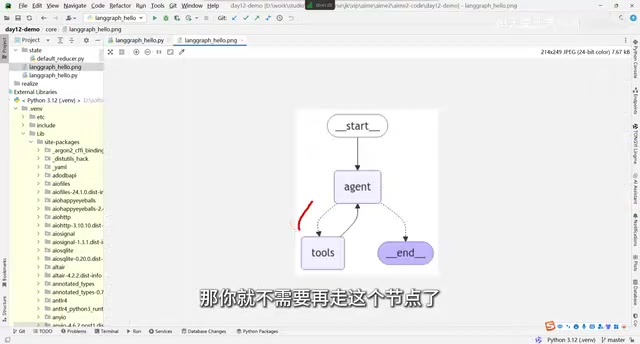
This is why dashed lines appear in the graph—dashed lines represent conditional edges (Conditional Edge), whose direction is dynamically determined by the routing function; solid lines represent regular edges (Edge), which are deterministic transitions, such as always returning to the agent node after a tool executes.
Assembling the Complete Graph: Four Steps to Build an Agent Workflow
After understanding the core components, you can build a complete workflow following these steps.
Step 1: Bind Tools and the Large Model
The matching of tool calls is actually done by the large model—the model returns the name of the tool it believes should be called. In June 2023, OpenAI officially launched the Function Calling feature on GPT-4 and GPT-3.5-turbo (renamed Tool Calling in early 2024, with extended support for parallel tool calls). Its core mechanism is: the developer passes the tool's name, description, and parameter schema to the model in JSON format, and during reasoning the model determines whether to call a certain tool—if triggered, it returns a structured response containing a tool_calls field instead of plain text. This capability relies on the model's specialized training during the RLHF phase, teaching it to make the correct judgment between "answering directly" and "requesting a tool." Anthropic's Claude and Google's Gemini subsequently introduced similar mechanisms, forming the de facto standard for today's mainstream model APIs. The bind_tools method registers this set of schemas into the model request, making the model "aware" of which tools are available; meanwhile, ToolNode wraps the tools into a tool node responsible for parsing the structured invocation instructions returned by the model and actually executing them.
Particular attention should be paid to the quality of the tool description. The model's decision on "whether to call a tool" and "which tool to call" depends entirely on its semantic understanding of the tool name and description, not on any hard-coded rules. This means the more precise the description and the closer it aligns with how users might phrase things, the higher the model's tool selection accuracy. In production environments, writing tool descriptions has itself become a Prompt Engineering task requiring repeated testing and iteration, and its importance is no less than that of the tool's implementation logic.
Step 2: Create the State Graph and Add Nodes
Use StateGraph to create a state graph that supports MessagesState (named workflow in the example). Then add nodes via add_node, where the first parameter is the node name and the second parameter is the corresponding handler function.
Step 3: Set the Entry Point and Connect Edges
Use set_entry_point to set agent as the starting point, meaning LangGraph first calls the agent node after startup. Then connect edges: use add_conditional_edges to add conditional edges with a routing function (agent → tools or end), and use add_edge to add regular edges (tools → agent).
Step 4: Compile and Run
Finally, call the compile method to compile the graph, passing in MemorySaver as the checkpoint. Compilation generates a runnable object, which essentially follows the LCEL (LangChain Expression Language) specification—a component interoperability standard introduced by LangChain since version 0.1, heavily influenced by the functional programming paradigm.
LCEL's design philosophy draws on the idea of "Functor Composition" from functional languages like Haskell. At its core is the Runnable protocol—any object that implements the four methods invoke/stream/batch/ainvoke can participate in composition. The | operator is implemented by overloading Python's __or__ magic method, automatically feeding the output of the left component as input to the right component, forming a pipeline without needing to explicitly declare intermediate variables. More importantly, LCEL performs type inference at compile time (rather than runtime) and automatically injects cross-cutting concerns such as LangSmith tracing, exponential backoff retries, and concurrency rate limiting into the entire pipeline. This "declarative" design allows the compiled graph to be seamlessly embedded into any existing LangChain pipeline, and to be called as a subgraph by a larger graph—embodying the design philosophy of composable architecture.
The invocation method is exactly the same as regular LangChain: pass in a message prompt, and pass the thread_id (i.e., session_id or user_id) via config. As long as the same id is passed, the context takes effect—first ask "Shanghai weather," then ask "which city did I just ask about," and the Agent can correctly recall it was Shanghai, verifying the practical effect of session sharing.
The Essential Difference Between an Agent and a Large Model
There's a frequently confused concept that needs clarification: a large model itself is not equal to an Agent.
The concept of "Agent" first emerged from the work of AI researchers in the 1980s, and was later systematically defined by Russell & Norvig in "Artificial Intelligence: A Modern Approach" as "an entity that perceives its environment and takes actions to maximize a goal function." In the era of large models, Anthropic refined it further: any system in which LLM output can affect the external world (such as executing code, calling APIs, operating files) and feed the results back into the model can be called an Agent. An Agent can call a large model—and not just one; it can orchestrate multiple large models and various tools to work collaboratively.
From an academic definition, an Agent possesses a "perceive-reason-act" closed loop: perceiving external input (user messages, tool return values), reasoning through the large model, and then deciding the next action (calling a tool or outputting a result). This loop can iterate repeatedly until the goal is achieved. The essential difference from a traditional Q&A system is: a Q&A system is "open-loop" (input → output), while an Agent is "closed-loop" (input → reason → act → observe → reason again).
Multi-Agent systems further introduce the dimension of "collaboration." In practical engineering, a single Agent often faces problems such as context window length limits, single-point capability bottlenecks, and insufficient task focus. Multi-Agent architecture breaks down complex tasks and distributes them to sub-Agents with different specialties (such as a "search Agent," "code execution Agent," and "result summarization Agent") to process in parallel or in series, and then a coordinating Agent (Orchestrator) integrates the results, thereby breaking through the capability ceiling of a single Agent. Different specialized Agents collaborate through message passing, and LangGraph natively supports this pattern through the send mechanism and subgraphs (Subgraph)—a subgraph is essentially a complete, independent StateGraph that can be called by the parent graph as a regular node, achieving the recursive composition of "Agent as node," and constituting a genuine intelligent agent system that goes beyond a single LLM Q&A.
This also explains the current development trend of Agent workflows: open-source drag-and-drop platforms like Dify essentially provide a visual encapsulation of LangGraph's "node + edge" ideas. For simple business tasks such as CRUD operations and management backends, drag-and-drop tools are fast and convenient enough; for complex scenarios, using LangGraph for precise control through code is a more suitable choice.
Summary
LangGraph makes Agent logic explicit through a graph structure, and its core can be summarized in four points: a node is a function, an edge is a transition, routing functions control branching, and state enables memory. Behind it lies a fusion of the finest ideas from multiple fields, including graph theory, the distributed system checkpoint mechanism, the functional programming paradigm, and ReAct agent theory. Once you've mastered this Hello World development pattern, understanding advanced features such as Plan-and-Execute and Cyclic Agent—and even the underlying principles of the various visual workflow tools on the market—will become much clearer.
Key Takeaways
Related articles

Resume Guide for Programmers Transitioning to AI: From an HR Perspective to Job Requirement Matching
How should programmers transitioning to AI write a resume? This Bilibili tutorial gives five key preparation actions: set aside two or three days to review skills and projects, choose a simple template, reverse-engineer the tech stack from job sites, emphasize LLM capabilities, and do a final check from an HR perspective.

Building a RAG Knowledge Base: A Complete Guide from Architecture to Retrieval Evaluation
A systematic overview of the full RAG knowledge base workflow: from overall architecture and mature retrieval solutions to key details of retrieval evaluation and who should learn it, helping developers build a path from beginner to hands-on practice.

Turn Screenshots into Web Code in Seconds: Anyone Can Write HTML with AI
A Bilibili creator demonstrates using AI to turn webpage screenshots directly into HTML and CSS code without manual coding. The article analyzes the tool's usage, new features like video-based app cloning, iterative refinement, and the real boundaries of AI giving zero-foundation users programming ability.